
On this page
Start here
Quick answer
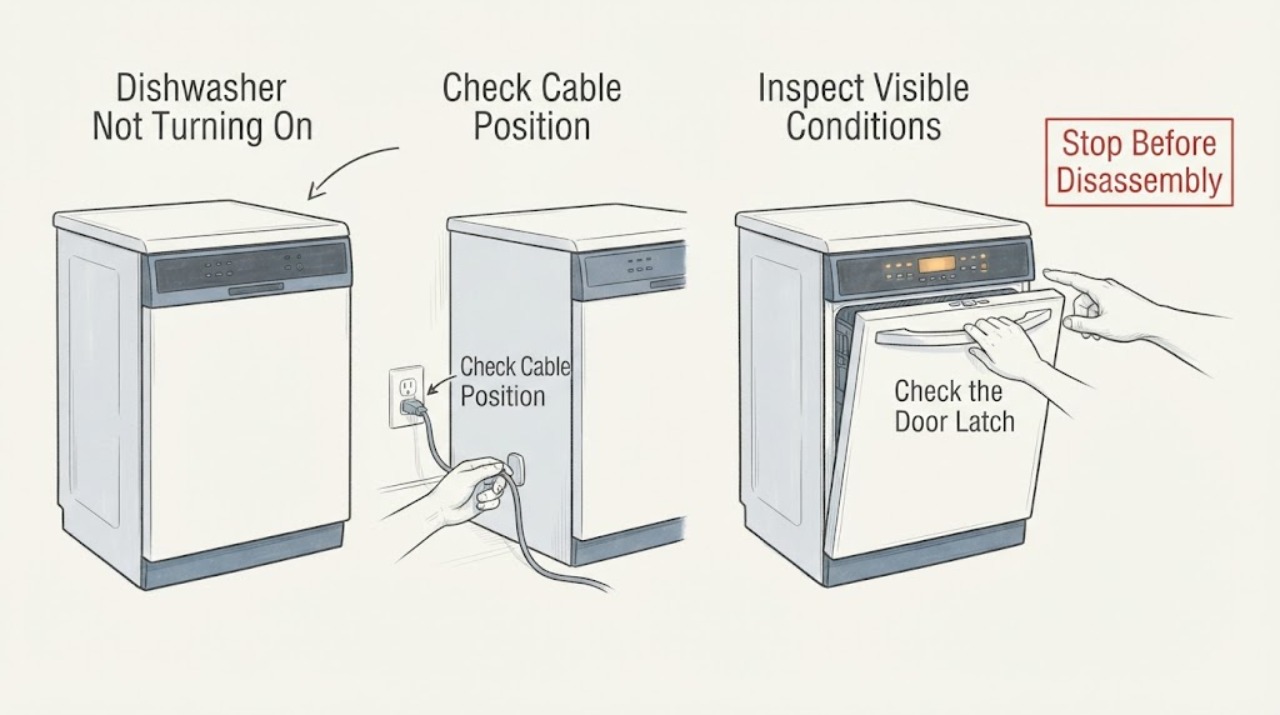
For a Whirlpool dishwasher that will not turn on, confirm the power connection or breaker, then check Control Lock, Standby/Sleep or Delay Wash, the water supply, and the door latch. Whirlpool says a hard-wired dishwasher can be reset by turning its breaker off for 30 seconds, but a repeated breaker trip or unresolved dead console needs service. Do not open direct-wiring connections or bypass the latch.
Work through in order
Diagnostic checks
Use only checks that match the exact appliance or system and its official guide.
-
Check 1
Confirm the accessible plug or hard-wired supply and inspect the household breaker without opening the dishwasher wiring.
Expected result: The plug is loose, the outlet is switched/dead, the breaker is tripped, or power is present.
Next step: Restore only a safe plug or wall-switch state. Have an electrician address a dead outlet or direct-wiring issue.
Why this matters
Why: A missing supply can leave the console completely dark. Whirlpool warns against an outlet controlled by a wall switch for a dishwasher; a sound supply shifts attention to controls and latch.
-
Check 2
Look for Control Lock, Standby/Sleep, or Delay Wash indicators and wake the dishwasher by opening/closing the door or pressing Start as the model permits.
Expected result: The panel wakes, a lock/delay state is active, or no controls respond.
Next step: Clear only the documented lock or delay. If the panel remains dead, continue with latch and one reset check.
Why this matters
Why: Whirlpool identifies these states as reasons a dishwasher may not start even when power is present. No response after wake-up makes supply or control failure more likely.
-
Check 3
Close the door firmly and confirm the latch engages without a rack or dish blocking it; check that the under-sink water valve is open.
Expected result: The door clicks and water is on, the door will not latch, or the water valve is closed/restricted.
Next step: Reposition only accessible items and open the water valve normally. Do not bypass the latch; arrange service for latch or installation faults.
Why this matters
Why: A Whirlpool dishwasher may refuse to start with an unlatched door or without immediate water pressure. These are separate from a dead console.
-
Check 4
If no hazard is present, reset the control once: unplug a plug-in unit for 30 seconds or turn the dishwasher breaker off for 30 seconds, then restore power.
Expected result: The panel returns, the breaker trips again, or the dishwasher remains dead.
Next step: Stop resetting after one attempt and arrange Whirlpool service; use an electrician for circuit or breaker concerns.
Why this matters
Why: A reset may clear a control state but does not repair a recurring failure. A repeated trip or dead console requires service/electrical diagnosis.
-
Check 5
Record the model number, console lights, lock/delay state, door-latch result, water-valve state, breaker behavior, and any error code.
Expected result: A matching manual identifies the controls; an error appears; or all user-level checks are normal but no cycle starts.
Next step: Give the record to Whirlpool service. Do not remove the console or junction-box cover.
Why this matters
Why: Model identity and code determine the next safe instruction. Persistent no-start after supply, control, water, latch, and reset checks is an appliance fault boundary.
Use your observations
Decision map
Find the observation that best matches what you see, then follow the next safe action.
-
PATH 01Next step
What you see
The console wakes after opening the door or clearing Control Lock/Delay Wash.
Do this next
Use the exact manual to select and start a cycle once; arrange service if it returns to the same state.
Why this path and its safety boundary
Why it matters: The dishwasher was powered but in a user-selectable standby or lock state.
-
PATH 02Next step
What you see
Power is missing, the outlet is controlled by a wall switch, or the breaker is tripped.
Do this next
Correct only an accessible switch/plug state and use a qualified electrician for outlet, breaker, or hard-wiring work.
Why this path and its safety boundary
Why it matters: The no-start symptom is primarily a supply/installation path.
-
PATH 03Next step
What you see
The console responds but the door will not latch or water is unavailable.
Do this next
Clear accessible obstruction/open the valve; service a damaged latch or installation.
Why this path and its safety boundary
Why it matters: Door safety or immediate water pressure is preventing a cycle from starting.
-
PATH 04Next step
What you see
The dishwasher remains dead or trips again after one 30-second reset.
Do this next
Leave it off and arrange Whirlpool service or qualified electrical evaluation.
Why this path and its safety boundary
Why it matters: A control, wiring, or household electrical fault remains possible; repeated resets are unsafe.
Helpful context
Understand the symptom
A Whirlpool dishwasher can look dead when it is asleep, locked, waiting for Delay Wash, or showing controls only in a particular state. Separate a dark console with no power from a responsive console that refuses a cycle, and note the door and water-supply state.
Use the model number for the exact installation and operating instructions. Do not bypass the door latch, open a junction box, or change wiring as a user check.
When checks do not resolve it
Need a professional?
Arrange Whirlpool service when the dishwasher remains dead with confirmed power, fails after one 30-second reset, will not latch, or shows a recurring control fault. Give the model, console state, lock/delay status, water and latch observations, and breaker behavior. Use an electrician for outlet or direct-wiring problems.
Common questions
FAQ
Can Sleep Mode make a Whirlpool dishwasher look like it will not turn on?
Yes. Whirlpool says Standby/Sleep and Delay Wash can make the dishwasher wait. Open/close the door or press Start as the model permits, then clear the state using the manual.
How do I reset a Whirlpool dishwasher?
For a plug-in model unplug it for 30 seconds; for a hard-wired model turn its breaker off for 30 seconds, then restore power. Do this once and stop if the breaker trips again.
Why will a Whirlpool dishwasher with power still not start?
Control Lock, a door that is not fully latched, Delay Wash, or a closed water valve can prevent a cycle. Check those states before service.
Read the exact guide
Official sources
- No Power - Not Turning On - DishwasherWhirlpool Product Help · Whirlpool dishwasher power connection, switched outlet, breaker, and service guidance.
- Whirlpool Product Manuals and SupportWhirlpool · Official Whirlpool model-resource and service entry point.
- Not Starting or Operating - DishwasherWhirlpool Product Help · Whirlpool dishwasher water, Control Lock, sleep/delay, door-latch, 30-second reset, and service guidance.
Community feedback
Share a repair observation
Share a plain-text repair observation. Accepted observations are published automatically; this page may take a moment to update.