
On this page
Start here
Quick answer
“Not working” can mean no display, a program that will not start, no fill, no drain, no spin, a leak, or an error state. Start by recording exactly what the Zanussi washer does, when it stops, and any code or flashing pattern. If the area is dry and safe, check the power source and the model controls; otherwise do not touch the plug or outlet. Then use the appropriate branch for the door or lid lock, water supply, drain, load and spin, or leak. Use only model-specific instructions for filters, resets, and access. Stop for standing water near electrical parts, uncontrolled filling, hot water, violent movement, smoke, burning odor, visible arcing, or a repeated electrical trip. Do not tilt the washer, force a locked door, open internal panels, or perform a live electrical check.
Before you begin
Safety first
- A technician should diagnose supply, lock, valve, drain, pump, motor, bearing, control, suspension, and leak paths before selecting any component.
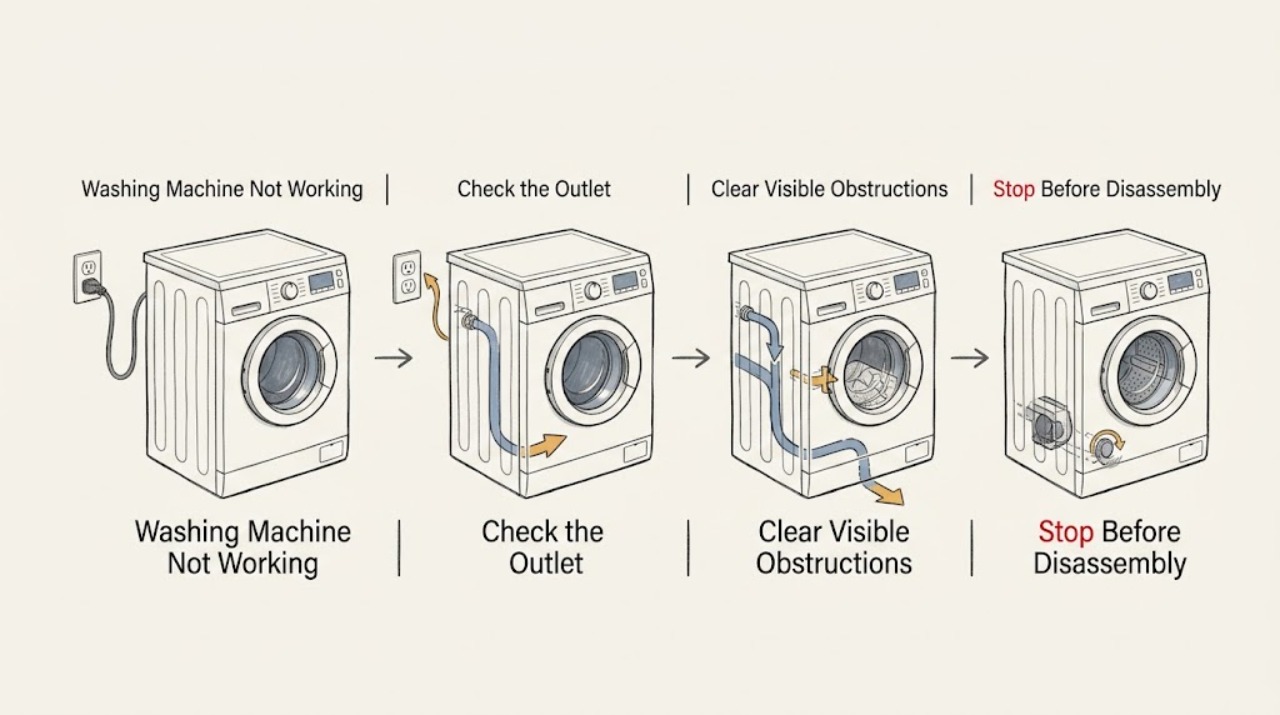
Work through in order
Diagnostic checks
Use only checks that match the exact appliance or system and its official guide.
-
Check 1
Write down what “not working” means in this case: no display, display but no Start response, no water entering, stops mid-cycle, leaves water, does not spin, leaks, or shows an error. Record the exact code, symbols, beeps, cycle, and point of failure before changing settings.
Expected result: A blank display, a powered control panel, a locked door with water, and a cycle that stops during drain are different failures. Zanussi lists separate error families for water supply, draining, door lock, motor, leakage or foam, and power.
Next step: Continue to the power check only for a blank or unresponsive display. For a code, retain the exact text and compare it with the model-specific Zanussi guidance before interpreting it.
Why this matters
Why: The symptom category selects the correct branch; a broad “not working” description cannot identify a part or justify a reset.
-
Check 2
If the floor, plug, and outlet are dry and there is no leak or electrical warning, check whether another low-risk appliance works at the same outlet without using an extension. Do not touch a wet plug or outlet, and do not repeat this check after a trip, burning smell, smoke, heat damage, or arcing.
Expected result: If the outlet is also dead, the supply or wiring is the likely branch. If the outlet works but the Zanussi display stays blank, the appliance needs service rather than repeated power cycling.
Next step: For a suspected outlet or wiring issue, stop and use a qualified electrician. For a washer-only power failure, record the model and arrange appliance service. Never bypass protection or use a damaged connection.
Why this matters
Why: The result separates a household electrical supply problem from an unresponsive washer; it does not authorize opening the washer or measuring live voltage.
-
Check 3
If the display is on but a program will not start, inspect the closed door or lid from the outside for trapped clothing, an overloaded drum, or a visible obstruction. Check for a padlock or control-lock indicator and use only the release sequence printed in the exact model manual; do not force or defeat the interlock.
Expected result: A door or lid that cannot latch, a lock indicator that remains active, or an E40/E41-style door indication can prevent the program from starting. A securely latched door with the same failure points toward program, water, or another error branch.
Next step: If the latch will not engage, the door or lid is damaged, or the lock indication returns, keep the washer out of use and arrange service. Do not force a locked door when water or heat may be present.
Why this matters
Why: The lock is a safety condition, so apparent inactivity can be a closure or control-state issue rather than a failed motor.
-
Check 4
For a program that does not fill or stops before washing, check from a dry, safe position that the water supply is available and the visible inlet hose is not sharply kinked. Do not disconnect a pressurized hose or handle a wet connection. Record any E10-family or water-supply indication and follow the exact model guidance.
Expected result: No fill, slow fill, a kinked hose, or a water-supply code supports an inlet or supply branch. If the washer fills but later stops with water present, move to the drain branch instead of treating it as a supply problem.
Next step: If the supply is unavailable, the hose or connection is damaged, water will not stop, or the error returns, close the supply only if safely reachable and arrange service. Do not tilt the washer or open internal valves.
Why this matters
Why: The water-in stage and the drain-out stage are different decisions; the display code and timing help separate them.
-
Check 5
If the washer stops with water in the drum or will not enter spin, note whether the drain hose is visibly kinked or crushed and whether the household outlet is backing up. A pump or fluff filter is model-specific: inspect it only when the exact manual provides an accessible procedure and the appliance can be isolated from power from a dry, safe position.
Expected result: Standing water, a drain code, slow outlet flow, or a blocked accessible filter can prevent a final spin. A clear visible hose does not exclude an internal pump or drain fault.
Next step: If water is hot, contaminated, near electrical parts, or cannot be contained, stop. If the manual gives no safe filter procedure or the fault persists, keep the washer out of use and arrange service; do not tilt it or force the door.
Why this matters
Why: The washer may require completed draining before spin; a no-spin symptom can therefore originate in the drain path.
-
Check 6
For a cycle that washes but leaves wet laundry, check the selected spin or Rinse Hold option, then wait for the drum to stop before redistributing a small, single bulky, or overloaded load within the manual's limits. Note visible excess foam and do not add more detergent to correct it.
Expected result: Rinse Hold can skip final spin; an unbalanced load or excess foam can cause repeated balance attempts, reduced spin, or a stop. A balanced normal load that still fails is a different branch.
Next step: Use one suitable spin-capable test only when there is no leak, standing water hazard, or unusual noise. Stop if the cabinet walks, bangs, scrapes, smokes, smells burnt, or trips again.
Why this matters
Why: Program selection, load balance, and foam management can look like a mechanical no-spin fault without proving a failed drive.
-
Check 7
If the washer leaks or a leak-protection indication appears, identify the first wet point from a safe dry position: rear inlet connection, front door seal, detergent drawer, accessible filter area, drain hose or outlet, or underneath. Do not run another cycle to locate a leak and do not open the cabinet.
Expected result: A hose connection, blocked drawer, damaged seal, incorrectly fitted filter, or internal water path can produce different leak locations. EF0 or EF3-style warnings can also be associated with water leakage, foam, or imbalance on applicable models.
Next step: If the door seal is damaged, water is inside or near electrical parts, the supply cannot be stopped, or the warning returns, keep the washer out of use and arrange urgent appliance service. Do not tilt the machine.
Why this matters
Why: The first wet point is more useful than the final puddle location; water can travel inside or under the cabinet.
-
Check 8
From outside the appliance, check whether it rocks on the floor and whether a recent installation leaves transport hardware or hose routing uncertain. If the washer is safe and stationary, compare installation with the model manual; do not remove panels or investigate suspension, bearings, motor, or controls as a user check.
Expected result: An unstable floor, rocking cabinet, incorrect hose routing, or transport hardware left after installation can cause vibration, cycle interruption, or a failure to balance for spin. A stable installation with an empty-drum failure needs service diagnosis.
Next step: Correct only an external, manual-authorized setup issue. If the washer walks, impacts nearby objects, grinds, or remains nonfunctional after the safe checks, stop and provide the technician the complete model and symptoms.
Why this matters
Why: Installation and movement clues distinguish a balance or setup problem from a persistent internal fault.
-
Check 9
Only when the washer is dry, stable, free of leaks and hazardous symptoms, and the manual authorizes it, perform one model-specific reset or empty-cycle test. Record whether the display returns, the door or lid locks, water enters and drains, and the drum spins; do not repeat a reset after an electrical trip or persistent fault.
Expected result: A single successful reset may clear a temporary control state. A recurring error, no response, no drain, no spin with an empty drum, or a failure across more than one safe program is evidence for service rather than another user test.
Next step: Arrange qualified Zanussi appliance service and provide the model, exact code, program, stopping stage, water status, load result, and sound, heat, smell, or movement description.
Why this matters
Why: The test confirms the symptom boundary but does not identify a replacement part; reset sequences differ by model.
Use your observations
Decision map
Find the observation that best matches what you see, then follow the next safe action.
-
PATH 01Next step
What you see
The display is blank, the washer is completely unresponsive, or the outlet is also dead.
Do this next
Use a qualified electrician for an outlet or wiring issue, or qualified appliance service for a washer-only failure. Stop immediately for heat, smoke, burning odor, arcing, or a repeated trip.
Why this path and its safety boundary
Why it matters: Separate a dry, safe household supply check from a washer-only power fault; do not open the appliance or perform a live electrical measurement.
-
PATH 02Next step
What you see
The display is on but the program will not start, the door or lid will not latch, or a lock indicator remains active.
Do this next
If the latch or lock indication persists, keep the washer out of use and arrange service, especially if water remains or the door is damaged.
Why this path and its safety boundary
Why it matters: Check only visible closure obstructions and the exact manual's control-lock guidance; do not force or bypass the interlock.
-
PATH 03Next step
What you see
The washer does not fill, fills slowly, or shows a water-supply indication.
Do this next
If water cannot be stopped, a connection is damaged, or the code returns, close the supply only if safely reachable and arrange service.
Why this path and its safety boundary
Why it matters: Use the safe visible supply and inlet-hose branch, keeping model-specific filters and valves under manual or technician control.
-
PATH 04Next step
What you see
The washer stops with water, will not drain, or will not spin after the cycle.
Do this next
Hot water, contaminated water, water near electrical parts, an inaccessible blockage, or a persistent drain fault requires stopping and arranging service without tilting the washer.
Why this path and its safety boundary
Why it matters: Treat draining as the first decision; inspect only a visible hose and an exact-model accessible filter procedure, then consider program and spin settings.
-
PATH 05Next step
What you see
The washer washes but leaves wet laundry, retries spin, or shows EF5, C9, or F9-style spin symptoms.
Do this next
If a balanced normal load or empty-drum test still fails, or the washer walks, bangs, or grinds, stop and arrange appliance service.
Why this path and its safety boundary
Why it matters: Check Rinse Hold or spin selection, load balance, foam, stable flooring, and recent-installation transport hardware only as applicable to the model.
-
PATH 06Next step
What you see
Water leaks, EF0 or EF3-style protection appears, filling will not stop, or the first wet point is inside or underneath.
Do this next
If water is near electrical parts, the door seal is damaged, the supply cannot be stopped, or the leak persists, keep the appliance out of use and arrange urgent service.
Why this path and its safety boundary
Why it matters: Stop operation and identify only the safe external wet-point category; do not run another cycle to reproduce the leak.
-
PATH 07Next step
What you see
Smoke, burning odor, visible arcing, a repeated electrical trip, uncontrolled movement, severe impact, or hot water that cannot be safely contained occurs.
Do this next
Use appropriate emergency support for active smoke or fire and qualified electrical or appliance service once the area is safe.
Why this path and its safety boundary
Why it matters: Stop all user testing, keep people away from the hazard, and do not touch wet electrical equipment or restore power repeatedly.
Helpful context
Understand the symptom
First classify the symptom instead of treating every failure as a motor problem. A blank display is a power branch; a lit display that will not begin is usually a control, lock, program, or error branch; a cycle that stops after filling may be a drain, balance, foam, or leak-protection branch. Note the exact model number, display symbols, stage, water level, and whether the washer made an unusual sound or moved.
The sequence below uses only dry, safe external observations and instructions that the exact Zanussi manual identifies for the model. Do not reach into a moving drum, force a door or lid, tilt the appliance, open an electrical panel, or work on an internal hose, pump, motor, heater, or control.
A useful diagnosis is the one that changes the next action: a dead outlet needs an electrician, a lock indicator needs the model control guidance, standing water needs a drain path decision, an empty-drum spin failure needs appliance service, and a leak or electrical symptom ends user testing.
Safety boundary
Stop conditions
- Stop if standing water is hot, contaminated, uncontrolled, or near the cord, outlet, controls, or other electrical parts.
- Stop if the washer is filling continuously and the water supply cannot be safely stopped from a dry position.
- Stop if the cabinet walks, bangs surrounding structures, vibrates violently, or makes grinding or metal-scraping sounds.
- Stop immediately for smoke, burning odor, visible arc, melted material, hot electrical parts, or a repeated electrical trip; do not run another test.
- Do not force or bypass a door or lid lock, reach into a moving drum, tilt the washer, open an electrical panel, or dismantle internal plumbing, motor, pump, bearing, or suspension parts.
- Stop using the appliance if the door seal is damaged, water appears inside or underneath the cabinet, or an error returns after a safe model-authorized check.
Only after diagnosis
Potential parts
- door or lid lock assembly
Consider only if the visible closure area is clear but the latch will not engage or a lock fault is confirmed for the exact model.
Confirm the complete Zanussi model and manufacturer fit information before selecting a component. - inlet valve or drain pump component
Consider only after a persistent fill or drain fault is confirmed and service information identifies the applicable component.
Valve, pump, filter access, and hose layouts vary by model; do not infer fit from a broad symptom. - motor, bearing, control, or suspension component
Consider only when safe checks show a repeat empty-drum, movement, motor, bearing, or control symptom and a technician confirms the cause.
A qualified technician should identify the failure and verify model fit before any component is ordered.
When checks do not resolve it
Need a professional?
A power, start, fill, drain, spin, leak, or error branch remains after safe external checks, or a stop condition is present.
Safety scope: A technician should diagnose supply, lock, valve, drain, pump, motor, bearing, control, suspension, and leak paths before selecting any component.
Have this ready
- Complete Zanussi model number, exact code or flashing pattern, cycle and setting, stopping stage, water status, door or lid state, load result, and any sound, movement, heat, smell, or visible leak location.
Common questions
FAQ
What does “not working” mean on a Zanussi washing machine?
It may mean no display, no start, no fill, no drain, no spin, a leak, or a displayed error. Record the exact symptom, cycle stage, water status, and code first because each has a different safe diagnostic branch.
Why does my Zanussi washer have power but not start?
Check the visible door or lid closure, trapped laundry, overload, and control-lock indicator. Use only the model manual's lock guidance; if the latch will not engage or the indication returns, keep the washer out of use and arrange service.
Why does my Zanussi washing machine stop with water inside?
A drain restriction, hose issue, accessible filter problem, foam condition, or error state can prevent the next stage. Note the exact code and inspect only a visible hose or an exact-model manual-approved filter. Do not force the door or tilt the machine.
Why does a Zanussi washer wash but not spin?
Rinse Hold or a reduced-spin setting, an unbalanced or sudsy load, incomplete draining, unstable installation, or a model-specific fault can all produce that symptom. Check the setting, load, safe drain path, and stability in that order, then arrange service if an empty or balanced test fails.
When should I stop using a Zanussi washing machine?
Stop for a leak near electrical parts, uncontrolled filling, hot or uncontained water, severe movement, grinding, smoke, burning odor, visible arcing, melted material, or repeated electrical trips. Do not repeat the cycle; use appropriate emergency or qualified service support.
Read the exact guide
Official sources
- Zanussi Washing Machine Leaking Water – Causes and SolutionsZanussi · Zanussi washing machines and washer dryers; hose, detergent drawer, filter, door-seal, overload, and internal leak paths
- Washing Machine Not Working or Not Turning On – Troubleshooting GuideZanussi · Zanussi washing machines and washer dryers; power, start, door, control lock, error, reset, and service guidance
- Zanussi Washing Machine Does Not Spin – Causes and SolutionsZanussi · Zanussi washing machines and washer dryers; spin, load balance, drain filter, leveling, transit bolts, and Rinse Hold guidance
- Washing machine displays error message EF0, EFo, EF3 or emits 15 beeps / 15 flashesZanussi · Zanussi washing machines and washer dryers; EF0/EF3 leakage, foam, imbalance, filter, hose, and door-seal guidance
- Washing machine displays an error code, how to fix it?Zanussi · Zanussi washing machines and washer dryers; error-code families and model-specific support
- Washing machine stops in the middle of a cycleZanussi · Zanussi washing machines and washer dryers; mid-cycle imbalance, drain, water-supply, and reset guidance
- Zanussi Washing Machine Making Unusual Noises During Draining or Spinning – Causes and SolutionsZanussi · Zanussi washing machines and washer dryers; hose routing, drain noise, vibration, and service guidance
Community feedback
Share a repair observation
Share a plain-text repair observation. Accepted observations are published automatically; this page may take a moment to update.