
On this page
Start here
Quick answer
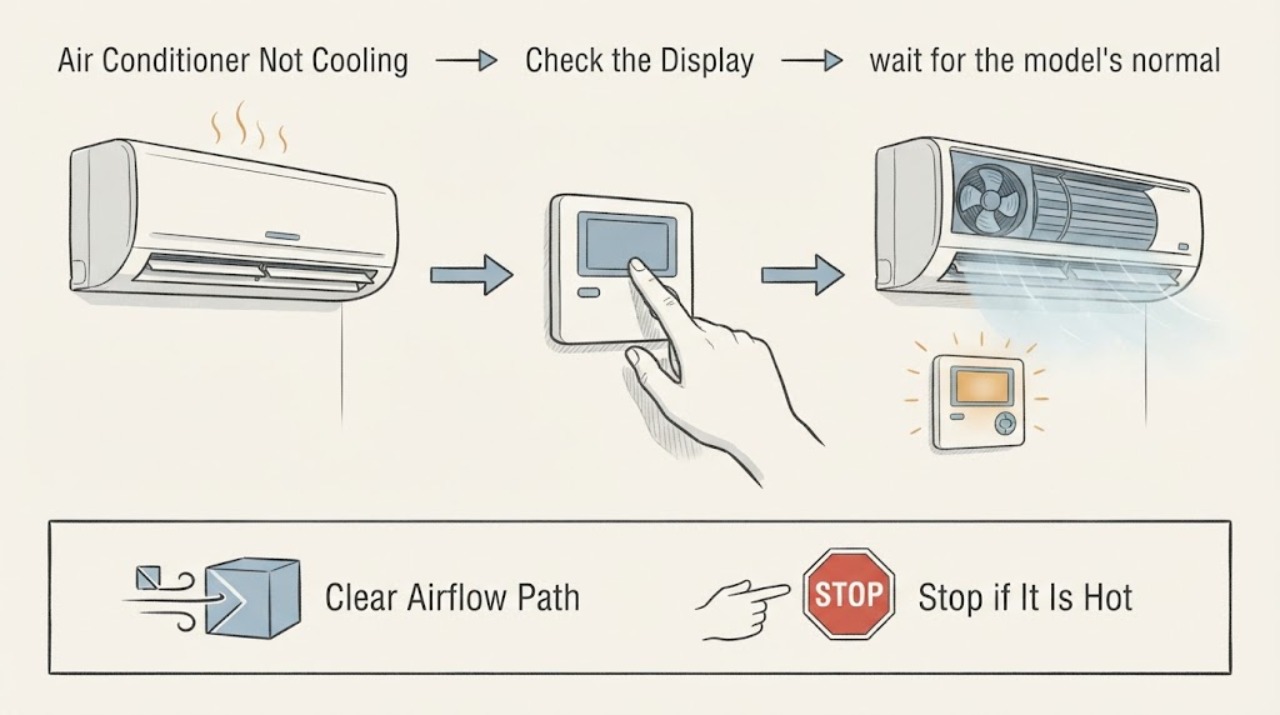
When an air conditioner is not cooling and the thermostat is the suspected component, confirm the thermostat is calling for Cool, the target is below the room temperature, and the fan and schedule are not overriding the request. Check the display or batteries if applicable, then turn the system off before inspecting an accessible filter and the return and supply openings. Ice, water, a blank or unresponsive control, a non-running indoor fan, repeated cycling, or continued warm air after these checks needs HVAC service; do not open high-voltage equipment or handle refrigerant.
Work through in order
Diagnostic checks
Use only checks that match the exact appliance or system and its official guide.
-
Check 1
At the thermostat, select Cool, set the target below the current room reading, set the fan to Auto, and check for a schedule override, hold, fan-only mode, or blank display.
Expected result: The cooling indicator appears and the indoor fan starts, or the display is blank, the fan runs without a cooling call, the schedule changes back, or the system does not respond.
Next step: Correct only the displayed mode, target, fan, schedule, or user-replaceable battery issue. If the control remains unresponsive or the system still does not cool, continue with the safe checks and plan HVAC service.
Stop if: Stop if the thermostat or wall area is hot, wet, damaged, smells burnt, or has exposed wiring.
Why this matters
Why: A normal cooling call makes a simple setting error less likely; a blank, overridden, or unresponsive control can prevent the equipment from receiving the intended call.
-
Check 2
If the thermostat shows a cooling call but the equipment does not start, wait for the model's normal protective delay without repeatedly changing the target or cycling power; note whether the system starts and whether the delay message clears.
Expected result: The system starts after the delay, stays inactive with a cooling call, or starts and stops again quickly.
Next step: If the delay clears and cooling begins, observe the air temperature and airflow once. If the call remains unanswered or short cycling returns, stop repeated tests and arrange professional diagnosis.
Stop if: Do not continue if a breaker trips, the control reports a recurring error, or you notice heat, smoke, a burning odor, or electrical noise.
Why this matters
Why: A normal delay can protect equipment after a recent cycle; persistent nonresponse or rapid cycling can indicate a thermostat-control, safety-switch, power, airflow, or equipment fault.
-
Check 3
Set the system off at the thermostat before inspecting each accessible return filter and the supply and return openings; replace or clean the filter only as its label and equipment instructions allow, with the airflow arrow oriented correctly.
Expected result: The filter is clogged, wet, collapsed, damaged, or incorrectly seated, or it is clean, dry, correctly fitted, and the registers are unobstructed.
Next step: Restore the filter and cover before one normal cooling check. If cooling remains weak, the filter becomes wet or loads quickly, or airflow is poor everywhere, stop and request HVAC service.
Stop if: Stop for standing water, damaged cabinet parts, sharp edges, exposed wiring, or a burning odor in the filter or return area.
Why this matters
Why: A restricted filter or return path can reduce airflow and contribute to poor cooling or a frozen coil; a clean path shifts attention to controls, the indoor fan, coil, ductwork, condenser, or refrigerant system.
-
Check 4
During one brief cooling observation, look from a safe distance at visible refrigerant lines or the indoor-unit area for ice, unusual water, or a condensate pan that appears to be filling; do not remove panels or disturb tubing.
Expected result: Ice or excess water is visible, or there is no visible ice or water but the air remains warm and the thermostat continues calling for cooling.
Next step: If ice or unusual water is present, leave cooling off and arrange HVAC service while the system defrosts naturally. Do not chip ice, open the coil cabinet, clear hidden drains, or add refrigerant.
Stop if: Stop immediately for water near electrical equipment, active leaking, smoke, a burning odor, or a hot or damaged disconnect.
Why this matters
Why: Ice can accompany restricted airflow or low refrigerant, and a rising condensate pan can activate a safety switch that stops the indoor unit; no visible ice does not rule out a mechanical or control fault.
-
Check 5
From a safe distance, compare the indoor fan and outdoor condenser behavior during the existing cooling call without opening either enclosure; record whether the indoor fan runs, the outdoor fan runs, and whether either unit makes an unusual sound.
Expected result: The thermostat calls but the indoor fan is silent, the outdoor unit is silent, one fan runs without the other, or both run while the home remains warm.
Next step: Keep the observations and arrange HVAC diagnosis. Do not reach into a fan, remove an access cover, handle capacitors, or work on high-voltage or refrigerant components.
Stop if: Stop for arcing, smoke, burning odor, exposed wiring, unusual heat, metal scraping, or a breaker that trips again.
Why this matters
Why: A mismatch between the thermostat call and fan response can point to power, controls, a safety switch, motor, or other equipment issue; both units running without cooling can involve airflow, condenser, coil, or refrigerant conditions.
-
Check 6
Make one final normal cooling observation after any safe setting or filter correction and record the room reading, thermostat target, fan mode, airflow, air temperature impression, cycle behavior, and whether the outdoor unit runs.
Expected result: Cooling returns and remains stable, improves only briefly, or remains absent despite a correct thermostat call and clear accessible airflow path.
Next step: Stop troubleshooting and arrange HVAC service when the symptom persists, recurs, or the home cannot reach the target. Provide the recorded observations rather than repeatedly restarting the system.
Stop if: Stop at once for ice, active water, smoke, burning odor, electrical noise, arcing, or repeated breaker trips.
Why this matters
Why: A stable recovery supports a setting or maintenance restriction; a temporary or absent recovery requires professional checks of the thermostat signal, safety controls, blower, coils, ducts, condenser, and refrigerant circuit.
Use your observations
Decision map
Find the observation that best matches what you see, then follow the next safe action.
-
PATH 01Next step
What you see
The thermostat is in Heat, Fan On, fan-only, a schedule override, or a target above the room temperature.
Do this next
Correct the mode, fan, target, or schedule and make one normal cooling observation. If the system still does not cool, continue to the filter and equipment checks.
-
PATH 02Next step
What you see
The thermostat display is blank or remains unresponsive after the applicable battery and user-control check.
Do this next
Leave the system out of service and arrange HVAC diagnosis for power, wiring, thermostat, and safety-control causes. Do not remove the thermostat faceplate to expose wiring.
-
PATH 03Next step
What you see
The filter is blocked or the return and supply paths are obstructed.
Do this next
With the system off, restore the correct clean filter and clear only accessible openings, then reassess once. Persistent weak airflow or a quickly wet filter requires service.
-
PATH 04Next step
What you see
Ice, excess condensate, a non-running indoor fan, or repeated short cycling is present.
Do this next
Stop cooling and arrange HVAC service. Do not chip ice, clear concealed drains, open equipment, or handle refrigerant or high-voltage parts.
-
PATH 05Next step
What you see
The thermostat calls for cooling but both or either unit stays warm, silent, or unusually noisy after the safe checks.
Do this next
Keep the documented observations and request professional diagnosis of controls, power, blower, condenser, coil, ductwork, and refrigerant conditions.
-
PATH 06Next step
What you see
Smoke, burning odor, arcing, a hot disconnect or panel, exposed wiring, active water near electrical equipment, or a repeated breaker trip is present.
Do this next
Stop immediately, keep people away from the equipment, and obtain urgent qualified HVAC or electrical help as appropriate. Do not reset or operate the equipment again.
Helpful context
Understand the symptom
A thermostat can be the first place to check without being the final cause. The screen may show a setting or delay that prevents a cooling call, while a normal cooling indicator with no cold air shifts attention to the indoor unit, airflow, outdoor condenser, condensate safety, or refrigeration circuit. Record what the thermostat says before changing anything.
Start with settings and accessible maintenance. A clean, correctly seated filter and clear registers can restore airflow, but they do not prove that the coil, blower, control board, or refrigerant system is healthy. Make one normal reassessment after a safe correction; repeated resets or repeated cooling tests can worsen an iced or failing system.
Visible ice, excess water, burning odor, exposed wiring, or a breaker that trips again is a stop point. Leave the equipment off and give an HVAC professional the thermostat display, filter condition, room temperature, airflow, ice or water observations, and outdoor-unit behavior.
Safety boundary
Stop conditions
- Stop immediately for smoke, burning odor, arcing, exposed or hot wiring, a hot disconnect or panel, or a breaker that trips again.
- Stop cooling when ice, active water, or condensate is visible near the indoor unit, especially near electrical equipment; allow natural defrosting and arrange service.
- Stop any check that requires opening a thermostat, blower, coil, or condenser enclosure, reaching into a fan, handling a capacitor, or working on refrigerant tubing.
Only after diagnosis
Potential parts
- HVAC air filter
Consider a replacement only when the existing filter is loaded, wet, damaged, or due for replacement and its size and type are confirmed.
Confirm dimensions, airflow direction, and equipment requirements from the existing filter or owner instructions before installation. - thermostat batteries
Consider batteries only when the thermostat model uses user-replaceable batteries and the display is blank or reports low power.
Use the battery type and procedure specified by the thermostat manufacturer; do not infer compatibility from the air-conditioner brand. - thermostat or HVAC control
Treat this as a professional diagnosis item only if the control remains unresponsive or fails to send a cooling call after safe settings and power observations.
A qualified technician must confirm wiring, equipment type, voltage class, and control compatibility before replacement.
When checks do not resolve it
Need a professional?
Arrange HVAC service when the thermostat calls for cooling but the home remains warm after one correct setting and accessible filter check., Call promptly for a blank or unresponsive thermostat, persistent error, repeated short cycling, a silent indoor fan, visible ice, condensate trouble, or suspected refrigerant issue., Do not open high-voltage equipment, handle capacitors or refrigerant, clear concealed drains, bypass safety switches, or continue testing after electrical or burning warning signs.
Common questions
FAQ
Can a thermostat make an air conditioner stop cooling?
Yes. Incorrect mode, fan setting, target, schedule, battery, delay, or a nonresponsive control can prevent a correct cooling call. If the thermostat shows a cooling call but the system remains warm, the fault may be elsewhere in the HVAC system.
What should I check first when my AC is not cooling?
Check the thermostat mode, target, fan, schedule, and display, then turn the system off and inspect the accessible filter and registers. Ice, water, a non-running fan, repeated cycling, or persistent warm air needs professional service.
Should I keep running the AC if I see ice?
No. Leave cooling off and arrange HVAC service. Ice can accompany restricted airflow or a refrigerant problem, and repeated operation can stress the system. Do not chip the ice or handle refrigerant yourself.
When is a blank thermostat screen an HVAC service issue?
If the thermostat uses replaceable batteries, follow its replacement instructions once. If the display remains blank or the system remains unresponsive, leave the equipment out of service and have an HVAC professional assess power, wiring, controls, and safety switches.
Read the exact guide
Official sources
- Common Thermostat Issues and How to TroubleshootCarrier · Carrier residential thermostat troubleshooting and safety
- Central AC Maintenance: Routine Tasks and TipsTrane · Trane residential central air conditioner maintenance
- AC Not Blowing Cold Air? Learn What to DoTrane · Trane residential air conditioner troubleshooting
- Troubleshoot an Air Conditioner: 6 Steps to Fix an AC Not WorkingCarrier · Carrier residential air conditioner troubleshooting
Community feedback
Share a repair observation
Share a plain-text repair observation. Accepted observations are published automatically; this page may take a moment to update.