
On this page
Start here
Quick answer
Start with the thermostat and the user-accessible air filter, then compare airflow with what the outdoor unit is visibly doing. A wrong mode or clogged filter can mimic a failed air conditioner, while weak or absent indoor airflow, ice, an outdoor fan that will not start, humming, or repeated electrical trips point toward a blower motor, capacitor, compressor, refrigerant, or control problem that needs HVAC service. Do not open the air handler or outdoor cabinet, handle a capacitor, test live voltage, or add refrigerant. Turn the system off for ice, water near electrical equipment, burning odor, smoke, arcing, or a repeat breaker trip.
Before you begin
Safety first
- The homeowner scope ends at thermostat controls, a dry accessible filter, registers, and external visual observations. High-voltage equipment, blower motors, capacitors, compressors, refrigerant, wiring, disconnects, and live testing require qualified service.
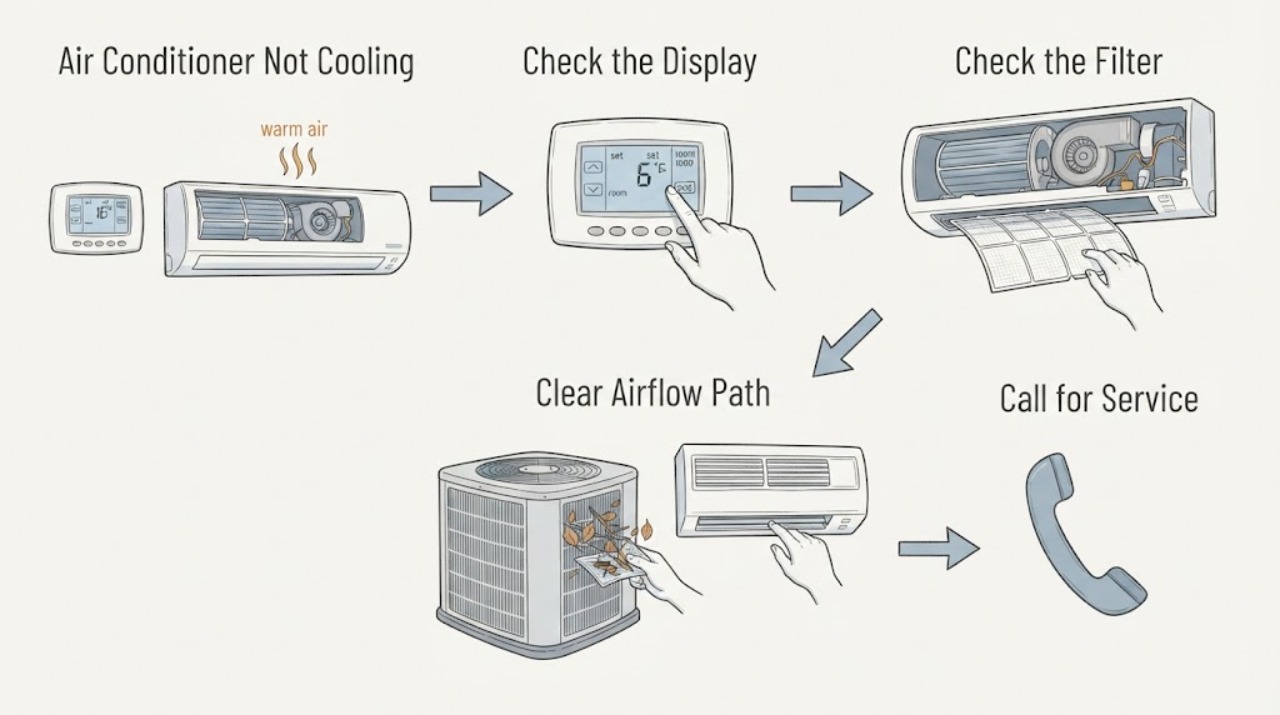
Work through in order
Diagnostic checks
Use only checks that match the exact appliance or system and its official guide.
-
Check 1
Check the thermostat display and settings: select cooling, set the target below the current room temperature, confirm the schedule is not overriding the request, and use the fan mode appropriate to the equipment; replace thermostat batteries only if the user manual permits it.
Expected result: The display is blank, the system is not calling for cooling, the fan runs without a cooling call, or the thermostat calls for cooling but the system does not respond.
Next step: Correct only the user settings or batteries that are clearly applicable. If the call is correct and cooling does not begin, continue with the external checks and do not open the thermostat wiring or equipment cabinet.
Why this matters
Why: A control or setting problem can look like a cooling failure, while a valid cooling call with no response shifts attention to power, the air handler, or the outdoor unit.
-
Check 2
Turn the system off at the thermostat, then inspect the dry, user-accessible air filter and confirm that return grilles and supply registers are not blocked by furniture, dust, or closed louvers.
Expected result: The filter is visibly loaded, airflow is weak at several registers, one register is blocked, or the filter and airflow path look clear.
Next step: Clean or replace the filter only with the type and access described by the equipment manual. If airflow remains weak, leave the system off and schedule HVAC service rather than opening the air handler.
Why this matters
Why: Restricted airflow can reduce cooling and contribute to short cycling or icing; a clear filter does not rule out a blower motor, coil, refrigerant, or electrical fault.
-
Check 3
With the thermostat still off, compare the airflow at several registers and listen only from outside the cabinet for the indoor blower; do not insert tools, spin a fan by hand, or reach into the return or supply opening.
Expected result: There is no airflow, airflow starts and stops, airflow is weak everywhere, or airflow is normal but the air is warm.
Next step: Report the airflow pattern to an HVAC technician. A blower motor or its capacitor can be a high-voltage internal fault; do not test, discharge, or replace either part yourself.
Why this matters
Why: No or weak airflow keeps the filter, return path, blower motor, and indoor controls in the decision path; normal airflow with warm air points more toward the outdoor unit, refrigerant, or heat-transfer side.
-
Check 4
Look at accessible refrigerant tubing and the area around the indoor unit without touching it, and check for ice, unusual frost, or excess water; do not scrape ice, pour hot water on the unit, or continue a cooling cycle to test it.
Expected result: Ice is visible on tubing or the unit, water is collecting near the indoor equipment, or there is no ice or unusual water.
Next step: Turn cooling off and arrange HVAC service for ice, water, or repeated freezing. Do not open the refrigerant circuit or attempt a refrigerant adjustment.
Why this matters
Why: Ice and excess condensate can accompany restricted airflow or a refrigerant-related fault and can damage the system if operation continues; a dry, ice-free view does not prove refrigerant charge or coil condition.
-
Check 5
From a safe distance, observe the outdoor unit while the thermostat is calling for cooling only if there are no warning signs and the equipment can be viewed without removing any cover; do not reach through the grille or touch the disconnect.
Expected result: The outdoor fan runs normally, the unit is silent, the fan does not start, the unit hums, or the unit starts and stops unusually.
Next step: Turn the system off after an abnormal observation and arrange HVAC service. If the breaker or disconnect is involved, also request qualified electrical assessment; do not test a capacitor or compressor.
Why this matters
Why: A non-starting or humming outdoor unit can involve the capacitor, fan motor, compressor, controls, or power supply; these are not interchangeable diagnoses and many are high-voltage service tasks.
-
Check 6
From a dry standing position, look for the air-conditioner breaker or disconnect being off, a repeat trip, damaged visible cord or conduit, water near the electrical equipment, smoke, arcing, or a burning odor; do not open the panel or reset a breaker repeatedly.
Expected result: The breaker is off but stable, it trips again, the disconnect or wiring looks damaged or wet, or there is heat, smoke, odor, buzzing, or arcing.
Next step: Leave the affected circuit off and arrange qualified electrical service. For smoke or fire, leave the area and contact emergency services from a safe location. Do not substitute a larger breaker or bypass protection.
Why this matters
Why: A single stable power interruption may be a control or supply clue, but a repeat trip or warning symptom indicates an unresolved electrical or equipment fault and a shock or fire risk.
-
Check 7
Record whether the thermostat calls for cooling, whether indoor airflow is present, whether the outdoor fan starts, the filter condition, ice or water, breaker behavior, and the exact sound or odor before contacting service; do not repeat a failed start for a better recording.
Expected result: The record shows a control or airflow issue, a frozen or wet system, an outdoor start problem, an electrical trip, or no clear pattern.
Next step: Give the record and equipment model information to an HVAC technician, and include an electrician when the breaker, disconnect, cord, or fixed wiring is implicated.
Why this matters
Why: This separates user-accessible setting and airflow checks from blower, capacitor, compressor, refrigerant, and wiring faults that need professional diagnosis.
Use your observations
Decision map
Find the observation that best matches what you see, then follow the next safe action.
-
PATH 01Next step
What you see
The mode, target, schedule, fan setting, or display is wrong or unavailable.
Do this next
Correct the user setting or battery only when clearly applicable. If the display remains blank or the call still does not control the system, arrange HVAC service without opening the wiring.
-
PATH 02Next step
What you see
Several registers have little air, the filter is blocked, or the indoor blower is silent or intermittent.
Do this next
Stop cooling, address only a clearly user-accessible filter or register obstruction, and call HVAC service if airflow does not return. Blower motor and capacitor diagnosis is professional work.
-
PATH 03Next step
What you see
The indoor blower runs normally but the room does not cool.
Do this next
Check the outdoor unit only by safe external observation. If it does not start, hums, has unusual noise, or runs continuously, turn the system off and arrange HVAC service for the outdoor fan, capacitor, compressor, coil, or refrigerant path.
-
PATH 04Next step
What you see
Frost or ice is visible on accessible tubing or the unit, or water is collecting around indoor equipment.
Do this next
Turn cooling off and let a qualified HVAC professional evaluate airflow, coils, drain conditions, and refrigerant-related causes. Do not scrape, heat, or continue running the system to force a result.
-
PATH 05Next step
What you see
The breaker trips again, an electrical part is hot or discolored, or there is buzzing, smoke, odor, water, or arcing.
Do this next
Do not reset or touch the equipment. Keep people away, leave the circuit off, and request urgent qualified electrical service; leave and contact emergency services for active smoke or fire.
Helpful context
Understand the symptom
Read the symptom before blaming a part
First separate no cooling from no airflow. If the indoor fan is blowing normally but the air stays warm, the outdoor unit, refrigerant circuit, condenser airflow, or compressor side needs attention. If little or no air comes from the registers, the filter, return path, blower motor, or indoor control may be involved. A thermostat that is in the wrong mode can imitate either complaint. The four assigned components are useful decision points, not a reason to order a part before the observed pattern supports it.
Safe checks end at the cabinet
Keep checks to the thermostat, dry and accessible filter, registers, and external visual observations. Do not remove electrical covers, reach through an outdoor grille, touch a capacitor, measure voltage, work on wiring, open the refrigerant circuit, or bypass a safety control. If the system has ice, water, a burning smell, smoke, arcing, or a breaker that trips again, turn it off and arrange professional help.
Safety boundary
Stop conditions
- Stop immediately for smoke, flame, visible arcing or sparks, sizzling, a burning or melting odor, a hot or discolored panel, disconnect, cord, or equipment.
- Do not touch or operate electrical equipment that is wet or surrounded by standing water. Keep people away and arrange qualified service from a safe location.
- If the breaker trips again or trips immediately, leave it off. Do not repeatedly reset it, install a larger breaker, bypass a safety device, or use an extension cord to defeat the symptom.
- Do not open the electrical panel, air handler, or outdoor cabinet; handle or discharge a capacitor; test live voltage; work on the blower motor or compressor; or open the refrigerant circuit.
- If ice, excess water, damaged wiring, a non-starting or humming outdoor unit, or repeated short cycling is present, stop cooling and arrange HVAC service.
Only after diagnosis
Potential parts
- air filter
Consider a replacement only if the existing filter is visibly loaded and the equipment manual identifies a user-replaceable filter and the correct size.
Confirm the exact equipment model and the filter specification in the manufacturer's documentation before ordering. - blower motor
Consider this part only after a qualified technician confirms that weak or absent indoor airflow is caused by the blower motor rather than the filter, controls, wiring, or another airflow restriction.
Fit, electrical characteristics, and installation must be confirmed by the technician for the exact equipment model. - run capacitor
Consider this part only after qualified testing identifies the capacitor as the cause of a non-starting or humming motor; a similar symptom can come from wiring, the motor, compressor, or controls.
Do not select or handle a capacitor by appearance. The technician must confirm the exact equipment requirements and safe installation.
When checks do not resolve it
Need a professional?
Call an HVAC technician when the thermostat and accessible filter checks do not restore cooling, airflow is weak or absent, ice or water is present, the outdoor unit does not start or hums, or a blower motor, capacitor, compressor, or refrigerant issue is suspected. Include a qualified electrician when a breaker, disconnect, cord, or fixed wiring trips or shows damage.
Safety scope: The homeowner scope ends at thermostat controls, a dry accessible filter, registers, and external visual observations. High-voltage equipment, blower motors, capacitors, compressors, refrigerant, wiring, disconnects, and live testing require qualified service.
Common questions
FAQ
What should I check first when my air conditioner is not cooling?
Confirm the thermostat is calling for cooling, then inspect the dry, user-accessible filter and airflow at the registers. Next observe the outdoor unit without removing covers. Ice, water, weak airflow, abnormal sounds, or a repeat breaker trip needs professional service.
Can a dirty filter cause an air conditioner to stop cooling?
A blocked filter can restrict airflow and contribute to poor cooling or icing, but it does not prove that the filter is the only fault. Replace or clean it only as the equipment manual allows; persistent weak airflow or ice needs HVAC diagnosis.
Is a bad capacitor or blower motor something I can test at home?
No. A non-starting, humming, or weak-airflow system can involve a capacitor, blower motor, compressor, controls, or wiring. These components can contain hazardous electrical energy and should be evaluated by a qualified HVAC professional.
Should I keep resetting the breaker if the air conditioner trips it?
No. Leave it off after a repeat or immediate trip. Repeated resets can leave an unresolved electrical or equipment fault energized; arrange qualified electrical or HVAC service instead.
Read the exact guide
Official sources
- Troubleshoot an Air Conditioner: 6 Steps to Fix an AC Not WorkingCarrier · Air-conditioner thermostat, filter, breaker, icing, outdoor unit, capacitor, compressor, and professional service guidance
- Air Conditioner Troubleshooting: Why Your AC Is Not CoolingTrane · Air-conditioner thermostat, filter, airflow, breaker, outdoor unit, icing, condensate, and HVAC technician guidance
- CPSC Guide to Home Wiring HazardsU.S. Consumer Product Safety Commission · Residential circuit breakers, overloads, repeated trips, wiring hazards, and electrical warning signs
- Air Conditioner and Fan SafetyElectrical Safety Foundation International · Seasonal air-conditioner electrical safety and qualified installation or service
Community feedback
Share a repair observation
Share a plain-text repair observation. Accepted observations are published automatically; this page may take a moment to update.