
On this page
Start here
Quick answer
Pollen on a solar panel system is a form of soiling: it can block light and reduce production, and rainfall may not remove enough of it in every location. Start from the ground or another safe access point by photographing the panel surface and checking the system monitor for a production change, while separating pollen from cloud, shade, inverter, or grid effects. Do not climb onto a roof, walk on modules, spray electrical equipment, scrub dry deposits, or disconnect equipment unless the system and panel manuals give a safe procedure and you are trained for it. If the array is safely reachable, follow the module manufacturer's cleaning instructions and plan cleaning around local pollen conditions; otherwise use a qualified solar professional. Cracked modules, loose wiring, water intrusion, inverter alarms, or a production drop that remains after safe cleaning require professional inspection.
Before you begin
Safety first
- The homeowner scope is limited to ground-level observation, monitoring review, safe documentation, and only the cleaning procedure explicitly permitted by the exact module and system manuals from a safe access position. Do not climb unsafe roofs, step on modules, scrape or pressure-wash glass, wet electrical enclosures, open inverters, touch damaged wiring, disconnect conductors, or perform electrical tests.
Work through in order
Diagnostic checks
Use only checks that match the exact appliance or system and its official guide.
-
Check 1
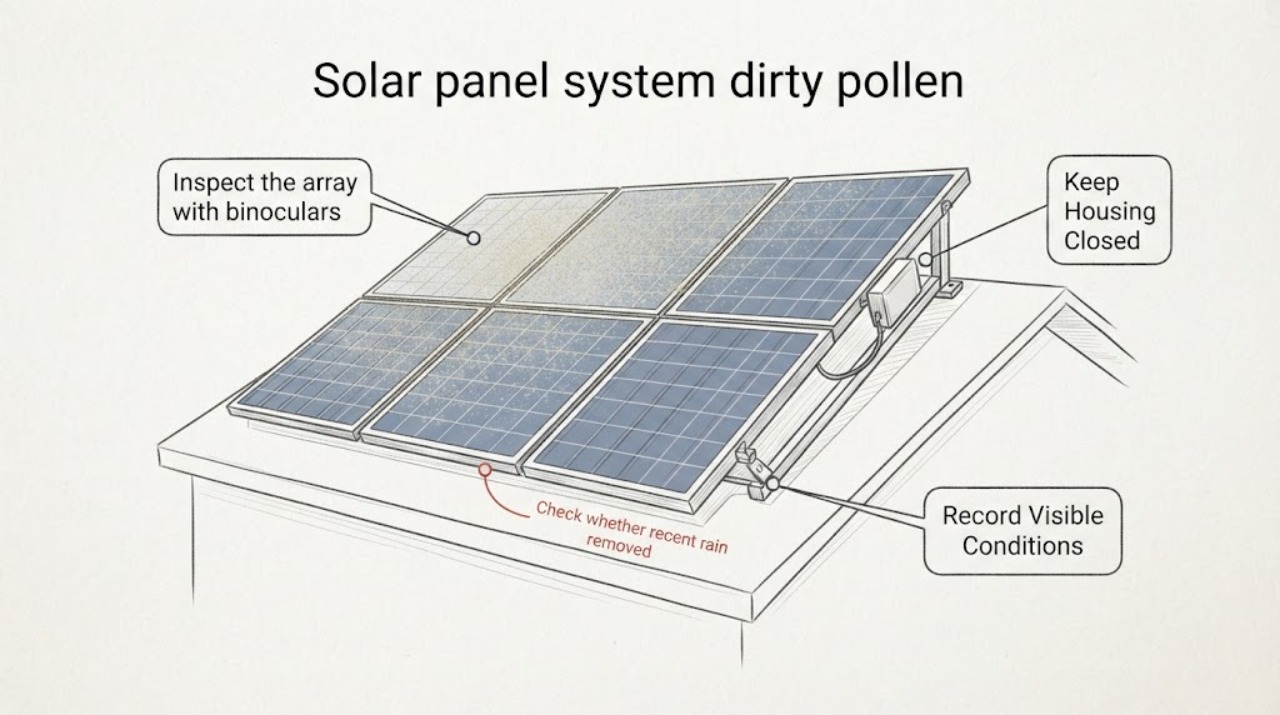
From the ground or a designated safe walkway, inspect the array with binoculars or a camera. Note whether a continuous yellow film, streaks, bird deposits, leaves, or other debris covers one module, a row, or the whole system; do not climb onto the roof or step on a panel.
Expected result: Pollen is visibly distributed across the array, only a few modules are soiled, debris is lodged at a frame or drain, or the glass appears clear.
Next step: Photograph the pattern and continue with production and alarm checks. Arrange professional cleaning for inaccessible or unsafe areas rather than trying to reach the array.
Stop if: Stop if a module is cracked, loose, displaced, badly stained, or surrounded by exposed or damaged wiring, or if the inspection requires roof access without suitable fall protection.
Why this matters
Why: Widespread pollen supports a soiling-related performance effect; localized deposits can create uneven shading; clear glass makes an inverter, shade, weather, or wiring cause more relevant than cleaning alone.
-
Check 2
Review the inverter or monitoring portal's production trend against your own prior clear-weather days, allowing for cloud cover, seasonal sun angle, shading, and system availability. Record any persistent drop, offline status, ground-fault indication, or other displayed alert without opening the inverter.
Expected result: Production fell during the pollen period with no inverter alert, production is normal despite visible pollen, or production is low with an alert or unrelated weather and shade change.
Next step: Save the trend and alert text. If the system is available and the only strong clue is surface soiling, plan a safe manufacturer-directed cleaning; if an alert or unexplained drop persists, contact the installer or qualified solar service.
Stop if: Do not reset repeatedly, open an enclosure, test wiring, or change protection settings to make production return.
Why this matters
Why: A pollen-timed drop with normal system status makes soiling more plausible; normal output means appearance alone may not justify cleaning; an alert or mismatch shifts concern toward electrical, inverter, shading, or grid diagnosis.
-
Check 3
Check whether recent rain removed the pollen and whether new deposits are still arriving from nearby trees, agricultural activity, or other airborne sources. Note whether soiling is uniform or concentrated on lower edges and frames; do not scrape deposits with a tool.
Expected result: Pollen remains after rain, new pollen accumulates quickly, or the surface is mostly clear after weather changes.
Next step: Use the production trend and the module manual to decide whether planned cleaning is worthwhile, often after the local pollen source has eased. Ask a professional to assess recurring soiling if access or cleaning frequency is difficult.
Stop if: Stop if cleaning would require climbing, pressure-washing, scraping, handling a damaged module, or disturbing roof hardware or wiring.
Why this matters
Why: Remaining or quickly recurring pollen indicates that rainfall alone may not restore the array and that cleaning timing should account for local pollen conditions; a clear surface makes a non-soiling cause more likely if output remains low.
-
Check 4
Read the panel and inverter manuals for the approved cleaning method, cool-panel timing, water or detergent restrictions, system shutdown steps, and warranty conditions. If the array is ground-mounted and safely reachable, visually check the glass and frame before any cleaning; if roof-mounted, treat access as professional work unless a qualified procedure and protection are already provided.
Expected result: The manual gives a clear user-safe procedure and the array is safely reachable, the system is on a roof or elevated structure, or the manual and system ownership or warranty instructions are unavailable.
Next step: Follow only the exact approved method or arrange a qualified cleaner. Never improvise a brush, solvent, pressure washer, roof route, or electrical shutdown sequence.
Stop if: Stop for steep or wet surfaces, skylights, unstable ladders, cracked glass, loose modules, exposed conductors, water near electrical equipment, or any need to step on panels.
Why this matters
Why: A clear procedure and safe access may permit limited maintenance; elevation, uncertainty, or contractual restrictions make professional cleaning the safer next step.
-
Check 5
After a safe, manual-approved cleaning performed from an appropriate access position, compare the panel appearance and the system's production trend under comparable weather. Do not judge success from an instantaneous power reading or from a cloudy day.
Expected result: The pollen film is removed and output returns toward its previous weather-adjusted pattern, the surface is cleaner but output remains low, or the cleaning could not be completed safely.
Next step: Keep the before-and-after photos and monitoring data. Arrange qualified solar service for persistent underperformance, recurring heavy soiling, or any damaged component.
Stop if: Do not repeat cleaning aggressively, spray electrical enclosures, walk on modules, or disconnect equipment to chase a small or uncertain output change.
Why this matters
Why: Improvement supports soiling as a contributor; no meaningful improvement means another fault, shading, degradation, or measurement issue needs investigation; an unsafe cleaning attempt is an access problem, not a reason to take more risk.
Use your observations
Decision map
Find the observation that best matches what you see, then follow the next safe action.
-
PATH 01Safety boundary
What you see
Visible pollen covers much of the array, production fell during the same period, and the inverter shows normal availability without another clear shading or weather explanation.
Do this next
Treat pollen soiling as a leading contributor and schedule cleaning after the local pollen source eases, using the module manufacturer's method or a qualified cleaner for elevated arrays.
Why this path and its safety boundary
Safety stop: Do not climb onto a roof, step on modules, scrape the glass, or improvise chemicals or electrical shutdowns.
-
PATH 02Safety boundary
What you see
Pollen is visible but production remains consistent with comparable weather and the system has no alert.
Do this next
Continue monitoring and compare the cleaning benefit with access risk; appearance alone does not establish that immediate cleaning is needed.
Why this path and its safety boundary
Safety stop: Escalate if output later drops, an alert appears, or a module becomes cracked, loose, or shaded.
-
PATH 03Safety boundary
What you see
Rain has passed but a pollen film remains, or pollen reappears quickly from nearby wind-pollinated trees or agricultural activity.
Do this next
Use production data and local conditions to plan a targeted cleaning window, commonly after the active pollen period, and address only accessible non-electrical debris sources.
Why this path and its safety boundary
Safety stop: Do not assume more rain will restore output or attempt frequent unsafe roof cleaning.
-
PATH 04Safety boundary
What you see
The array is on a steep or elevated roof, near skylights, or otherwise cannot be reached with proper fall protection, or the cleaning method is uncertain.
Do this next
Leave the array untouched and arrange qualified solar maintenance with the system manual and access details available.
Why this path and its safety boundary
Safety stop: Do not use an unstable ladder, walk on panels, carry tools onto the roof, or work near exposed conductors.
-
PATH 05Safety boundary
What you see
Production is low but panel surfaces are clear, or the inverter shows an error, ground-fault indication, repeated trip, or unexplained offline status.
Do this next
Stop treating the issue as pollen and arrange qualified solar or electrical diagnosis; provide the alert text, production trend, and photos without opening equipment.
Why this path and its safety boundary
Safety stop: Do not repeatedly reset the inverter, open electrical enclosures, test conductors, or replace fuses from the output symptom alone.
-
PATH 06Safety boundary
What you see
A module is cracked or displaced, wiring or conduit is loose or damaged, water has entered an enclosure, or a cleaning attempt would wet damaged electrical equipment.
Do this next
Keep people away from the affected area, follow the system's documented emergency shutdown procedure only if qualified and safe, and arrange professional inspection before re-energizing or cleaning.
Why this path and its safety boundary
Safety stop: Do not touch damaged modules or wiring, spray water, remove modules, or restore a damaged system without qualified assessment.
Helpful context
Understand the symptom
Pollen can remain after rain
Pollen is one source of soiling, along with dust, bird droppings, and other airborne material. DOE research describes pollen from agricultural and wind-pollinated sources as a cause of panel soiling, and its NREL-related work notes that rain may not restore performance to the pre-soiled level. A yellow film or streaks on the glass are useful clues, but a production change should still be compared with weather and shading before cleaning is blamed.
Inspect from a safe position first
Solar panels may be on roofs, carports, or ground-mounted structures, and access conditions differ. OSHA identifies fall hazards around roofs, skylights, ladders, and solar maintenance. Use ground-level observation and the system monitor whenever possible. A professional should handle steep or fragile roofs, damaged modules, wiring, conduit, disconnects, or any cleaning that requires stepping onto the array.
Cleaning is not a substitute for electrical diagnosis
DOE recommends monitoring operational indicators and keeping an operations and maintenance plan. If production is low without visible pollen, the inverter shows an error, or output remains low after a safe manufacturer-approved cleaning, the cause may be shading, a module or wiring fault, inverter behavior, or another system issue. Do not repeatedly reset an inverter or open electrical enclosures to investigate.
Only after diagnosis
Potential parts
- module-manufacturer-approved cleaning accessory
Consider this category only when the module manual permits owner cleaning, the array is safely reachable, and the deposit is confirmed as removable surface soiling.
Match the exact module instructions, surface, water quality, brush or cloth specification, access method, and warranty conditions; never choose a harsh tool or solvent from the pollen symptom alone. - solar PV module or frame replacement component
Consider this category only after a qualified installer confirms that a cracked, delaminated, or otherwise damaged module or frame requires replacement rather than cleaning.
Match electrical characteristics, dimensions, connectors, mounting, system design, and warranty requirements; do not substitute a module based only on appearance or output. - solar monitoring or soiling-measurement component
Consider this category only when qualified service confirms that monitoring data are missing or inadequate to distinguish soiling from an electrical or weather-related performance change.
Compatibility depends on the inverter, communications, meter, system ownership, and installer configuration; monitoring equipment does not clean or repair a panel.
When checks do not resolve it
Need a professional?
Escalate for rooftop or elevated cleaning, cracked modules, loose wiring, water intrusion, inverter alerts, unexplained output loss, repeated trips, or any work involving disconnects, electrical testing, module removal, or sealed equipment.
Safety scope: The homeowner scope is limited to ground-level observation, monitoring review, safe documentation, and only the cleaning procedure explicitly permitted by the exact module and system manuals from a safe access position. Do not climb unsafe roofs, step on modules, scrape or pressure-wash glass, wet electrical enclosures, open inverters, touch damaged wiring, disconnect conductors, or perform electrical tests.
Have this ready
- Provide the system make and model if available, array location and access type, panel photos from a safe position, pollen or debris pattern, before-and-after production trend under comparable weather, inverter status and exact alert text, recent rain or cleaning, visible damage, and the module and system manuals.
Common questions
FAQ
Can pollen make solar panels produce less power?
Yes. Pollen is a form of soiling that can block light from reaching PV cells. Compare production with comparable weather and check for inverter alerts before assuming pollen is the only cause; rain may not remove enough residue in every location.
Will rain clean pollen off my solar panels?
Not always. DOE research reports that rainfall can remove some pollen without restoring PV performance to the earlier level. Inspect from a safe position and use production data and the module manual to decide whether planned cleaning is warranted.
Can I clean pollen off rooftop solar panels myself?
Only when the exact module instructions permit it and the panels are safely reachable without unsafe roof, ladder, skylight, electrical, or wet-surface exposure. Otherwise use qualified solar maintenance; do not walk on panels, scrape glass, or pressure-wash the array.
How do I know low solar output is caused by pollen?
Look for a pollen film or streak pattern, a production drop during the local pollen period, and no stronger explanation from clouds, shade, inverter alerts, or system availability. Clean only by an approved safe method, then compare output under similar conditions; persistent underperformance needs professional diagnosis.
When should a solar professional clean or inspect the system?
Use a professional for elevated or unsafe access, cracked or loose modules, damaged wiring, water intrusion, inverter errors, unexplained output loss, or cleaning that requires electrical shutdown or module access. Keep away from damaged equipment until it has been assessed.
Read the exact guide
Official sources
- Green Job Hazards - Solar Energy: FallsOccupational Safety and Health Administration · OSHA workplace fall-protection guidance; it is not a homeowner work plan, but it establishes why elevated solar cleaning requires appropriate protection and training.
- EERE Success Story – The Plug-and-Play Device That Streamlines Solar CleaningU.S. Department of Energy · DOE discussion of photovoltaic soiling and utility-scale measurement; it supports the mechanism and monitoring logic, not a universal homeowner cleaning method.
- Farmer's Guide to Going SolarU.S. Department of Energy · DOE guidance discussing agricultural and utility-scale solar contexts; the pollen and soiling mechanism is relevant, but residential cleaning procedures remain model- and access-specific.
- Homeowner's Guide to SolarU.S. Department of Energy · DOE homeowner guide for residential solar; exact system shutdown and maintenance instructions remain installer- and model-specific.
- Life Cycle of Photovoltaic Systems: Operate and Maintain an Existing Photovoltaic SystemU.S. Department of Energy · DOE FEMP guidance for existing PV systems, including larger systems; residential owners should follow their system documentation and qualified installer guidance.
Community feedback
Share a repair observation
Share a plain-text repair observation. Accepted observations are published automatically; this page may take a moment to update.