
On this page
Start here
Quick answer
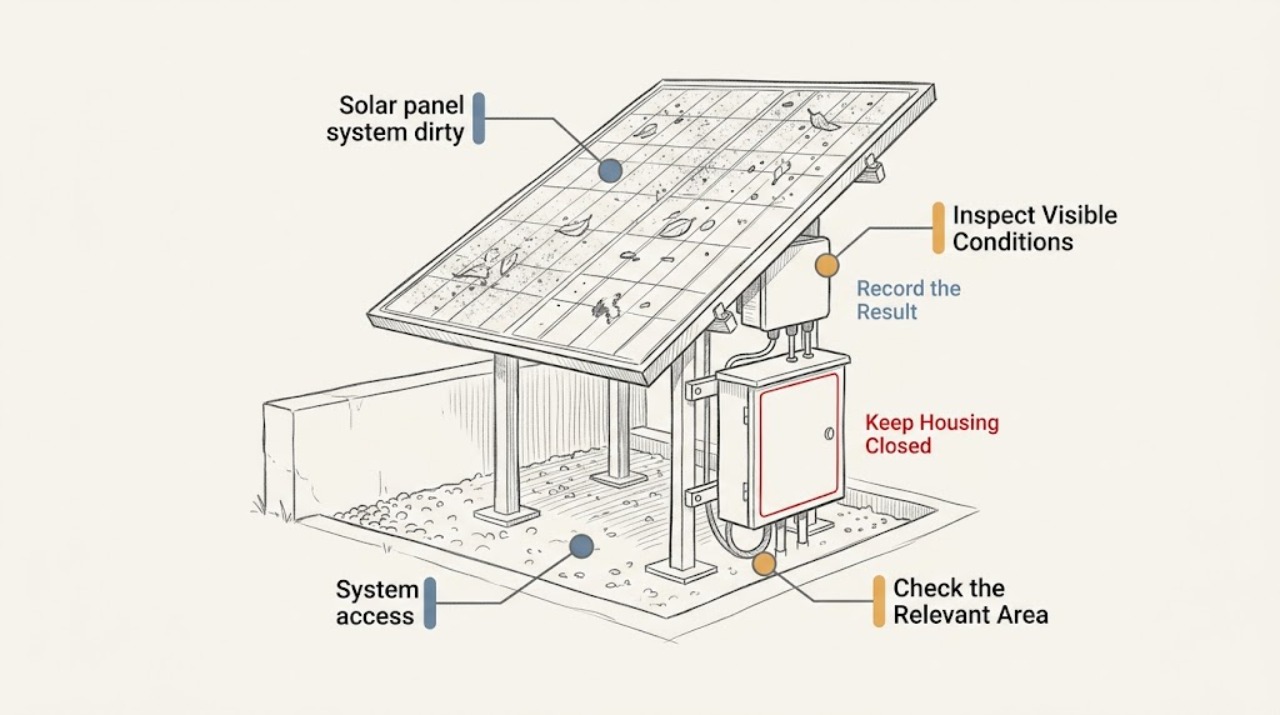
First separate visible soiling from a system fault. From a safe ground-level or window viewpoint, record what is visible on the array, its location and extent, nearby shade or debris, and any cracks, loose material, exposed wiring, burning odor, or unusual hot-spot report. From the owner-facing monitoring interface, compare the production pattern with similar weather and earlier periods, without resetting, shading, touching, cleaning, or disconnecting anything. Dirt can reduce received sunlight, but weather, communications, module damage, and other conditions can look similar. Arrange professional cleaning or inspection when the array is inaccessible, heavily soiled, damaged, or underperforming; immediately keep people away and seek qualified or emergency help for a crack, exposed conductor, smoke, burning odor, or suspected hot spot.
Before you begin
Safety first
- The professional must handle roof or ladder access, module contact and cleaning, electrical or DC isolation, panel inspection, thermal testing, and repair decisions. The reader should not climb, touch, clean, shade-test, disconnect, open, or electrically test the array.
Work through in order
Diagnostic checks
Use only checks that match the exact appliance or system and its official guide.
-
Check 1
From a safe ground-level or window viewpoint, compare the suspected modules with nearby modules and photograph the visible surface without touching, approaching, cleaning, or reaching toward the array.
Expected result: Record whether the deposit looks like dust, pollen, leaves, bird droppings, snow, or another material, whether it is localized or widespread, and whether cracks, dark marks, broken glass, or delamination are also visible.
Next step: Send the safe-view photographs and location to a qualified solar maintenance provider and ask whether professional cleaning or inspection is appropriate.
Stop if: Stop and keep people away for broken glass, a loose or fallen module, exposed wiring, smoke, burning odor, or a suspected hot spot.
Why this matters
Why: A visible deposit can support a cleaning assessment, but its appearance does not quantify energy loss or rule out a damaged module. A crack, dark mark, or changed surface needs inspection rather than cleaning.
-
Check 2
Open only the normal owner-facing monitoring interface and record the displayed production, status, alarm text, and affected array or inverter identifier if available without resetting or cycling equipment.
Expected result: Note whether output is broadly reduced, whether one array or inverter is singled out, whether the system is offline, and whether the change aligns with a visible soiling event; preserve screenshots and timestamps.
Next step: Provide the screenshots and timeline to the service provider so they can compare the system with irradiance and weather context and decide on a safe inspection.
Stop if: Do not repeatedly reset or operate the system. Escalate immediately for a safety alarm, smoke, burning odor, arc indication, or unexplained hot-spot report.
Why this matters
Why: A matching visible-soiling and production pattern makes a cleaning assessment reasonable, but monitoring cannot prove that dirt is the sole cause or identify a particular module fault.
-
Check 3
From the ground or monitoring view, record recent rain, dust, pollen, snow, bird activity, nearby trees, construction, or persistent shadow that could explain where deposits or output changes occur without removing debris or creating a deliberate shade test.
Expected result: Note whether the condition is recent or recurring, whether it affects one section or the whole array, and whether output returns after ordinary rain or remains low; do not infer a guaranteed cleaning interval from one event.
Next step: Share the weather and surroundings timeline with the provider and ask for a maintenance recommendation suited to the array's access and exposure.
Stop if: Stop if storm debris, unstable material, downed conductors, overhead hazards, or water near electrical equipment is visible.
Why this matters
Why: Weather and local surroundings help explain soiling patterns and the value of a professional visit, while a persistent shadow or debris source may continue after cleaning unless the broader condition is addressed.
-
Check 4
From a safe distance, look only at externally visible inverter, conduit, cable, and mounting surroundings for scorching, loose material, unusual noise, damaged housings, or an alarm indicator without opening, touching, or moving equipment.
Expected result: Record any visible damage or abnormal indication, or record that no external abnormality is visible; do not treat a clear exterior as proof that the modules or internal connections are safe.
Next step: Tell the qualified provider exactly what was visible and request safe isolation and inspection guidance; keep the area clear while waiting.
Stop if: Stop immediately for smoke, flame, arcing, burning odor, exposed conductors, liquid entering electrical equipment, or an unstable module, and contact emergency responders for fire or immediate danger.
Why this matters
Why: A safety or damage indication changes the task from routine cleaning to urgent professional inspection. A normal exterior supports only continued safe documentation, not a user cleaning procedure.
-
Check 5
Review prior cleaning, service, monitoring, and weather records and compare them with current safe-view photographs without attempting to reproduce a low-output event.
Expected result: Record whether soiling and output change together repeatedly, whether cleaning was recent but the output stayed low, and whether the issue began after a storm, construction, nearby vegetation change, or equipment service.
Next step: Give the history to a qualified solar professional and request inspection when the pattern is unexplained, recurring, or accompanied by any damage or alarm.
Stop if: Stop if further investigation would require roof or ladder access, contact with the array or wiring, panel cleaning, shading, DC disconnection, or electrical testing.
Why this matters
Why: Repeated correlation can help a professional scope maintenance, but persistent low output after a clean appearance suggests that dirt may not be the root cause.
Use your observations
Decision map
Find the observation that best matches what you see, then follow the next safe action.
-
PATH 01Safety boundary
What you see
Broken glass, exposed wiring, smoke, flame, burning odor, arcing, an unstable module, or a suspected hot spot is visible or reported.
Do this next
Keep people and pets away and request qualified emergency or solar service; use emergency responders for fire or immediate danger.
Why this path and its safety boundary
Safety stop: Stop all user troubleshooting until emergency responders or qualified personnel declare the area safe.
-
PATH 02Safety boundary
What you see
Visible deposits are present and the monitoring timeline shows a compatible localized or recurring production change, with no damage or emergency sign.
Do this next
Request professional solar-panel cleaning or maintenance assessment and provide the photos, location, weather, and monitoring history.
Why this path and its safety boundary
Safety stop: Stop if the provider finds cracks, hot spots, loose components, or a safety alarm; use the damage or emergency path.
-
PATH 03Safety boundary
What you see
Deposits are visible but production changes track cloud, rain, snow, season, or other weather context without a persistent alarm.
Do this next
Document the condition and ask a professional whether cleaning is worthwhile for this site and access arrangement.
Why this path and its safety boundary
Safety stop: Stop if a new crack, exposed wiring, abnormal odor, hot-spot report, or unsafe access issue appears.
-
PATH 04Safety boundary
What you see
Output remains reduced or an alarm persists after no significant soiling is visible, or the array appears clean but underperforms.
Do this next
Request a qualified solar fault inspection instead of arranging cleaning alone.
Why this path and its safety boundary
Safety stop: Stop immediately for smoke, burning odor, arcing, exposed conductors, or a safety alarm.
Helpful context
Understand the symptom
A dirty appearance is not a diagnosis
Dust, pollen, leaves, bird droppings, and other deposits can block some light, but a lower output can also reflect cloud cover, seasonal sun, communications loss, degradation, or a component fault. A ground-level photograph and monitoring timeline are more useful than assuming that every production change is caused by dirt.
Keep cleaning and electrical work professional
Do not climb onto a roof, use a ladder, touch modules or wiring, scrub or spray the glass, create a cover or shade test, or disconnect DC equipment. A PV system can remain electrically hazardous in daylight, and cleaning access can introduce fall, glass, and equipment risks.
What to hand off
Give the service provider safe-view photographs, the affected area or panel location if known, the monitoring trend and weather context, the type of deposit, and any visible damage or alarm. The provider can decide whether cleaning, inspection, imaging, or a repair assessment is appropriate.
Only after diagnosis
Potential parts
- solar-panel-cleaning brush
Consider this category only if a qualified provider confirms that an approved, safe cleaning method is appropriate for the module surface and access conditions.
Confirm the module manufacturer guidance, surface, access, water method, and safety plan; the reader should not use a brush on the array. - solar-panel wash tool
A wash tool may be relevant only as part of a professional cleaning scope after the array and access hazards have been assessed.
Confirm that the method is suitable for the modules, coatings, water conditions, and warranty requirements; do not spray or wash the system yourself. - production monitor
A monitoring device may help establish a longer production baseline when a provider identifies insufficient existing data, but it cannot diagnose or clean a dirty module.
Confirm compatibility with the existing inverter, communications path, and system architecture before ordering or installing.
When checks do not resolve it
Need a professional?
Request professional solar maintenance when deposits are heavy, recurring, inaccessible, associated with persistent underperformance, or beyond a safe ground-level observation. Request urgent qualified service for cracks, loose modules, abnormal hot-spot reports, exposed wiring, alarms, or suspected damage; use emergency services for smoke or fire.
Safety scope: The professional must handle roof or ladder access, module contact and cleaning, electrical or DC isolation, panel inspection, thermal testing, and repair decisions. The reader should not climb, touch, clean, shade-test, disconnect, open, or electrically test the array.
Common questions
FAQ
Can I clean the panels myself from a ladder?
No. Do not use a ladder or touch, scrub, spray, or wash the array. Ask a qualified solar provider to assess access, module condition, electrical hazards, and the appropriate cleaning method.
Does dirty glass prove that dirt caused the lower production?
No. Compare the monitoring pattern with similar weather and the location of the deposit, but remember that weather, communications, damage, and other faults can also reduce output.
Should I cover a clean panel to compare output?
No. Do not shade or cover a module as a test. Preserve normal monitoring data and ask a professional to evaluate soiling and system performance safely.
What if the system is dirty and I also see a crack or exposed wire?
Treat it as a damage and safety issue, not a cleaning job. Keep everyone away and request qualified service; use emergency responders for smoke, flame, arcing, or immediate danger.
Read the exact guide
Official sources
- Life Cycle of Photovoltaic Systems: Operate and Maintain an Existing Photovoltaic SystemU.S. Department of Energy · Supports monitoring site debris, tracking production over time, comparing weather and system performance, and using qualified O&M personnel for inspections and maintenance.
- Monitoring Platforms for Solar Photovoltaic SystemsU.S. Department of Energy · Supports using owner-facing monitoring trends, status messages, alarms, performance reports, and maintenance records as diagnostic context rather than as a substitute for field inspection.
- Farmer’s Guide to Going SolarU.S. Department of Energy · Supports recognizing dust and pollen as local soiling sources, the dependence of production impact on weather and site conditions, and the need to weigh cleaning decisions against the specific array context.
Community feedback
Share a repair observation
Share a plain-text repair observation. Accepted observations are published automatically; this page may take a moment to update.