
On this page
Start here
Quick answer
If an AEG dishwasher stops before the programme finishes, record the display or flashing-light pattern and whether water remains. Check that the door is fully latched, cancel any delay or previously active programme using the model's documented RESET/CANCEL control, and inspect the accessible filters and sump with power disconnected. AEG links specific drain codes such as i20, C2, F2, or AL6 with drainage checks, while iC0-family faults can recur after a reset. If the code returns, the dishwasher leaks, the controls stay unresponsive, or the programme stops every time, leave it off and arrange authorised service. [AEG stuck-mid-cycle, AEG drain-code, AEG iC0 guidance]
Work through in order
Diagnostic checks
Use only checks that match the exact appliance or system and its official guide.
-
Check 1
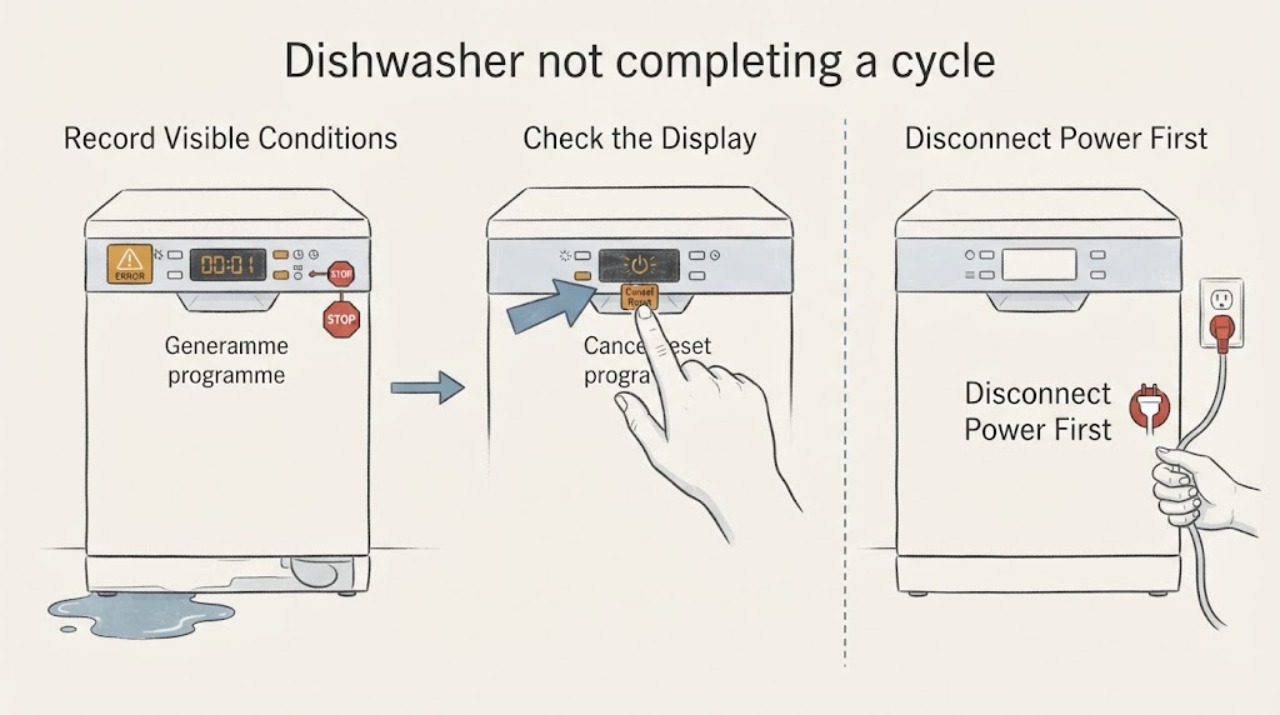
Before cancelling the programme, record the exact display code or flashing-light pattern, whether the door is locked or latched, whether water remains in the tub, and where in the cycle the stop occurred.
Expected result: The dishwasher shows a named code or repeatable light pattern, leaves standing water, or simply remains on an active programme without a code.
Next step: Keep the record for the exact model manual or service visit and continue only with the matching external branch below.
Why this matters
Why: The observation separates a documented drain or control path from a stuck programme; a missing code does not prove a component failure.
-
Check 2
Check that the door closes fully with an audible latch and that Delay Start or another previous programme is not still active; do not force the door or guess a button combination.
Expected result: The door does not latch, a delay countdown is active, or the controls remain on the previous programme; alternatively the door latches and no delay is shown.
Next step: Use the exact model manual to cancel the delay or programme. If the door cannot latch or the programme remains stuck, arrange service rather than bending hardware or bypassing the latch.
Why this matters
Why: AEG identifies door closure and prior programme/delay settings as reasons a cycle may not start or a new cycle may not be selectable.
-
Check 3
If the dishwasher is safely idle and the model's controls match the AEG support guidance, hold the documented RESET/CANCEL control to abort the active programme and allow the appliance to drain; use the exact model manual if the controls differ.
Expected result: The appliance returns to programme selection and drains, or it remains stuck, does not drain, or immediately shows a fault again.
Next step: If reset fails or the error returns, stop repeating resets and move to the model-specific service path; never use a reset to conceal a leak or standing-water hazard.
Why this matters
Why: A reset can clear a previously active programme, but it does not establish or repair an underlying drain, control, or electronic fault.
-
Check 4
Disconnect the dishwasher from power, then inspect and clean only the accessible interior filters and sump; if water remains, check the visible drain hose and sink connection for kinks or an obstruction without dismantling the pump.
Expected result: Filters or the sump are clogged, the drain hose is kinked/blocked, or the accessible drain path is clear but water remains.
Next step: Refit filters correctly and use the exact model's documented drain test. If water remains or the path is inaccessible, leave the appliance off and request service.
Why this matters
Why: AEG associates i20-family drainage symptoms with filter/sump, hose, and sink-spigot conditions. A clear external path does not prove the internal pump or wiring is sound.
-
Check 5
Stop user troubleshooting if the programme stops on every cycle, a code returns after the documented checks, controls stay unresponsive, water leaks, or the appliance shows a power or electrical concern.
Expected result: The failure is repeatable or accompanied by a leak, repeated code, burning smell, damaged cord, or unresponsive controls.
Next step: Keep the dishwasher switched off, close the water supply if there is active leakage and it is safe to do so, and arrange an authorised service visit. Do not open the cabinet or perform live electrical tests.
Why this matters
Why: AEG treats recurring error conditions and persistent programme failure as requiring professional diagnosis; the symptom alone cannot identify the failed internal component.
Use your observations
Decision map
Find the observation that best matches what you see, then follow the next safe action.
-
PATH 01Next step
What you see
The dishwasher is simply stuck on an active programme or delay and the door latches normally.
Do this next
Use the exact model's RESET/CANCEL procedure, then turn the appliance off and back on only as the support guidance allows.
Why this path and its safety boundary
Why it matters: AEG documents this as a programme-selection/cancel path rather than proof of an internal part failure.
-
PATH 02Next step
What you see
Water remains and the display shows i20, C2, F2, AL6, or the corresponding documented two-beep/two-flash pattern.
Do this next
Disconnect power, perform only the accessible filter, sump, hose, and sink checks in the AEG guidance, and request service if draining does not recover.
Why this path and its safety boundary
Why it matters: AEG identifies this family as a drainage problem and directs attention to the sink spigot, filter/sump, and drain-hose installation.
-
PATH 03Next step
What you see
The dishwasher shows iC0, iCo, iC1, iC2, or iC3, or stops every cycle after a reset.
Do this next
Disconnect power, clean accessible filters and sump as directed, and stop using the dishwasher if the code returns.
Why this path and its safety boundary
Why it matters: AEG associates the iC0 family with a technical malfunction; filter/sump debris or foam may be checked, but a recurring code needs professional diagnosis.
-
PATH 04Next step
What you see
The display shows PF or another power-related warning, or there is a leak, electrical odor, or damaged wiring/cord.
Do this next
Leave the dishwasher switched off, avoid electrical contact with wet equipment, and arrange qualified electrical or authorised appliance service.
Why this path and its safety boundary
Why it matters: AEG's PF guidance indicates out-of-range operating voltage, and leaks or electrical concerns exceed ordinary cycle troubleshooting.
Helpful context
Understand the symptom
First identify how the programme stopped
A dishwasher that is still counting down, a dishwasher that has returned to programme selection, and a dishwasher that leaves water in the tub are different observations. Record the exact code or light pattern, whether the door is latched, whether the pump is still running, and whether water remains before resetting anything. Do not infer a failed pump, heater, or control board from an incomplete cycle alone.
Keep model-specific controls model-specific
AEG shows different reset controls for integrated and freestanding interfaces and warns that button layouts vary. Use the assigned model's manual for the exact sequence. The safe checks below stay at the accessible door, controls, filter, sump, hose, and error-message level.
When checks do not resolve it
Need a professional?
Arrange authorised AEG service if reset and accessible filter/drain checks do not restore completion, if a code returns, the dishwasher stops every cycle, water leaks, or the controls remain unresponsive. Use an electrician for a suspected supply or voltage problem.
Common questions
FAQ
Can I reset an AEG dishwasher that stops mid-cycle?
AEG provides model-dependent RESET/CANCEL procedures that can abort an active programme and drain the appliance. The button layout varies, so use the exact model manual; a recurring stop after reset needs service.
Does water left in the tub always mean the pump is broken?
No. AEG's drain guidance starts with the sink connection, filters, sump, and drain hose. A clear accessible path does not prove an internal pump fault, so persistent standing water should go to service.
What if the same error returns after cleaning and resetting?
Stop repeating the reset. AEG recommends an authorised service visit for recurring iC0-family faults or a programme that continues to stop, and its error guidance says to note the complete code before contacting support.
Read the exact guide
Official sources
- Program not starting and cycle indicator light flashing on dishwasherAEG · AEG flashing-indicator, door, delay, filter, spray-arm, reset, and authorised-service guidance.
- How to clean and maintain your AEG dishwasherAEG · AEG maintenance safety for filters/sump and soft-cloth cleaning; power disconnection before filter maintenance.
- Dishwasher is stuck mid-cycle and won't allow me to select a different programmeAEG · AEG programme-cancel/reset guidance for a dishwasher stuck mid-cycle; button layout remains model-specific.
- Dishwasher displays error code iC0 / iCoAEG · AEG iC0/iCo/iC1/iC2/iC3 reset, filter/sump check, and recurring-fault service boundary.
- Dishwasher does not / will not start but the power is onAEG · AEG door-latch, previous programme/delay, reset, and model-specific control guidance.
- AEG Dishwasher Error Codes – Causes and SolutionsAEG · AEG guidance to record complete codes, distinguish water/drain/heating/control conditions, and stop for recurring faults or leaks; exact model remains controlling.
- PF error code is displayed on the dishwasher's displayAEG · AEG PF power-failure/low-voltage warning and instruction to leave the dishwasher off until voltage is normal.
- Fix Dishwasher Not Draining | Error I20 GuideAEG · AEG drainage-code path for i20/C2/F2/AL6 or matching two-beep/two-flash symptoms, including external filter/sump, hose, and sink checks.
Community feedback
Share a repair observation
Share a plain-text repair observation. Accepted observations are published automatically; this page may take a moment to update.