
On this page
Start here
Quick answer
First decide whether this is an Amana central HVAC system, a window unit, a portable unit, or a packaged terminal unit, because their controls and owner instructions differ. A central air conditioner normally cycles off after the thermostat reaches its setting; if it stops while the space is still warm, check the thermostat mode and schedule, the accessible filter and registers, and visible ice, water, or outdoor obstruction without opening equipment. On a window or portable unit, check the timer, Sleep or Eco setting, filter alert, and any display message against that model's manual. Amana notes that an oversized system can satisfy a thermostat locally and shut off before the whole home is comfortable, while restricted airflow, duct problems, condensate, refrigerant, controls, or electrical faults require qualified diagnosis. Leave cooling off for ice, water near electrical equipment, burning odor, smoke, a harsh noise, or a repeated breaker trip.
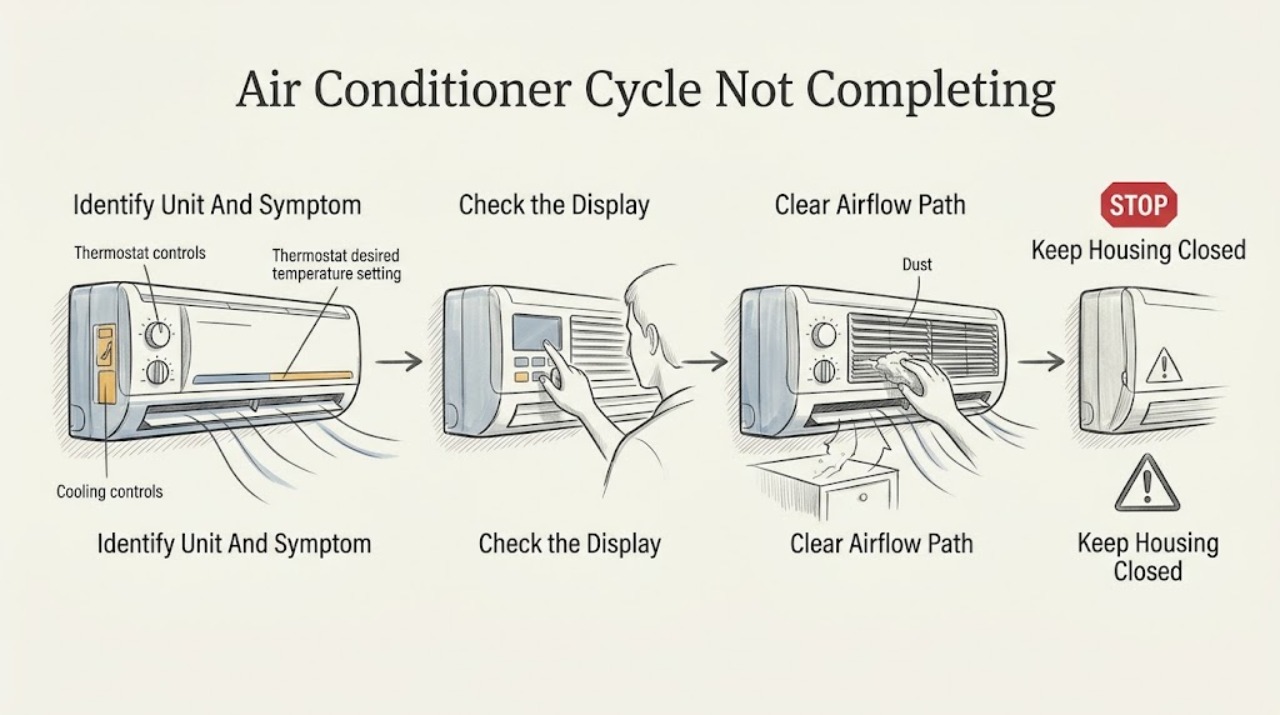
Work through in order
Diagnostic checks
Use only checks that match the exact appliance or system and its official guide.
-
Check 1
From normal user access, identify whether the Amana unit is central HVAC with a thermostat and outdoor condenser, a window or portable room unit, or a packaged terminal unit; record the model number only if it is already visible without opening equipment.
Expected result: Record the architecture, whether the fan or compressor stops, the room or home temperature, the thermostat or display setting, and how long the unit runs before stopping.
Next step: Use the matching Amana manual and follow the branch below for that architecture. Do not open a cabinet or slide out a chassis to identify a part.
Stop if: Stop if identification requires removing a panel, reaching near a fan, handling wiring, or working around water or electrical equipment.
Why this matters
Why: A central unit's cycle is governed by a separate thermostat and air-distribution system, while a room, portable, or packaged terminal unit may stop because of its own timer, mode, display condition, or model-specific control. A stop at the setpoint is different from a stop while the space remains warm.
-
Check 2
Check the thermostat or room-unit control from the front: confirm cooling mode, the intended setpoint, fan setting, active schedule, and any timer, Sleep, Eco, filter, or water-related display message; make only an obvious user-setting correction.
Expected result: Record whether the unit stops exactly after reaching the setpoint, stops above it, stops on a programmed time or mode, shows a warning, or has a blank or unstable control display.
Next step: Correct an obvious mode or schedule setting and observe one normal call. If the system still stops while the space is warm, leave the setting documented and continue with the safe airflow check or arrange service.
Stop if: Do not remove the thermostat, change wiring, bypass a control, or repeatedly restart a unit that shows a fault or safety warning.
Why this matters
Why: Stopping after the target is reached is normal control behavior. A timer or comfort mode can intentionally alter a room unit's run pattern. Stopping above the target with an active cooling demand makes thermostat sensing, sizing, airflow, cooling capacity, or a protection/control fault more likely; the display alone cannot identify the failed component.
-
Check 3
With the unit stopped, inspect the filter only through its normal user access and confirm that accessible supply and return grilles or room-unit inlets and outlets are open and free of furniture, curtains, dust, or other blockage.
Expected result: Record a clean filter and strong airflow, a visibly loaded filter, weak or uneven airflow, a blocked grille, a wet filter, or an access point that requires tools.
Next step: Open an accidentally blocked grille or replace a filter only with the exact type and procedure specified for that model. If airflow remains weak, the filter is wet, or the unit still stops above the target, turn cooling off and arrange qualified service.
Stop if: Do not remove a blower or coil cover, reach into an opening, wash an installed filter in place, or use tools inside the equipment.
Why this matters
Why: A loaded filter or blocked air path can reduce airflow and cooling performance, and central duct imbalance can leave rooms warm even when air is moving. A wet filter, inaccessible filter, or persistent weak airflow points beyond a simple user check and may involve a coil, blower, condensate, or control problem.
-
Check 4
From a dry, safe position, look for visible ice, unusual water, and blocked outdoor airflow; for a central system, observe the outdoor unit without touching the fan or removing a cover, and for a room or portable unit, record only the display or drain condition described by its manual.
Expected result: Record no ice or water, ice with weak airflow, water near the indoor or electrical area, an obstructed outdoor unit, or a fan that is stopped, noisy, or visibly abnormal.
Next step: Turn cooling off for ice, abnormal water, or an abnormal outdoor response and provide the timing and photos from a safe distance to a qualified technician. Follow only the model manual's normal water-removal instruction for a room or portable unit.
Stop if: Do not chip ice, touch refrigerant lines, reach through a grille, enter the outdoor unit, pour water into the equipment, or operate near water and exposed electrical components.
Why this matters
Why: Ice, water, a blocked outdoor coil, or an abnormal outdoor response can accompany airflow, condensate, refrigeration, mechanical, or control problems. The visual check cannot confirm refrigerant charge, a leak, a capacitor, a compressor, or an electrical fault.
-
Check 5
From a dry, safe position, record whether the unit's known circuit or plug appears normal and whether the incomplete cycle followed a power interruption; collect the model, settings, run time, airflow, ice or water, sound, and room-temperature observations for service.
Expected result: Record normal power, one known interruption, a repeated breaker trip, a hot or buzzing enclosure, scorch marks, smoke, burning odor, or a control that resets unexpectedly.
Next step: Leave a repeatedly tripping circuit or damaged unit off and request qualified HVAC or electrical service as appropriate. Give the technician the symptom timeline instead of attempting another restart to reproduce it.
Stop if: Do not open an electrical panel, touch exposed conductors, perform a live test, bypass protection, or reset a breaker again after an immediate repeat trip.
Why this matters
Why: A single interruption may explain a stopped cycle, but repeated trips, heat, odor, smoke, buzzing, or visible damage indicate an unresolved electrical or equipment fault. A normal-looking circuit does not rule out controls, compressor, fan, refrigerant, or condensate problems.
Use your observations
Decision map
Find the observation that best matches what you see, then follow the next safe action.
-
PATH 01Next step
What you see
The unit stops after the room or home reaches the selected temperature, with normal airflow and no warning, ice, water, or abnormal sound.
Do this next
Treat the completed cycle as normal. If comfort varies by room, record which rooms remain warm and request an airflow, duct, thermostat-location, or sizing assessment rather than forcing a colder setpoint.
-
PATH 02Next step
What you see
A central Amana system stops while the thermostat still calls for cooling, airflow is normal, and there is no urgent safety sign.
Do this next
Leave the symptom documented and arrange qualified HVAC diagnosis for thermostat sensing, equipment sizing, duct balance, cooling capacity, condensate, controls, and refrigeration. Amana specifically says incorrect sizing can shut a system off before the whole home reaches the desired temperature.
-
PATH 03Next step
What you see
The incomplete cycle comes with weak airflow, a loaded filter, visible ice, or a major change in supply air.
Do this next
Correct only an obvious blocked register or user-accessible filter issue, then leave cooling off if the symptom remains. Request service to distinguish airflow restriction, coil, blower, condensate, and refrigeration causes; do not chip ice or open the equipment.
-
PATH 04Next step
What you see
A window, portable, or packaged terminal unit stops on a timer, Sleep or Eco setting, filter reminder, water-related display, or another model-specific message.
Do this next
Use the exact model manual to interpret the message and change only the documented user control or filter step. If the unit still stops above the target, the message returns, or the manual calls for service, stop and use the manufacturer's support path.
-
PATH 05Next step
What you see
There is smoke, burning odor, arcing, a hot or buzzing enclosure, water near electrical equipment, a harsh mechanical sound, a stationary fan, or a repeated breaker trip.
Do this next
Stop using the air conditioner and keep clear. Use appropriate emergency or electrical help for immediate hazards and qualified HVAC service for the equipment; do not restart it to reproduce the symptom.
Helpful context
Understand the symptom
A stopped compressor is not automatically a failed cycle
If the room or home has reached the thermostat setting, the cooling cycle ending is expected. The problem is different when the system stops while the space is still warm, restarts repeatedly, or leaves some rooms uncomfortable. Amana says an air conditioner should cycle at intervals when properly sized, but an oversized system can cool the area around the thermostat quickly and shut off before the rest of the home reaches the desired temperature. Record the temperature and timing rather than repeatedly lowering the setpoint.
Identify the product before applying a check
Amana's owner guidance separates central heating and cooling equipment from room and portable air conditioners. Central systems use a thermostat, air handler, ductwork, and an outdoor unit; a room or portable model may have its own display, timer, Sleep or Eco behavior, washable filter, and model-specific instructions. If the model number is not visible from ordinary access, do not open a cabinet to find it. Use the correct manual and support path for the product you actually have.
Airflow and maintenance can shorten a cooling run
For central equipment, a loaded filter, obstructed registers, unbalanced duct airflow, condensate problem, coil issue, or outdoor obstruction can change the cooling result even when the control calls for cooling. Amana lists filters, ductwork, condensate drainage, coils, fans, and controls among the areas a technician may inspect. A homeowner can make only the normal filter and register checks described by the model instructions; refrigerant, electrical, coil, and cabinet work belong to a qualified HVAC professional.
Safety boundary
Stop conditions
- Stop immediately for smoke, fire, burning odor, arcing, a hot or buzzing enclosure, exposed wiring, water near electrical equipment, or a repeated breaker trip.
- Leave cooling off for visible ice, abnormal water, a harsh or worsening mechanical sound, a stationary fan, weak or absent airflow, or repeated stopping while the space remains warm.
- Never open an HVAC cabinet, reach through a fan guard, change wiring, perform live electrical tests, handle refrigerant, chip ice, or bypass a safety device as a homeowner.
When checks do not resolve it
Need a professional?
Arrange qualified HVAC service when an Amana air conditioner stops while the space remains warm after the safe control and airflow checks, or when the symptom repeats. Call promptly for ice, abnormal water, weak airflow, a stationary or noisy fan, a recurring display fault, or a suspected condensate, refrigeration, control, or sizing problem. Use electrical or emergency help for smoke, burning odor, arcing, a hot or buzzing enclosure, exposed wiring, water at electrical equipment, or repeated breaker trips.
Have this ready
- Provide the architecture and model if safely visible, thermostat or display settings, target and observed temperature, run-time pattern, airflow and filter observations, timer or mode status, ice or water notes, outdoor response, sound location, and breaker or power history.
Common questions
FAQ
Is it normal for an Amana air conditioner to stop before the set temperature is reached?
It is normal for cooling to stop after the thermostat reaches its setting. If the space is still warm, check the control setting, accessible airflow, filter, and visible ice or water. For a central system, incorrect sizing, duct or airflow problems, thermostat sensing, cooling capacity, condensate, controls, or refrigeration may be involved and need qualified diagnosis.
Why does my Amana air conditioner run briefly and then stop?
First separate a programmed timer, Sleep or Eco behavior on a room unit from a central HVAC symptom. A central unit that stops above the target can have a thermostat, sizing, airflow, duct, condensate, control, or cooling problem. Do not keep forcing short runs by repeatedly changing the setpoint; document the pattern and arrange service if it repeats.
Can I add refrigerant or open the Amana air conditioner to make the cycle complete?
No. Do not open the cabinet, handle refrigerant, touch fans or wiring, or bypass a safety device. A technician must distinguish airflow, condensate, refrigerant, mechanical, control, and electrical causes using the exact model information and the external observations you recorded.
Read the exact guide
Official sources
- Get the Facts: BUSTED Air Conditioner Myths!Amana brand · Amana residential central HVAC guidance used for the distinction between normal cycling and stopping before the home reaches the desired temperature.
- PBC093 - TTWAmana PTAC · An Amana packaged terminal air-conditioner product page used only for architecture identification and the presence of user-accessible filter and fan-cycle controls; exact model literature governs.
- 10,000 BTU Window AC with Electronic ControlsAmana Home Comfort · A current Amana window-unit product page used only to establish that room units can expose timer, Sleep, Eco, and filter controls; the owner's exact model manual governs.
- 13,000 BTU Portable AC Heat/CoolAmana Home Comfort · A current Amana portable-unit product page used only to establish model-specific timer, Sleep, display, and filter controls; it is not a claim about every Amana portable model.
- OperationAmana brand · Amana HVAC operation guidance used for air-handler airflow, duct balance, filters, and the effect of sizing on incomplete cooling.
- RegistrationAmana · Amana owner guidance used to direct room and portable units to their licensed support path and central HVAC units to Amana HVAC resources.
- HVAC MaintenanceAmana brand · Amana HVAC maintenance guidance used to separate safe external observations from professional inspection of coils, drains, controls, electrical, fans, and refrigerant.
Community feedback
Share a repair observation
Share a plain-text repair observation. Accepted observations are published automatically; this page may take a moment to update.