
On this page
Start here
Quick answer
Do not diagnose an Amana air-conditioner display from the code alone. First photograph or write the complete message exactly as shown and identify whether the equipment is a room or portable unit, PTAC/TTW/WRAC unit, or central HVAC system. Amana's owner resources route these categories to different documentation, while Amana says model-specific tech sheets can contain error codes and are intended for trained appliance-repair personnel. Use the exact model manual for any owner-level reset, filter, drain, or water-container step; do not open the cabinet or probe wiring. If the code persists, the unit will not operate, protection trips, or the model is one of the recalled Amana TTW/WRAC units, switch it off and arrange the applicable qualified service or recall remedy.
Before you begin
Safety first
- This article covers product-family identification, external display and label recording, matching-manual lookup, and one clearly documented owner-level step. It does not authorize cabinet removal, live electrical testing, service-mode entry, refrigerant handling, hardwired work, or safety-control bypass.
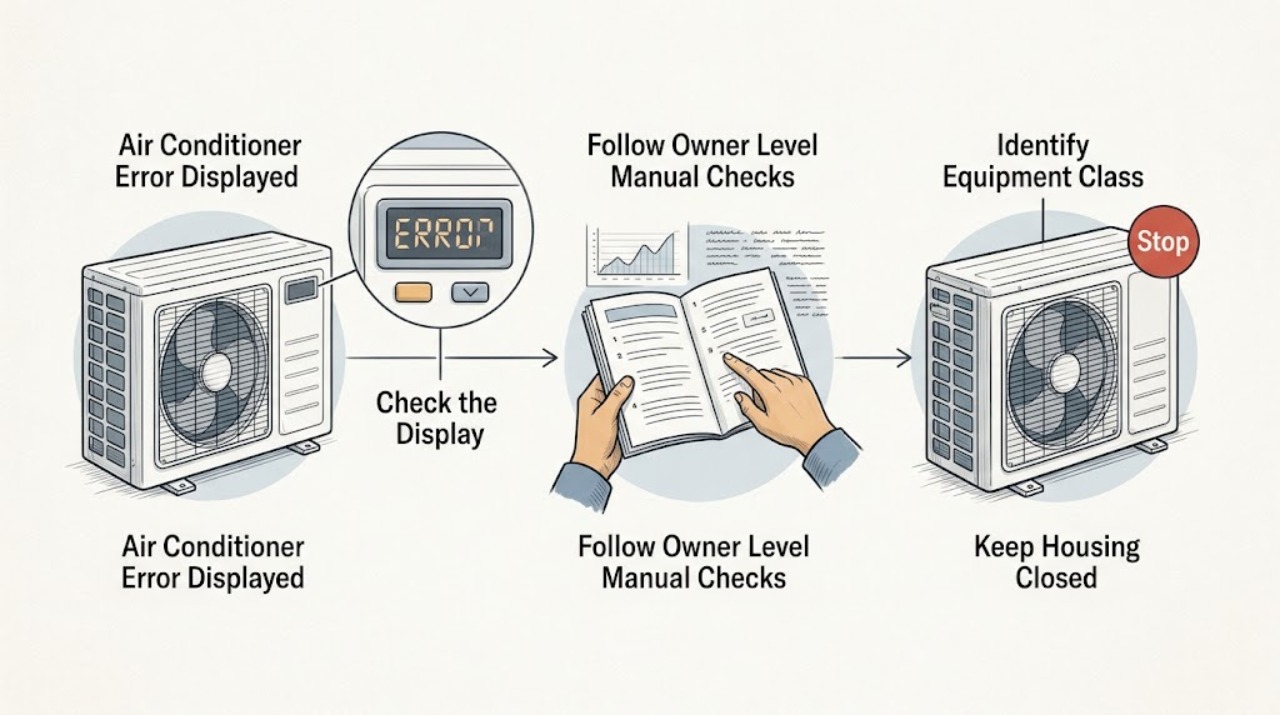
Work through in order
Diagnostic checks
Use only checks that match the exact appliance or system and its official guide.
-
Check 1
From outside the equipment, identify whether the Amana unit is a portable or room air conditioner, a PTAC or through-the-wall/window-room unit, or a central HVAC system. Note whether the error is on the unit, a remote, thermostat, or separate wall control. Do not pull out a chassis or remove a cover to identify it.
Expected result: The unit type is clear, the display belongs to a separate thermostat or controller, or the equipment category cannot be confirmed.
Next step: Use the matching Amana owner or product resource only after the category is known. If the category is unclear, record the visible brand, installation style, and controller without opening the equipment and request service guidance.
Stop if: Stop if identifying the unit would require moving a heavy chassis, entering an electrical compartment, or disconnecting a hardwired system.
Why this matters
Why: Amana publishes separate documentation routes for HVAC, PTAC, and room or portable air conditioners. The category changes which manual and code table can apply; an unknown category makes a generic code interpretation unreliable.
-
Check 2
Photograph or transcribe the complete display, including letters, numbers, decimal points, flashing segments, and any accompanying indicator. Record the model from the sales paperwork or an exterior identification label that is safely visible; do not open the equipment to find it.
Expected result: The code and model are complete, only part of the code is visible, or the display changes between messages.
Next step: Use the exact model manual or provide the complete record to a qualified Amana service provider. If the code is unreadable or keeps changing, do not substitute a similar-looking code from another model.
Stop if: Stop if the label is behind a panel, inside the chassis, near exposed wiring, or accessible only by removing the unit from a wall sleeve or cabinet.
Why this matters
Why: A partial or changing display cannot safely identify a fault. Amana directs owners to use the model number to locate product manuals and says model-specific service documents may contain the relevant error-code information.
-
Check 3
In the exact Amana manual, look for an owner-labeled response to the recorded code. Perform only clearly external steps the manual assigns to the owner, such as pressing a labeled reset, emptying an accessible water container, restoring a normal control setting, or cleaning an accessible filter. Do not enter a service mode or test a component.
Expected result: The manual gives a specific owner step, no owner step is listed, or the error remains after one documented step.
Next step: Apply one model-approved owner step and observe whether the code clears during normal operation. If there is no owner step or the code returns, switch the unit off as appropriate and arrange qualified diagnosis.
Stop if: Stop for an instruction involving cabinet removal, live voltage, refrigerant, capacitors, wiring, service mode, or a safety control bypass.
Why this matters
Why: An owner-level instruction may clear a documented state, but the absence of a step or a returning code means the cause is not established. Amana says tech sheets can include electrical tests and service-mode information intended for trained repair personnel.
-
Check 4
Without opening the unit, note whether the error coincides with no operation, an electrical protection trip, water at the unit, unusual noise, burning or melting odor, or a unit that simply stops and later resumes. Do not restart repeatedly to reproduce a hazardous symptom.
Expected result: The code appears with a hazard, a repeated breaker or power-cord trip, a leak, a recall-matching unit, or no external hazard is present.
Next step: For a hazard or a recall-matching model, stop use and follow the applicable qualified service or official recall process. For a non-hazardous unresolved code, preserve the display and model record for normal service diagnosis.
Stop if: Stop immediately for smoke, burning or melting plastic, water at electrical parts, arcing, a damaged cord, or repeated protection operation.
Why this matters
Why: A safety symptom changes the response from code interpretation to power isolation and professional help. Amana's recall notice identifies a fire or burn hazard for specified WRAC and TTW models; its HVAC guidance likewise describes licensed inspection for electrical, control, refrigerant, drainage, and airflow causes.
-
Check 5
Prepare a service handoff with the equipment category, exact model and serial information available without opening the unit, full display text, controller involved, operating state, owner-level step attempted, and any protection, leak, noise, or odor observation. Leave the cabinet and wiring untouched.
Expected result: The code cleared and normal operation returned, the code recurred, or the code's meaning remains unknown.
Next step: Use the unit only if it completes normal operation without a safety symptom. Otherwise switch it off, disconnect it only when safe and permitted, and give the record to a licensed HVAC or appliance service provider.
Stop if: Stop if service would require cabinet access, live testing, refrigerant handling, moving a hardwired unit, or bypassing a safety control.
Why this matters
Why: A cleared display narrows the symptom but does not prove a hidden component is healthy. A recurring or unknown code needs model-specific diagnosis; the exact replacement component cannot be selected from a generic display complaint.
Use your observations
Decision map
Find the observation that best matches what you see, then follow the next safe action.
-
PATH 01Safety boundary
What you see
The unit is labeled Amana but it is not clear whether the display belongs to a portable or room unit, PTAC/TTW/WRAC, or central HVAC controller.
Do this next
Record the installation style, controller, visible model information, and complete display without opening equipment, then obtain the matching manual or qualified service guidance.
Why this path and its safety boundary
Why it matters: A code chart from another Amana product family may be wrong; the product category determines the manual, controller, and service route.
Safety stop: Do not remove panels, slide out a chassis, or disconnect a hardwired system to identify the category.
-
PATH 02Safety boundary
What you see
The exact Amana manual clearly assigns an external step to the owner and the unit has no smoke, burning, leak, arcing, or repeated protection symptom.
Do this next
Perform the single manual-directed step once, observe normal operation, and record whether the full code clears. If it returns, arrange model-specific service.
Why this path and its safety boundary
Why it matters: A documented control, water-container, or filter step may clear a known operating state, but success does not establish an internal repair.
Safety stop: Do not use a service-mode procedure, electrical test, refrigerant step, or safety-control bypass as an owner check.
-
PATH 03Safety boundary
What you see
The display is complete and the model is known, but the code remains or returns after the matching owner-level instruction, with no immediate hazard.
Do this next
Switch the unit off as the manual permits, preserve the code and model record, and contact a qualified Amana service provider. Do not order a part from the code alone.
Why this path and its safety boundary
Why it matters: A persistent code requires model-specific diagnosis; Amana's public guidance does not justify naming a failed board, sensor, compressor, fan, or other part from the display alone.
Safety stop: Do not open the unit or use a technician-only tech sheet for live testing or service-mode entry.
-
PATH 04Safety boundary
What you see
The error appears with smoke, burning or melting plastic, water at electrical parts, arcing, repeated protection operation, or a WRAC/TTW model covered by Amana's current recall notice.
Do this next
Stop use, disconnect only if safe and permitted, and follow the official recall remedy or qualified service process. Do not attempt an internal repair or repeated restart.
Why this path and its safety boundary
Why it matters: The issue has a safety or recall dimension, so ordinary code interpretation is no longer the next step. Specified recalled units carry a fire or burn hazard according to Amana's notice.
Safety stop: Remain clear of smoke, heat, arcing, melted parts, exposed conductors, or water near electrical connections and obtain urgent qualified help.
Helpful context
Understand the symptom
An Amana error display is model-specific
The same words, letter, or number can belong to different Amana product families. A portable or room unit may show a water or control condition; a PTAC or through-the-wall unit has a different service path; a central split system may report a thermostat, control, protection, or communicating-system condition. Establish the equipment type and preserve the complete display before trying to clear it.
Use the model manual, not a generic code chart
Amana's owner site asks for the model number to locate manuals and points heating and cooling owners to its HVAC resources. Amana also explains that tech sheets may contain error codes and electrical tests, but reserves that service data for trained repair personnel. An owner can use the model manual for clearly labeled external controls; the presence of a code is not permission to enter service mode or test a component.
When an error requires immediate professional help
Stop and arrange qualified service for smoke, burning or melting plastic, water near electrical parts, repeated breaker or cord protection trips, refrigerant or electrical work, or a code that returns after the model-documented owner step. If a window-room or through-the-wall unit matches the models in Amana's current recall notice, stop using it and follow the official recall process instead of troubleshooting the internal fault.
Safety boundary
Stop conditions
- Do not open the cabinet, remove an access panel, probe wiring, enter service mode, or perform live electrical tests.
- Do not handle refrigerant, capacitors, compressors, control boards, or safety switches as an owner repair.
- Do not repeatedly reset a unit after a breaker or power-cord protector trips, or after smoke, burning, arcing, melting, or water at electrical parts.
- Do not move a hardwired, PTAC, through-the-wall, or central HVAC unit solely to read a hidden label.
- Do not order a sensor, board, fan, compressor, drain component, or other part until the exact model and failed component are confirmed.
When checks do not resolve it
Need a professional?
Call a qualified Amana service provider or licensed HVAC professional when the complete display code remains or returns after the exact model's owner step, the model or product family cannot be confirmed safely, the unit will not operate, a breaker or power-cord protector trips again, or diagnosis would require opening the cabinet, testing wiring, handling refrigerant, entering service mode, or bypassing a safety control. Stop use immediately for smoke, burning or melting plastic, arcing, water at electrical parts, a damaged cord, or a unit matching the recalled Amana TTW/WRAC models.
Safety scope: This article covers product-family identification, external display and label recording, matching-manual lookup, and one clearly documented owner-level step. It does not authorize cabinet removal, live electrical testing, service-mode entry, refrigerant handling, hardwired work, or safety-control bypass.
Common questions
FAQ
What does an error code on an Amana air conditioner mean?
It depends on the product family and exact model. Identify whether the unit is portable or room type, PTAC/TTW/WRAC, or central HVAC, then record the complete code and use the matching Amana manual. Do not apply a code chart from another model.
Can I use an Amana tech sheet to test the error?
Amana says tech sheets may include error codes, wiring diagrams, component tests, and service-mode information, but also says they are intended for people with electrical, electronic, and mechanical repair experience. For an owner, use only clearly labeled manual steps and leave electrical or internal diagnosis to qualified personnel.
How do I find the correct Amana manual for an air-conditioner error?
Record the model from paperwork or a safely visible exterior label and use Amana's manual resources for that model. Amana's owner site routes HVAC systems to its HVAC resources and PTAC systems to its PTAC resources, so the installation type matters.
When is an Amana air-conditioner error an emergency?
Stop using the unit for smoke, burning or melting plastic, arcing, water at electrical parts, a damaged cord, or repeated protection trips. Also check the official Amana recall notice if the unit is a TTW or WRAC model; recalled products should stop being used and follow the stated remedy.
Read the exact guide
Official sources
- Where Can I Find the Tech Sheet for My Appliance?Product Help | Amana · Official Amana Product Help article; availability and content of a tech sheet vary by exact model and appliance type.
- Manuals and Guides | AmanaAmana · Official Amana owner resource; the exact manual and support route depend on model, product family, and market.
- Amana TTW & WRAC RecallAmana PTAC / Daikin Comfort Technologies · Official recall notice for specified Amana TTW and WRAC air conditioners and heat pumps; it is not a generic error-code chart.
- The Air Conditioning Repair Service CallAmana brand · Official Amana HVAC learning-center page for air-conditioning systems; room, portable, PTAC, and model-specific procedures can differ.
Community feedback
Share a repair observation
Share a plain-text repair observation. Accepted observations are published automatically; this page may take a moment to update.