
On this page
Start here
Quick answer
If an Amana dryer cycle is not completing, first decide whether it is ending early with damp clothes, stopping mid-cycle, or taking so long that it appears stuck. Amana says automatic cycles sense humidity and turn off when the selected dryness is reached, so a small load, poor sensor contact, a low-heat setting, or a restricted vent can make the result look wrong. Check the selected cycle and load, clean and dry the lint screen, inspect the visible exhaust path, and confirm the door closes and latches. If the dryer stops with no heat, an error code, unusual noise, a burning odor, repeated breaker trips, a damaged cord, or persistent damp loads after airflow checks, stop troubleshooting and arrange qualified appliance or electrical service.
Before you begin
Safety first
- The reader-level scope is cycle and load observation, lint-screen care, safe external exhaust observation, normal door-latch checking, and manual lookup. Cabinet access, live electrical diagnosis, heater or motor work, gas components, concealed ductwork, and control or sensor replacement require qualified professionals.
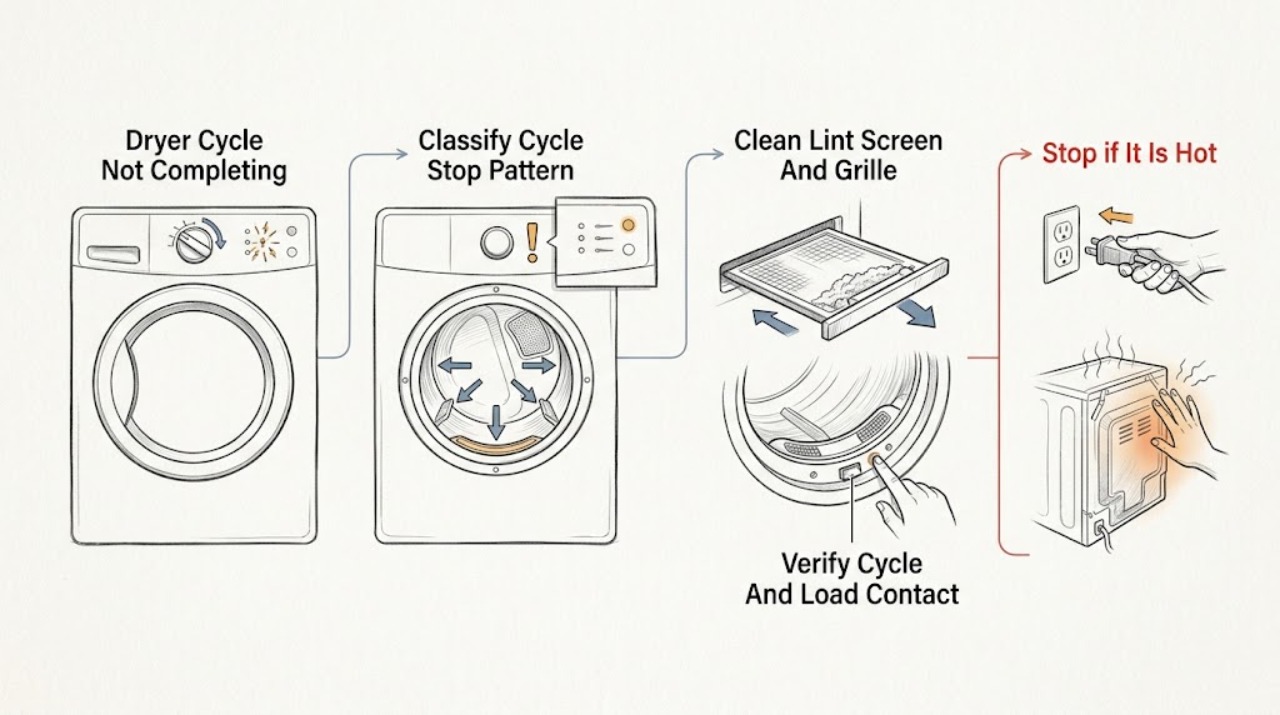
Work through in order
Diagnostic checks
Use only checks that match the exact appliance or system and its official guide.
-
Check 1
Note exactly when the Amana dryer stops: shortly after starting, before the clothes are dry, during a timed cycle, after a full heated cycle, or only after the door is opened and closed.
Expected result: Record an early stop with damp clothes, a mid-cycle stop with the drum no longer running, a normal end with damp clothes, or a cycle that runs unusually long.
Next step: Use the matching branch below and write down the selected cycle, load type, whether the drum was warm, and any display message before changing settings.
Stop if: Stop using the dryer for smoke, burning odor, sparks, shock, repeated trips, or a cord or plug that is hot, damaged, or discolored.
Why this matters
Why: An early stop on an automatic cycle points toward dryness sensing, load contact, or cycle selection. A true mid-cycle stop points toward door, power, motor, heat, or control concerns. A long cycle with warm damp clothes points toward airflow or load conditions.
-
Check 2
Check the selected cycle and option against the load, then remove excess items so similar fabrics can tumble freely; on a sensor cycle, check from the door opening that the load can contact the visible sensor area as the drum turns.
Expected result: Record Air Dry or Fluff, a timed cycle used for a large or heavy load, a very small load, a tightly packed or mixed load, or a load that tumbles normally on an appropriate automatic cycle.
Next step: Run one appropriate cycle with a balanced, freely tumbling load and compare the result; do not keep changing dryness settings to compensate for a restricted vent or missing heat.
Stop if: Do not overload the drum, bypass the door switch, force the door, or dismantle the drum or sensor assembly.
Why this matters
Why: Air-only cycles do not add heat. An unsuitable cycle, a small load, or poor tumbling can make the automatic endpoint inaccurate or extend the result. A normal load and correct cycle make a vent, heat, sensor, or control issue more likely if clothes remain damp.
-
Check 3
Remove the lint screen, clear lint, inspect it for a coating that prevents airflow, and check the accessible lint-screen housing and air-outlet grille for buildup or a fabric-softener sheet; reinstall the screen fully.
Expected result: Record a clean, dry screen with open mesh, heavy lint, a residue film, a blocked housing or grille, or lint that returns immediately.
Next step: For residue, wash the screen as directed in the model guidance, dry it completely, reinstall it, and run one normal load. If airflow or drying does not improve, continue to the vent check and service boundary.
Stop if: Do not run the dryer with the lint screen removed, use a wet screen, scrape internal components, or reach behind the cabinet.
Why this matters
Why: A blocked screen or grille can reduce airflow and lengthen drying, leaving the cycle apparently incomplete. A clean screen with persistent poor drying shifts attention to the exhaust path, heat, sensors, or service diagnosis.
-
Check 4
With the dryer otherwise safe to operate, run it briefly as directed by the Amana guidance and observe the outside exhaust hood from a safe position; before any hose inspection, turn the dryer off and disconnect power as the guidance directs.
Expected result: Record a strong, steady outside airflow and opening hood flap, weak airflow, no airflow, a crushed or kinked visible hose, or lint, debris, or a nest at the hood.
Next step: Clear only accessible lint or debris at the outside hood when the dryer is off and safe; arrange professional vent cleaning or appliance service for a hidden, long, crushed, damaged, or repeatedly restricted vent path.
Stop if: Do not enter a roof, wall, crawlspace, or confined area, remove hidden ductwork, operate with a disconnected vent in an unsafe location, or continue if heat or lint accumulates indoors.
Why this matters
Why: Weak or absent exhaust flow supports a restricted vent path, which can leave clothes warm and damp and extend the cycle. A clear outside flow does not rule out a sensor, heater, motor, or control fault if the cycle still stops or runs abnormally.
-
Check 5
With a small empty load only if there are no hazard signs, verify that the door closes and latches, select a heated cycle, and observe whether the drum starts and produces warmth; inspect only the visible cord and plug, and follow the model manual for any reset or error message.
Expected result: Record a secure latch and normal heat, a drum that stops when the door is disturbed, no heat, an error code, a tripped breaker, an unusual noise, or a damaged or hot power connection.
Next step: Record the model, cycle, error message, and observed heat, then arrange qualified appliance service; use a qualified electrician for a persistent household power fault rather than opening the dryer.
Stop if: Do not open the cabinet, test live terminals, bypass the door switch, reset protection repeatedly, or work on gas supply components.
Why this matters
Why: No heat, a door or start interruption, a persistent error, unusual noise, or a power fault can prevent a cycle from completing and cannot be diagnosed safely by changing dryness settings. A normal latch, heat, and power path with persistent failure points toward sensors, motor, controls, or a deeper vent issue.
Use your observations
Decision map
Find the observation that best matches what you see, then follow the next safe action.
-
PATH 01Safety boundary
What you see
The dryer ends an automatic cycle early and the clothes are still damp, without an error code or hazard sign.
Do this next
Use an appropriate automatic cycle with a balanced load that tumbles freely, confirm the dryer is level from the outside, and clean the lint screen; arrange service if every load still ends early and damp.
Why this path and its safety boundary
Why it matters: The dryness sensor may have reached its threshold because the load is too small, not contacting the sensors, unevenly mixed, or using an unsuitable cycle; airflow and heat can also affect the result.
Safety stop: Do not bypass sensor strips or dismantle the control or drum to force a longer cycle.
-
PATH 02Safety boundary
What you see
The cycle runs to its endpoint or longer, the clothes are warm but damp, and the dryer otherwise continues tumbling.
Do this next
Clean the lint screen and observe the outside exhaust flow; arrange professional vent cleaning or appliance service if the flow remains weak or the condition recurs.
Why this path and its safety boundary
Why it matters: Restricted exhaust airflow, a blocked lint path, an unsuitable load, or low heat is more likely than a simple early-stop setting.
Safety stop: Do not continue running repeated long cycles when the laundry area becomes unusually hot or humid or lint is escaping around the housing.
-
PATH 03Safety boundary
What you see
The drum stops before the selected cycle ends and does not resume normally, especially if the door was not opened.
Do this next
Check only that the door closes and latches and that the visible power connection is intact; arrange appliance service for recurrence, no heat, an error, or unusual noise.
Why this path and its safety boundary
Why it matters: A door switch, power supply, motor, heat, or control fault is possible; changing the dryness level does not address a true interruption.
Safety stop: Do not bypass the door switch, open the cabinet, reset protection repeatedly, or test internal wiring.
-
PATH 04Safety boundary
What you see
The dryer tumbles but produces no heat, displays an error, or stops with a warning or unusual noise.
Do this next
Stop repeated testing, record the exact message and cycle, and arrange qualified appliance service; use a qualified electrician for a persistent supply or breaker issue.
Why this path and its safety boundary
Why it matters: A heat, sensor, control, airflow, or power fault needs model-specific diagnosis and can create unsafe operating conditions if repeatedly restarted.
Safety stop: Do not access heating elements, gas components, live terminals, or internal controls.
-
PATH 05Safety boundary
What you see
The dryer has a burning odor, smoke, sparks, shock, hot or damaged cord or plug, repeated trips, weak or absent exhaust, or lint and heat accumulating indoors.
Do this next
Stop using the dryer, disconnect power only if it can be done without touching a hazard, keep the area clear, and obtain qualified appliance, vent, or electrical service as appropriate.
Why this path and its safety boundary
Why it matters: This is a safety or installation concern, not a normal cycle-setting problem.
Safety stop: Do not run another cycle, reset protection repeatedly, move a heavy dryer to expose wiring, or attempt live repairs.
Helpful context
Understand the symptom
An automatic cycle can end before the clothes feel dry
“Not completing” can mean the dryer stops early, stops unexpectedly in the middle, or keeps running through a long cycle. On Amana automatic cycles, the control uses drum humidity to decide when to stop. If the load is very small, the sensor strips do not contact the items, the selected cycle is Air Dry or another low-heat setting, or the clothes are mixed in a way that dries unevenly, the endpoint may not match your expectation.
Use the remaining moisture and airflow as the decision clues
Damp clothes after an early stop point toward the cycle, load, sensor contact, heat, or airflow. Warm but damp clothes after a full cycle point more strongly toward restricted ventilation or a load that cannot tumble freely. Amana recommends cleaning the lint screen, checking the outside exhaust flow, and arranging service when poor performance persists or the dryer does not heat.
Do not turn a drying complaint into a live electrical or gas repair
Keep checks to the controls, lint screen, accessible vent path, door closure, and other external observations. Do not remove the cabinet, bypass the door switch, test live terminals, or work on gas components. If the dryer smells hot, sparks, trips protection, or has a damaged power connection, stop using it and obtain qualified help.
Safety boundary
Stop conditions
- Stop using the dryer for smoke, burning odor, sparks, shock, a hot or damaged cord or plug, repeated breaker trips, or unusual mechanical noise.
- Do not bypass the door switch, open the cabinet, test live terminals, or work on heating, gas, motor, or control components.
- Do not run repeated long cycles when the laundry area becomes hot or humid, lint escapes, or outside exhaust airflow is weak or absent.
- Keep the lint screen installed, dry, and clean; do not operate the dryer with the screen removed or with a blocked accessible grille.
- Arrange qualified appliance or vent service for a cycle that repeatedly stops mid-cycle, ends early with damp clothes, does not heat, displays an error, or remains abnormal after the external checks.
When checks do not resolve it
Need a professional?
Arrange urgent qualified appliance or electrical help for smoke, burning odor, sparks, shock, hot or damaged power connections, repeated trips, or unsafe gas or electrical conditions. Arrange prompt appliance service for a true mid-cycle stop, no heat, an error code, unusual noise, or automatic cycles that repeatedly end early with damp clothes. Arrange professional vent service for weak or absent outside exhaust, a hidden or damaged duct, or recurring warm-damp loads. A single early stop on a small or unsuitable load may be addressed by correcting the cycle, load, and lint-screen condition first.
Safety scope: The reader-level scope is cycle and load observation, lint-screen care, safe external exhaust observation, normal door-latch checking, and manual lookup. Cabinet access, live electrical diagnosis, heater or motor work, gas components, concealed ductwork, and control or sensor replacement require qualified professionals.
Common questions
FAQ
Why does my Amana dryer stop before the cycle is complete?
An automatic cycle may stop when its humidity sensor reaches the selected dryness, even if the load feels damp because it is too small, not contacting the sensors, unevenly mixed, or affected by restricted airflow. A true mid-cycle stop, no heat, error, or unusual noise is a different service path.
What should I check when an Amana dryer ends early with wet clothes?
Check the cycle and load, use a balanced load that tumbles freely, confirm the dryer is level from the outside, clean and dry the lint screen, and inspect outside exhaust airflow. If every suitable load still ends early and damp, arrange service rather than bypassing the sensors.
Can a blocked vent make a dryer cycle seem incomplete?
Yes. Amana says restricted exhaust airflow extends drying time and can leave loads warm but damp. Clean the lint screen and observe the outside hood from a safe position; weak or absent airflow or a hidden or damaged duct needs professional vent or appliance service.
Is it normal for an Amana dryer to stop on Air Dry or Fluff?
Air Dry or Fluff does not add heat, so it will not behave like a heated cycle. Check the selected cycle and the load's care requirements. If the dryer stops unexpectedly on a heated cycle, or the clothes remain damp despite correct selection and airflow, arrange service.
When should I call for Amana dryer service?
Arrange service for repeated mid-cycle stops, no heat, an error code, unusual noise, recurring damp loads after lint and airflow checks, or a damaged or hot power connection. Stop immediately for smoke, sparks, burning odor, shock, repeated trips, or unsafe heat and lint buildup.
Read the exact guide
Official sources
- Dryer is not Drying or Experiencing Long Dry Times - Product HelpAmana · Amana guidance used for external checks that can explain damp loads or a cycle that appears not to complete; model installation instructions control exact vent limits.
- Electric or Gas Dryer Use and Care GuideAmana · An opened Amana use-and-care guide used as a model-specific example for safe external checks; the reader's exact manual controls the appliance.
- Not Drying - Product HelpAmana · Amana drying-performance guidance used for symptom observation and low-risk cleaning or airflow checks; it does not authorize internal repair.
- Dryer Stops Mid-Cycle - Product HelpAmana · Amana product-help guidance used to distinguish an automatic cycle ending at a sensed dryness level from a true interruption; exact controls vary by model.
Community feedback
Share a repair observation
Share a plain-text repair observation. Accepted observations are published automatically; this page may take a moment to update.