
On this page
Start here
Quick answer
If an ASKO dryer cycle is not completing, first decide whether it ends early with damp clothes, runs much longer than expected, or remains running after the load is dry. Some ASKO programs intentionally stop before fabric is completely dry, while Sensi Dry programs adjust time and stop when the machine detects that clothes are dry. For a genuine early stop or a long cycle, check the selected program against the model manual, clean the accessible lint filter, and follow the model instructions for any condenser or heat-pump filter. If the dryer stops repeatedly with damp clothes, shows an error, overheats, smells electrical, makes an unusual noise, or will not finish after these safe checks, stop using it and arrange qualified appliance service.
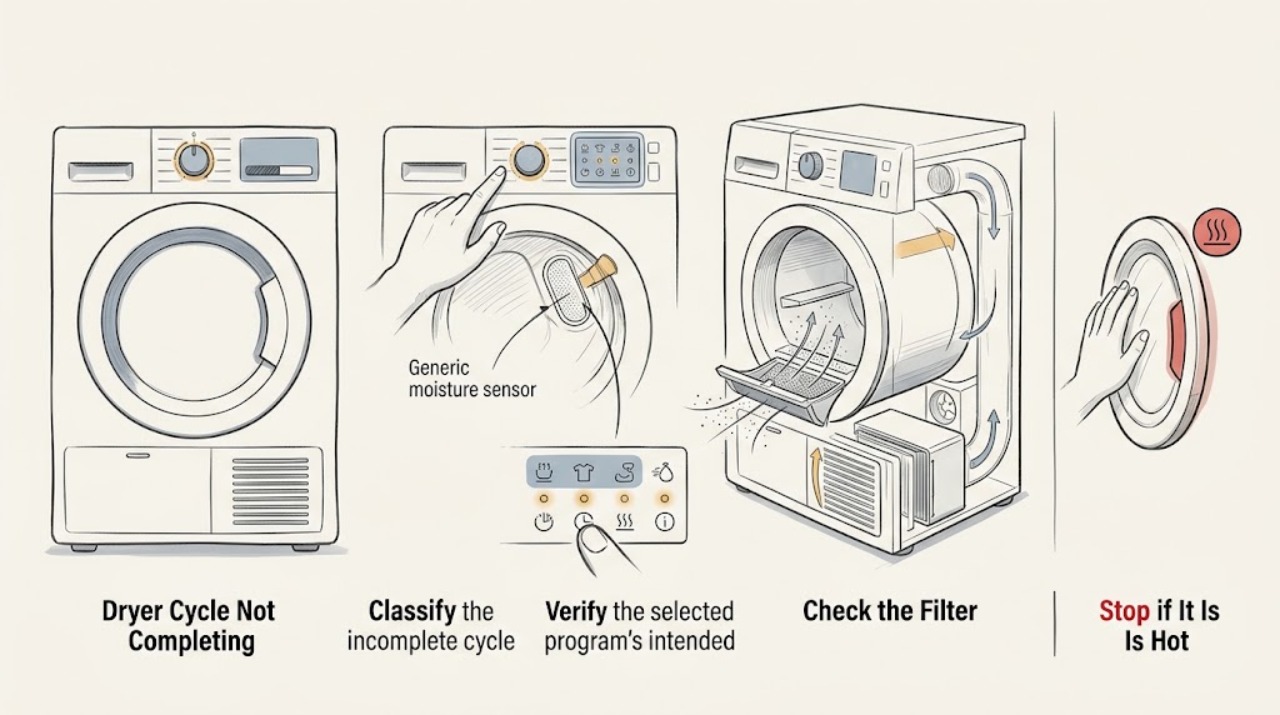
Work through in order
Diagnostic checks
Use only checks that match the exact appliance or system and its official guide.
-
Classify the incomplete cycle
After the dryer has stopped or is safely idle, note whether the load is dry, partly damp, or wet; whether the drum stopped early or keeps running; whether the display shows an end state or an error; and whether the issue occurs on every program or only one.
Expected result: The load is dry but the user expected more time, the load is damp after an early stop, the timer remains extended, or the dryer stops with a code or blank display.
Next step: Record the program name and display state, then compare that program with the exact ASKO manual. Stop using the dryer for a code, overheating, electrical odor, or abnormal noise.
Stop if: Stop immediately for smoke, burning or electrical odor, sparking, a hot cord or control area, exposed damage, or a drum that behaves dangerously.
Why this matters
Why: A dry load can indicate normal sensor completion or a program designed for a partly dry result. Damp clothes, repeated early stops, an unexplained extended cycle, or an error require the corresponding checks below rather than a generic reset.
-
Verify the selected program's intended finish
Read the selected program in the model manual or the program chart and compare its intended finish with the clothes. Pay particular attention to delicate, shirt, refresh, timed, and automatic programs; do not switch repeatedly while the dryer is running.
Expected result: The selected program intentionally stops before fully dry, is intended to leave garments almost dry, is a sensor-controlled program, or should complete to a different finish according to the manual.
Next step: If the result matches the documented program, use the program's intended finish or select a suitable program next time. If the result does not match the manual, continue with filter and load checks.
Stop if: Do not override a safety or error message, add heat to a program that is not designed for it, or alter service settings to extend the cycle.
Why this matters
Why: ASKO describes Silk & Wool as stopping before fabric is completely dry and Shirts as running until garments are almost dry. Sensi Dry adjusts the running time and stops when clothes are dry, so the program name changes what a normal finish means.
-
Clean and reseat the door lint filter
Turn the dryer off and wait for the drum and accessible surfaces to be safe. Remove the door lint filter as the model instructions show, clear lint from all sides, and reinstall it fully; do not use the dryer with the filter missing.
Expected result: The filter is packed with lint, damp or coated with residue, damaged, incorrectly seated, or clean and correctly installed.
Next step: Run one appropriate test load only after the filter is clean and correctly installed. If the cycle still stops early, remains excessively long, or the filter cannot seat, stop and request service.
Stop if: Do not reach into a moving drum, operate with a missing or broken filter, scrape internal parts, or continue if lint is accompanied by overheating or smoke.
Why this matters
Why: ASKO says lint can lead to longer drying times and its cleaning guide says a clean lint filter supports shorter dry time and a cooler room. A damaged or loose filter can change airflow and needs model-specific attention.
-
Check the load against the program
With the dryer stopped, compare the load type and amount with the program's model instructions. Untangle or redistribute items only while the drum is stationary, and do not use a timed or delicate program as proof that an automatic program's sensor is faulty.
Expected result: The load is a small mixed group, a single bulky item, a delicate fabric, a tightly bundled group, or a load that matches the selected program's normal use.
Next step: Use the exact program and loading guidance for the fabric, then compare one normal load. If different suitable loads fail in the same way, record that pattern for service.
Stop if: Do not overload, force the door, run damaged garments that shed unusual material, or keep testing if the dryer overheats or stops abruptly.
Why this matters
Why: ASKO's program descriptions show that different fabrics and load types have different intended results, and its drying system is designed to distribute garments and adjust time. A result that changes with the load points toward program or load suitability rather than proving a failed component.
-
Inspect model-approved condenser or heat-pump filters
If the dryer is a condenser or heat-pump model, use the exact ASKO manual to identify any user-accessible front filter or condenser maintenance. Only when the manual permits it and the dryer is off and cool, inspect and clean that item as directed; do not remove a panel merely because the cycle is long.
Expected result: The model has no such filter, the manual identifies a blocked or dirty user-serviceable filter, the filter is clean, or access would require cabinet removal or an undocumented procedure.
Next step: Complete only the maintenance named in the model manual, reinstall every filter, and test once. If the cycle remains abnormal or the required filter is inaccessible, arrange qualified service.
Stop if: Do not open the cabinet, disconnect wiring, use live tests, force a condenser, or wash a component unless the model instructions explicitly allow it.
Why this matters
Why: ASKO documents different dryer types and says its multi-filter system protects airflow; the cleaning guide gives separate condenser care for applicable models. Because construction varies, an undocumented access step is a professional boundary.
-
Record the display and recurrence before service
Record the model number, dryer type, program, load description, filter condition, whether the drum stops or runs on, approximate point of interruption, displayed code, and any odor, heat, or unusual sound. Take a photo of the display only when the appliance is safe.
Expected result: The same code or interruption repeats, the issue follows one program, all suitable loads fail, or the dryer has abnormal heat, noise, or smell.
Next step: Give the record and model-specific manual information to qualified ASKO appliance service. Leave the dryer unused if the fault repeats or any hazard symptom is present.
Stop if: Do not bypass a door or safety switch, remove covers, replace a component based only on the symptom, or continue a cycle with smoke, sparking, or excessive heat.
Why this matters
Why: A repeatable pattern helps service distinguish program behavior from an appliance fault, but the symptom alone does not identify a failed sensor, motor, heater, control, or filter assembly.
Use your observations
Decision map
Find the observation that best matches what you see, then follow the next safe action.
-
PATH 01Safety boundary
What you see
The cycle ends with dry clothes and the selected program is documented to stop when dry or to leave delicate items partly dry.
Do this next
Treat the result as likely program behavior, confirm the model's program description, and choose a different documented finish only if the fabric permits it.
Why this path and its safety boundary
Safety stop: If clothes are unexpectedly damp, the program stops at the same point across suitable loads, or an error appears, continue troubleshooting and consider service.
-
PATH 02Safety boundary
What you see
The load is damp after an early stop, but there is no code, abnormal heat, or electrical symptom.
Do this next
Verify the program and load, clean and reseat the door lint filter, and complete only any model-approved filter care before one controlled test.
Why this path and its safety boundary
Safety stop: Stop if the early stop repeats after those checks or if the filter is damaged or cannot seat correctly.
-
PATH 03Safety boundary
What you see
The cycle takes much longer than expected or appears not to reach its end state.
Do this next
Check the selected program, load suitability, door lint filter, and model-approved condenser or heat-pump filter maintenance; record whether time changes with a normal load.
Why this path and its safety boundary
Safety stop: Do not remove cabinet panels or continue testing if the dryer overheats, smells electrical, makes unusual noise, or repeatedly runs without a normal end state.
-
PATH 04Safety boundary
What you see
The same cycle interruption or code repeats after the documented program and safe filter checks.
Do this next
Stop using the dryer and arrange qualified ASKO appliance service with the recorded code, program, load, and filter observations.
Why this path and its safety boundary
Safety stop: Do not clear a recurring fault by repeatedly restarting, bypass a safety switch, or replace a sensor or control without model-specific diagnosis.
-
PATH 05Safety boundary
What you see
The dryer shows smoke, sparking, an electrical odor, excessive heat, a damaged cord, or a dangerous mechanical sound.
Do this next
Stop the cycle, keep people away, and obtain qualified appliance or electrical help appropriate to the hazard. Use only a safely accessible normal disconnect if needed and if it can be done without contact with damage.
Why this path and its safety boundary
Safety stop: Do not touch damaged wiring, open the cabinet, reach into a moving drum, or resume operation to collect more evidence.
-
PATH 06Safety boundary
What you see
The required inspection would involve an undocumented panel, live electrical measurement, internal filter housing, or a component replacement.
Do this next
Stop the user-level diagnosis and provide the model and symptom record to qualified service.
Why this path and its safety boundary
Safety stop: Do not continue beyond the maintenance steps explicitly allowed by the exact ASKO manual.
Helpful context
Understand the symptom
Define what not completing means
A cycle that ends with dry clothes may be behaving normally, while a cycle that ends with damp clothes is a different fault path. A time display that seems long can also be normal for a moisture-sensing program or a load that still needs drying. Record whether the drum stops, the display shows an end state, the clothes are damp, and any warning appears before changing settings.
Program choice matters
ASKO lists programs with different intended results. Its Silk & Wool program is described as stopping before the fabric is completely dry, and Shirts is intended to leave garments almost dry to reduce wrinkling. Compare the result with the exact program description for your model before treating that behavior as a failure.
Clean only the user-accessible parts described for the model
ASKO's cleaning guidance says the door lint filter should be emptied after every load and cleaned more thoroughly on its stated schedule. Condenser and heat-pump layouts differ, so use the exact manual before removing a front filter or condenser. Do not open the cabinet or perform live electrical checks to make a cycle finish.
When checks do not resolve it
Need a professional?
Arrange qualified ASKO appliance service when a suitable program repeatedly stops with damp clothes, a cycle remains abnormally long or never reaches its end state, an error repeats, the lint or condenser filter is damaged or cannot be serviced as instructed, or the problem persists after safe documented maintenance. Stop immediately and seek appropriate local emergency, electrical, or appliance help for smoke, sparking, electrical odor, excessive heat, or dangerous mechanical behavior.
Have this ready
- Provide the model number, dryer type, selected program, load description, whether the load was dry or damp, the point at which the cycle stopped or extended, display or error state, lint and other model-approved filter observations, and any odor, heat, sound, or recent installation or move.
Common questions
FAQ
Why does my ASKO dryer stop before the clothes are completely dry?
Check the selected program first. ASKO describes Silk & Wool as stopping before fabric is completely dry and Shirts as leaving garments almost dry. If a program that should finish normally stops with damp clothes, check the load and clean the accessible lint filter, then arrange service if the result repeats.
Why is my ASKO dryer cycle taking too long?
A sensor program can adjust its time, but ASKO also says lint leads to longer drying times. Verify the program and load, clean and correctly reinstall the door lint filter, and follow the exact model manual for any condenser or heat-pump filter. Persistent long cycles need service.
Should I change the program when the ASKO dryer says the cycle is complete but clothes are damp?
Do not assume the program is faulty. Compare the program's intended finish with the model manual, then check the load and lint filter. A suitable program that repeatedly ends with damp clothes after safe filter care should be diagnosed by qualified service.
Can I remove the condenser to make my ASKO dryer finish a cycle?
Only perform condenser or heat-pump filter maintenance when the exact model manual identifies it as a user step and the dryer is off and cool. Do not remove cabinet panels or force a filter. If access or cleaning is unclear, use qualified service.
When should I stop using an ASKO dryer that will not complete its cycle?
Stop when the interruption repeats, an error returns, the dryer overheats, or you notice smoke, sparking, electrical odor, a hot cord, or dangerous mechanical noise. Do not bypass a safety switch or open the cabinet; provide the model and symptom record to qualified service.
Read the exact guide
Official sources
- Dryer CleaningASKO · Official ASKO USA cleaning guide opened for the dryer section; filter and condenser access depends on the dryer type and model.
- User manualsASKO · Official ASKO manuals portal opened to establish that model-specific manuals are needed for program, filter, and service instructions; no generic model-specific component claim is inferred.
- A new generation of laundryASKO · Official ASKO USA laundry brochure opened for program behavior and dryer-system descriptions; exact programs and features vary by model.
Community feedback
Share a repair observation
Share a plain-text repair observation. Accepted observations are published automatically; this page may take a moment to update.