
On this page
Start here
Quick answer
If a Bosch dryer stops before the load is dry, first note whether it ends early, stops mid-cycle, or completes with damp clothes. Use the intended program and an appropriate load, clean the lint filter, wipe the accessible moisture sensors near the filter with a damp cloth and a little white vinegar, and check the outside vent for obstruction. Also confirm the door closes and the dryer has steady power. If it repeats the stop, shows a heating or electronics fault, will not turn the drum, smells burnt, trips the breaker, or has a damaged door or cord, stop using it and arrange qualified Bosch appliance service rather than opening panels.
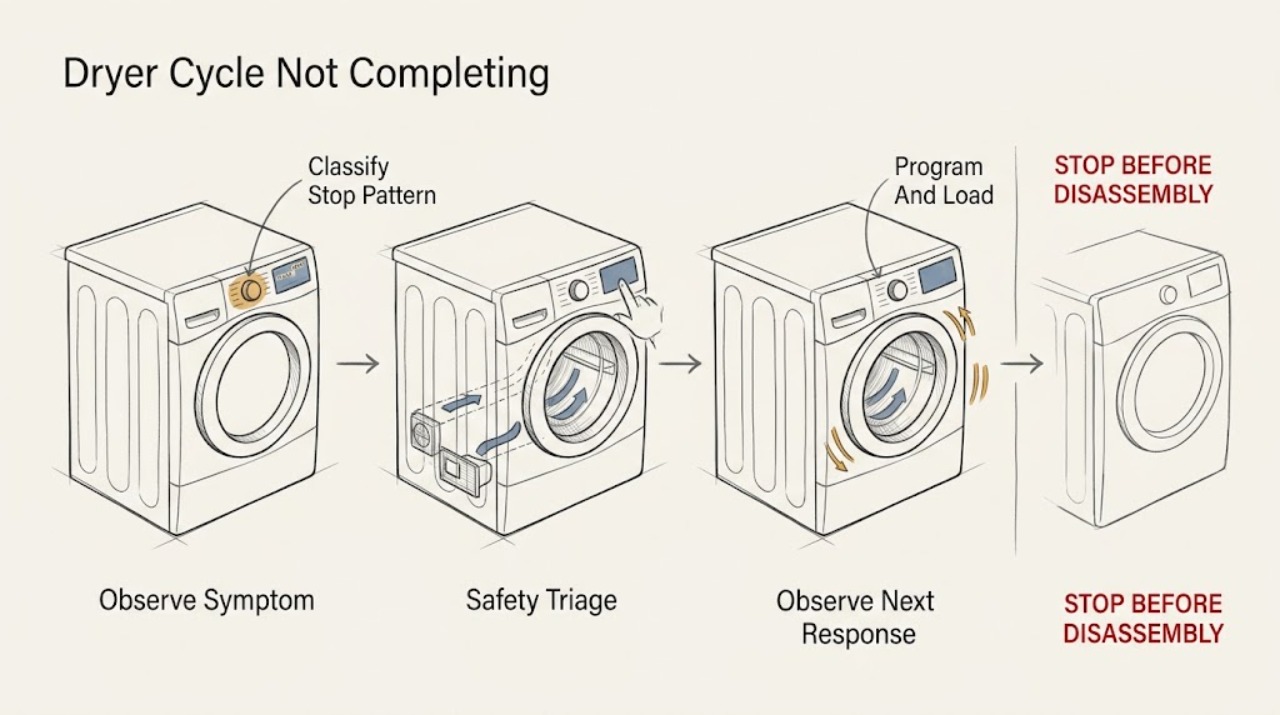
Work through in order
Diagnostic checks
Use only checks that match the exact appliance or system and its official guide.
-
Check 1
Stop the dryer and unplug it only if it is safe to reach the plug without touching damaged wiring when you notice smoke, a burning electrical smell, sparking, a very hot plug, a damaged cord or door, water where it should not be, or repeated breaker trips.
Expected result: The hazard remains after the dryer is stopped, or the cabinet, cord, outlet, door, or drum is visibly damaged.
Next step: Leave the dryer out of service and arrange qualified appliance service. Do not remove panels or test energized circuits.
Why this matters
Why: This is no longer a routine cycle-completion check; continued operation could worsen an electrical, thermal, mechanical, or installation fault.
-
Check 2
Run one careful observation of the symptom without repeatedly restarting it: note whether it ends early with damp clothes, stops mid-cycle, completes but leaves clothes damp, stops when the door is touched, or shows a code or lock indicator.
Expected result: The same pattern repeats, and the drum movement, heat, door status, and display behavior are clear.
Next step: Use the matching branch after the basic checks below, and record any code exactly as displayed for service if it returns.
Why this matters
Why: An early end with damp clothes prioritizes program, load, sensor, and airflow checks; no drum movement prioritizes power, door, and drive service; a code or lock indicator takes precedence over guessing at a part.
-
Check 3
Select the program intended for the fabric and drying result, then use a balanced load rather than a single very small item or an overloaded drum. Check that the load is suitable for the selected cycle and that the clothes are not tightly packed.
Expected result: A correctly sized, balanced load completes more normally or reaches the expected dryness, while the original load ended early or stayed damp.
Next step: If the same correctly loaded program still ends early, clean the lint filter and check the moisture sensors before arranging service.
Why this matters
Why: The original result may have come from the program or from the load giving the moisture-control system too little or inconsistent information; it does not establish a failed component.
-
Check 4
Switch the dryer off, let hot surfaces cool, and clean the lint filter according to the owner's instructions. Remove visible lint without damaging the filter; do not run the dryer with the filter missing.
Expected result: The filter is heavily coated, the filter path is visibly restricted, or the dryer performs better after cleaning.
Next step: Run a normal test load only after the filter is correctly installed. If the filter is already clean or the stop repeats, continue to the moisture-sensor and vent checks.
Why this matters
Why: Lint restriction reduces airflow and can make drying slow or cause the dryer to protect itself from excess heat, so a cycle may stop before the load is dry.
-
Check 5
With the dryer off, find the accessible moisture-sensing surfaces near the lint-filter area described in the Bosch support guidance. Wipe them with a damp cloth and a little white vinegar, then let the area dry; do not scrape, bend, or dismantle the sensor.
Expected result: A film or residue is visible, or the dryer ends early mainly with small or lightly damp loads; after cleaning, a representative load behaves differently.
Next step: If the sensor is clean and the same symptom remains, check airflow and the selected program. If the dryer still ends early, request service for diagnosis.
Why this matters
Why: Residue can make the sensor read the load incorrectly. A changed result supports a sensing-surface issue, but it does not prove that the sensor assembly or control electronics has failed.
-
Check 6
Inspect the user-accessible outside vent outlet and the dryer's visible air-inlet area for lint, blockage, crushed flexible ducting, or a flap that cannot open. Do not disassemble a wall or roof vent or reach into the appliance cabinet.
Expected result: Airflow is weak, the outlet is blocked, the duct is kinked, or the outlet flap does not open during operation; alternatively, the accessible path is clear.
Next step: Correct only an obvious, accessible obstruction and retest once. If the duct is concealed, damaged, or still restricted, have the vent and dryer checked professionally; do not keep restarting a dryer that stops from overheating.
Why this matters
Why: Restricted exhaust or intake airflow can lengthen drying and contribute to heat buildup, whereas a clear accessible path shifts suspicion toward the program, sensor, heating system, or controls.
-
Check 7
Close the door firmly and check the accessible seal and latch area for clothing or debris. Confirm the power cord is fully seated and the breaker or fuse has not opened; if a code or lock symbol appears, record it rather than repeatedly clearing it.
Expected result: The cycle resumes only after the door is repositioned, the display goes blank, the breaker opens again, or a code returns immediately.
Next step: If the door will not latch, power is unstable, or a fault returns, stop using the dryer and arrange qualified service. If the door, power, and display are normal, use the earlier results to choose the correct branch.
Why this matters
Why: A door-latch or switch issue can interrupt a cycle, while unstable power or a returning code points to an electrical, heating, sensor, or control fault that an external check cannot confirm.
Use your observations
Decision map
Find the observation that best matches what you see, then follow the next safe action.
-
PATH 01Next step
What you see
The dryer shows End early and the clothes are still damp, especially with a small or lightly damp load.
Do this next
If one correctly loaded test works after these checks, monitor it. If the same failure repeats with a clean filter, clean sensor, and clear accessible vent, call for service.
Why this path and its safety boundary
Why it matters: Start with the program and load, then clean the lint filter and moisture-sensing surfaces; a clear external vent is the next separation point.
-
PATH 02Next step
What you see
The dryer stops while running and the filter or external exhaust path is visibly restricted.
Do this next
Correct the accessible restriction once and retest only when safe. If the duct is concealed or the stop returns, stop and have the vent and dryer inspected professionally.
Why this path and its safety boundary
Why it matters: Airflow restriction is a plausible contributor to long drying or heat protection, but a repeated stop after an accessible cleaning is not proof that the user should open the appliance.
-
PATH 03Next step
What you see
The cycle stops when the door moves, will not start until the door is pressed, or the latch does not hold.
Do this next
Remove only an accessible obstruction and close the door normally. If the latch, switch, hinge, or seal is damaged or the symptom persists, arrange service.
Why this path and its safety boundary
Why it matters: The door-latch or interlock path may be interrupting the cycle.
-
PATH 04Next step
What you see
The dryer powers on but the drum does not turn, or it stops turning during the cycle.
Do this next
If the outlet, cord, breaker, and door are normal, stop using the dryer and request qualified service for the drive system.
Why this path and its safety boundary
Why it matters: Power and door checks are appropriate first, but drive components and their electrical control are not a safe user-level diagnosis.
-
PATH 05Next step
What you see
A heating, electronics, or other fault code returns, or the dryer repeatedly stops after the external checks.
Do this next
Record the exact code, model information, and failure pattern, then leave the dryer out of service until qualified service evaluates it.
Why this path and its safety boundary
Why it matters: The code or repeatability is evidence for a technician's diagnostic path, not a reason to guess at a replacement part or bypass a safety device.
-
PATH 06Next step
What you see
The timer completes normally but the load remains damp.
Do this next
Repeat the program/load, filter, sensor, and accessible vent checks once. If drying remains poor, request service rather than replacing a part without a diagnosis.
Why this path and its safety boundary
Why it matters: This pattern favors the selected program, load, lint filter, moisture sensing, or exhaust path over a door interruption.
Helpful context
Understand the symptom
What the symptom tells you
A Bosch dryer that displays End with damp clothes is a different lead from one that stops with no drum movement. An early end often points to the program, load, moisture sensing, or restricted airflow. A mid-cycle stop can also involve the door, power, overheating protection, or a stored fault. Keep the checks below external and low risk; the result of each check determines whether you continue or call for service.
Use the failure pattern, not a guessed part
Record the selected program, whether the drum was turning, whether the load was warm or damp, and any displayed code. That short record helps a technician separate a sensing or airflow problem from a door, heating, drive, or control fault. Do not repeatedly restart a dryer that smells burnt, overheats, damages clothing, or trips a breaker.
Only after diagnosis
Potential parts
- moisture sensor or sensor harness
Consider this only if the correct program and load, clean filter, clean sensing surfaces, and accessible airflow have been verified and a technician diagnoses inaccurate sensing or a failed sensor circuit.
Confirm the complete dryer model and the manufacturer's fit information before ordering; Bosch dryer sensor parts are not interchangeable by appearance alone. - door latch or door switch
Relevant only when the door does not latch or a technician confirms that the door-interlock circuit is opening during a cycle.
Verify the exact model and approved replacement specification with Bosch or the service provider before ordering. - heating or airflow safety component
Do not choose a heater, thermostat, thermal safety, or related part from the symptom alone; consider it only after a qualified diagnosis of a returning heating fault with the airflow path addressed.
Internal heating and safety components require exact model fitment and professional installation; do not bypass or substitute a safety device. - drive or electronic control component
Relevant only if the drum does not turn or a qualified technician identifies a drive or control fault after power and door checks.
Confirm model-specific compatibility and diagnostic findings before any part is ordered or installed.
When checks do not resolve it
What to give the technician
Provide the full Bosch model information, the selected program, load type and size, whether the drum was turning and warm, the point at which the cycle stopped, and any displayed code. Mention whether the lint filter, moisture-sensing surfaces, and accessible vent were checked. This helps service distinguish airflow or sensing behavior from door, heating, drive, or control faults.
Common questions
FAQ
Why does my Bosch dryer stop before the clothes are dry?
A wrong program or load, lint restriction, moisture-sensor residue, restricted exhaust, door interruption, power issue, or a technical fault can produce this pattern. Start with the program/load, filter, sensor, vent, door, and display checks; repeated stops need service.
Can a small load make a Bosch dryer end early?
It can make moisture-based decisions less reliable, so compare the behavior with a representative balanced load on the appropriate program. If the dryer still ends early after the filter and sensing surfaces are clean, arrange diagnosis rather than assuming the sensor needs replacement.
How should I check the moisture sensor?
With the dryer off, wipe the accessible sensing surfaces near the lint-filter area with a damp cloth and a little white vinegar, as Bosch describes. Do not scrape the surfaces or open the cabinet; persistent symptoms require service.
What if the Bosch dryer stops mid-cycle and the drum is not turning?
Check that the dryer has power and the door closes normally. If those checks are normal and the drum still does not turn, leave the dryer off and have the drive system professionally diagnosed.
Should I keep restarting a Bosch dryer that stops?
No. Do not keep restarting it when there is a burning smell, smoke, sparking, a hot cord, repeated breaker trips, a returning fault, or signs of overheating. Stop using it and arrange qualified service.
Read the exact guide
Official sources
- Dryer troubleshooting: Dryer is not drying clothes completelyBosch Home Appliances · Bosch dryers that stop or finish before clothes are completely dry
- Dryer Troubleshooting: Dryer is not getting warm or heating up at allBosch Home Appliances · Bosch dryer completes or stops without expected heat
- Dryer Troubleshooting: Dryer drum is not spinningBosch Home Appliances · Bosch dryer stops with a drum that does not rotate
- Dryer Troubleshooting: Dryer is not turning onBosch Home Appliances · Bosch dryer no-start or apparent power interruption during a cycle
- Bosch Dryer Error CodesBosch Home Appliances · Bosch dryer displays an error or fault indicator while a cycle does not complete
- Bosch Dryer Troubleshooting & RepairBosch Home Appliances · Bosch dryer cycles that stop mid-cycle or do not complete
Community feedback
Share a repair observation
Share a plain-text repair observation. Accepted observations are published automatically; this page may take a moment to update.