
On this page
Start here
Quick answer
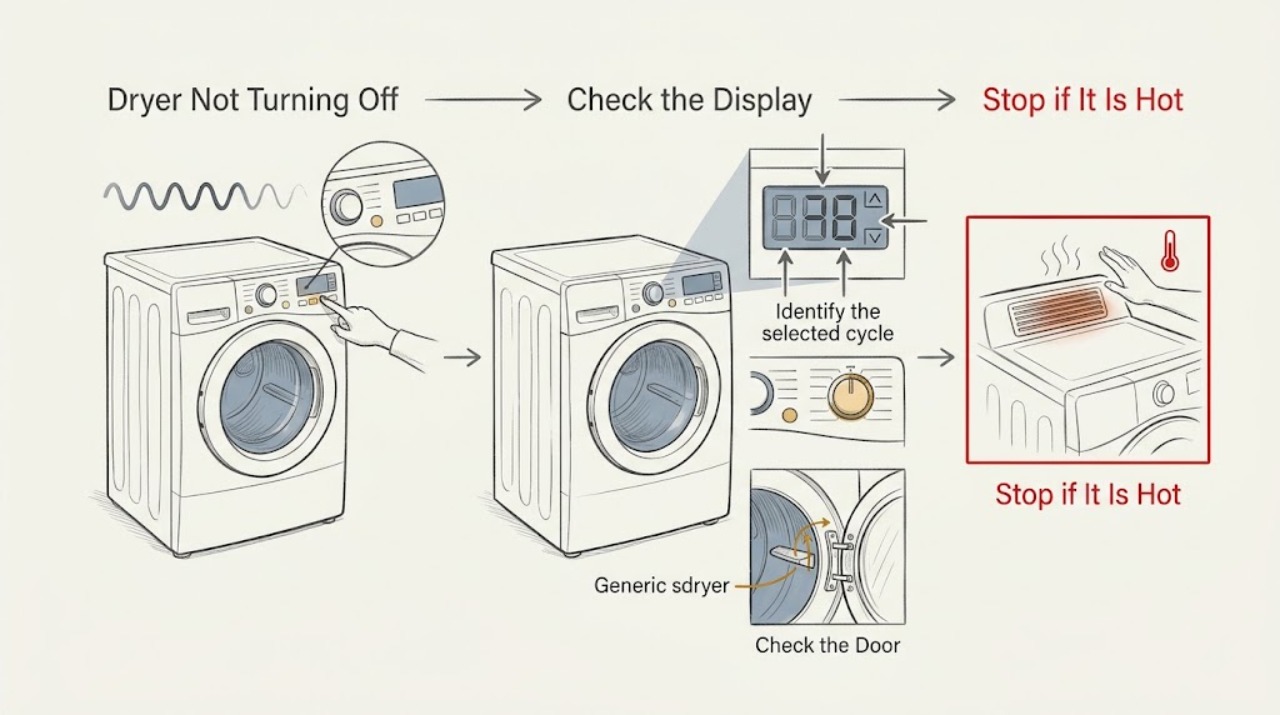
If an Amana dryer will not turn off, first determine whether it is actually running a selected Wrinkle Prevent or other periodic-tumble option, paused after the door was opened, or stuck in an active cycle. On models with Wrinkle Prevent, opening the door before that option ends can leave the dryer paused; use the normal Power control to turn it off or Start/Pause to continue, as the manual directs. On an automatic cycle, the dryer should stop when the selected dryness is reached. Do not reach into a moving drum, repeatedly press controls, open the cabinet, or work on wiring. If Power does not stop the drum, the dryer runs with no selected cycle, a fault returns, it becomes unusually hot, or there is smoke, a burning odor, gas odor, or a damaged cord, stop using it and arrange qualified appliance service or an electrician as appropriate.
Work through in order
Diagnostic checks
Use only checks that match the exact appliance or system and its official guide.
-
Use the normal Power control once
Press the Amana dryer's normal Power control once from a safe position. Do not reach into the drum, hold random keys, or repeat the command rapidly.
Expected result: The drum and heat stop, the display turns off but the drum continues, the dryer pauses, or Power has no effect.
Next step: If it stops, identify the cycle and option that were active. If it pauses, inspect the indicator without reaching into the drum. If Power has no effect, stop use and arrange service.
Stop if: Stop immediately for smoke, burning odor, gas odor, sparking, a hot cord, a damaged door, or uncontrolled heating; leave the area as appropriate and obtain urgent qualified help.
Why this matters
Why: A normal stop suggests the earlier state was a cycle or option behavior. A pause can follow a door opening during Wrinkle Prevent on some models. A drum that continues despite Power points toward a control or internal fault and should not be tested repeatedly.
-
Identify the selected cycle and option
Read the cycle selector and option lights or display without changing them repeatedly. Note whether the dryer is on Automatic, Timed Dry, Air/Fluff, Wrinkle Prevent, or another model-specific option.
Expected result: Wrinkle Prevent or periodic tumbling is active, an automatic cycle is still sensing, a timed cycle is running, or no cycle is selected while the drum continues.
Next step: For a normal option, use Power or the model manual's cancel instruction. If the machine runs with no cycle, or an automatic cycle never reaches its stop state, keep it unused and request service.
Stop if: Do not switch among cycles to force a stop, bypass an option, or open the control panel.
Why this matters
Why: Wrinkle Prevent can intentionally tumble periodically. Automatic cycles use load sensing to decide when the dryness target is reached, while timed and air cycles have different stop behavior. Continued operation with no selected cycle is not explained by a normal option.
-
Check whether the door was opened during Wrinkle Prevent
Recall whether the door was opened before the Wrinkle Prevent option ended and observe the display for Pause or a related indicator. Do not open the door again while the drum is moving or reach into the appliance.
Expected result: The door was opened during Wrinkle Prevent and the dryer is paused, the option is still active, or the dryer continues turning after a normal Power command.
Next step: Use Power to turn the dryer off or Start/Pause to continue only as the exact manual directs. If the display or drum does not follow that command, stop use and arrange service.
Stop if: Do not force the door, bypass the door switch, or reach into a moving drum.
Why this matters
Why: Amana manuals identify the early door opening as a reason the dryer can enter Pause during Wrinkle Prevent. A paused dryer is different from a control that ignores Power; persistent movement after Power is a service clue.
-
Check the automatic-cycle result without restarting repeatedly
If the dryer was on an automatic cycle, note whether the load is dry, damp, tightly packed, or not contacting the model's moisture sensors. Do not run repeated high-heat tests or add more items while the dryer is operating.
Expected result: The load is dry and the dryer is in a normal post-cycle option, the load is damp and the dryer continues, or the dryer keeps running with an empty or very small load.
Next step: Allow a normal cycle to complete if there is no hazard, then use the model's recommended load and cycle. If the dryer cannot stop or runs empty, keep it unused and request service.
Stop if: Stop for unusual heat, a load that is scorching, smoke, an abnormal sound, or any need to reach into the drum while it moves.
Why this matters
Why: Automatic cycles are designed to stop when sensed dryness is reached, but a load that is tightly packed or does not contact sensors can affect cycle behavior. A machine that runs continuously with no meaningful load points away from ordinary moisture sensing.
-
Inspect the lint screen and visible airflow path
After the dryer is off and cool, clean the lint screen and look at the visible exhaust hood or vent outlet from a safe location. Do not remove the rear panel, enter the duct, or dismantle the dryer.
Expected result: The lint screen or visible outlet is blocked, airflow is weak, the path is clear, or the vent cannot be assessed safely.
Next step: Clear only the user-accessible lint screen and loose visible obstruction as the manual directs. If airflow remains weak or the duct needs cleaning, arrange qualified vent or appliance service.
Stop if: Stop for a hot exhaust, lint buildup with heat or odor, a crushed or inaccessible duct, or any need to remove a cover or move the dryer.
Why this matters
Why: Amana identifies restricted exhaust airflow as a cause of long drying times and poor performance. It does not by itself prove why Power would fail, but poor airflow can keep a cycle active longer and can create a fire concern if lint accumulates.
-
Record indicators and power behavior
Photograph or transcribe the full display, indicator lights, beeps, and whether the drum, blower, or heat continues after Power. Note whether the issue occurs on one cycle or every cycle; do not clear a fault by repeated cycling.
Expected result: A code or warning appears, only Wrinkle Prevent continues, the same behavior occurs on every cycle, or the dryer runs with no selected cycle.
Next step: Provide the exact model, cycle, option, indicator, and sequence to Amana or a qualified appliance technician. Leave the dryer unused when the fault is repeatable.
Stop if: Do not open the cabinet, bypass a safety switch, or test the heater, motor, timer, or control board.
Why this matters
Why: A cycle-specific option can be normal, while an unchanging response to Power or operation without a selected cycle suggests control, motor, timer, or another internal fault. The exact model determines any code meaning.
-
Prepare a safe service handoff
Record the Amana model number if visible without moving the appliance, the selected cycle and options, whether the door was opened, load condition, airflow observation, exact display behavior, and what happened when Power was pressed.
Expected result: The dryer stops with the normal control, pauses only during Wrinkle Prevent, runs continuously on one cycle, ignores Power, or shows a thermal, electrical, or gas warning.
Next step: Give the record to a qualified appliance technician; use an electrician for a household supply or repeated circuit problem and a qualified gas professional for a gas-supply concern.
Stop if: Stop all DIY work if diagnosis would require moving the dryer, opening panels, disconnecting gas or power wiring, or reaching into a moving or hot appliance.
Why this matters
Why: This history separates expected option behavior from a repeatable control or safety fault without requiring internal access. A persistent or hazardous symptom needs professional diagnosis.
Use your observations
Decision map
Find the observation that best matches what you see, then follow the next safe action.
-
PATH 01Safety boundary
What you see
The dryer is in Wrinkle Prevent or another documented periodic-tumble option and responds to the normal Power control.
Do this next
Use Power to end the option or let it follow the exact manual behavior; do not treat periodic tumbling as an internal failure by itself.
Why this path and its safety boundary
Safety stop: Do not reach into the drum or repeatedly restart the option to prove it has stopped.
-
PATH 02Safety boundary
What you see
The door was opened before Wrinkle Prevent ended and the dryer shows Pause or a related state.
Do this next
Use Power to turn it off or Start/Pause to continue only as the exact Amana manual directs.
Why this path and its safety boundary
Safety stop: Do not force the door, bypass the switch, or reach into the drum while it moves.
-
PATH 03Safety boundary
What you see
An automatic cycle is running and the load is still damp or tightly packed, with no warning and normal Power response.
Do this next
Let the normal cycle finish if safe, then use the recommended load size and automatic cycle. If the dryer never reaches a normal stop, request service.
Why this path and its safety boundary
Safety stop: Do not run repeated high-heat tests or continue if the load scorches, the dryer overheats, or smoke appears.
-
PATH 04Safety boundary
What you see
A timed, air, or other cycle is selected and the dryer is operating according to that option's programmed behavior.
Do this next
Use the model manual to cancel or end the selected cycle, then choose an appropriate cycle for the load.
Why this path and its safety boundary
Safety stop: Do not change options repeatedly or assume a timed or periodic cycle has the same stop behavior as an automatic cycle.
-
PATH 05Safety boundary
What you see
The dryer runs with no selected cycle, ignores Power, or continues after the documented option and cancel steps.
Do this next
Stop using the dryer and arrange qualified appliance service for the control, motor, timer, or related internal diagnosis.
Why this path and its safety boundary
Safety stop: Do not open the cabinet, bypass the door switch, or keep cycling the appliance.
-
PATH 06Safety boundary
What you see
The lint screen or visible exhaust path is restricted and the dryer is taking unusually long to finish.
Do this next
Clean only the user-accessible lint screen and arrange qualified vent or appliance service if airflow remains weak or the duct needs access.
Why this path and its safety boundary
Safety stop: Do not operate with severe lint accumulation, hot exhaust, burning odor, or a crushed or inaccessible vent.
-
PATH 07Safety boundary
What you see
There is smoke, fire, gas odor, burning odor, sparking, a hot or damaged cord, uncontrolled heat, or a broken door.
Do this next
Stop using the dryer, keep people away, isolate power or gas only through a safe accessible control when appropriate, and follow local emergency or qualified-service guidance.
Why this path and its safety boundary
Safety stop: Do not touch damaged parts, open panels, relight or adjust gas equipment, or continue the cycle.
Helpful context
Understand the symptom
A dryer that tumbles is not always stuck
The first distinction is between an active option and a control fault. Wrinkle Prevent can periodically tumble a load after the main drying cycle, and a door opened during that option can put some models into Pause. An automatic cycle is intended to stop when its sensed dryness target is reached; a timed cycle follows its selected duration. Read the cycle and option indicators before assuming the motor or control has failed.
Keep hands and panels away from the machine
Do not reach into a moving drum, remove covers, bypass the door switch, or probe the motor, heater, timer, or control board. If the normal Power command does not stop the appliance, use the safe accessible disconnect specified by the installation instructions only if there is no hazard, then arrange service. Keep the area clear if the machine is hot, smoking, leaking, or producing an unusual odor.
The cycle history is useful evidence
Record the selected cycle, options, whether the door was opened, whether the drum still turns or only the display remains on, the load condition, and any code or indicator. A dryer that runs only during Wrinkle Prevent has a different path from one that ignores Power on every cycle.
When checks do not resolve it
Need a professional?
Arrange qualified Amana appliance service when Power does not stop the drum, the dryer runs without a selected cycle, the same behavior returns after the documented Wrinkle Prevent or cycle-cancel steps, or an internal control, motor, timer, sensor, heater, or airflow fault is suspected. Use an electrician for a household supply problem and qualified gas service for a gas-supply concern. Seek urgent help for smoke, fire, gas odor, sparking, a hot cord, or uncontrolled heat.
Have this ready
- Provide the Amana model number if safely visible, cycle and options, whether the door was opened, display and indicator state, whether the drum, blower, or heat continued, load and airflow observations, exact Power response, and any recent installation or service history.
Common questions
FAQ
Why does my Amana dryer keep running after the cycle ends?
Check whether Wrinkle Prevent or another periodic-tumble option is active. If the dryer responds to Power, it may be following that option. If it runs with no selected cycle or ignores Power, stop using it and arrange appliance service.
What happens if I open the Amana dryer door during Wrinkle Prevent?
On the cited Amana models, opening the door before Wrinkle Prevent ends can put the dryer into Pause. Use Power to turn it off or Start/Pause to continue as the exact manual directs; do not reach into a moving drum.
Should an automatic Amana cycle turn off by itself?
Automatic cycles are designed to sense the load and turn off when the selected dryness is reached. If the dryer keeps running with a normal load, no warning, and no normal stop, record the cycle and request service rather than repeating high-heat tests.
Is it safe to keep using a dryer that ignores the Power button?
No. If Power does not stop the drum or heat, leave the dryer unused and arrange qualified service. Do not open the cabinet, bypass the door switch, or test internal controls yourself.
Can a blocked vent make an Amana dryer run too long?
Yes, restricted lint or exhaust airflow can lengthen drying and reduce performance. Clean only the user-accessible lint screen and arrange qualified vent service if the visible airflow remains weak or the duct needs access.
Read the exact guide
Official sources
- Dryer Stops Mid-CycleAmana · Official Amana support page used to distinguish automatic, timed, air, and periodic cycles. It supports the cycle-behavior decision but does not diagnose a control that ignores Power.
- Use and Care GuideAmana · Official Amana use-and-care guide used for the exact no-turn-off symptom, including the Wrinkle Prevent pause behavior, Power control, airflow, and professional safety boundaries. Exact features vary by model.
- Use and Care GuideAmana · Official Amana guide used as a second model-family reference for the no-turn-off condition, periodic tumble behavior, cooldown, airflow, and the limits on user repair. Use the exact appliance manual for final control details.
Community feedback
Share a repair observation
Share a plain-text repair observation. Accepted observations are published automatically; this page may take a moment to update.