
On this page
Start here
Quick answer
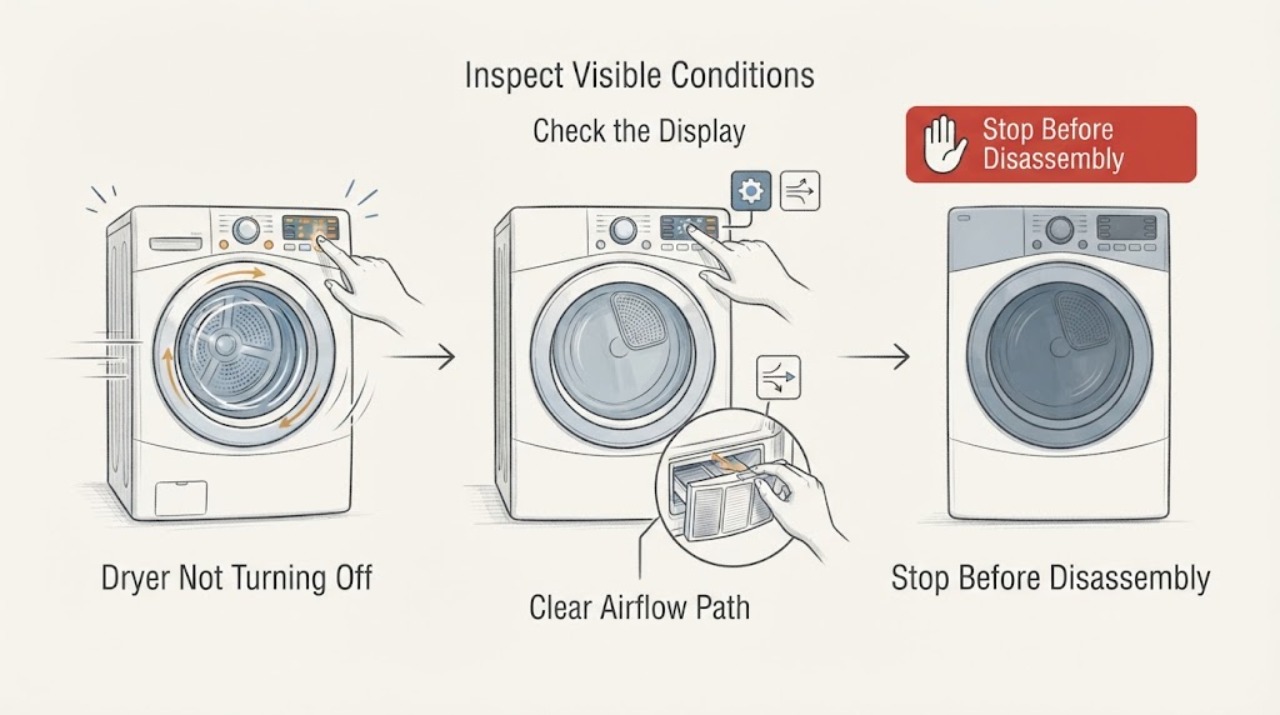
If a Kenmore dryer keeps running, press Power or Cancel once. If the drum, heat, or blower continues, disconnect power immediately by unplugging it only when the plug and receptacle are cool, dry, undamaged, and safely reachable; otherwise switch off the dryer circuit at the breaker. Do not keep running a hot or burning-smelling dryer. A normal wrinkle-prevention or extended-tumble option can look like a failure on some models, but a dryer that ignores the stop control, continues with the door opened, overheats, or trips protection needs model-specific diagnosis and professional service.
Work through in order
Diagnostic checks
Use only checks that match the exact appliance or system and its official guide.
-
Check 1
Press the Kenmore dryer's Power or Cancel control once, then step back and observe whether the drum, heat, blower noise, and display stop. Do not reach into the drum while it is moving or hot.
Expected result: The cycle cancels and the machine begins its model-defined stopping or cool-down behavior.
Next step: Record the selected cycle and option, then use Kenmore's model-specific manual search before the next load.
Why this matters
Why: The original setting or a post-cycle option may have been active, but the exact behavior still needs confirmation in the model manual.
-
Check 2
If the dryer continues after Power or Cancel, disconnect it immediately. Unplug it only if the plug and receptacle are cool, dry, undamaged, and safely reachable without touching the appliance cabinet; otherwise turn off the dedicated dryer breaker. Do not repeatedly press controls or reset protection to keep it running.
Expected result: The drum, heater, blower, or control display remains active after the stop command, or the control panel is unresponsive.
Next step: Leave the dryer de-energized and arrange appliance-repair service with the model number and the exact part that continued running.
Why this matters
Why: The appliance is not responding to its normal stop path; continuing to run can increase heat and component risk, and the fault cannot be identified safely from the outside.
-
Check 3
While the dryer is disconnected and fully cool, inspect only the lint screen area, the visible exhaust hood, and the accessible vent connection for a heavy lint buildup, crushed hose, or blocked flap. Do not run the dryer to test airflow while a no-stop or overheating symptom remains.
Expected result: Lint is packed into the screen or visible vent path, the hose is crushed, or the outside flap cannot open freely.
Next step: Clean the lint screen and correct only an obvious external obstruction when everything is cool and disconnected; keep the dryer off and request service if it previously ran continuously or overheated.
Why this matters
Why: Restricted airflow can worsen heat and drying problems, but cleaning the visible path does not prove that a no-stop control fault is repaired.
-
Check 4
Check the symptom without opening the cabinet: note whether opening the dryer door, using the stop control, or switching off the breaker changes the drum, heat, blower, and display. Keep hands out and do not bypass a door switch or safety device.
Expected result: The machine only stops when power is removed, or it continues despite the door being open or the control being cancelled.
Next step: Leave power off and provide this observation to a qualified appliance technician. Do not remove panels or test terminals yourself.
Why this matters
Why: The stop/control path or a safety-related component may be involved; the result calls for de-energized, model-specific diagnosis rather than a live test.
-
Check 5
Look and listen from a safe distance for heat at the cabinet, a burning or hot-insulation odor, smoke, crackling, buzzing, visible arcing, a damaged cord or receptacle, or a breaker that trips again. Do not touch a hot or damaged plug, switch, cord, or receptacle.
Expected result: Any overheat, odor, smoke, spark, crackle, shock, damaged insulation, or repeated trip is present.
Next step: Keep people away, disconnect power only if safe, and contact emergency services for smoke or fire; otherwise arrange qualified electrical/appliance inspection before use.
Why this matters
Why: These are electrical or fire stop signs, not evidence that a reset or replacement part is safe; the CPSC and ESFI identify these symptoms as hazards requiring professional attention.
-
Check 6
Find the model number from the dryer's rating label or documentation and use Kenmore's official manual search and customer-care resources. Tell the technician whether the issue is continuous tumbling, continuous heat, continuous blower operation, or a display that stays on after cancel.
Expected result: The manual confirms an intentional post-cycle option, or it does not describe the observed behavior.
Next step: Follow only the model manual's normal cancellation instructions. If the symptom remains or the manual is unavailable, keep the appliance off and schedule repair.
Why this matters
Why: A model-defined option may explain intermittent post-cycle tumbling, while an undocumented or persistent no-stop condition needs service diagnosis; Kenmore's generic guidance cannot establish a part fit for an unknown model.
Use your observations
Decision map
Find the observation that best matches what you see, then follow the next safe action.
-
PATH 01Next step
What you see
Power or Cancel stops the machine and the model manual describes the selected post-cycle option.
Do this next
Use the manual's option-specific cancellation method and monitor the next cycle; stop using the dryer if it does not follow that behavior.
Why this path and its safety boundary
Why it matters: The observed running may be an intentional cycle or wrinkle-prevention behavior.
-
PATH 02Next step
What you see
The dryer ignores Power or Cancel and only stops when power is removed.
Do this next
Keep it de-energized and arrange model-specific appliance repair.
Why this path and its safety boundary
Why it matters: A control or stop-path fault is possible and cannot be safely confirmed by live cabinet testing.
-
PATH 03Next step
What you see
The dryer continues running with the door open, or the drum or heater remains active after a stop command.
Do this next
Do not reach inside or bypass the door switch; disconnect power safely and request service.
Why this path and its safety boundary
Why it matters: Treat the behavior as unsafe rather than normal extended tumbling.
-
PATH 04Next step
What you see
There is heat, a burning smell, smoke, crackling, a spark, shock, damaged cord, or a breaker that trips again.
Do this next
Stop use, keep clear, shut off power only if safe, and use emergency services for smoke or fire.
Why this path and its safety boundary
Why it matters: A potential fire or shock hazard takes priority over diagnosis.
-
PATH 05Next step
What you see
The dryer is cool, power is removed, and only the visible vent path has lint or an obvious external obstruction.
Do this next
Clean or correct the visible restriction without opening the cabinet, then keep the dryer off until persistent running or overheating has been professionally assessed.
Why this path and its safety boundary
Why it matters: An external airflow restriction may be contributing to heat or drying concerns, but it does not explain every no-stop symptom.
Helpful context
Understand the symptom
Treat a dryer that will not stop as a heat and fire-safety question first. Use the normal Power or Cancel control once; if the machine ignores it, remove power without reaching behind a hot or moving appliance. A cool-down, wrinkle-prevention, or extended-tumble option may be intentional on some models, so identify the exact cycle in the model manual before deciding that the control has failed.
Kenmore dryers vary by model and by the manufacturer behind that model. Kenmore's official manual search asks for the appliance model number, while its customer-care page provides the routes for manuals and repair support. Keep the model number and a short description of what continues—drum motion, heat, blower noise, or only the display—so the next diagnosis is specific rather than a guessed parts swap.
When checks do not resolve it
Need a professional?
Arrange appliance repair if the dryer ignores Power or Cancel, continues with the door open, only stops at the breaker, runs hot, or repeats the symptom after the model-specific cycle option is ruled out. Use a qualified electrician or emergency services for heat, smoke, arcing, shocks, damaged wiring, or a repeatedly tripping circuit.
Common questions
FAQ
Could a Kenmore dryer be tumbling on purpose after the cycle ends?
Possibly. Post-cycle behavior varies by model and selected option, so check the exact manual using the dryer's model number. If the dryer ignores Power or Cancel, keeps heating, or will not stop when the door is opened, leave it off and arrange service.
What should I do if the dryer will not stop and feels hot?
Press Power or Cancel once, then disconnect power immediately only if the plug and receptacle are cool, dry, undamaged, and safely reachable; otherwise turn off the breaker. Do not continue testing. Smoke, sparks, burning odor, a shock, or a hot or discolored cord or receptacle requires an urgent safety response.
Should I replace the timer or control board first?
No. Kenmore dryer designs and controls vary by model, and the same symptom can involve cycle settings, control behavior, wiring, airflow, or a safety component. Keep the dryer off and provide the model number and exact stop behavior to a qualified technician.
Read the exact guide
Official sources
- CPSC Guide to Home Wiring HazardsU.S. Consumer Product Safety Commission · home wiring hazard recognition
- Customer Care & Support | Kenmore AppliancesKenmore · Kenmore product support and repair routes
- Find Your Manual | Kenmore Appliance Manuals & GuidesKenmore · Kenmore appliance manuals
- Home Wiring Safety TipsElectrical Safety Foundation International · home electrical hazard warning signs
Community feedback
Share a repair observation
Share a plain-text repair observation. Accepted observations are published automatically; this page may take a moment to update.