
On this page
Start here
Quick answer
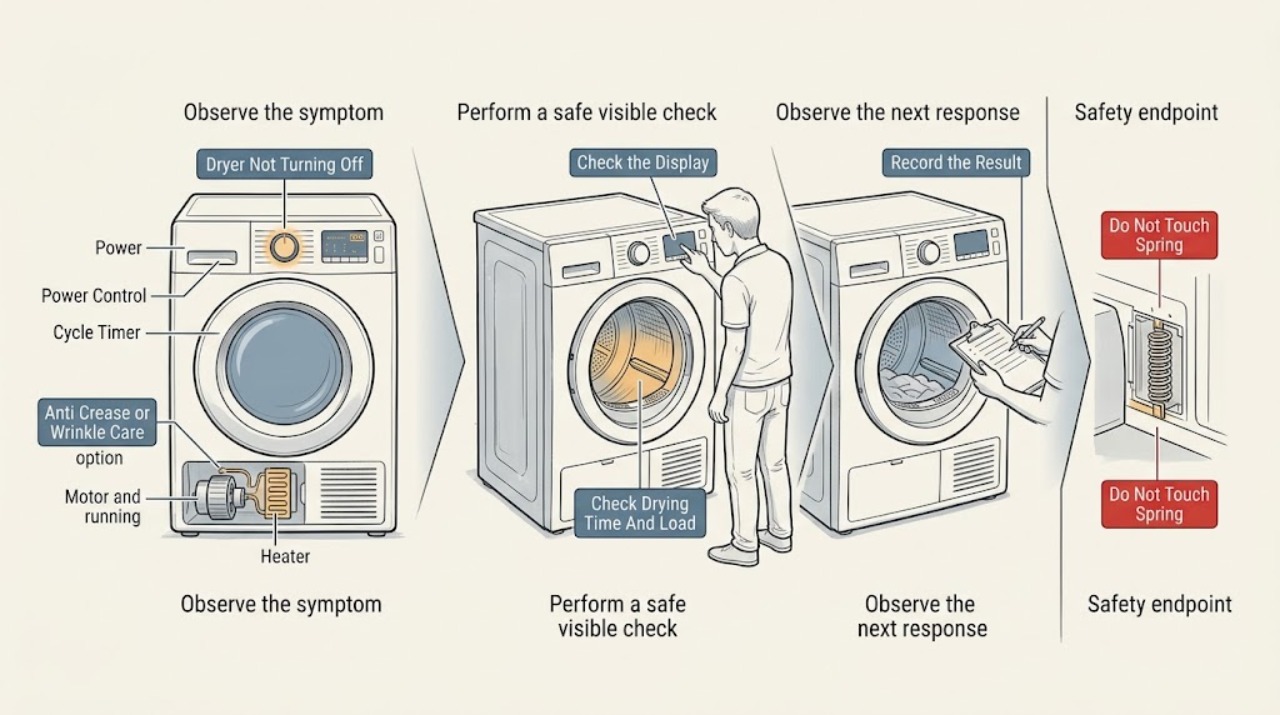
An LG dryer that appears not to turn off may be in Anti Crease or Wrinkle Care, adding drying time because the load is still sensed as damp, or continuing because of a control, sensor, motor, heater, or power fault. Check the display for a dotted border or Anti Crease/Wrinkle Care indicator, and press Power once to end a completed cycle as LG directs; wait for a Door Locked indicator to disappear before opening the door. If the drum and heat continue after Power, the display ignores the command, or a code returns, stop normal use and arrange service. If the dryer is overheating or has a burning smell, smoke, sparking, gas odor, damaged cord, or a breaker trips again, isolate power only if safe and dry, leave gas hazards to a safe location, and do not keep resetting or opening the appliance.
Work through in order
Diagnostic checks
Use only checks that match the exact appliance or system and its official guide.
-
Check 1
Read the display after the selected drying time ends and check for a dotted border, End indicator, Anti Crease, Wrinkle Care, or Wrinkle Prevention indication; observe whether the drum tumbles only periodically and whether the door remains locked.
Expected result: A post-cycle indicator is present and the drum tumbles intermittently, the remaining time has ended but the dryer is only displaying a status, or the drum and heat continue continuously without that indicator.
Next step: For the documented post-cycle state, press Power once as LG directs and wait for Door Locked to disappear before opening. If motion or heat continues after the command, stop normal use and follow the service branch.
Why this matters
Why: LG says Anti Crease or Wrinkle Care can tumble intermittently after the cycle and make the dryer appear to be running. Continuous motion or heat without the documented indicator is a fault branch rather than a normal wrinkle-prevention phase.
-
Check 2
Note whether the remaining time increases, stays unchanged, or repeatedly extends, and whether the load is still damp; do not keep opening the door or adding heat to force the cycle to finish.
Expected result: The dryer adds time because the load is sensed as insufficiently dry, the time stays unchanged while the cycle completes, or the dryer keeps running after the load is dry and Power has been pressed.
Next step: Allow only the model-documented cycle behavior to complete. If the dryer does not respond to Power, continues with a dry load, or repeatedly extends with excessive heat, stop using it and arrange service.
Why this matters
Why: LG describes additional time as a natural drying process on applicable gas and electric models and says an electric model may continue with the displayed time unchanged. Continued operation after a completed cycle and Power command needs diagnosis.
-
Check 3
Check for CL or a lock symbol, confirm that the Power button responds, and use the exact model manual's Child or Control Lock release; after unlocking, press Power once and observe whether the dryer stops without forcing any button.
Expected result: CL or a lock indicator is present, Power responds and stops the dryer, another control remains disabled, or the panel ignores Power.
Next step: Use the model-specific unlock sequence once. If Power still does not stop the dryer, isolate power only if safe and dry and arrange qualified service; do not bypass a control or door safety function.
Why this matters
Why: LG identifies CL as Child Lock or Control Lock and says the feature disables controls on supported models. A panel that ignores Power after the documented unlock is a control or power fault, not evidence that the cycle needs more time.
-
Check 4
Record every displayed code or indicator and whether the drum, heater, and control panel remain active; compare the message with the exact LG model error-code guide before attempting any reset.
Expected result: LE1 or another motor code appears, tE indicates a thermistor issue, dE/dE4 indicates the door, D80/D90/D95 indicates airflow, gAS indicates gas supply, PF indicates a power event, or no code is shown.
Next step: Follow only the exact model's user-level instruction for the displayed code. If a code returns, the dryer continues running, or the code involves gas, heat, motor, or power, stop using it and arrange qualified service.
Why this matters
Why: LG maps these messages to different subsystems and directs recurring motor, thermistor, door, airflow, gas, and power issues to model-specific troubleshooting or service. A code that returns is more useful to a technician than repeated start/stop attempts.
-
Check 5
With the dryer stopped and cool, visually check that the power cord and outlet are not damaged, that the lint filter is seated, and that the accessible outside exhaust flap is not blocked; do not open the terminal block, cabinet, or duct.
Expected result: The cord or outlet is hot or damaged, lint or the exhaust opening is visibly restricted, the breaker has tripped, or the external power and airflow appear normal but the dryer will not stop.
Next step: Remove only loose lint at the accessible filter or exhaust opening when cool. If the breaker trips again, a cord or outlet is hot, or cleaning would require disassembly, isolate the appliance if safe and arrange an electrician, professional vent service, or appliance technician.
Why this matters
Why: LG links power conditions with shutdown behavior and identifies restricted airflow codes between the dryer and outside exhaust. A hot or damaged power part, repeated trip, or inaccessible blockage is a safety or service condition, not a reason to keep running the dryer.
-
Check 6
Stop immediately if the dryer continues with excessive heat, a burning smell, smoke, visible sparking, a hot or damaged plug or cord, severe mechanical noise, a gas odor, a damaged gas line, water near electrical parts, or a breaker that trips again.
Expected result: The hazard persists, the dryer cannot be stopped at its normal controls, or diagnosis would require touching wiring, a motor, a heater, a moving drum, the exhaust interior, or the gas path.
Next step: Stop using the dryer and keep people away. Isolate power at the normal switch or breaker only if safe and dry; never touch water, damaged wiring, hot parts, or a gas line. For a gas odor, leave the area and follow local gas-emergency guidance from a safe location, then arrange qualified service.
Stop if: Stop and call qualified appliance service; use a licensed gas professional for gas work.
Why this matters
Why: These signs can involve fire, electric shock, moving parts, restricted exhaust, or gas safety and are outside safe user-level troubleshooting. Repeatedly restoring power can worsen a fault.
Use your observations
Decision map
Find the observation that best matches what you see, then follow the next safe action.
-
PATH 01Next step
What you see
Anti Crease, Wrinkle Care, Wrinkle Prevention, a dotted border, or an End indicator shows and the drum tumbles only periodically after the cycle.
Do this next
Press Power once to end the post-cycle operation and wait for Door Locked to disappear before opening. If continuous heat or motion remains, arrange service.
-
PATH 02Next step
What you see
The remaining time extends or stays unchanged while the load is still damp and the dryer otherwise behaves normally.
Do this next
Treat it as the model's sensing and drying behavior for one cycle. Persistent extension with a dry load, excessive heat, or failure to respond to Power requires service.
-
PATH 03Next step
What you see
CL or a lock symbol is present, or controls do not respond normally.
Do this next
Use the exact model's Child or Control Lock release, then press Power once. A panel that still ignores Power needs qualified service; do not bypass controls.
-
PATH 04Next step
What you see
A motor, thermistor, door, airflow, gas, or power code appears or returns.
Do this next
Record the code and follow only the exact LG model guide. A recurring or safety-related code requires service rather than repeated reset attempts.
-
PATH 05Next step
What you see
The breaker trips, the cord or outlet is hot or damaged, or an airflow warning accompanies continued operation.
Do this next
Stop using the dryer, isolate power only if safe and dry, and arrange an electrician, professional vent service, or appliance technician as appropriate.
-
PATH 06Next step
What you see
Smoke, burning smell, sparking, severe noise, abnormal heat, gas odor, damaged gas line, water near electrical parts, or a repeat trip occurs.
Do this next
Stop immediately, keep clear, isolate power only if safe and dry, and seek qualified service. For suspected gas, leave the area and follow local gas-emergency guidance without operating switches or retrying the appliance.
Helpful context
Understand the symptom
First distinguish a programmed post-cycle action
LG says Anti Crease can make a dryer appear to keep running after the timer ends. Some models periodically tumble for up to three hours, while other models display a dotted border or an End indicator. A gas dryer may also add time when its sensor determines that laundry is not sufficiently dry. These are different from a motor that continues after Power or a heater that stays on unexpectedly.
Use the display and heat state to choose the branch
Record the remaining time, indicator, error code, and whether the drum is tumbling, the exhaust feels warm, or the dryer is only displaying a status. Do not rely on the timer alone: LG notes that electric models can continue drying with the displayed time unchanged, and a completed Anti Crease phase can look like a running cycle. Persistent heat or motion after a confirmed Power command needs diagnosis.
Power and error-code symptoms are not all the same
LG's dryer guidance separates Control Lock, door, thermistor, motor, airflow, gas, and power-related messages. A control lock can disable most controls while leaving Power available on some models. A recurring motor or sensor code should not be handled by repeatedly restarting the dryer, and a supply or gas symptom belongs with qualified service after the user-visible checks.
Protect against heat, fire, and gas hazards
A dryer that continues with excessive heat, smoke, a burning smell, sparking, or a hot or damaged cord is not a normal Anti Crease situation. On a gas model, a gas odor or unsafe combustion symptom is an immediate stop. HSE says not to use a gas appliance suspected to be unsafe until it has been checked by a Gas Safe registered engineer. Keep all internal motor, heater, wiring, vent, and gas work with a qualified professional.
Only after diagnosis
Potential parts
- control panel or main control assembly
Consider only if a qualified technician confirms that Power remains ineffective after the documented Control Lock check and safe external power verification.
Confirm the complete model and manufacturer fit information; an unresponsive Power button does not identify a particular board. - drive motor, belt, or drum support component
Consider only after a technician confirms a drive fault when the drum continues, stops, or makes abnormal mechanical noise outside the selected cycle behavior.
Moving-part and cabinet work is professional service; confirm model-specific compatibility and do not select a part from sound alone. - thermistor or temperature-control component
Consider only when the exact model displays a recurring thermistor code or a technician confirms incorrect temperature control after checking airflow and operating conditions.
Confirm the complete model and manufacturer fit information; persistent heat is a safety condition, not a reason for user replacement. - exhaust or airflow component
Consider only if a qualified vent or appliance professional confirms a damaged or restricted exhaust component after accessible lint checks.
Do not dismantle the exhaust or substitute a vent component without model-specific and installation guidance.
When checks do not resolve it
Need a professional?
Arrange LG or qualified appliance service when the dryer continues to tumble or heat after Anti Crease or Wrinkle Care is ended with Power, the panel ignores Power, a motor or thermistor code returns, the dryer repeatedly extends a completed load, or diagnosis would require a cabinet, motor, heater, control, wiring, vent interior, or gas-path access. Use a licensed gas professional for gas work where applicable.
Common questions
FAQ
Why does my LG dryer keep tumbling after the timer ends?
Check for Anti Crease, Wrinkle Care, or Wrinkle Prevention. LG says these options can tumble the load periodically or without heat after the drying cycle. Press Power once to end the documented post-cycle operation and wait for Door Locked to disappear before opening. Continuous motion or heat after Power needs service.
Why does my LG dryer keep adding time?
LG says the dryer may add time when its sensor determines that the laundry is not sufficiently dry, and an electric model may continue with the displayed time unchanged. If the load is dry but the dryer does not respond to Power, or it becomes excessively hot, stop using it and arrange service.
Can Control Lock make an LG dryer seem impossible to turn off?
Control Lock can disable many dryer controls, but the exact behavior varies by model. Check for CL or a lock symbol and use the exact model's release sequence. If Power still does not stop the dryer after unlocking, isolate power only if safe and dry and arrange qualified service.
What should I do if an LG dryer keeps running with an error code?
Record the code and match it to the exact LG model guide. Codes such as LE1, tE, dE/dE4, D80/D90/D95, gAS, and PF indicate different motor, sensor, door, airflow, gas, or power branches. A code that returns or accompanies continued operation requires service rather than repeated resets.
When should I stop using an LG dryer that will not turn off?
Stop for smoke, burning smell, sparking, abnormal heat, severe noise, a hot or damaged cord, gas odor, a damaged gas line, water near electrical parts, or a breaker that trips again. Keep clear and isolate power only if safe and dry. For suspected gas, leave the area and follow local gas-emergency guidance.
Read the exact guide
Official sources
- Power Issues - Laundry DryerLG USA · LG dryer power, Child Lock, start response, drum operation, and service troubleshooting
- Gas safety - Home ownersHealth and Safety Executive · Domestic gas-appliance safety, suspected unsafe appliances, suspected leaks, and qualified gas-engineer boundaries
- LG Dryer - Error Code List(New)LG USA · LG dryer motor, thermistor, door, airflow, gas, power, and control error-code interpretation
- [LG Dryer drying time] The drying time has finished, but the dryer continues to operateLG USA · LG dryer continued operation after drying time, Anti Crease behavior, and Power shutdown guidance
- LG Dryer - Cycles and OptionsLG USA · LG dryer Wrinkle Care, Wrinkle Prevention, Child Lock, and cycle-option behavior
- [LG Dryer error code] A CL error appears on the display or the select function button is not workingLG USA · LG dryer Control Lock behavior, model-specific unlock methods, and inactive function controls
Community feedback
Share a repair observation
Share a plain-text repair observation. Accepted observations are published automatically; this page may take a moment to update.