
On this page
Start here
Quick answer
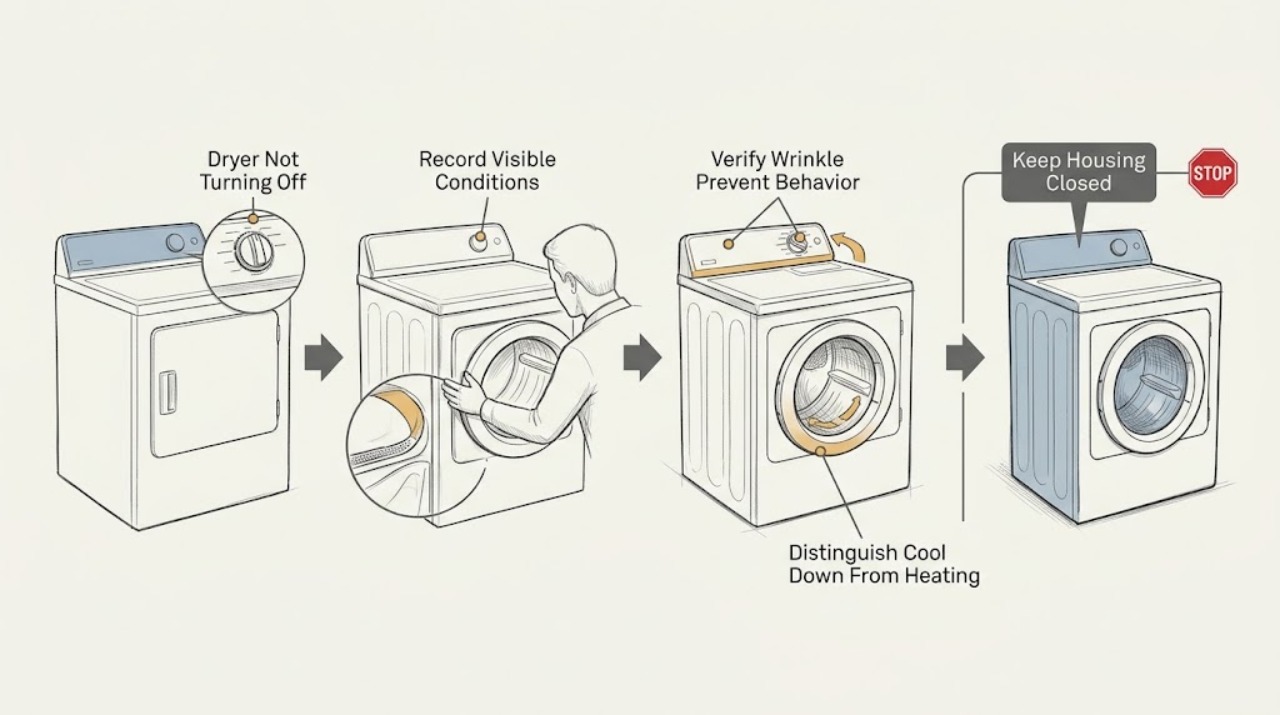
A Maytag dryer may tumble after the main cycle because Wrinkle Shield, Wrinkle Prevent, or Wrinkle Guard is enabled; Maytag says this feature can periodically restart tumbling after the normal cycle and that this behavior is normal. First identify the exact model, cycle, and option lights, then distinguish cool-down or intermittent no-heat tumbling from continuous heated operation. If the drum or heater keeps running after Cancel, opening the door, or the documented cycle end, or if there is smoke, a burning or gas odor, abnormal heat, sparking, violent movement, or a breaker trip, stop using the dryer and disconnect it only if safe. Do not open the cabinet or bypass a door or control safety circuit.
Before you begin
Safety first
- Only external observation and model-documented controls are described. Do not open the cabinet, test live terminals, bypass the door switch, defeat thermal protection, work on gas components, or keep resetting a protection device.
Work through in order
Diagnostic checks
Use only checks that match the exact appliance or system and its official guide.
-
Check 1
From a safe position, record the exact Maytag model number, selected cycle, Wrinkle Shield/Wrinkle Prevent/Wrinkle Guard and steam indicators, whether the drum stops before restarting, and whether the load or exhaust feels heated. Do not touch the cabinet, vent, plug, or clothes if they are hot.
Expected result: The dryer may stop and later tumble briefly, tumble continuously without heat, or keep tumbling with heat; the option indicator may be on, off, or unclear.
Next step: If smoke, burning or gas odor, sparking, abnormal heat, violent movement, or a tripped breaker is present, use the immediate safety branch. Otherwise compare the selected option with the exact model manual before changing settings.
Stop if: Stop observing and keep away if there is smoke, burning or gas odor, sparking, exposed damage, an unusually hot cabinet or outlet, or violent movement.
Why this matters
Why: A stop-and-restart pattern with a wrinkle option selected is consistent with Maytag’s normal wrinkle-prevention behavior. Continuous heated operation or an unknown option state is not established as normal from the symptom alone.
-
Check 2
With the dryer cool and no hazard present, use the exact model manual to determine whether a wrinkle-prevention option is selected and how it is canceled. If the manual permits it, cancel the option or open the door to stop the intermittent tumble; do not force the door or defeat a latch.
Expected result: The intermittent tumble may stop when the option is canceled or the door is opened, or it may continue despite the documented control and a safely open door.
Next step: If it stops normally, record the setting for the next load. If it does not stop, leave it disconnected if safe and arrange qualified service; do not keep cycling the controls.
Stop if: Do not touch the door, controls, or appliance if the surface is hot, wet, damaged, sparking, or accompanied by a burning or gas odor.
Why this matters
Why: Stopping through the model-documented control supports a selected wrinkle-prevention feature. Continuing to run after the documented stop path points to a control, door-switch, or drive condition requiring service.
-
Check 3
Identify whether the selected cycle is an automatic, timed, or air-only cycle and whether the display shows Cool Down, Wrinkle Prevent, or another model-specific status. Do not reach into the drum or remove panels; use only the indicator and the exact manual’s cycle description.
Expected result: Automatic cycles may end when the selected dryness is reached; air-only or cool-down behavior should not add heat; a wrinkle option may periodically tumble after the main cycle. The display may instead show a running heated cycle or an error.
Next step: If the display and behavior match the manual, allow the documented phase to end or cancel it as instructed. If they do not match, stop use and record the status for a technician.
Stop if: Stop immediately for excessive heat, smoke, odor, sparks, unusual noise, damaged controls, or an electrical trip.
Why this matters
Why: A no-heat cool-down or documented wrinkle phase can account for movement after the main dry period. A heated cycle that will not end, an unexpected status, or a code outside the manual’s normal behavior needs service rather than repeated resets.
-
Check 4
Only when the dryer is cool, dry, undamaged, and free of hazard signs, use the model’s documented Power/Cancel or cycle-stop control once. If the manual identifies opening the door as a stop method, confirm the door is unblocked and open it normally; never tape, hold, or bypass the door switch.
Expected result: The drum and heat may stop as expected, the drum may stop but the panel remain powered, or the drum/heater may continue despite the documented stop action.
Next step: If it fails to stop, disconnect the supply only by a safe external method and arrange appliance service. Do not perform live tests or open the control or heater area.
Stop if: Do not repeat the test if the dryer continues heating, emits odor or smoke, sparks, becomes hot, or trips protection.
Why this matters
Why: A normal stop indicates that the prior behavior may have been an option or cycle phase. Continued drum movement or heat after the safe stop path suggests a stuck control, relay, motor, heater-control, or door-switch problem and is not a user adjustment.
-
Check 5
With the dryer isolated, write down whether the drum was moving, whether heat continued, which controls were pressed, the option and cycle indicators, any displayed code, and whether the symptom started at cycle end or during a run. Do not remove panels, test terminals, or repeatedly reset the breaker.
Expected result: The record may show normal intermittent no-heat tumbling, continuous drive operation, continuous heat, a control that ignores Stop, or a protective trip.
Next step: Provide the model number, gas or electric type, exact cycle and option state, stop response, heat observation, sound, and safety events to qualified service. Use an electrician when the supply, outlet, cord, or breaker is implicated.
Stop if: The dryer remains out of service for continuous heat, failure to stop, smoke, gas odor, sparks, abnormal heat, violent movement, damaged wiring, or repeated protection trips.
Why this matters
Why: This separates a documented wrinkle feature from a drive, motor, heater-control, sensor, door-switch, or electrical fault and gives the technician a reproducible symptom without unsafe access.
Use your observations
Decision map
Find the observation that best matches what you see, then follow the next safe action.
-
PATH 01Safety boundary
What you see
Smoke, burning or gas odor, sparks, abnormal heat, violent movement, damaged electrical parts, or a breaker trip is present.
Do this next
Stop the cycle and keep people away. Disconnect power only if it can be done without touching wet or damaged components. For gas odor, do not operate switches or create an ignition source; leave the area and contact the appropriate emergency or gas authority from a safe location. Arrange qualified help.
Why this path and its safety boundary
Why it matters: This is a safety event and cannot be explained away as Wrinkle Prevent or normal cool-down.
Safety stop: Do not re-energize, run another load, or open the appliance until the hazard is assessed.
-
PATH 02Safety boundary
What you see
The dryer stops after the main cycle and then tumbles intermittently without added heat while a wrinkle-prevention option is selected.
Do this next
Use the exact model manual to cancel the option or let its documented phase finish; remove the load when practical and record the setting if it was not intended.
Why this path and its safety boundary
Why it matters: Maytag describes this as normal Wrinkle Shield, Wrinkle Prevent, or Wrinkle Guard behavior on applicable models.
Safety stop: Escalate if the drum does not stop as documented, heat continues unexpectedly, or a hazard sign appears.
-
PATH 03Safety boundary
What you see
The drum keeps moving without heat, but the behavior does not match the exact model’s wrinkle or cool-down instructions.
Do this next
Use the model-documented stop control once. If movement continues, isolate the dryer safely and arrange appliance service.
Why this path and its safety boundary
Why it matters: A control, motor, door-switch, or cycle-state fault remains possible; a no-heat observation does not make indefinite operation safe.
Safety stop: Do not keep testing if movement is accompanied by noise, wobble, heat, smell, sparks, or a protection trip.
-
PATH 04Safety boundary
What you see
The dryer continues tumbling with heat beyond the cycle or does not respond to the documented stop control.
Do this next
Stop using the dryer and disconnect it only by a safe external method. Obtain qualified appliance service; do not open the cabinet or test live parts.
Why this path and its safety boundary
Why it matters: This is not established as normal wrinkle prevention; a heater-control, relay, sensor, motor, or control fault may be present.
Safety stop: Keep it isolated for any abnormal heat, smoke, odor, sparks, or damaged cord/outlet.
-
PATH 05Safety boundary
What you see
The documented model stop control or safe door opening stops the drum and no hazard was observed.
Do this next
Record the cycle and option setting, then consult the exact manual before the next load. If the symptom returns with the option off, arrange service.
Why this path and its safety boundary
Why it matters: The original observation may have been a selected option or normal cycle phase rather than a confirmed component fault.
Safety stop: Stop if the dryer again runs continuously, adds heat unexpectedly, or shows any safety symptom.
-
PATH 06Safety boundary
What you see
The model, cycle, option, or status indicator cannot be identified.
Do this next
Find the model number from the appliance label or owner documentation and use the corresponding manual. Keep the dryer out of service if it is continuously moving or heating.
Why this path and its safety boundary
Why it matters: Maytag features and stop behavior vary by model, so the behavior cannot be classified reliably.
Safety stop: Do not guess a button sequence or bypass a safety device.
Helpful context
Understand the symptom
First decide what “not turning off” means
Watch one safe cycle from a distance and note whether the dryer stops completely and later tumbles briefly, tumbles continuously without heat, or continues heating without reaching a stop. Record the model number and every illuminated option. A pause-and-restart pattern can be the selected wrinkle-prevention feature; an unbroken heated run or a control that cannot stop the machine needs service.
The model manual controls the final interpretation
Maytag uses several names and time ranges for wrinkle-prevention features, and controls vary by model. Use the owner manual for the exact model to identify how the option is canceled and how a normal cool-down is displayed. Do not assume that a setting or indicator on one Maytag dryer behaves the same way on another.
Keep a possible heat or electrical fault isolated
If clothing, the cabinet, plug, or outlet is unusually hot, or if the smell is electrical, smoky, or like gas, the normal-cycle explanation no longer applies. Keep the dryer out of service and use qualified appliance, electrical, or gas help as appropriate.
Safety boundary
Stop conditions
- Smoke, burning odor, gas odor, sparks, arcing, or visible flame.
- Abnormally hot cabinet, clothes, plug, cord, outlet, vent, or control area.
- A breaker or fuse trips again, damaged wiring is visible, or an electrical area is wet.
- Continuous heated operation, failure to stop through the model-documented control, or a stuck control.
- Violent movement, metal scraping, severe noise, or a damaged door, latch, cabinet, or gas connection.
Only after diagnosis
Potential parts
- dryer electronic control or relay
Consider only when the dryer ignores the model-documented stop path and service confirms a control or relay fault after ruling out a selected cycle feature.
Confirm the complete Maytag model number and manufacturer fit information before ordering. - dryer door switch or latch
Consider only when the door cannot safely signal an open or closed state and a technician confirms the switch or latch is defective.
Use exact model documentation and never bypass the door safety circuit. - dryer thermal control or sensor
Consider only when qualified diagnosis links continued heat or incorrect cycle termination to a failed temperature-sensing or thermal-control component.
Component location and fit vary by model; verify compatibility with the exact model. - dryer drive motor
Consider only when continuous or abnormal drum movement is traced to the motor or its drive circuit rather than a wrinkle-prevention phase.
Motor fit and electrical configuration are model-specific; confirm before ordering.
When checks do not resolve it
Need a professional?
Arrange qualified appliance service when the dryer continues to tumble or heat after its documented cycle and stop controls, when the model’s normal wrinkle or cool-down behavior does not match the observation, or when a door switch, control, motor, heater-control, sensor, relay, or wiring diagnosis would be required. Use an electrician for a supply, outlet, cord, or recurring breaker issue. For gas odor or fire concern, leave the area and seek appropriate emergency or gas-safety help from a safe location.
Safety scope: Only external observation and model-documented controls are described. Do not open the cabinet, test live terminals, bypass the door switch, defeat thermal protection, work on gas components, or keep resetting a protection device.
Common questions
FAQ
Why does my Maytag dryer turn back on after the cycle ends?
If Wrinkle Shield, Wrinkle Prevent, or Wrinkle Guard is selected, Maytag says the dryer can turn off and then tumble periodically after the normal cycle. Check the exact model manual and the option indicator. Continuous heated operation or behavior that ignores the documented stop path needs service.
Is it normal for a Maytag dryer to keep tumbling after it says the cycle is complete?
It can be normal when a wrinkle-prevention feature is active. The feature should match the model manual and should not be treated as an explanation for continuous heat, smoke, abnormal temperature, or a machine that cannot be stopped through its documented controls.
How can I tell cool-down from a dryer that will not turn off?
Use the model’s indicators and manual to identify Cool Down, an air-only phase, or a wrinkle-prevention phase. Note whether the dryer stops before brief movement resumes and whether heat is absent. A continuously heated run or a stop control that has no effect is abnormal and should be serviced.
Should I unplug a Maytag dryer that will not stop?
If it is safe to do so and there is no wet or damaged electrical area, stop the cycle and isolate the appliance using the normal external power method. Do not touch hot, scorched, wet, or damaged parts. For smoke, sparks, gas odor, or fire concern, leave the area and seek appropriate emergency help from a safe location.
What information should I give a Maytag dryer technician?
Provide the exact model, gas or electric type, selected cycle, wrinkle-option state, display indicators, whether the drum stopped before restarting, whether heat continued, which documented stop path was used, and any noise, odor, heat, spark, or breaker event.
Read the exact guide
Official sources
- Dryer Not Starting or No Operation - Product HelpMaytag Product Help · Maytag general dryer guidance; controls and features vary by model.
- Dry Time Keeps Going Up - Dryer - Product HelpMaytag Product Help · Maytag dryer product-help guidance; exact sensor and display behavior varies.
- Dryer Stops Mid-Cycle - Product HelpMaytag Product Help · Maytag product-help guidance; available cycles and labels vary by model.
- How Wrinkle Prevent Option Works - Product HelpMaytag Product Help · Maytag guidance for models that include the option; not every dryer has the same feature.
- MAYTAG® ELECTRIC DRYERMaytag · The opened W10150622 manual covers several Maytag electric dryer models; exact manuals must be used for other models.
- Dryer Turns On after Cycle is Complete - Dryer - Product HelpMaytag Product Help · Maytag dryer product-help guidance; names, controls, and duration vary by model.
Community feedback
Share a repair observation
Share a plain-text repair observation. Accepted observations are published automatically; this page may take a moment to update.