
On this page
Start here
Quick answer
First identify the cycle. On an Amana automatic or sensor-dry cycle, the timer or displayed estimate may stay in place while the dryer senses moisture; an Amana owner manual says the cycle-control knob does not move until the load is almost dry, then advances through cool down. On a Timed Dry cycle, the dryer should run for the selected time, so a control that remains fixed while the drum runs is a different symptom. Check the selected cycle, load size and moisture, level, lint screen and visible vent airflow, door latch, controls, and accessible power conditions. Do not open the cabinet or test live wiring. If a Timed Dry control truly does not advance, the dryer overheats, stops repeatedly, smells burnt, smokes, or the cycle will not complete after these external checks, stop using it and arrange Amana service with the exact model and cycle information.
Before you begin
Safety first
- Stop using the dryer for burning odor, smoke, scorching, unusual heat, repeated breaker trips, or repeated incomplete operation. Do not open the cabinet, test live wiring, bypass the door switch, or replace a timer, sensor, motor, or control board by guesswork.
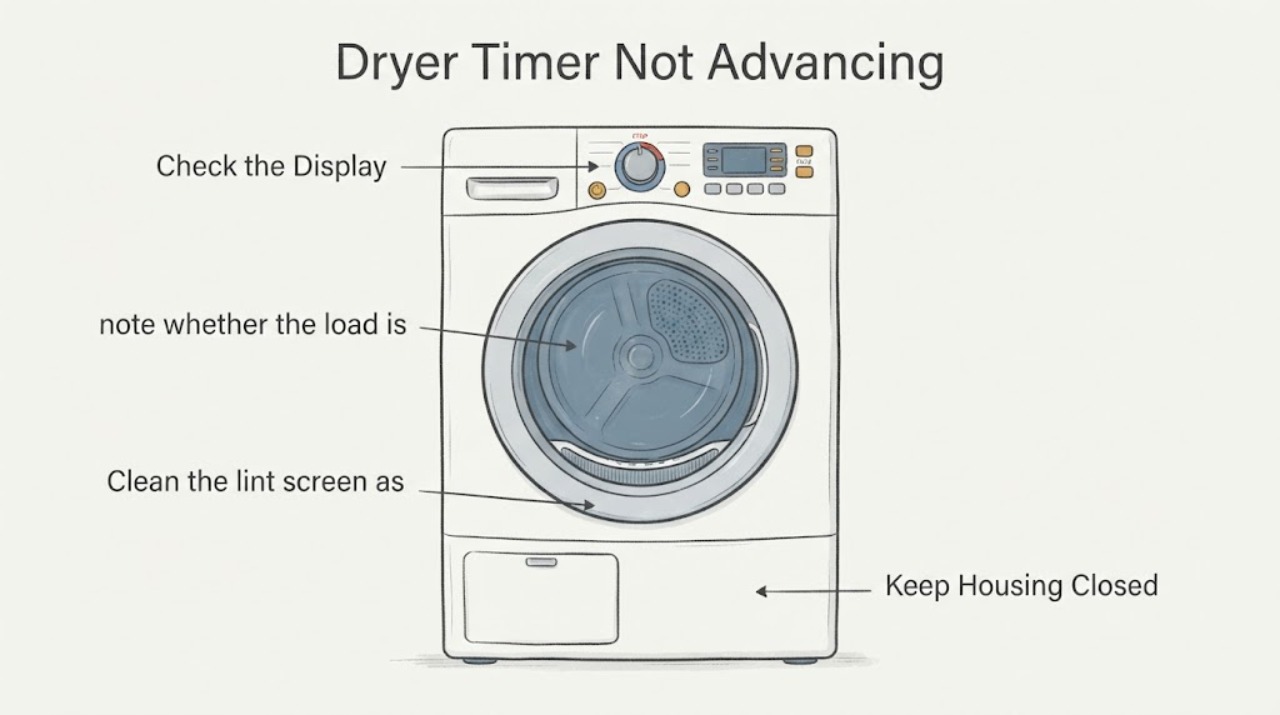
Work through in order
Diagnostic checks
Use only checks that match the exact appliance or system and its official guide.
-
Check 1
Identify whether the dryer is on Automatic or Sensor Dry, Timed Dry, Air Dry or Fluff, or another model-specific option. Note whether the control is a mechanical knob or a digital estimated-time display.
Expected result: The control stays in one place on Automatic or Sensor Dry, or it stays fixed on Timed Dry while the drum runs.
Next step: Treat stationary Automatic timing as potentially normal and continue with load and airflow checks. If Timed Dry remains fixed, record the exact model and arrange service rather than replacing a guessed timer.
Why this matters
Why: Amana documents delayed or changing timing on automatic cycles because moisture and temperature are sensed; Timed Dry is intended to run for the selected time.
-
Check 2
With the dryer stopped, note whether the load is very small, very large, mixed in fabric type, still wet, or was changed after the cycle started. Do not add or remove clothing while the drum is moving.
Expected result: The remaining time changes as the load dries, or the result changes with a normal load and consistent cycle; the control remains fixed despite a dry load on Timed Dry.
Next step: Use the model's recommended load and cycle. If a Timed Dry control still does not advance or the dryer stops before the load is dry, continue to airflow and service checks.
Why this matters
Why: Amana says automatic time responds to load size, material, drying rate, and newly added damp clothing. These observations can explain an estimate that moves or seems to wait, but not a fixed Timed Dry control.
-
Check 3
Clean the lint screen as the owner's manual directs and check from outside that the visible exhaust path and area around the dryer are not obstructed. Do not remove the cabinet or probe a live dryer.
Expected result: The lint screen is coated with detergent or softener residue, airflow is visibly restricted, or the screen and visible path are clear while timing remains abnormal.
Next step: Correct only the accessible lint or obstruction issue and follow the model manual for vent maintenance. If timing remains abnormal or the dryer overheats, stop use and arrange service.
Why this matters
Why: Amana manuals warn that a blocked lint screen can increase drying time and residue can make a dryer stop before the load is dry; poor airflow affects performance and can be a fire risk. This does not prove a timer fault.
-
Check 4
Check from outside that the dryer is level, the door closes and latches, the correct cycle is selected, Control Lock is not active where fitted, and the accessible breaker or fuse condition is normal. Do not bypass the door switch or test wiring.
Expected result: The dryer does not start, starts only after the door or control condition is corrected, or tumbles normally while the control still fails to advance on Timed Dry.
Next step: If the corrected control condition resolves operation, monitor one normal cycle. If the Timed Dry control remains fixed or the dryer stops again, use the exact model for service diagnosis.
Why this matters
Why: Amana lists levelness, door latch, cycle selection, Control Lock, and household protection among start and drying checks. A start-condition correction is not evidence of a damaged timer or board.
-
Check 5
Stop using the dryer for burning odor, smoke, scorching, unusual heat, repeated breaker trips, or a recurring incomplete cycle. Gather the full model number, gas or electric configuration, cycle and options, control behavior, load result, lint and airflow observations, and any status light or code.
Expected result: The abnormal timing persists on Timed Dry or the dryer shows a safety or repeated-operation symptom after external checks.
Next step: Keep the dryer off and arrange qualified Amana service. Do not open the cabinet, replace a timer or control board by guesswork, or repeatedly reset the dryer to continue operating it.
Why this matters
Why: The remaining cause is not safely identifiable from the general Amana family guidance and may require model-specific service inspection.
Use your observations
Decision map
Find the observation that best matches what you see, then follow the next safe action.
-
PATH 01Next step
What you see
The dryer is on Automatic or Sensor Dry, the drum runs, and the timer or estimated time waits or changes while the load is still damp.
Do this next
Treat this as potentially normal sensor behavior. Check load size, level, lint screen, and airflow; consult the exact model manual if the load never reaches dryness.
Why this path and its safety boundary
Why it matters: Amana says moisture and temperature sensing adjust the time, and an owner manual says a mechanical control may not move until the load is almost dry.
-
PATH 02Next step
What you see
The dryer is on Timed Dry, the drum runs, and the selected time or mechanical control remains fixed through the run.
Do this next
Stop relying on that cycle, record the exact model and observed drum and heat behavior, and arrange Amana service. Do not open the cabinet or replace a timer by guesswork.
Why this path and its safety boundary
Why it matters: Timed Dry is intended to run for the selected time. A fixed control is therefore a genuine model-specific timing symptom, but it does not identify a failed timer versus another control or drive condition.
-
PATH 03Next step
What you see
The cycle time changes with load size or dampness, clothes remain wet, the lint screen is coated, airflow is restricted, or the dryer is not level.
Do this next
Correct accessible load, lint, level, or vent conditions according to the model manual. If the dryer remains abnormal or overheats, stop use and request service.
Why this path and its safety boundary
Why it matters: Amana documents load, moisture sensing, levelness, lint, and vent airflow as drying-performance factors that can make timing appear abnormal.
-
PATH 04Next step
What you see
The dryer never starts, stops repeatedly, will not complete a cycle, or shows burning odor, smoke, scorching, unusual heat, or repeated breaker trips.
Do this next
Keep the dryer off, use only safe accessible power controls, and arrange qualified Amana service. Do not bypass the door switch, test live wiring, or continue resetting the dryer.
Why this path and its safety boundary
Why it matters: This is outside a normal sensor-timing explanation and requires a safety stop or model-specific diagnosis.
Helpful context
Understand the symptom
A stationary timer can be normal on Automatic Dry
Do not judge the timer before identifying the cycle. Amana says Automatic cycles sense air temperature or moisture and adjust the remaining time as the load dries. Its owner manual gives the older mechanical-control behavior explicitly: the cycle-control knob does not move until the load is almost dry, then advances through cool down. Timed Dry is different because it runs for the time selected on the control. The same complaint therefore needs different interpretation on the two cycle types.
Check the load and airflow before calling the timer defective
Amana says automatic time changes with load size, fabric type, drying rate, and wet clothes added after the cycle starts. It also identifies levelness, lint-screen condition, and vent airflow as drying-performance factors. Clean the lint screen as directed, keep the visible vent path clear, and check that the dryer is level from outside. Do not remove panels or turn an airflow observation into a motor, timer, sensor, or control-board diagnosis.
Separate a timer issue from a start or door issue
If the drum never starts, check only that the door is firmly latched, the correct Automatic Dry or Timed Dry cycle is selected, the controls are not locked, and the accessible household breaker or fuse condition is normal. Amana says the exact controls vary by model. A dryer that starts and tumbles but has a fixed control on Timed Dry is a different observation from one that never starts or stops because the door, cycle, control lock, or power condition is unresolved.
Use the model manual for the final timing interpretation
Amana manuals differ in whether time is shown as an estimate, actual timed minutes, a mechanical knob position, or a sensor-status indicator. Record the full model number, cycle, displayed time or knob position, whether the drum tumbles and heats, whether the load is damp, and whether the control changes at the end of a Timed Dry run. The official support pages repeatedly send model-specific features and cycle options back to the owner's manual, so do not substitute a different model's timer procedure.
Stop for overheating or repeated failure
Keep the dryer off for a burning smell, smoke, visible scorching, unusual heat, repeated breaker trips, or a cycle that repeatedly stops and will not complete. A lint screen or vent problem can affect drying and safety, but the official material does not make a universal timer or control-board diagnosis from the symptom. Arrange qualified Amana service and provide the model, cycle, control behavior, airflow observations, and any displayed status or code.
When checks do not resolve it
Need a professional?
Arrange Amana service when the control remains fixed on Timed Dry, the dryer repeatedly stops or fails to complete a cycle, or accessible load, lint, airflow, level, door, cycle, and power checks do not resolve the behavior. Keep the dryer off for smoke, burning odor, scorching, unusual heat, or repeated breaker trips.
Safety scope: Stop using the dryer for burning odor, smoke, scorching, unusual heat, repeated breaker trips, or repeated incomplete operation. Do not open the cabinet, test live wiring, bypass the door switch, or replace a timer, sensor, motor, or control board by guesswork.
Have this ready
- Provide the complete model number, gas or electric configuration, cycle and options, whether the control is a knob or display, whether the drum tumbles and heats, load moisture, lint and visible airflow observations, and any status light or code.
Common questions
FAQ
Is it normal for an Amana dryer timer to stay still?
It can be normal on Automatic or Sensor Dry. Amana says sensed moisture and temperature affect the remaining time, and an owner manual says a mechanical cycle-control knob may not move until the load is almost dry. Timed Dry is intended to run for the selected time, so a fixed control there needs model-specific service if it persists.
Can a small or damp load make the dryer seem stuck?
Yes, on an automatic cycle the dryer senses the load and adjusts time as moisture changes. Amana also says load size, material, drying rate, and clothes added after starting can change the remaining time. Check the cycle and load before assuming a timer failure.
Should I replace the timer if it does not advance?
Do not replace it by guesswork. Confirm that the cycle is Timed Dry, record whether the drum tumbles and heats, check the accessible lint, airflow, level, door, control, and power conditions, then use the exact model manual or qualified Amana service. The same symptom can be normal sensor behavior on another cycle.
Read the exact guide
Official sources
- Using Auto Dry, Timed Dry and EcoBoostAmana · Opened official Amana support content. It distinguishes moisture or temperature-sensing Automatic Cycles from Timed Dry, which runs for the selected time; available options vary by model.
- Dryer Not Starting or No OperationAmana · Opened official Amana support content. It covers door latching, correct Automatic or Timed Dry selection, Control Lock, touch-control moisture, and household fuses or breakers, with exact model features controlled by the owner's manual.
- Dryer Stops Mid-CycleAmana · Opened official Amana support content. It says automatic cycles sense humidity and stop at the selected dryness and distinguishes Air Dry, Quick/Rapid Dry, and automatic cycles; it does not identify an internal timing component.
- Amana Owner's ManualAmana · Opened official Amana owner-manual PDF. The manual states that features vary by model; its Auto Dry section explicitly explains that the cycle-control knob does not move until the load is almost dry, then advances as the load dries and enters cool down. It is used to explain behavior, not to transfer model-specific repairs.
- Dry Time Keeps Going Up - DryerAmana · Opened official Amana support content. It says Automatic-cycle time may adjust up or down with load size, fabric, drying rate, and damp clothes added after the cycle starts; it does not diagnose a timer component.
- Not DryingAmana · Opened official Amana support content. It supports cycle selection, automatic-cycle use, levelness and moisture-sensor contact, dryness settings, and the model-manual boundary; it is not used to diagnose a timer or board.
Community feedback
Share a repair observation
Share a plain-text repair observation. Accepted observations are published automatically; this page may take a moment to update.