
On this page
Start here
Quick answer
Turn the Amana dryer off before investigating a scraping sound. Amana's direct scraping guidance says coins, paper clips, safety pins, screws, nails, or other small hardware can lodge where the drum meets the front or rear; inspect those seams and remove only a loose object that is plainly accessible. Also note whether the sound occurs with an empty drum, only with clothing or metal fasteners, at startup after nonuse, or with drum drag, vibration, smoke, or a burning odor. Check pockets and visible lint-screen or blower-area debris, confirm the dryer is stable on all feet, and do not open the cabinet for a homeowner inspection. Persistent scraping with an empty drum, difficult hand rotation, metal-on-metal contact, heat, smoke, or burning odor points to a drum seal, glide, roller, belt, pulley, blower, or other internal fault: stop using the dryer and arrange qualified service.
Before you begin
Safety first
- Keep the dryer off for smoke, burning or electrical odor, unusual heat, sparks, a hot plug, damaged wiring, severe grinding, or a gas concern. Do not open the cabinet, bypass safety devices, or repeat powered tests in a hazardous condition.
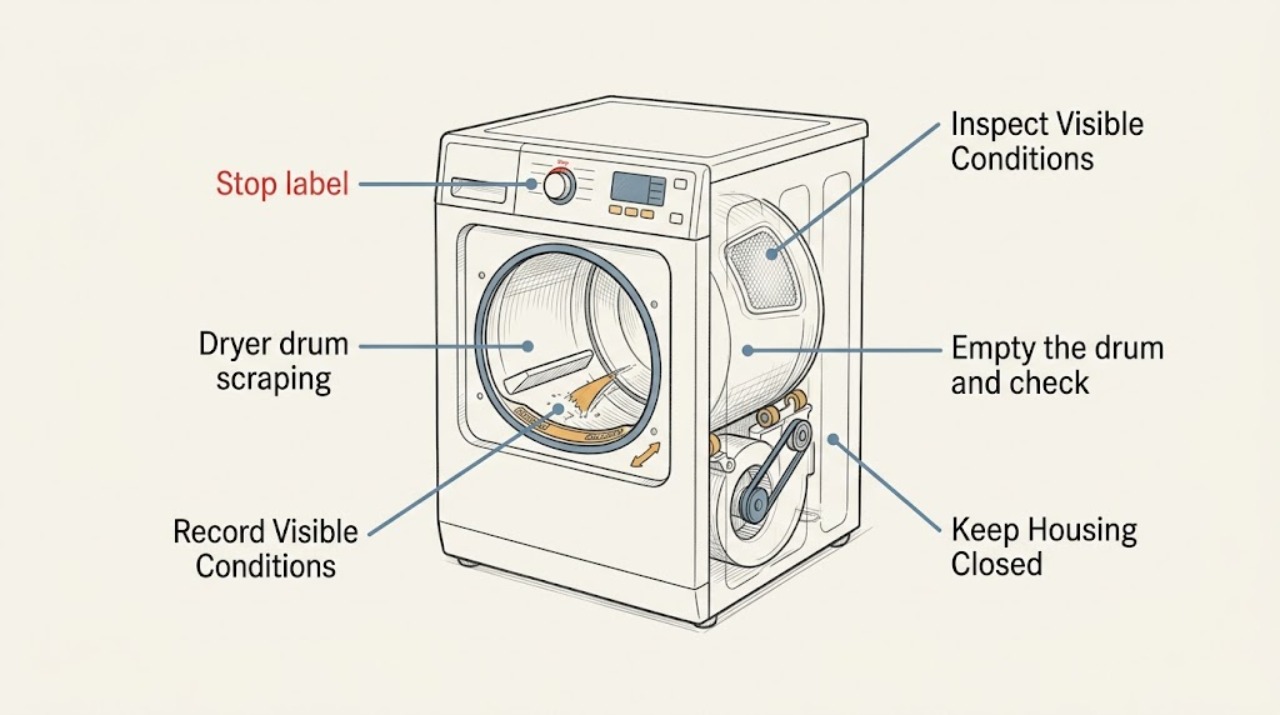
Work through in order
Diagnostic checks
Use only checks that match the exact appliance or system and its official guide.
-
Check 1
Stop the dryer, let the drum come to a complete stop, and record whether the scrape starts, stops, or changes during tumbling, reversing, or heat. Look from outside for smoke, a burning odor, unusual heat, a hot plug, sparks, or a damaged cord; do not restart when any hazard is present.
Expected result: The sound is a sharp scrape or metal contact, it occurs only with a load, it occurs with an empty drum, it is a brief startup thump after nonuse, or smoke, heat, odor, sparks, or cord damage is present.
Next step: Stop immediately for smoke, burning odor, sparks, a hot connection, or damaged wiring and arrange qualified help. Otherwise continue with the accessible seam, load, lint-area, and level checks that match the sound.
Stop if: Do not run another cycle to test a dryer with metal-on-metal scraping, smoke, burning odor, unusual heat, or a hot plug.
Why this matters
Why: Timing separates a trapped load object or temporary roller thump from a persistent internal mechanical fault; smoke, heat, or electrical symptoms override all sound checks.
-
Check 2
With the dryer off and the drum stationary, inspect the front and rear edges where the drum meets the cabinet. Look for a coin, paper clip, safety pin, screw, nail, or other small hardware and remove only an object that is loose and safely reachable without taking panels off.
Expected result: A small object is visible in a seam, nothing is visible but the scrape continues, or an object is wedged in a seal or bulkhead.
Next step: Remove a plainly loose object, inspect for a torn seal or sharp edge, and do not run the dryer if damage remains. Arrange service for a wedged object, persistent scrape, or suspected drum-contact damage.
Stop if: Do not insert screwdrivers, knives, fingers, or other tools deep into the seam, and do not remove panels to reach a trapped object.
Why this matters
Why: Amana identifies objects caught at the front or rear drum seam as a direct scraping cause. A hidden or wedged item may have damaged the seal or bulkhead and cannot be safely extracted by probing.
-
Check 3
Empty the drum and check pockets and garments for hard objects, zippers, buckles, buttons, rivets, pens, or other metal items. Remove items that can tumble against the drum, and keep the dryer separated from a washer or nearby object that may be striking its cabinet.
Expected result: The scrape disappears when the load or a hard garment item is removed, hard objects are found in a pocket, the cabinet is touching another appliance, or the empty dryer still scrapes.
Next step: Clear pockets and keep surrounding objects from contacting the dryer, then use a normal load only if no scrape or damage remains. If the empty drum still scrapes, leave the dryer off and arrange service.
Stop if: Do not continue using a load that produces metal contact, and do not place hands inside while the drum is moving.
Why this matters
Why: A load-dependent sound is more likely external hardware or contact; a sound that remains empty points toward the drum seam, support, seal, drive, or blower path.
-
Check 4
From a safe position, rotate the empty drum slowly by hand only after power is disconnected or the dryer is otherwise safely isolated. Note whether it turns smoothly through a full rotation, catches at one location, rubs continuously, or feels unusually difficult to move; do not remove the belt or cabinet panels.
Expected result: The drum turns smoothly, catches or scrapes at one point, rubs throughout the rotation, wobbles, or is difficult to turn.
Next step: Stop the dryer and give the technician the rotation result and sound location. Do not diagnose a specific part or continue powered tests based only on hand rotation.
Stop if: Do not perform this check with power connected, do not reach near a belt or motor, and do not force a stuck drum.
Why this matters
Why: A repeatable catch, rub, wobble, or drag with an empty drum makes an internal support, seal, glide, roller, bearing, or drum alignment issue more likely than a pocket object.
-
Check 5
Check that the dryer stands firmly on all installed feet and does not rock or teeter. Look for a missing foot, a visibly uneven floor, or the cabinet touching another appliance; use only the model installation instructions for any accessible leveling adjustment.
Expected result: The dryer rocks, a foot is missing, the floor is uneven, the cabinet contacts a nearby appliance, or the dryer is stable and separated.
Next step: Correct only a safe, visible leveling or clearance issue according to the manual, then check whether the sound is gone without a long test. Arrange service for a damaged foot, severe vibration, or scraping that remains on a stable dryer.
Stop if: Do not move a heavy dryer alone, drag it with gas or power connections attached, or continue operation when it rocks severely.
Why this matters
Why: Amana links an unstable or unlevel dryer to noise and vibration, but stable installation with persistent scraping points back to drum or drive components.
-
Check 6
With the dryer off, remove the lint screen and inspect only the accessible lint-screen housing for a loose coin, sock, or other object. Keep the lint screen installed for any later operation; do not remove the back or front panel to clean internal belt, pulley, blower, or vent areas.
Expected result: A foreign object is visible in the lint housing, lint is heavily packed, the accessible area is clear, or the scrape seems to come from behind a panel.
Next step: Remove only an accessible loose object with the dryer safely isolated, replace the lint screen, and arrange service if the sound persists or appears internal. Keep the vent and lint system maintained under the model manual.
Stop if: Do not operate without the lint screen, push objects deeper into the housing, or insert tools toward the blower wheel.
Why this matters
Why: Amana notes that objects can fall into the lint chute and contact the blower wheel, while lint buildup can affect belt and pulley noise. A behind-panel sound requires professional access.
-
Check 7
Compare the sound after the safe, accessible checks without running repeated cycles. If the drum seam and load are clear, the dryer is stable, and a short supervised operation still produces scraping, stop and document the sound location, load condition, heat setting, and whether the drum was hard to turn.
Expected result: The scrape is gone, it occurs only briefly after a long nonuse period and fades, or it remains with an empty or normal load.
Next step: Use the dryer only if the sound and any damage are gone. For persistent or worsening scraping, leave it off and arrange qualified service with the observations; do not open the cabinet for part replacement.
Stop if: Stop immediately if the scrape becomes grinding or metal-on-metal, the drum binds, heat or smoke appears, or a burning odor develops.
Why this matters
Why: A resolved loose object or short-lived roller thump is different from a persistent empty-drum scrape, which may involve a worn support, seal, glide, roller, belt, pulley, blower, or motor.
Use your observations
Decision map
Find the observation that best matches what you see, then follow the next safe action.
-
PATH 01Next step
What you see
A coin, paper clip, screw, nail, or other small hardware is plainly visible at the front or rear drum seam and the dryer has no heat, smoke, or electrical hazard.
Do this next
Turn the dryer off and remove only the loose object that is safely reachable. Inspect the seam and seal for damage; arrange service if the object is wedged or the scrape remains.
Why this path and its safety boundary
Why it matters: A trapped object is the leading explanation for a direct scraping sound.
-
PATH 02Next step
What you see
The sound occurs only with clothing, disappears when hard items are removed, or changes with zippers, buckles, buttons, or rivets.
Do this next
Empty pockets, separate hard items where appropriate, and keep the load from striking the cabinet. Stop if any metal contact or damage continues with an empty drum.
Why this path and its safety boundary
Why it matters: The load or garment hardware is more likely making the noise than an internal drum support failure.
-
PATH 03Next step
What you see
The dryer was unused for a while and makes a light thump that fades during the first few minutes, without a sharp scrape or drag.
Do this next
Do not disassemble the dryer for a fading thump. Stop and arrange service if it becomes a scrape, grinding sound, strong vibration, or does not diminish as described.
Why this path and its safety boundary
Why it matters: Amana says temporary flat spots on support rollers can cause this startup thump and recover with regular operation; this is not the same as persistent scraping.
-
PATH 04Next step
What you see
The dryer rocks, a foot is missing, or its cabinet contacts another appliance, while the drum and load do not show a trapped object.
Do this next
Level the dryer only with the model installation procedure and restore clearance. Arrange service for severe rocking, a damaged foot, or any scraping that remains when stable.
Why this path and its safety boundary
Why it matters: Installation or external cabinet contact can add noise and vibration, but it does not prove the drum mechanism is healthy.
-
PATH 05Next step
What you see
A loose object is visible in the lint-screen housing, or the noise seems to come from the blower or behind a panel.
Do this next
Remove only a visible loose object with power isolated and replace the lint screen. Request service for anything behind a panel, for packed internal lint, or for a sound that continues.
Why this path and its safety boundary
Why it matters: A foreign object may be contacting the blower wheel, or lint and drive components may need internal service access.
-
PATH 06Next step
What you see
The empty drum catches, rubs, wobbles, or is difficult to turn, or a scrape continues after the seam, load, lint housing, and leveling checks are normal.
Do this next
Leave the dryer off and arrange qualified service. Give the technician the sound timing, hand-rotation result, location, heat setting, and whether any object or damage was found.
Why this path and its safety boundary
Why it matters: An internal drum support, seal, glide, roller, bearing, belt, pulley, blower, motor, or alignment fault is possible; a sound alone cannot identify the failed part.
-
PATH 07Next step
What you see
Smoke, burning odor, unusual heat, sparks, a hot plug, damaged wiring, or severe metal-on-metal grinding appears.
Do this next
Stop immediately, keep clear, isolate power only from a safe dry location, close the gas valve if applicable and safe, and obtain qualified or emergency help. Do not restart to test.
Why this path and its safety boundary
Why it matters: Continued operation could create a fire, electrical, or mechanical injury hazard.
Helpful context
Understand the symptom
Scraping is different from a brief startup thump
A brief light thump after a long period of nonuse can come from temporary flat spots on the drum support rollers, and Amana says that sound should diminish as the rollers regain their shape. A sharp scrape, rhythmic metal contact, or noise that continues with an empty drum is a different pattern. Stop the dryer, identify when the sound occurs, and do not keep running it to make the diagnosis clearer.
Start with the accessible drum seams and load
Small hardware can move out of a pocket and become trapped between the drum and the front or rear edge. Inspect the seam with the dryer off and check garments for coins, zippers, buckles, buttons, rivets, and other hard objects. Remove only a loose item that can be reached without disassembling the dryer; a part that is wedged in the seal or bulkhead needs service.
Internal wear needs a service boundary
The drum is supported by several internal wear and drive components, but a homeowner cannot confirm a roller, glide, seal, belt, pulley, blower, or motor fault by sound alone. Amana directs users to service when noise remains, while its manuals reserve cabinet and power work for appropriate procedures. Keep the dryer off when the sound is severe or accompanied by heat, smoke, a burning odor, or visible damage.
Safety boundary
Stop conditions
- Stop for smoke, burning or electrical odor, unusual heat, sparks, a hot plug or outlet, damaged wiring, or severe metal-on-metal grinding. Keep clear, isolate power only from a safe dry location, close the gas valve if applicable and safe, and arrange qualified help.
- Turn the dryer off and isolate power before reaching into the drum, seam, lint housing, or any accessible service area. Do not reach near a moving drum, belt, motor, or blower.
- Do not open the cabinet, remove the belt or panels, probe a trapped object, lubricate internal parts, or bypass a safety device as a homeowner scraping check.
- Do not operate without the lint screen, with a damaged drum seal or cord, with a drum that binds or wobbles, or after a persistent scrape remains with an empty drum.
Only after diagnosis
Potential parts
- dryer drum seal
Consider this only if inspection or qualified diagnosis confirms a torn, displaced, or worn seal at the drum edge or bulkhead after a scraping object is removed.
Drum seals vary by Amana dryer design and model. Confirm the exact model and service diagnosis before selecting a replacement. - dryer drum glide
Consider this only when persistent empty-drum rubbing or drag and qualified inspection show a worn or damaged glide rather than a trapped object or load contact.
Glides and their supports are model-specific and may require cabinet access. Confirm exact fit and safe installation before ordering. - dryer drum roller
Consider this only when qualified diagnosis identifies a worn, seized, flattened, or wobbling support roller after the empty-drum symptom is confirmed.
Roller assemblies and axles vary by Amana model. Do not choose by appearance or startup noise alone; confirm diagnosis and exact model.
When checks do not resolve it
Need a professional?
Request service for persistent or worsening scraping, empty-drum drag, a damaged or wedged drum-seam object, failed leveling or support, a behind-panel lint or blower obstruction, or any heat, smoke, electrical, gas, or burning symptom.
Safety scope: Keep the dryer off for smoke, burning or electrical odor, unusual heat, sparks, a hot plug, damaged wiring, severe grinding, or a gas concern. Do not open the cabinet, bypass safety devices, or repeat powered tests in a hazardous condition.
Common questions
FAQ
Why is my Amana dryer making a scraping sound?
Start by turning it off and checking the front and rear drum seams for a coin, paper clip, screw, nail, or similar hardware. If the empty drum still scrapes, catches, rubs, or is hard to turn, an internal seal, glide, roller, drive, blower, or alignment fault is possible and needs service.
Can a zipper or coin cause scraping in an Amana dryer?
Yes. Amana warns that pocket objects and garment hardware can make noise, and small hardware can lodge where the drum meets the front or rear. Empty the drum, check pockets, and do not continue if metal contact or damage remains.
Is a thump after my Amana dryer has been unused normal?
A light thump during the first few minutes after nonuse can come from temporary flat spots on support rollers and should diminish as they recover. A sharp scrape, grinding, drag, smoke, or persistent sound is a different condition and should be serviced.
Should I open the Amana dryer to inspect rollers or the belt?
Not as a routine homeowner scraping check. Amana's public guidance supports inspecting accessible seams, loads, lint housing, and leveling; rollers, glides, seals, belts, pulleys, blower parts, and wiring require the exact model procedure and qualified service when the sound persists.
Can an unlevel Amana dryer make scraping or grinding noise?
An unlevel dryer or missing foot can cause rocking and noise, and nearby appliances can contact the cabinet. Level it only with the model installation guidance and stop for severe vibration or a scrape that remains when the dryer is stable.
When should I stop using an Amana dryer that is scraping?
Stop for persistent empty-drum scraping, a drum that binds or wobbles, severe metal contact, smoke, burning odor, unusual heat, sparks, a hot plug, damaged wiring, or a gas concern. Isolate power from a safe location and arrange qualified help rather than running more tests.
Read the exact guide
Official sources
- Use & Care GuideAmana · Amana use and care guide for specified dryer models; consult the matching manual for another model.
- Dryer Noises and Lights: Troubleshooting GuideAmana · Amana troubleshooting guide for dryers; use the exact model manual for service access.
- Dryer Sounds and NoisesAmana · Amana Product Help article; noise behavior varies with dryer model and installation.
- Squealing or Squeaking Sound - DryerAmana · Amana Product Help article; internal component access requires model-specific service procedures.
- Scraping Sound - DryerAmana · Amana Product Help article; exact dryer access depends on model.
Community feedback
Share a repair observation
Share a plain-text repair observation. Accepted observations are published automatically; this page may take a moment to update.