
On this page
Start here
Quick answer
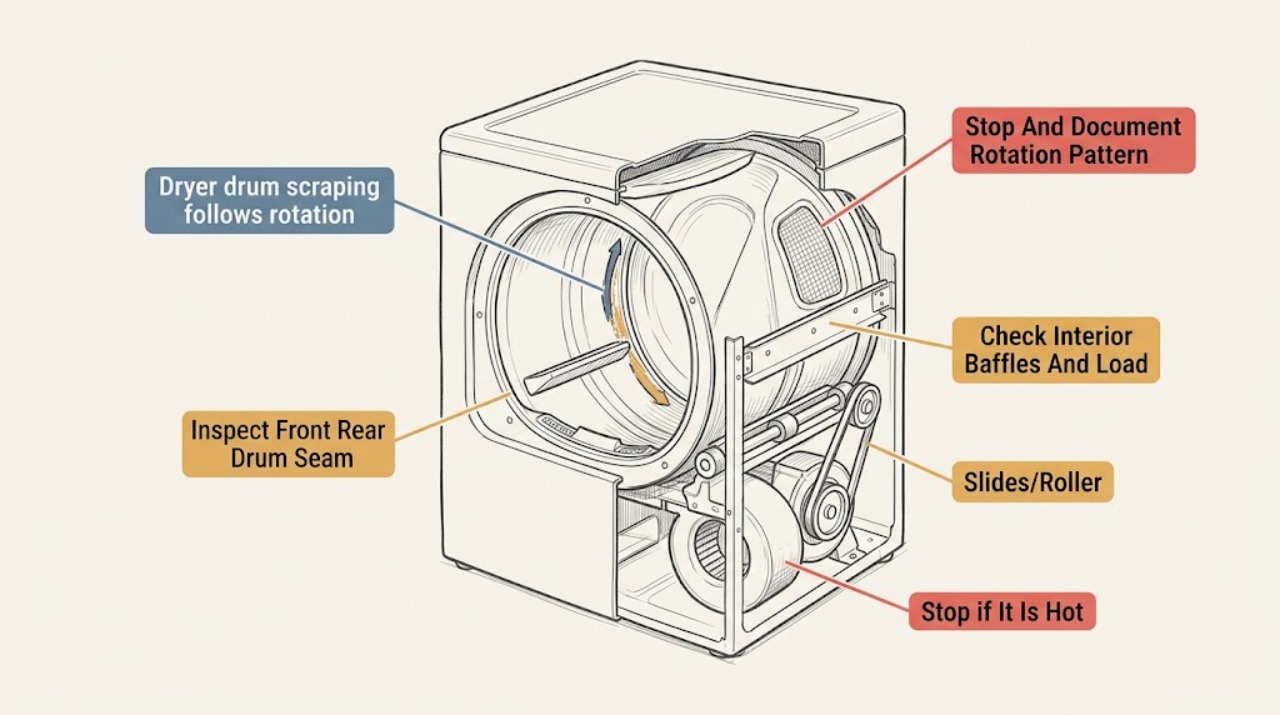
A scraping sound that repeats with dryer-drum rotation usually comes from an object caught where the drum meets the front or rear, a loose or worn drum slide, a support or roller problem, or a loose baffle or seal. Stop the dryer, disconnect power using the normal plug or approved disconnect, and inspect only the empty drum and accessible edges for coins, screws, clips, or other objects. Do not reach into the lint-filter opening or cabinet unless the manual explicitly makes that area a user check, because edges may be sharp. If the scraping remains with the drum empty, the drum feels rough or drops, a belt or seal is damaged, there is a burning smell, smoke, heat, or the dryer will not turn freely by its normal controls, leave it off and arrange qualified appliance service. Do not keep running it to see whether the noise improves: a rotating scrape can damage the drum, support surfaces, belt, or other parts.
Work through in order
Diagnostic checks
Use only checks that match the exact appliance or system and its official guide.
-
Check 1
Stop the cycle, remove the load, disconnect power using the normal plug or approved disconnect, and record when the scrape occurs: continuously while the drum moves, once per revolution, only with a heavy load, or also when the dryer is empty.
Expected result: Record a repeating scrape with each rotation, a scrape only under load, a noise that stops when empty, or a noise that continues even though the dryer is empty and powered off afterward.
Next step: Keep the dryer off and use the corresponding inspection branch. Do not run another cycle merely to reproduce a sharp or metallic scrape.
Stop if: Stop immediately for smoke, burning odor, a hot cabinet, visible sparks, a frayed belt, a loose drum, or a drum that does not move normally; keep power disconnected and arrange qualified service.
Why this matters
Why: A one-position-per-revolution pattern makes contact at the drum seam, seal, slide, roller, baffle, or another rotating interface more likely. A load-only sound makes a zipper, buckle, or object in the load more likely, while an empty-drum scrape points toward the dryer itself.
-
Check 2
With the empty dryer off and power disconnected, use a light to inspect the visible front and rear drum edges, the gap or seam, and the accessible door seal for a coin, screw, clip, nail, paper fragment, torn fabric, or other object.
Expected result: Record a loose object that is plainly reachable, a mark or groove at the seam, torn or displaced seal material, no visible object, or an edge that cannot be inspected safely.
Next step: Remove only a loose object that can be lifted out without force or reaching past sharp edges. Leave the dryer off and arrange service for a mark, damaged seal, trapped object, or inaccessible contact area.
Stop if: Do not force an object out, insert tools into the gap, reach into a narrow seam, or continue if sharp metal, broken glass, or unstable drum movement is present.
Why this matters
Why: Small hardware caught between the drum and front or rear can create a scrape synchronized with rotation. A groove, torn seal, or inaccessible edge means the contact may already be damaging a support surface and is not a routine object-removal problem.
-
Check 3
Inspect the empty drum interior, pockets, and baffles for a loose fastener, detached baffle, exposed sharp edge, or item that could contact the drum as it turns; compare the load for metal zippers, buckles, buttons, or hardware.
Expected result: Record a loose or damaged baffle, an exposed sharp edge, hardware left in a pocket, a load-only contact mark, or no interior finding.
Next step: Remove loose laundry hardware from the load and do not use the dryer if a baffle, drum surface, or edge is loose or damaged. Arrange service for any dryer-side finding.
Stop if: Do not tighten or remove a baffle, straighten drum metal, or reach behind an interior panel; those tasks can expose sharp edges and alter drum balance.
Why this matters
Why: Loose garment hardware can scrape or rattle while tumbling, while a loose baffle or sharp interior edge can create a repeatable contact point even with no load. No interior finding shifts attention to the drum support or drive path.
-
Check 4
Without moving or opening the dryer, inspect whether the vent, power cord, adjacent wall or appliance, pedestal or top surface, leveling feet, or exposed cabinet screws can touch or rattle against the cabinet.
Expected result: Record a secure clearance, a vent or cord touching the cabinet, an object leaning against the dryer, a visibly loose exposed screw, or a dryer that rocks or lacks a stable foot.
Next step: Clear only an obvious external contact and verify that the vent is supported without tension. Do not move the dryer or remove panels; if the sound remains or the dryer is unstable, arrange service.
Stop if: Do not pull the dryer away from the wall, reach behind it, adjust gas or electrical connections, or continue if the vent is damaged or the appliance can tip.
Why this matters
Why: A contact or cabinet rattle can imitate a rotating scrape, but it is less likely to produce a fixed sound once per drum revolution. An unstable or missing-foot condition can add vibration and should be corrected according to the installation instructions.
-
Check 5
From the doorway and without starting the dryer, note any visible drum sag, scraping marks, rubbing seal, belt fragments, unusual resistance during normal door-opening inspection, or a sound that previously changed with drum speed.
Expected result: Record a level drum with no marks, a drum that appears low or off-center, worn slide or seal material, belt debris, or no safe way to assess the support area.
Next step: Leave the dryer off and provide the findings to qualified appliance service. Do not remove the cabinet, belt, drum, slides, rollers, or motor as a homeowner diagnostic step.
Stop if: Stop all inspection if access would require a panel, live electrical testing, gas-line work, lifting the dryer, or reaching near sharp or moving parts.
Why this matters
Why: A sagging or off-center drum and visible wear make a support, slide, roller, seal, bearing, belt, or related rotating assembly issue more likely. These parts are inside the cabinet on many models and cannot be identified reliably by sound alone.
-
Check 6
Prepare a service handoff with the exact model, gas or electric type, whether the scrape repeats once per rotation, whether it occurs empty, where it sounds loudest, visible seam or seal marks, load hardware findings, and any heat, odor, vibration, or drying change.
Expected result: Confirm that the only actions taken were stopping and disconnecting power, empty-drum inspection, removal of a plainly loose object, and external clearance checks that required no appliance movement or panel access.
Next step: Arrange qualified appliance service for persistent scraping, any empty-drum scrape, visible wear, drum sag, damaged belt or seal, or an unidentified repeating contact.
Stop if: Do not resume ordinary drying until a persistent or metallic scrape has been assessed; use emergency help for smoke, fire, shock, or uncontrolled electrical damage.
Why this matters
Why: A timed sound description and visible findings help separate a trapped object or load hardware from drum-support, belt, seal, roller, motor, or cabinet issues without guessing at a part.
Use your observations
Decision map
Find the observation that best matches what you see, then follow the next safe action.
-
PATH 01Next step
What you see
The sound occurs only with a particular load, stops when the drum is empty, and the empty drum, seam, and baffles show no damage.
Do this next
Remove or turn in the offending garment hardware and keep pockets clear. If the sound returns with an empty drum, use the service branch instead of continuing cycles.
-
PATH 02Next step
What you see
A loose object is visible at the front or rear seam, or the drum edge or seal shows a scrape, groove, displacement, or torn material.
Do this next
Remove only a plainly loose object that requires no force and keep the dryer off. Arrange service for a trapped object, groove, torn seal, or any contact that remains.
-
PATH 03Next step
What you see
The scrape continues with an empty drum, repeats with rotation, and there is drum sag, a rubbing seal, wear material, belt debris, or no visible object.
Do this next
Leave the dryer disconnected and arrange qualified appliance diagnosis. Do not open the cabinet or select a replacement part from the sound alone.
-
PATH 04Next step
What you see
The noise changes when an accessible vent, cord, adjacent object, or exposed cabinet contact is cleared, and there is no repeating drum-position scrape or visible drum damage.
Do this next
Restore safe clearance and vent support without moving or opening the appliance. Stop and arrange service if the noise remains or the dryer rocks.
-
PATH 05Next step
What you see
Scraping is accompanied by burning odor, smoke, sparks, hot cabinet, damaged wiring or belt, shock, breaker trip, a loose drum, or an inaccessible contact point.
Do this next
Keep the dryer off and power disconnected if it can be done without approaching a hazard. Arrange qualified appliance or electrical service; use emergency help for smoke, fire, shock, or an active electrical hazard.
Helpful context
Understand the symptom
Why rotation timing matters
If the scrape occurs at the same point on each drum revolution, the noise is more likely tied to a rotating part or to something contacting the drum than to a loose item sitting on top of the appliance. A coin, screw, paper clip, or similar hardware can lodge at the seam where the drum meets the front or rear. GE also lists a foreign object at the front seal and worn or loose drum slides as causes of metal scraping while the drum rotates. The timing narrows the inspection; it does not identify a failed part by itself.
Start with the accessible drum, not the cabinet
With the dryer stopped and power disconnected, remove the load and look along the front and rear edges of the drum, around the visible seal, and at the interior baffles. Remove only a loose object that is plainly reachable without sharp-edge exposure or force. A scrape that remains with an empty drum, or any visible wear at a support, slide, roller, belt, or seal, needs a service diagnosis rather than repeated test cycles.
Separate a drum scrape from a cabinet rattle
A loose vent, cord, cabinet screw, leveling foot, or object leaning against the dryer can make noise without being part of the drum path. GE recommends checking that the dryer is level and secure and checking exposed screws; Samsung likewise distinguishes loose external objects and vent rattles from noises that continue with an empty drum. Because this topic is a scrape that follows rotation, an external rattle is less likely when the sound repeats at the same drum position, but it is still worth ruling out without moving or opening the appliance.
Why continued operation is a poor test
Drum slides or pads support the drum as it rotates, while rollers hold it in place and the belt transfers motor drive. A part that is rubbing can worsen as the dryer runs and can mark the drum or wear neighboring parts. GE advises discontinuing use when unusual noise is not resolved, and Whirlpool directs users to service when the scraping source is at a drum seam or support surface. Record the sound pattern and visible findings for the technician instead of running additional cycles.
Safety boundary
Stop conditions
- Disconnect power and stop using the dryer for a persistent or metallic scrape, empty-drum scraping, visible wear, a loose drum, burning odor, smoke, sparks, hot cabinet, shock, or breaker trip.
- Do not reach into a narrow drum seam or lint-filter opening, insert tools, remove panels, adjust gas or electrical connections, or handle a belt, motor, slides, rollers, bearing, or baffle as a casual homeowner check.
- Do not move, tilt, or run the dryer with a damaged vent, unstable cabinet, exposed wiring, frayed belt, torn seal, sharp edge, or an object that cannot be removed without force.
Only after diagnosis
Potential parts
- dryer drum slide, glide, or pad
Consider this only when qualified diagnosis confirms a worn or loose slide or pad and the scrape continues with the drum empty.
Confirm the exact dryer model, slide or pad shape, mounting position, and manufacturer-approved fit before selection. - dryer drum roller or support
Consider this only when qualified diagnosis finds a worn, seized, flat-spotted, or misaligned roller or drum support after loose-object causes are excluded.
Verify the exact model, roller dimensions, shaft or bearing arrangement, support bracket, and manufacturer fit before replacement. - dryer drum seal or felt seal
Consider this only when inspection or service confirms a torn, displaced, or worn seal contacting the rotating drum or allowing objects into the gap.
Confirm the exact model, seal location, adhesive or fastening method, and manufacturer installation instructions before selection. - dryer drive belt or idler pulley
Consider this only when qualified service confirms belt debris, damaged belt tracking, or an idler pulley fault related to the noise; a scrape alone does not prove either part failed.
Confirm the exact dryer model, belt routing, length, pulley type, and required service procedure before replacement.
When checks do not resolve it
Need a professional?
Arrange qualified appliance service when scraping persists with an empty drum, repeats once per rotation, leaves a mark, involves the front/rear seam, seal, slides, rollers, belt, baffle, motor, or drum support, or cannot be inspected safely. Stop immediately for smoke, burning odor, sparks, shock, hot cabinet, damaged wiring or belt, breaker trip, unstable appliance, or a loose drum. Do not open the cabinet, work on gas or electrical connections, or run repeated cycles to test a metallic scrape.
Have this ready
- Provide the exact model, gas or electric type, empty-versus-loaded result, rotation timing, sound location, visible seam/seal/baffle findings, external clearance findings, and any odor, heat, vibration, belt, wiring, or drying symptom.
Common questions
FAQ
Why does my dryer make a scraping sound once per drum rotation?
A repeating scrape commonly points to contact at the front or rear drum seam, a foreign object, a worn or loose slide, a support or roller issue, or a loose seal or baffle. Stop the dryer and inspect only accessible empty-drum areas; persistent or metallic scraping needs qualified service.
Can a coin or screw cause a dryer drum to scrape?
Yes. Manufacturer guidance identifies coins, paper clips, screws, nails, and similar hardware caught between the drum and its front or rear edge as possible scraping causes. Remove only an object that is plainly reachable without force or sharp-edge exposure, and stop if it is trapped.
How do I know whether the scrape is from the load or the dryer?
If the sound occurs only with one load and stops when the empty drum is checked, garment hardware such as zippers, buckles, or buttons is more likely. If it persists with an empty drum or repeats at the same rotation point, a dryer-side contact or support problem is more likely.
Should I run the dryer empty to see whether the scraping stops?
Do not keep running a dryer with a sharp or metallic scrape merely as a test. Stop and disconnect power, inspect the accessible drum and seam, and arrange service if the sound persists, the drum is damaged or off-center, or the source is not safely visible.
Which dryer part should I replace for a scraping noise?
Do not choose a part from the sound alone. Slides, pads, rollers, seals, baffles, belts, and other supports differ by model; a qualified technician should confirm the failed component and exact model fit after the dryer is safe to inspect.
Read the exact guide
Official sources
- What are The Parts of a Dryer?Whirlpool · Whirlpool parts overview used for component roles and conditional diagnosis; model-specific designs vary.
- Dryer - NoisesGE Appliances · GE dryer support guidance used for general dryer-noise triage; exact model instructions govern access and repair.
- Scraping Sound - DryerWhirlpool Product Help · Whirlpool dryer support guidance used for general seam and object checks; exact model instructions govern access.
- Samsung dryer is too noisySamsung Electronics America · Samsung dryer support guidance used for cross-brand sound-pattern comparison; exact model instructions govern checks.
Community feedback
Share a repair observation
Share a plain-text repair observation. Accepted observations are published automatically; this page may take a moment to update.