
On this page
Start here
Quick answer
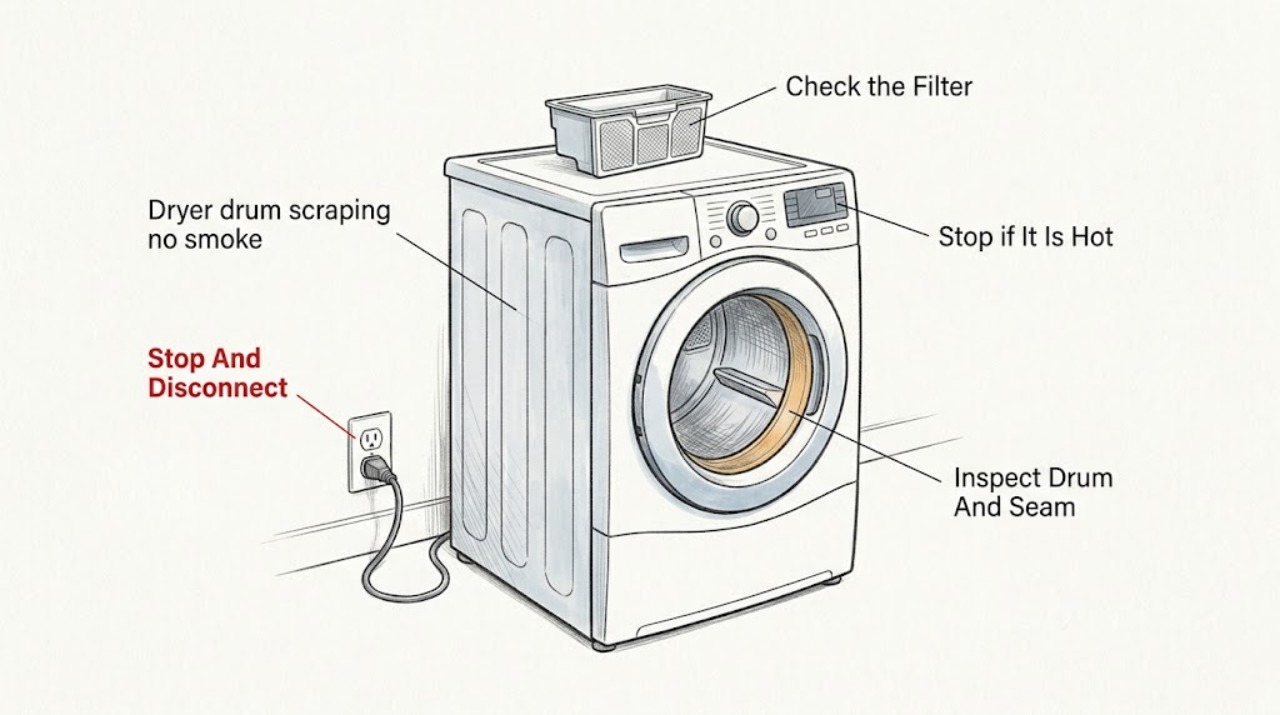
No smoke is a useful observation, but it does not make a scraping dryer safe to keep running. Stop the cycle, disconnect power as the owner's instructions allow, and inspect only the drum opening, front and rear drum edges, lint-filter area, and surrounding floor for a coin, fastener, zipper, or other loose object. A scraping sound that changes with the load can be an item in the drum or seam; scraping with an empty drum, a repeating metal rub, a drum that is hard to turn by hand, or a noise that continues after accessible debris is removed can indicate worn drum slides, rollers, a seal, belt, bearing, or another internal support. Do not remove cabinet panels or reach into the drive or heating area. Keep the dryer out of service and arrange qualified appliance repair if the sound persists, the drum is damaged or misaligned, or any smell, smoke, heat damage, sparking, or electrical concern appears.
Before you begin
Safety first
- This article supports stopping the cycle, disconnecting power, ordinary-access visual inspection, and removal of a completely visible loose object only. It does not authorize cabinet, drive, drum-support, heating, gas, or electrical work.
Work through in order
Diagnostic checks
Use only checks that match the exact appliance or system and its official guide.
-
Check 1
Stop the dryer, turn its controls off, and disconnect electrical power according to the owner's instructions before placing hands near the drum or lint-filter opening; for a gas dryer, do not disturb the gas connection.
Expected result: The scraping stops with the dryer off, or there is still heat, a smell, smoke, sparking, or another abnormal sign after the cycle stops.
Next step: Continue only with cool, powered-off ordinary-access inspection when no safety sign is present. Otherwise keep the dryer disconnected, leave the area if needed, and arrange appropriate emergency or appliance service.
Stop if: Do not keep running the dryer to reproduce scraping when smoke, burning odor, sparks, damaged wiring, or unusual heat is present.
Why this matters
Why: A stopped sound can still reflect a mechanical contact that needs inspection. Heat, odor, smoke, or sparking changes this from a routine noise check to a stop-use and safety-service condition.
-
Check 2
With power disconnected and the drum cool, inspect the visible drum interior and the front and rear edges where the drum meets the cabinet for a coin, paper clip, screw, nail, zipper, or other loose object.
Expected result: A loose object is visible at the drum edge or inside the drum, the edges are clear, or a sharp edge, scrape mark, gap, or damaged seal is visible.
Next step: Remove only an object that is completely visible and reachable without force, then keep the dryer off until the drum area is clear and a qualified person confirms the sound is gone. Escalate for damage or trapped objects.
Stop if: Do not reach past the drum edge, pry a trapped object, bend the seal, or remove panels to access the front or rear support.
Why this matters
Why: A loose object can rub as the drum rotates and is a plausible localized cause. A scrape mark, gap, or damaged seal points to a drum-support or alignment concern rather than a simple load item.
-
Check 3
Inspect the lint filter, filter slot, and immediately visible area for a loose fastener or object without reaching deeply into the opening; use a light and keep hands clear of sharp edges.
Expected result: An object is visible and reachable, the filter or slot is damaged or loose, or the area is clear but the drum-scrape report continues.
Next step: Remove only a fully visible loose item, replace a damaged filter with the exact specified type, and arrange service when the object is not safely reachable or the sound remains.
Stop if: Do not insert tools, reach into the blower or heater area, disassemble the filter housing, or operate without a correctly fitted lint filter.
Why this matters
Why: A loose item near the lint filter can travel into the drum path and create noise. A damaged filter slot or clear opening with continued scraping makes an internal drum support, seal, roller, or drive issue more likely.
-
Check 4
After accessible objects are removed and only when the dryer is safe and cool, record whether the scraping was tied to one garment, fastener, or heavy load; do not run a damaged or persistently scraping dryer for repeated tests.
Expected result: The noise was load-specific and absent when the drum was empty, or it occurred with an empty drum and at the same point in rotation.
Next step: Remove the implicated garment or object from service and monitor only after a qualified person confirms the dryer is mechanically sound; arrange service for any empty-drum scraping.
Stop if: Do not overload the dryer, continue a high-heat cycle, or use repeated runs to see whether a mechanical scrape disappears.
Why this matters
Why: Load-specific noise supports an item or garment contact. Empty-drum scraping or a rotation-synchronous rub points toward the drum edge, seal, slides, rollers, belt, bearing, or another mechanical support.
-
Check 5
From outside the cabinet, check that the dryer stands level on a solid floor and that the exhaust duct, power cord, and nearby objects are not contacting or rattling against the cabinet; do not move a stacked or hard-connected unit by force.
Expected result: The cabinet rocks, a duct or cord contacts the cabinet, an external screw or object is loose, or the exterior is stable and clear while scraping remains.
Next step: Clear only loose external contact that can be moved safely, leave the dryer disconnected if scraping persists, and provide the installation and sound observations to a qualified servicer.
Stop if: Do not pull gas tubing, disconnect the exhaust from a running dryer, remove cabinet screws, or move a stacked unit without proper support.
Why this matters
Why: A rocking cabinet or external contact can add vibration sounds, but it does not explain a rotation-synchronous metal scrape inside the drum. A stable exterior with continued scraping favors internal service.
-
Check 6
Before returning the dryer to use, review the sound source, empty-drum result, visible scrape or damage, and any smell or heat record; do not energize the unit to test an unresolved internal contact.
Expected result: A fully visible object was removed and no damage or repeat scraping is present, or scraping remains, the drum is damaged or hard to turn, or a support, seal, belt, roller, bearing, motor, wiring, or heater area would need access.
Next step: Keep the dryer disconnected and arrange qualified repair; provide the model, load versus empty result, sound recording, location, and visible marks or objects found.
Stop if: Do not remove panels, tension or replace a belt, pull a drum, service a motor or heater, or bypass a door or safety switch.
Why this matters
Why: Only a clearly resolved loose-object case stays within ordinary observation. Persistent, empty-drum, rotation-synchronous, or internal-contact noise requires appliance service even when no smoke was seen.
Use your observations
Decision map
Find the observation that best matches what you see, then follow the next safe action.
-
PATH 01Next step
What you see
With power disconnected, a coin, fastener, or other object is completely visible at the drum edge or inside the drum and there are no scrape marks or safety signs.
Do this next
Remove only the fully reachable object without force, keep the lint filter fitted, and have the dryer checked before normal use if any scraping or mark remains.
Why this path and its safety boundary
Why it matters: A foreign object is a plausible local cause of the scraping.
-
PATH 02Safety boundary
What you see
Scraping occurs with the drum empty or repeats at the same point in each rotation after the visible drum area is clear.
Do this next
Keep the dryer disconnected and arrange qualified appliance repair; do not open the cabinet to identify the part yourself.
Why this path and its safety boundary
Why it matters: Drum slides, rollers, front or rear seal, bearing, belt, alignment, or another internal support may be contacting or wearing.
Safety stop: Do not continue cycles just because there is no smoke; mechanical damage can worsen without visible smoke.
-
PATH 03Next step
What you see
The scrape occurs only with a particular garment or heavy load and disappears when the item is removed, with no drum damage visible.
Do this next
Inspect pockets and fasteners before future loads, reduce the implicated load, and stop if scraping returns with an ordinary load or the empty drum.
Why this path and its safety boundary
Why it matters: A pocket item, zipper, button, or load contact is more likely than a constant internal support failure.
-
PATH 04Next step
What you see
The dryer rocks or an exhaust duct, cord, cabinet screw, or nearby object contacts the cabinet, while the drum itself is clear and the sound is not rotation-synchronous.
Do this next
Clear only the safe external contact or have the unit leveled according to its manual; arrange service if the sound continues or the unit is stacked or hard-connected.
Why this path and its safety boundary
Why it matters: External vibration or contact may be adding the noise, but a mechanical scrape must not be assumed resolved until the drum remains quiet.
-
PATH 05Safety boundary
What you see
Any smoke, burning smell, sparking, damaged wiring, unusual heat, drum misalignment, hard rotation, or noise that persists after accessible checks is present.
Do this next
Keep the dryer disconnected, leave the area if an immediate hazard is present, and arrange emergency or qualified appliance service as appropriate.
Why this path and its safety boundary
Why it matters: The no-smoke condition no longer applies or does not make the unresolved mechanical fault safe; continued operation could create fire, electrical, or further mechanical risk.
Safety stop: Do not restart, open panels, or attempt belt, motor, heater, wiring, bearing, roller, or seal work.
Helpful context
Understand the symptom
No smoke narrows the immediate symptom, not the mechanical risk
A dry, smoke-free scraping sound may be caused by a loose object or a contact point that has not yet overheated. It can still damage the drum, seal, slides, rollers, belt, or motor if the dryer keeps running. Stop and disconnect power before putting hands near the drum or lint-filter opening, and use only ordinary-access checks.
Use the sound pattern and an empty-drum comparison
A scrape that appears only with a particular load points toward a pocket item, zipper, button, or load contact. A scrape with the drum empty, or one that repeats at the same point in each rotation, is more consistent with the drum edge, seal, support, roller, or drive path. Do not treat an empty test as permission to remove panels; persistent mechanical noise is a service boundary.
Keep hands away from the cabinet and heating system
The drum opening and lint-filter area can have sharp edges, and internal dryer components include moving and heated parts. Remove only a clearly visible loose object from safe access after power is disconnected. If the object is trapped, the drum rubs, or the sound persists, leave the dryer disconnected for a qualified servicer.
Safety boundary
Stop conditions
- Do not keep running a dryer with persistent, empty-drum, rotation-synchronous, or metal scraping noise just because no smoke is visible.
- Disconnect power before reaching near the drum or lint-filter opening, and do not defeat a door switch or safety interlock.
- Do not remove cabinet panels, reach into the blower or heater area, pull the drum, tension a belt, or service rollers, slides, seals, bearings, motors, or wiring.
- Stop immediately for smoke, burning odor, sparking, damaged wiring, unusual heat, a gas odor, hard drum rotation, or visible drum misalignment.
- Do not insert tools or force a trapped object from a seam; leave the object and arrange qualified appliance repair.
Only after diagnosis
Potential parts
- dryer drum front or rear seal
Consider this category only when qualified inspection finds a worn, torn, displaced, or damaged drum seal that explains the scrape or visible rubbing.
Confirm the exact dryer model, seal location, adhesive or installation requirements, and fit information before ordering. - dryer drum support roller or slide
Consider this category only when service diagnosis identifies worn or damaged drum support hardware as the source of an empty-drum or rotation-synchronous scrape.
Confirm the exact model and complete support configuration; do not replace one internal support part without checking related wear and alignment. - dryer drum belt or bearing
Consider this category only after qualified diagnosis identifies belt or bearing damage rather than a loose object or external vibration.
Confirm model fit and the technician's diagnosis before ordering; belt, bearing, and drum work requires appropriate disassembly and safety checks.
When checks do not resolve it
Need a professional?
Arrange qualified appliance repair when scraping occurs with an empty drum, repeats at the same rotation point, continues after a fully visible loose object is removed, leaves marks, involves a loose or damaged seal, or requires cabinet, drive, heating, electrical, or drum-support access. Stop use immediately for smoke, burning odor, sparks, damaged wiring, unusual heat, gas odor, hard rotation, or misalignment.
Safety scope: This article supports stopping the cycle, disconnecting power, ordinary-access visual inspection, and removal of a completely visible loose object only. It does not authorize cabinet, drive, drum-support, heating, gas, or electrical work.
Common questions
FAQ
Is a scraping dryer safe if there is no smoke?
No. No smoke does not rule out a loose object, damaged seal, worn slide or roller, belt, bearing, or other mechanical contact. Stop the cycle, disconnect power before ordinary-access inspection, and arrange service if scraping persists or occurs with an empty drum.
What can cause a dryer drum to scrape?
A coin, fastener, zipper, or other object can lodge at the drum edge or seam. Persistent or empty-drum scraping can involve a drum seal, slide, roller, belt, bearing, alignment, motor, or another internal support, which cannot be identified safely by sound alone.
Can I remove an object from the dryer drum seam?
Only if the dryer is cool and disconnected and the object is completely visible and reachable without force. Do not insert tools, pry the seam, bend the seal, or remove panels. Leave trapped objects for a qualified appliance servicer.
Why does the dryer scrape only with a heavy load?
The load may contact the drum or add weight to worn supports, but load-specific noise does not prove the dryer is healthy. Remove the implicated load, check for pocket items and fasteners, and stop if the sound returns with an ordinary load or an empty drum.
Read the exact guide
Official sources
- Scraping Sound - Dryer - Product HelpWhirlpool Product Help · General manufacturer guidance for an ordinary-access loose-object check; the installed dryer's own manual and service boundary control.
- Dryer - NoisesGE Appliances · General dryer-noise guidance used to separate foreign objects from worn drum slides or seals and to stop use when unusual noise persists.
- Samsung dryer is too noisySamsung Support · General manufacturer guidance used to distinguish load-related sounds from empty-drum or persistent mechanical noise; model-specific instructions remain authoritative.
Community feedback
Share a repair observation
Share a plain-text repair observation. Accepted observations are published automatically; this page may take a moment to update.