
On this page
Start here
Quick answer
First identify which Amana light is affected: the oven cavity lamp, a Bake/Broil/Timer indicator, a cooktop Hot light on a range, or the control display. A cavity light may stay off during self-clean or Sabbath Mode, while a Hot light should be treated as a heat warning until the surface is cool. With the oven cool and controls off, use the exact model manual before replacing a bulb or resetting power. If the display is blank, the indicator stays on after cooling and a safe power reset, or the oven has heat, odor, sparking, or wiring symptoms, stop and arrange Amana or qualified appliance service.
Before you begin
Safety first
- Do not work on a hot oven or cooktop, remove covers, probe the socket or wiring, bypass an interlock, or perform live electrical tests. Disconnect power at the breaker or fuse before any model-supported bulb procedure; use service for persistent or hazardous symptoms.
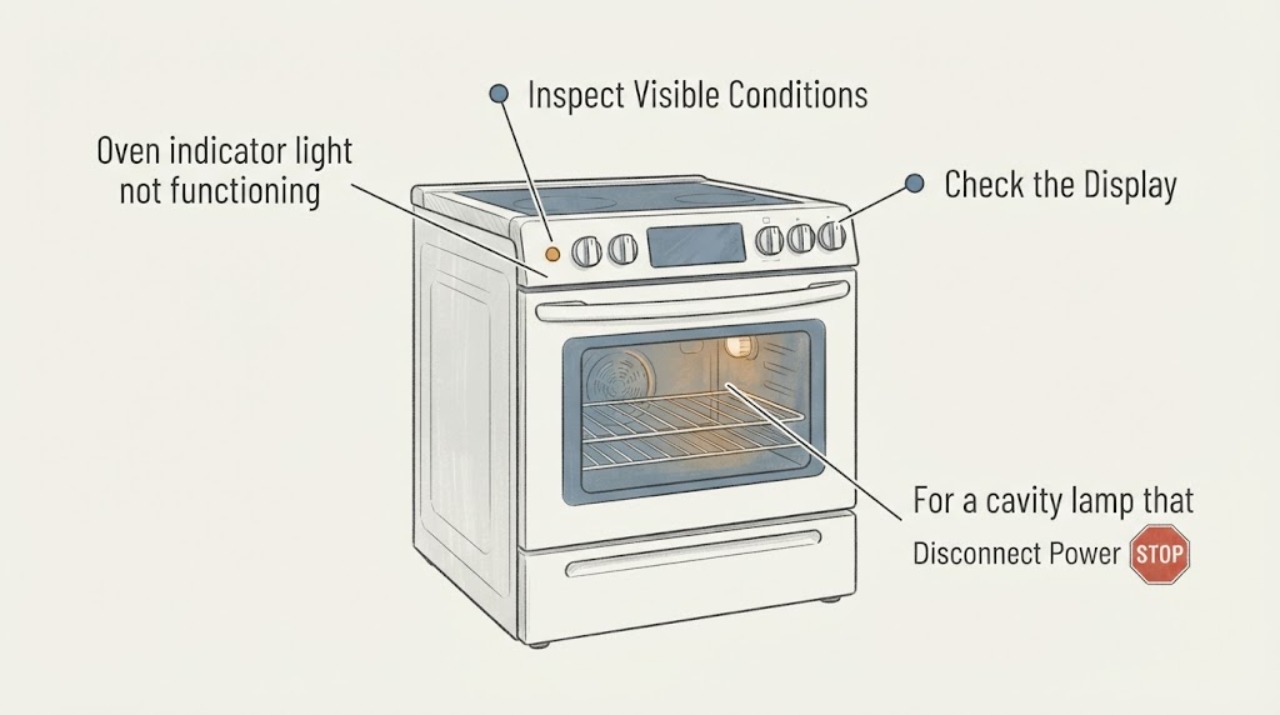
Work through in order
Diagnostic checks
Use only checks that match the exact appliance or system and its official guide.
-
Check 1
Identify the affected light before touching anything: look for the oven cavity lamp, a Bake/Broil/Timer status indicator, a cooktop Hot light on a range, or a blank/partial display. Record whether the oven is a range or wall oven and the full model number.
Expected result: Only the cavity lamp is dark, a function indicator fails to illuminate, a Hot light remains on or does not appear, or the control display is blank/partial.
Next step: Follow only the branch that matches the observed light and the exact model manual; do not transfer range Hot-light steps to a wall-oven display or cavity lamp.
Why this matters
Why: Amana publishes separate guidance for these symptoms. A generic “indicator light” description does not identify a bulb, sensor, control, or wiring fault.
-
Check 2
If the affected light is the oven cavity lamp, make sure the oven and cooktop are cool and all controls are Off. Check whether the oven is currently in self-clean or Sabbath Mode before considering a bulb check.
Expected result: The light is off only during self-clean or Sabbath Mode, or it stays off during ordinary use with those modes not active.
Next step: Exit the mode only through the exact owner guide. If the light remains inoperative during normal use, continue to the model-specific bulb/service branch.
Why this matters
Why: Amana says the cavity light will not come on during self-clean, and Sabbath Mode can prevent it from turning on or off. If neither mode explains the symptom, a bulb or model-specific lighting fault remains possible but is not diagnosed yet.
-
Check 3
For a cavity lamp that remains dark in normal use, use the exact Amana manual to determine whether the model has a standard appliance bulb or a halogen bulb. If the manual supports owner replacement, disconnect power at the circuit breaker or fuse, then use only the documented cover and bulb procedure.
Expected result: The exact manual matches a standard bulb or halogen procedure, or the bulb type/cover cannot be matched to the model.
Next step: Replace only the manual-specified bulb with power disconnected and the oven cool. If the model or procedure is unclear, leave the appliance off and use service rather than removing panels or probing the socket.
Why this matters
Why: Amana documents different bulb types and warns that halogen wattage and handling vary by model. A visually similar bulb or an unverified cover procedure is not a safe compatibility check.
-
Check 4
If the light is a range cooktop Hot indicator, turn every cooktop control Off and allow the element or burner area to cool without touching it. Observe whether the light changes after the surface is safely cool.
Expected result: A control is still on, the surface is still hot, or the surface is cool and the Hot light remains on or behaves abnormally.
Next step: If the surface is cool and the indication remains, use the documented one-minute breaker reset once and monitor it. If it returns, stop and arrange service.
Why this matters
Why: Amana treats an active control or a surface too hot to touch as a normal reason for the Hot light. A light that remains after cooling is a separate indicator fault path, not permission to touch or test the cooktop.
-
Check 5
If the control display or several indicators are blank/partial, check for a recent outage or control state and perform the Amana power reset only from a safe, accessible breaker: turn the range/oven circuit off for one minute, restore it, and verify operation without opening the appliance.
Expected result: The display and indicators return after the reset, remain blank, or return to a fault state.
Next step: If the display remains blank or the symptom returns, keep the appliance off and contact Amana or qualified service with the model and observed light behavior.
Why this matters
Why: Amana supports a one-minute power reset for a no/partial display and directs service if operation is not restored. The reset result does not identify a failed control board or wiring.
-
Check 6
Stop user troubleshooting and arrange service if the correct light branch does not restore normal behavior, if the oven will not heat or controls do not respond, or if there is smoke, burning odor, sparking, damaged wiring, or a hot surface that cannot be safely classified.
Expected result: The symptom persists after the matching mode, bulb, cooling, or safe power checks; or any heat/electrical hazard is present.
Next step: Leave the appliance off, disconnect power only if safe, keep clear of hot or damaged areas, and request Amana or qualified appliance service. Do not bypass an interlock or perform live electrical tests.
Why this matters
Why: Amana’s public guidance provides user-level mode, bulb, cooling, and reset checks but does not establish a universal internal sensor, socket, control, or wiring repair for an unspecified model.
Use your observations
Decision map
Find the observation that best matches what you see, then follow the next safe action.
-
PATH 01Next step
What you see
The cavity light is off only during self-clean or Sabbath Mode and behaves normally outside that mode.
Do this next
Use the exact owner guide for mode operation; no bulb replacement is justified from that observation alone.
Why this path and its safety boundary
Why it matters: Amana documents those modes as conditions that can intentionally prevent the oven light from turning on or off.
-
PATH 02Next step
What you see
The cavity light stays off during ordinary use, the model manual identifies an owner-replaceable bulb, and the bulb procedure can be matched exactly.
Do this next
Cool the oven, turn controls Off, disconnect power at the breaker or fuse, and follow the exact manual. If the light remains off, arrange service.
Why this path and its safety boundary
Why it matters: A bulb replacement is within the documented user boundary for that model, but the symptom still does not identify a socket or wiring fault if a new bulb fails.
-
PATH 03Next step
What you see
The affected indicator is a cooktop Hot light and the controls are Off but the surface is still hot.
Do this next
Wait for the surface to cool naturally and monitor it. If the light remains after cooling, use the documented power reset once and then service if it returns.
Why this path and its safety boundary
Why it matters: The indication is consistent with Amana’s heat warning; touching or servicing the surface while hot is unsafe.
-
PATH 04Next step
What you see
The display or multiple indicators remain blank after the safe one-minute power reset, or the display returns to an error/fault state.
Do this next
Keep the oven off and provide the full model, display state, recent outage, and any heat or control symptoms to Amana or qualified service.
Why this path and its safety boundary
Why it matters: Amana directs persistent no/partial display symptoms to service; the result does not prove a board, fuse, or wiring diagnosis.
-
PATH 05Next step
What you see
The light problem is accompanied by smoke, burning odor, sparking, damaged wiring, uncontrolled heating, or a surface that cannot be safely classified as cool.
Do this next
Stop use, keep clear, disconnect power only if safe, and arrange qualified service; do not repeat tests or open the appliance.
Why this path and its safety boundary
Why it matters: The situation exceeds a lighting check and may be an electrical or heat hazard.
Helpful context
Understand the symptom
“Indicator light” is not one universal Amana component. A cavity lamp, Bake/Broil/Timer status light, cooktop Hot light, and control display can have different normal behavior and different service boundaries. Record what the light says or illuminates, whether the oven is a range or wall oven, and the full model number before choosing a procedure.
Separate normal mode behavior from a failed light
Amana says the oven light does not come on during self-clean, and Sabbath Mode can prevent the oven light from turning on or off. A blank display can also be an Energy Save state on select ranges. These observations do not prove a failed bulb or control board; use the exact owner guide for the model’s mode controls.
Use the model-specific bulb and power boundary
Amana describes a standard 40-watt appliance bulb for certain models, but says halogen wattage and removal details are model-specific. The oven and cooktop must be cool, controls must be Off, and power must be disconnected before the supported bulb procedure.
Only after diagnosis
Potential parts
- oven appliance bulb
Only consider a bulb after the exact model manual identifies the cavity-light type and the light remains off during normal use outside self-clean or Sabbath Mode.
Confirm the full Amana model and the manual-specified standard or halogen bulb before ordering; do not substitute by appearance or wattage alone.
When checks do not resolve it
Need a professional?
Arrange Amana or qualified appliance service when the matching mode, model-supported bulb check, cooling observation, or safe one-minute power reset does not restore the light/display; when the Hot light remains after the surface is cool; or when there is smoke, burning odor, sparking, damaged wiring, uncontrolled heating, or a nonresponsive oven.
Safety scope: Do not work on a hot oven or cooktop, remove covers, probe the socket or wiring, bypass an interlock, or perform live electrical tests. Disconnect power at the breaker or fuse before any model-supported bulb procedure; use service for persistent or hazardous symptoms.
Have this ready
- Full model number, range versus wall oven, which light/display is affected, mode or cycle, whether the cavity is cool, Hot-light behavior, recent outage, bulb type if known, and any heat, odor, sparking, or control symptoms.
Common questions
FAQ
Does an Amana oven light being off always mean the bulb failed?
No. Amana says the cavity light will not come on during self-clean, and Sabbath Mode can prevent it from turning on or off. Identify the mode and appliance model before treating the bulb as failed.
Can I replace the bulb without knowing the Amana model?
Do not choose a bulb or cover procedure by appearance alone. Amana describes standard and halogen bulbs for certain models and directs you to the owner manual for the exact wattage and steps. The oven must be cool, controls Off, and power disconnected first.
What does an Amana Hot indicator light mean?
On an electric range, Amana says the Hot light can reflect a cooktop control that is still on or an element that is still too hot to touch. Turn controls Off and allow the surface to cool. If the light remains after cooling, use the documented power reset once and arrange service if it returns.
What should I do if the Amana oven display and indicators are blank?
Amana supports turning the range/oven circuit off for one minute, restoring power, and verifying operation. If the display remains blank or the symptom returns, use service rather than opening the control area or testing wiring.
Read the exact guide
Official sources
- No or Partial Display - Range - Product HelpAmana · Opened official Amana display-help page. Supports the one-minute breaker reset, operation verification, and service escalation for a blank/partial display; no internal control diagnosis is inferred.
- Removing and Replacing the Oven Light - Product HelpAmana · Opened official Amana product-help article. Supports standard versus halogen model variation, cooling and control-off requirements, breaker/fuse disconnection, and model-specific cover/bulb instructions.
- Indicator or Hot Light On- Electric Range - Product HelpAmana · Opened official Amana page for electric ranges. Supports controls-Off and cool-surface interpretation, one-minute breaker reset, monitoring, and service escalation; it is not a universal cavity-light or wall-oven display diagnosis.
- Oven Light Not Coming On - Range - Product HelpAmana · Opened official Amana Product Help page. Supports standard cavity-light troubleshooting, self-clean and Sabbath Mode behavior, model manual use, and service escalation; it is range-focused and does not establish a universal wall-oven procedure.
- Nothing is Working - Electric - Product HelpAmana · Opened official Amana electric-range troubleshooting page. Supports recent-outage, Demo Mode, blank-display/Energy Save, and model-guide boundaries; it is used only to distinguish control-state symptoms from an indicator-light fault.
Community feedback
Share a repair observation
Share a plain-text repair observation. Accepted observations are published automatically; this page may take a moment to update.