
On this page
Start here
Quick answer
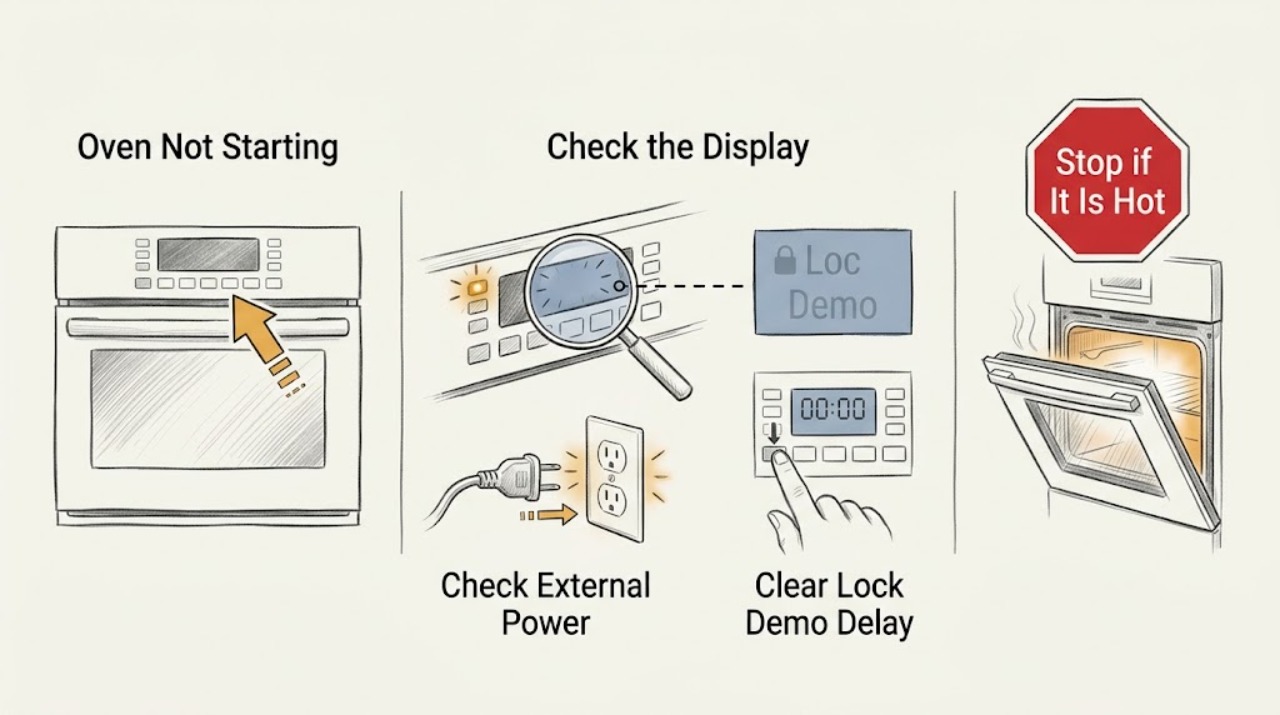
If an Amana oven will not start, first determine whether the display is blank or the controls are powered but locked, in demo mode, or set for a delayed start. Check only the external power, door, control setting, and—on a gas range—the visible gas shut-off condition. If the breaker trips again, a gas odor is present, an error returns, or the oven still will not start, stop and arrange qualified appliance or electrical service instead of opening the range.
Work through in order
Diagnostic checks
Use only checks that match the exact appliance or system and its official guide.
-
Check 1
Look at the clock/display and indicator lights, then press the normal Cancel or Off control once and try the normal oven-start control once. Note whether the panel is blank, lit, locked, in a demonstration mode, or showing an error.
Expected result: The panel is completely blank; or it is lit but shows a lock/demo indicator, a fault code, or responds without starting the selected oven function.
Next step: For a blank panel, check only external power. For a lit panel, retrieve the model manual and continue with lock, demo, delayed-start, and door checks.
Stop if: Stop for smoke, burning odor, arcing, cracked glass, or visible damage to the cord, plug, controls, or appliance body.
Why this matters
Why: A blank panel points toward supply or internal power. A lit panel narrows the issue to a setting, command, door/fuel interlock, or appliance fault.
-
Check 2
From outside the appliance, check that the accessible range/oven switch is on, the plug is seated where the model uses one, and the household breaker or fuse has not opened. If a breaker has tripped, reset it once only when there is no visible hazard.
Expected result: The oven display returns after the external correction, remains blank despite an apparently working supply, or the breaker/fuse opens again.
Next step: If the panel returns, continue with the control sequence. If it remains blank or the breaker trips again, leave the appliance off and arrange qualified appliance/electrical service.
Stop if: Do not remove a breaker, outlet, junction-box, terminal-block, or appliance cover; do not replace a fuse with a different rating.
Why this matters
Why: An off switch or outage can prevent a start. A repeated trip or a blank panel with supply available indicates an installation or appliance fault rather than a programming error.
-
Check 3
Read the model-specific manual and inspect the control for Control Lock, LOC, demo mode, or Delayed Start. Cancel any delayed program and use only the documented unlock or demo-mode procedure; do not copy a key sequence from another Amana model.
Expected result: The lock/demo/delay indicator clears and a new Bake or Broil command starts, or the panel remains locked/does not accept the command.
Next step: If the command starts, monitor the oven normally. If it does not, record the exact display message and continue to the door/fuel branch and service decision.
Stop if: Do not enter undocumented service or diagnostic combinations and do not bypass a control lock or interlock.
Why this matters
Why: A lock or demo mode can intentionally prevent normal oven operation, while a delayed start can make a valid command appear not to start. A persistent indication after the correct procedure may be a control fault.
-
Check 4
Close the oven door fully and inspect the accessible opening for a rack, pan, foil, liner, or storage-drawer item interfering with closure or the burner/igniter area. Do not remove panels or reach behind the cavity.
Expected result: The door was not fully closed, the storage drawer is overloaded, the oven bottom is covered, or no visible obstruction is present.
Next step: Remove only the visible obstruction, close the door, and restart using the normal sequence. If the door, latch, hinge, or gasket is damaged, arrange service.
Stop if: Do not force a misaligned door, remove a hot obstruction by hand, or lift the appliance to reach a hidden connection.
Why this matters
Why: Depending on the model, an open door can prevent an element from operating; Amana also warns that a covered oven bottom can block air or gas flow, and storage items can interfere with an igniter on some gas ranges.
-
Check 5
Use the model manual to identify electric or gas operation. For gas, look only at the accessible main gas valve or regulator shut-off position and the power-cord connection; for electric, note whether a recent installation or outage preceded the failure. Do not disconnect a line or access wiring.
Expected result: A gas shut-off appears off, the gas range has power but no oven ignition, an electric oven had a recent connection/outage, or the visible supply conditions look normal.
Next step: Correct only a clearly visible, manual-authorized shut-off position without moving the range. For a new installation, supply concern, or uncertain grounding/wiring, use a qualified professional; for gas odor, stop immediately.
Stop if: Do not loosen gas fittings, move a built-in range to inspect piping, test terminals, or continue after smelling gas.
Why this matters
Why: A gas range can have working surface burners while the oven's regulator shut-off is closed. An electric oven can fail to start after a supply or programming event. Normal visible conditions leave an internal or model-specific fault.
-
Check 6
Record the full Amana model number, electric/gas type, display state, lock/demo/delay indicator, error message, breaker behavior, door result, and whether the oven ever starts a cycle or heats. Include any recent installation, outage, spill, or cleaning event.
Expected result: The oven still will not start after the model-specific external checks, an error returns after reset, the supply trips, or a gas/electrical/physical hazard is present.
Next step: Arrange Amana or qualified appliance service; use a licensed electrician for an uncertain electrical supply and qualified gas service for gas-line or regulator work. Provide the symptom record and manual.
Stop if: Stop using the oven for gas odor, smoke, burning smell, arcing, damaged cord/wiring, cracked glass, or a supply that trips again.
Why this matters
Why: The unresolved causes may include a control, interlock, igniter, valve, element, sensor, wiring, or installation fault that requires model-specific diagnosis.
Use your observations
Decision map
Find the observation that best matches what you see, then follow the next safe action.
-
PATH 01Next step
What you see
The clock/display and indicators are blank.
Do this next
Check only the accessible switch, plug where applicable, and breaker/fuse state. If the panel remains blank with supply available, arrange qualified service.
Why this path and its safety boundary
Why it matters: The oven may not have supply power, or its internal control power path may have failed.
-
PATH 02Next step
What you see
The panel is lit but shows a lock/demo indicator or a delayed-start program.
Do this next
Cancel the delayed program and follow the exact model manual for Control Lock or demo mode. If the control will not clear, arrange service.
Why this path and its safety boundary
Why it matters: The control is intentionally preventing immediate heating or waiting for a scheduled start.
-
PATH 03Next step
What you see
The door is not fully closed, or a rack, foil/liner, or storage-drawer item visibly interferes with the cavity or igniter area.
Do this next
Remove only the visible obstruction and retry. Arrange service for a damaged latch, hinge, seal, or cabinet.
Why this path and its safety boundary
Why it matters: A door or obstruction can prevent an element, burner, or igniter from operating on some models.
-
PATH 04Next step
What you see
The surface burners work but the gas oven does not start, or the accessible gas regulator/main valve appears off.
Do this next
Do not loosen fittings or move the range. If the valve position is not clearly user-accessible and manual-authorized, use qualified gas service; stop immediately for gas odor.
Why this path and its safety boundary
Why it matters: The oven branch can be deprived of gas even when another part of a gas range appears to operate.
-
PATH 05Next step
What you see
An error returns after the model-authorized reset, or the breaker/fuse opens again.
Do this next
Leave the oven off and arrange qualified appliance/electrical service; do not repeat resets or open the appliance.
Why this path and its safety boundary
Why it matters: The fault is persistent and may involve supply wiring, control electronics, or a component failure.
-
PATH 06Next step
What you see
There is gas odor, smoke, burning smell, arcing, damaged wiring or cord, cracked glass, or water entering electrical parts.
Do this next
Stop using the oven. If gas is suspected, avoid flames and switches and follow local gas-emergency guidance; arrange qualified service. Isolate electrical power only when it can be done safely.
Why this path and its safety boundary
Why it matters: This is an immediate safety condition, not a programming or start-button problem.
Helpful context
Understand the symptom
Start by separating a no-power symptom from a no-start command. A blank clock/display suggests an external supply or internal electrical issue. A lit display with no heating or no response is more often a control lock, demo mode, delayed start, door condition, gas-supply condition, or programming issue. Amana's guidance differs between electric ovens, gas ranges, and model families, so the owner's manual remains the authority for the exact controls.
Make only external checks first. Look at the display, check the accessible switch or breaker, confirm the door is fully closed, cancel a delayed program, and look for a lock or demo indication. For a gas range, verify the visible main gas valve or regulator position only if it can be checked without moving the appliance or disturbing a connection. Never diagnose an internal terminal, igniter, valve, element, or control board while energized.
If a single documented power reset is permitted for the model, follow the manual and observe whether the symptom returns. An error that comes back, a supply that trips again, or a failure after the external checks needs qualified service. Stop immediately for gas odor, smoke, scorching, arcing, damaged wiring, cracked glass, or a damaged power cord.
Safety boundary
Stop conditions
- Do not remove covers, expose terminals, bypass door or control interlocks, or take electrical readings as a home troubleshooting step.
- Do not repeatedly reset a breaker or fuse that opens again; leave the oven off and arrange qualified service.
- Do not loosen gas fittings, move a built-in range to reach piping, or continue after smelling gas; follow local gas-emergency guidance.
- Stop immediately for smoke, burning odor, arcing, damaged cord or wiring, cracked glass, or water near electrical components.
- Use the model-specific manual for lock, demo, delay, reset, and installation instructions; do not generalize a sequence from another Amana model.
When checks do not resolve it
Need a professional?
Arrange Amana or qualified appliance service when the display stays blank with external power available, a lock/demo/delay condition will not clear, the oven does not start after the correct sequence, an error returns, the breaker trips again, a gas valve/connection needs work, or any safety hazard is present.
Have this ready
- Full Amana model number, oven fuel type, display and indicator behavior, error text, lock/demo/delay observations, breaker behavior, door/cavity result, recent installation/outage/spill, and the exact manual steps attempted.
Common questions
FAQ
Why does my Amana oven have power but not start?
Check for Control Lock, demo mode, or Delayed Start, then cancel the current control and restart the desired function using the model manual. If the panel remains unresponsive or an error returns, arrange service.
What if my Amana oven display is blank?
Check only the accessible switch, plug where applicable, and breaker/fuse state. If the supply appears available but the display stays blank, treat it as an electrical or appliance fault and use qualified service.
Can a delayed start make an Amana oven seem not to work?
Yes. Amana explains that a delayed Bake function will not begin until its scheduled start time. Cancel the control and restart a normal function using the model-specific instructions.
Why does the cooktop work but the Amana gas oven not start?
Depending on the model, check full door closure, storage-drawer or oven-bottom interference, the accessible regulator/main gas-valve condition, and the oven's power connection. Do not loosen gas fittings; use qualified service for uncertain supply or gas odor.
When should I stop trying to start an Amana oven?
Stop for a repeated breaker trip, returning error, damaged cord or wiring, cracked glass, smoke, burning odor, or any gas odor. Leave the appliance off and arrange qualified appliance, electrical, or gas service as appropriate.
Read the exact guide
Official sources
- Oven Not Working - Cooktop Working - Not ClickingAmana Product Help · Amana's gas-range guidance covers full door closure, oven-bottom liners, storage-drawer interference, regulator shut-off position, main gas valve, and an operational grounded outlet.
- Oven Not Working - GasAmana Product Help · Amana's official gas-oven guidance covers recent reconnection, grounded power, the main gas valve, and qualified electrical help when supply is uncertain.
- Oven Not WorkingAmana Product Help · Amana's general oven-support page routes users to the electric/gas troubleshooting guides and model-number manuals and service resources.
- Amana Use & Care GuideAmana · This official manual is a model-specific example, not a universal Amana procedure. Its troubleshooting table covers power outage, breaker/fuse, oven programming reset, display errors, and the instruction to use service when faults persist.
- Oven Not Working - ElectricAmana Product Help · Amana's official electric-oven guidance covers recent outages, control lock, demo mode, delayed start, breaker/fuse state, model manuals, and escalation to a licensed electrician or service.
Community feedback
Share a repair observation
Share a plain-text repair observation. Accepted observations are published automatically; this page may take a moment to update.