
On this page
Start here
Quick answer
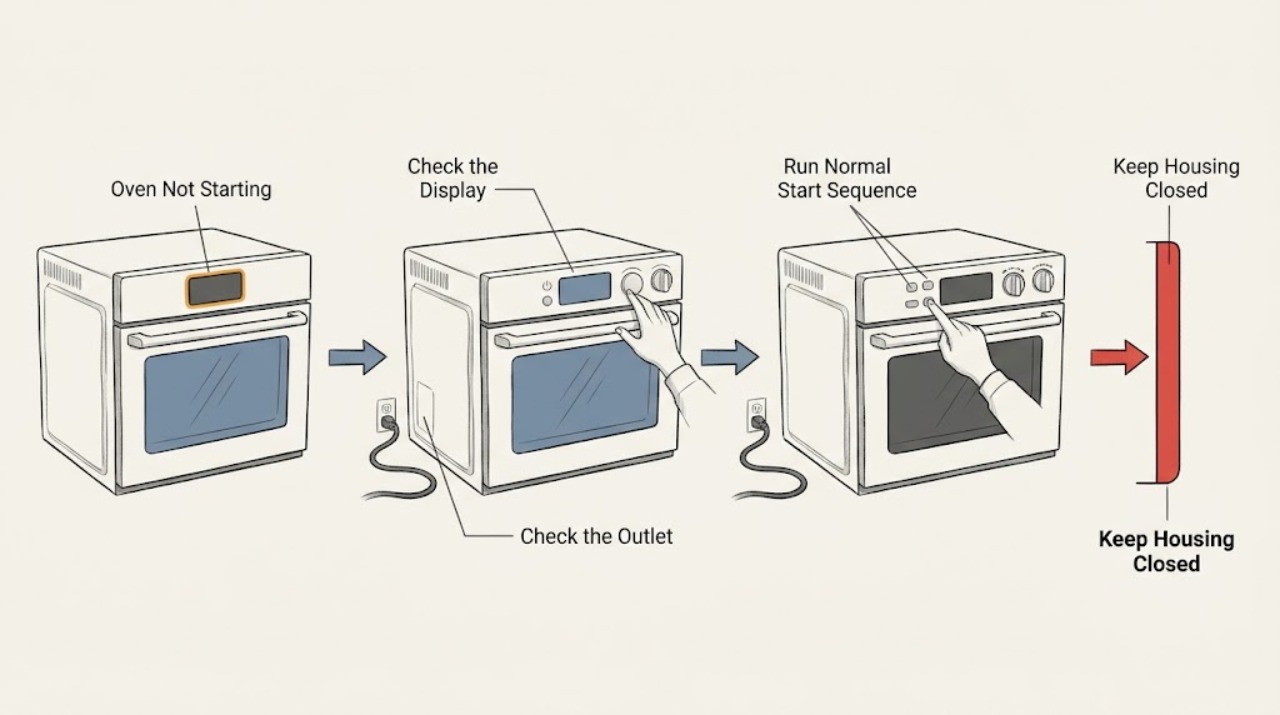
If a Breville countertop oven will not start, first distinguish a dark standby display from a completely unpowered oven. Check that the plug is fully inserted into a suitable independent outlet, verify the outlet or household breaker from a dry and safe position, and use the model's normal START/CANCEL or dial sequence. Breville's oven manuals describe standby behavior in which the screen is dim or shows a standby indication until a control is pressed, and they list a loose plug, outlet choice, or breaker as the first no-power checks. If the oven shows a recurring error, trips the breaker, smells hot, has a damaged cord, or remains dead after a single model-approved power reset, stop using it and arrange qualified appliance or electrical service. Do not open the case, touch heating elements, bypass protection, or repeatedly reset a failing circuit.
Before you begin
Safety first
- This article covers standby identification, dry-access plug and outlet observations, normal controls, and one exact manual-approved reset only. Do not open the oven or electrical panel, touch heating elements, test live wiring, bypass protection, or use a damaged cord or outlet.
Work through in order
Diagnostic checks
Use only checks that match the exact appliance or system and its official guide.
-
Check 1
From a cool, dry oven, look at the LCD and START/CANCEL surround without opening the case. Record whether the screen shows a standby indication, the display is completely dark, or a letter or number error is present; if the manual says the oven is in standby, press START/CANCEL or turn one dial once.
Expected result: The screen re-illuminates, the oven shows an error, the display remains dark but the outlet is known to work, or no control responds.
Next step: If the screen wakes, continue with the normal function, temperature, time, and START/CANCEL sequence. If it stays dark or shows a recurring error, keep the oven off and proceed to the safe plug and outlet check.
Stop if: Stop for smoke, a burning smell, a hot or damaged cord, a cracked display, liquid entry, or any need to remove a cover to see the controls.
Why this matters
Why: Breville says standby can stop the screen from illuminating while leaving a standby indication, and a control or dial should reactivate it. A persistent error or a completely dead display points beyond standby and toward power, control, or thermal protection.
-
Check 2
With dry hands and a dry floor, confirm that the Breville plug is fully seated in the outlet and that the outlet is not controlled by a switched power strip. Check the household breaker only from a safe, accessible position and only when there is no damage, moisture, odor, or heat; do not open the oven or electrical parts.
Expected result: The plug was loose, the outlet has no power, the breaker is tripped, the breaker trips again, or the outlet and breaker appear normal while the oven remains dark.
Next step: Correct only an obvious loose connection or safe breaker state once, then try the normal oven controls. If the breaker trips again or the display remains dark with a known-good supply, stop and arrange qualified appliance or electrical service.
Stop if: Do not use a damaged outlet, adapter, improvised extension, hot cord, wet receptacle, or repeatedly tripping breaker; do not touch exposed wiring or open the oven case.
Why this matters
Why: Breville lists a secure plug, an independent or different outlet, and a breaker reset among the first solutions when the oven will not switch on. A repeat trip indicates a circuit or appliance fault rather than a setting problem; normal supply with no display leaves the oven's internal power path in question.
-
Check 3
If the display is active, turn the FUNCTION dial to a normal cooking function, set a temperature and time using the model's controls, close the door, and press START/CANCEL once as described in the manual. Watch for the normal start indication rather than repeatedly pressing the button.
Expected result: The oven begins preheating, the display accepts settings but does not start, the control returns to standby, or the oven shuts off immediately.
Next step: If the oven starts, monitor it from a safe position and use the model's normal cycle. If it will not start after the documented sequence, record the function, settings, display state, and any alert, then stop and request service.
Stop if: Do not run an empty oven to reproduce a fault, leave it unattended, touch hot elements, or continue after smoke, abnormal heat, or a burning smell.
Why this matters
Why: A successful start indicates the earlier symptom was likely standby or a missed control sequence. A responsive display with no heating or immediate shutdown can involve a control, door or thermal-protection condition; it is not corrected by repeated button presses.
-
Check 4
If the display shows an error or the oven stopped after cooking, photograph the code and note whether the oven is still hot, whether its cooling fan was running, and whether the code clears after the exact model manual's cool-down instruction. Do not touch the heating elements or remove panels.
Expected result: The code clears after the documented cool-down or reset, the same code returns, the oven is unusually hot, or there is no code but the oven still will not start.
Next step: Allow the oven to cool as the manual directs and perform at most the documented reset once. If the code or shutdown returns, leave the oven disconnected when safe and arrange qualified service with the exact code and timing.
Stop if: Stop immediately for a burning smell, smoke, sparking, melted material, a hot cord, or any error that the manual identifies as non-resettable; do not keep cycling power.
Why this matters
Why: Breville manuals distinguish temporary thermal conditions from non-resettable errors. A returning code or persistent no-start condition needs diagnosis; a fan or cool-down period can be normal after operation but does not justify bypassing a thermal protector.
-
Check 5
Only when the oven is cool, dry, undamaged, and safely accessible, turn it off using its normal control, remove the plug from the wall outlet, wait the model manual's documented reset interval, and reconnect it once. Preserve the exact model and the result; do not disassemble the oven.
Expected result: The display and controls return normally, the oven remains dead, or the same error, shutdown, or breaker trip returns.
Next step: If the oven does not start after the one approved reset, stop troubleshooting, keep it out of service, and arrange Breville appliance or qualified electrical service. Provide the model, outlet and breaker observations, display state, code, and timing.
Stop if: Do not repeat resets, use a different voltage source, bypass a thermal or electrical protector, or operate the oven with a damaged cord or case.
Why this matters
Why: A single successful reset supports a temporary control state but does not rule out a developing fault. No recovery or a recurring failure requires qualified diagnosis of the supply, control board, thermal protection, fan, or heating circuit.
Use your observations
Decision map
Find the observation that best matches what you see, then follow the next safe action.
-
PATH 01Safety boundary
What you see
The LCD still shows the model's standby indication and re-illuminates after START/CANCEL or a dial is turned.
Do this next
Select the desired function and set the temperature and time before pressing START/CANCEL once.
Why this path and its safety boundary
Why it matters: The oven was in standby rather than electrically dead.
Safety stop: Request service if the screen will not reactivate, the display repeatedly enters standby immediately, or an error appears.
-
PATH 02Safety boundary
What you see
The plug was loose, the outlet is dead, or the household breaker is tripped while the oven remains cool and undamaged.
Do this next
Use a suitable independent outlet or restore the normal breaker once from a safe position, then run the documented start sequence.
Why this path and its safety boundary
Why it matters: The no-start symptom may be outside the oven, but the circuit must still be treated as a possible fault if it trips again.
Safety stop: Leave a repeatedly tripping breaker off and arrange qualified electrical or appliance service; do not use adapters, damaged outlets, or improvised extensions.
-
PATH 03Safety boundary
What you see
The LCD accepts a function, temperature, or time but the oven does not begin when START/CANCEL is pressed or it shuts off immediately.
Do this next
Record the exact settings and display behavior, try the normal sequence once more only if the manual calls for it, and arrange service if the oven still will not start.
Why this path and its safety boundary
Why it matters: The supply and display are alive, but a control, thermal-protection, door, or internal power condition may be preventing operation.
Safety stop: Do not repeatedly press the control, run the oven unattended, or open the case to inspect the switch, wiring, or elements.
-
PATH 04Safety boundary
What you see
An error appears, the oven stopped after prolonged operation, or the cabinet is hotter than expected while the controls are unresponsive.
Do this next
Let the oven cool and follow only the exact model manual's documented reset or code instruction once, then stop if the code returns.
Why this path and its safety boundary
Why it matters: The oven may be protecting itself from a thermal condition or reporting a fault; the display code and model manual determine whether a reset is allowed.
Safety stop: Do not bypass protection or continue operation for smoke, burning odor, melting, sparking, a hot cord, or a recurring non-resettable error.
-
PATH 05Safety boundary
What you see
The display remains dark after the plug, outlet, breaker, and one model-approved reset check, or the same failure returns immediately.
Do this next
Keep the oven unplugged when safe, preserve the model and symptom record, and arrange Breville appliance or qualified electrical service.
Why this path and its safety boundary
Why it matters: A persistent power, control, thermal, or internal electrical fault needs qualified diagnosis.
Safety stop: Do not open the case, probe live wiring, replace internal parts, or keep resetting the circuit to reproduce the symptom.
Helpful context
Understand the symptom
First identify what ‘not starting’ means
A Breville countertop oven can appear off while its LCD is in standby, or it can have no display, no control response, and no sign of power. If the screen still shows a standby indication, press the model's START/CANCEL control or turn a dial as the manual describes. If nothing lights, treat the symptom as a supply or appliance-power question before changing cooking settings. Record the exact model from its rating label because the control names, error codes, and reset procedure vary across the Smart Oven family.
Use only the normal controls and a safe outlet check
Breville's troubleshooting guidance starts with the plug, outlet, and breaker. Check those from a dry position and use an independent outlet that can safely supply the appliance as the model manual requires. Do not use a damaged cord, loose receptacle, adapter, or improvised extension as a workaround. A breaker that trips again or a cord that becomes hot changes the problem from a simple reset to an electrical-service boundary.
A reset is a confirmation, not a repair
A single model-approved unplug-and-reconnect can clear a temporary control state, but it cannot prove that a failing control board, thermal protector, heating element, or circuit is safe. Breville manuals also require the oven to be turned off, cool, and disconnected before cleaning or moving it. Leave the case and heating elements closed to the user; document any display code, smell, noise, or breaker behavior for a qualified technician.
Safety boundary
Stop conditions
- Stop for smoke, sparking, a burning smell, melted material, liquid entry, a hot or damaged cord, or a breaker that trips again.
- Do not open the oven case, touch heating elements, probe live wiring, bypass a fuse or thermal protector, or use an adapter or improvised extension.
- Use at most one model-approved power reset; do not repeatedly cycle power or keep operating an oven that shuts down or shows a recurring error.
- Keep the oven cool and disconnected before moving or cleaning it, and leave internal electrical or heating diagnosis to a qualified technician.
- Arrange Breville appliance or qualified electrical service when the display remains dead, the normal start sequence fails, a fault returns, or the supply is uncertain.
Only after diagnosis
Potential parts
- Breville-compatible power cord or plug assembly
Consider this category only if qualified diagnosis confirms cord or plug damage rather than a faulty outlet, breaker, or internal power connection.
Confirm the exact Breville model, cord specification, strain relief, and manufacturer fit information; do not replace a cord on an energized appliance. - Breville-compatible control interface or control board
Consider this category only after diagnosis confirms that the display or controls fail with a verified power supply and no allowed standby or reset explanation.
Confirm the exact model, display and connector revision, and approved service procedure; the case and live circuits are not user-serviceable. - Breville-compatible thermal protector or temperature sensor
Consider this category only when a qualified diagnosis links a recurring thermal shutdown or error to a failed protector or sensor.
Confirm the exact Breville model and diagnosis; do not bypass, short, or substitute a thermal safety component.
When checks do not resolve it
Need a professional?
Arrange qualified Breville appliance or electrical service when the oven remains dark after a safe plug, outlet, breaker, and one model-approved reset check; when the normal controls respond but the oven will not start; when an error returns; or when the breaker trips. Stop immediately for smoke, sparking, burning odor, liquid entry, melting, or a hot or damaged cord.
Safety scope: This article covers standby identification, dry-access plug and outlet observations, normal controls, and one exact manual-approved reset only. Do not open the oven or electrical panel, touch heating elements, test live wiring, bypass protection, or use a damaged cord or outlet.
Common questions
FAQ
Why is my Breville oven display dark but the oven still has power?
Some Breville ovens enter standby and stop illuminating the LCD while still showing a standby indication. Press START/CANCEL or turn a dial as the exact manual describes. A completely blank screen with a known-good outlet is a different symptom and needs power or appliance diagnosis.
What should I check when my Breville oven will not switch on?
Check that the plug is secure, use a suitable independent outlet, and check the household breaker from a dry, safe position. Then run the model's normal function, temperature, time, and START/CANCEL sequence. If the breaker trips again or the oven stays dead, arrange qualified service.
Can I reset a Breville oven that will not start?
Only use the exact model manual's reset procedure, and use it once when the oven is cool, dry, and undamaged. A successful reset may clear a temporary control state, but a returning error, shutdown, or no display requires service rather than repeated power cycling.
Why does my Breville oven start and then turn off?
A standby state, control sequence, thermal protection, or internal fault can produce that pattern. Record the function, display, temperature, timing, fan behavior, and any error. Let the oven cool only as the manual directs; arrange service if the shutdown returns.
Should I keep using a Breville oven with an error code?
No. Record the exact code and check the model manual for whether it is resettable. Stop for a recurring or non-resettable code, smoke, burning odor, sparking, melting, or a hot or damaged cord, and arrange qualified appliance or electrical service.
When should I stop troubleshooting a Breville oven that will not start?
Stop after the safe plug, outlet, breaker, normal controls, and one model-approved reset check fail. Do not open the case, touch heating elements, bypass a thermal protector, probe live wiring, or keep resetting a tripping circuit.
Read the exact guide
Official sources
- the Smart Oven® - OVENS Support & FAQsBreville · Applies to identifying model-specific Breville Smart Oven support, manuals, tutorials, and repair options when the exact oven model is known.
- the Smart Oven® Compact ConvectionBreville · Directly applies to the BOV670 Smart Oven Compact Convection manual and supports the general troubleshooting pattern for other Breville countertop oven models; the exact model manual controls final steps.
- the Smart Oven® Pro - OVENS Support & FAQsBreville · Applies to identifying model-specific Breville Smart Oven Pro support and reinforces the need to use the exact model documentation for a no-start condition.
Community feedback
Share a repair observation
Share a plain-text repair observation. Accepted observations are published automatically; this page may take a moment to update.