
On this page
Start here
Quick answer
If a Bosch oven will not start, first determine whether the display is completely dark or the display works but the oven will not begin heating. Check that the appliance is connected securely, the household breaker or fuse has not opened, and a cooking mode and temperature have actually been selected. If the panel shows an E-number, records a recurring fault, stays unresponsive, or requires access to high-voltage wiring or a heating element, turn the oven off and arrange qualified Bosch service. Do not remove the control panel or attempt an internal repair.
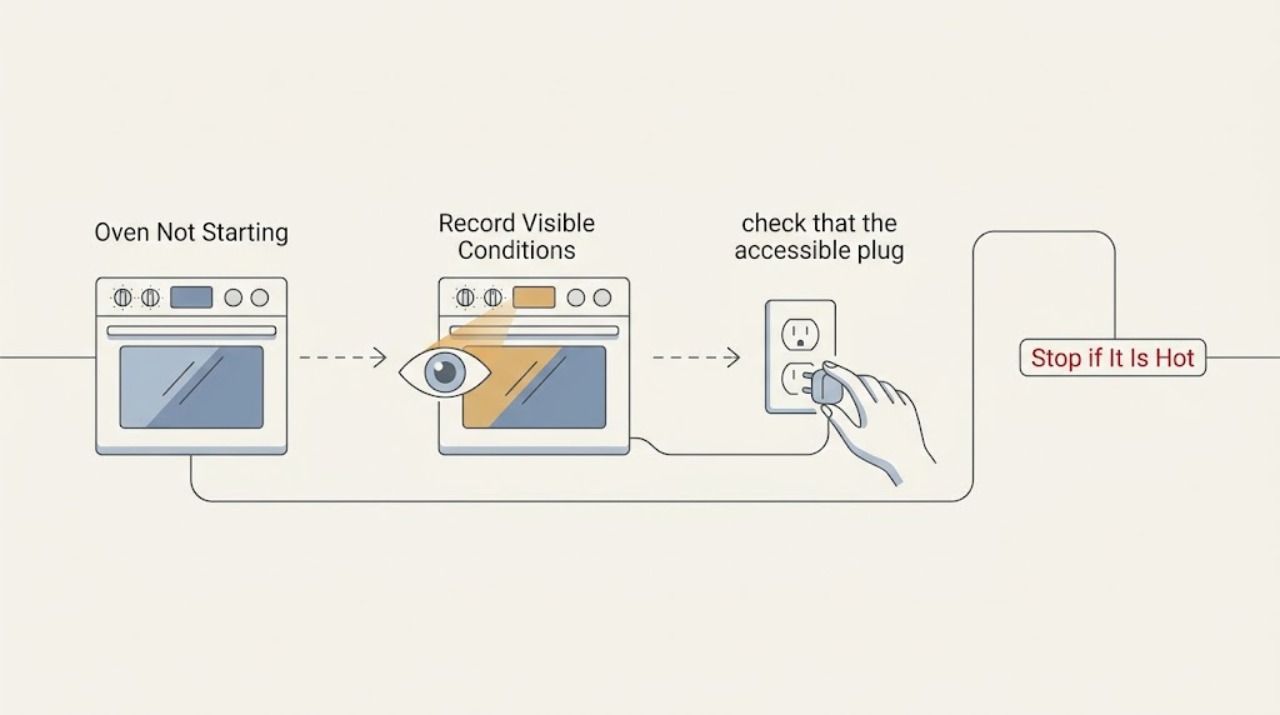
Work through in order
Diagnostic checks
Use only checks that match the exact appliance or system and its official guide.
-
Check 1
Press the normal Power or On control and classify the result: note whether the display remains dark, lights up but ignores keys, or accepts keys without starting a selected mode. Record any text, code, beeps, or flashing indicators before resetting anything.
Expected result: A dark display points to power or connection. A lit display that ignores keys points to a control lockup or keypad issue. A responsive display with no heating after a mode is selected points to a start or technical fault.
Next step: Keep the exact display behavior and any code for the next checks. Do not force the controls or begin a cooking cycle while the panel reports a fault.
Why this matters
Why: The first visible response separates a household-supply check from a control or heating branch; the same no-start wording can represent different failures.
-
Check 2
If the display is dark or the oven lost power, check that the accessible plug is seated securely and that the household breaker or fuse supplying the oven has not opened. Reset only a breaker that operates normally; do not open the appliance or perform electrical measurements.
Expected result: A normal display after the supply is restored indicates that the no-start symptom was power-related. A breaker that trips again, a damaged cord, or a display that remains dark indicates a supply or appliance fault.
Next step: If the supply is stable, select a cooking mode and temperature. If the breaker trips again or the display remains dark, leave the oven off and arrange qualified electrical or appliance service.
Why this matters
Why: Bosch owner guidance treats secure connection and household supply as the first check for an oven that will not turn on, while repeated power loss needs professional evaluation.
-
Check 3
With the display responsive and no fault message, select a normal bake or other available cooking mode, set a temperature appropriate for the model, and press Start or confirm the mode as the owner's instructions require. Check that the door is fully closed and that a delayed-start or special mode was not intentionally selected.
Expected result: If the oven begins its normal start sequence, the earlier problem was a missing mode, temperature, confirmation, or door condition. If the controls accept the selection but the oven remains cold, the symptom is not resolved by the user settings.
Next step: Allow one brief supervised start attempt. If there is no heat, a fault appears, or the door will not close normally, turn the oven off and follow the service boundary.
Why this matters
Why: An oven cannot heat until a valid cooking mode and temperature are selected; once those are present, persistent no-start or no-heat behavior moves toward service diagnosis.
-
Check 4
If an E followed by a number appears, write down the complete code and whether the control is beeping or accepting keys. Press a normal key only to silence the alert when the panel responds, then follow the exact model's owner instructions for a single reset.
Expected result: The code may clear after a model-approved reset, or it may return immediately. A recurring code, unresponsive panel, or persistent beeping means the fault remains.
Next step: Turn the oven off if the code returns and arrange qualified service with the exact code and model information. Do not guess at a sensor, board, or element replacement.
Why this matters
Why: Bosch classifies an E-number as a malfunction or fault condition; clearing the sound or restarting the control does not establish that the underlying problem is fixed.
-
Check 5
If the oven starts a mode but never heats, do not remove racks, panels, or the heating element to investigate. Confirm the selected temperature once, note whether the display advances normally, and stop the test if there is smoke, a burning odor, abnormal sparking, or unusual heat at the controls.
Expected result: A responsive control with no heat after a valid selection suggests a technical heating fault. Smoke, burning odor, sparking, or a damaged control is an immediate stop condition.
Next step: Leave the oven off and arrange qualified Bosch service. Provide the model, mode, temperature, display behavior, and any odor or visible symptom.
Why this matters
Why: Bosch specifically directs owners not to repair a suspected heating element themselves because the oven system presents a high-voltage hazard.
Use your observations
Decision map
Find the observation that best matches what you see, then follow the next safe action.
-
PATH 01Next step
What you see
The display is dark and the accessible plug or household breaker is not supplying stable power.
Do this next
Resolve the supply issue with a qualified electrician or appliance technician. Do not open the oven or continue resetting a tripping breaker.
-
PATH 02Next step
What you see
The display is responsive but no cooking mode or temperature was selected.
Do this next
Select the appropriate cooking mode and temperature, close the door fully, and make one normal start attempt.
-
PATH 03Next step
What you see
An E-number appears or the same fault returns after one model-approved reset.
Do this next
Turn the oven off, record the complete code, and arrange qualified Bosch service.
-
PATH 04Next step
What you see
The controls respond and a mode is selected, but the oven remains cold or needs an element or wiring test.
Do this next
Stop user troubleshooting and arrange qualified service; do not remove panels or attempt a heating-element repair.
-
PATH 05Next step
What you see
There is smoke, a burning odor, abnormal sparking, visible electrical damage, or a breaker trips again.
Do this next
Stop using the oven and seek qualified appliance or electrical help. If there is an immediate fire hazard, leave the area and contact emergency help from a safe location.
Helpful context
Understand the symptom
A dark panel and a non-heating oven are different symptoms
If the display is dark, begin with the plug and household supply. If the display works but the oven does nothing, check that a cooking mode and temperature were selected and that no fault message is present. If the controls respond but the oven never heats, the symptom has moved from starting logic to a heating or technical fault and should not be diagnosed by opening the appliance.
Keep the electrical boundary clear
Bosch ovens use high-voltage electrical systems. A user can observe the display, confirm an accessible plug and breaker, select a mode, and record a fault message. Do not remove panels, probe wiring, bypass a door or safety switch, or attempt to repair an element, board, sensor, or power connection.
When checks do not resolve it
Need a professional?
Qualified Bosch service is appropriate for a persistent no-start or no-heat symptom after the accessible power and control checks, for recurring error codes, or for any suspected board, sensor, door interlock, heating element, or wiring fault.
Common questions
FAQ
Why is my Bosch oven not starting even though the display is on?
Confirm that a cooking mode and temperature are selected, the door is closed, and no delayed or special mode is active. If the controls respond but the oven remains cold, qualified service is appropriate.
What should I check if my Bosch oven display is completely dark?
Check the accessible plug and household breaker or fuse. Reset only a breaker that operates normally. A repeated trip or dark display after stable supply requires qualified electrical or appliance service.
What does an E-number mean on a Bosch oven?
Bosch treats an E followed by a number as a malfunction or fault code. Record the complete code, follow the model's reset instruction once, and arrange service if it returns.
Can I replace a Bosch oven heating element myself?
Bosch advises leaving suspected heating-element repairs to experts because ovens use high-voltage electricity. Turn the oven off and arrange qualified service instead of removing panels or testing wiring.
Read the exact guide
Official sources
- Common Oven Problems and How to Fix ThemBosch Home Appliances · Bosch guidance for common oven problems and contacting an authorized servicer when repair is required.
- Bosch Oven & Microwave Error CodesBosch Home Appliances · Bosch guidance for E-number malfunctions, beeping faults, code recording, and service escalation.
- Oven Troubleshooting: Convection Oven Not Heating UpBosch Home Appliances · Bosch guidance to check household electrical supply and selected oven temperature, then seek support for a technical fault.
- Get Support - Ovens & Ranges | Bosch Home AppliancesBosch Home Appliances · Bosch routes oven owners to model-specific troubleshooting, error codes, owner manuals, and authorized service.
- Oven Troubleshooting: Broken heating elementBosch Home Appliances · Bosch warning that suspected heating-element repair should be left to experts because ovens use high-voltage electricity.
Community feedback
Share a repair observation
Share a plain-text repair observation. Accepted observations are published automatically; this page may take a moment to update.