
On this page
Start here
Quick answer
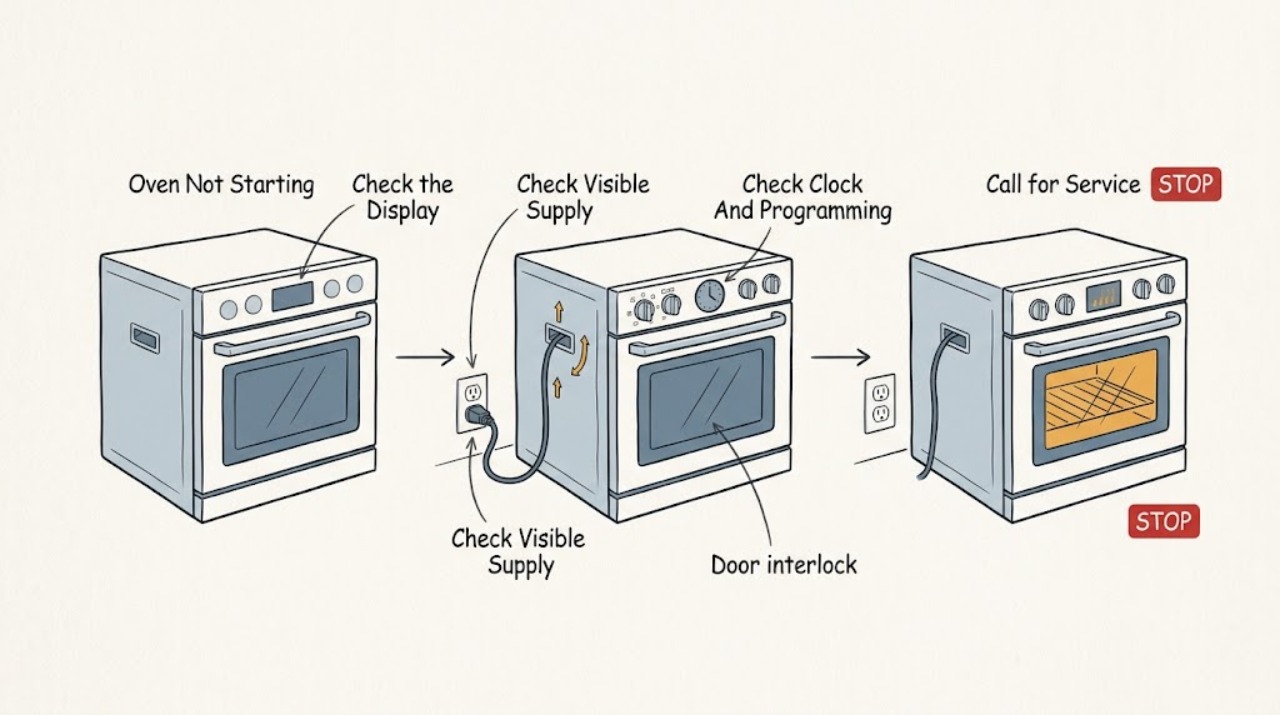
If an AEG oven will not start, first note whether the display is blank, whether the clock is flashing, and whether the oven accepts a heating function and temperature. Check the visible power supply and breaker or residual-current device only from a safe position, then check the clock, Duration or End setting, Child Lock, Demo mode, required display prompts, and full door closure. If the oven trips power again, has a damaged cord or outlet, remains unresponsive, or needs panels or wiring accessed, stop and arrange qualified appliance service. Use the exact manual for the model because controls differ across AEG ovens.
Work through in order
Diagnostic checks
Use only checks that match the exact appliance or system and its official guide.
-
Check 1
Press the normal power or function control once and observe the display, indicators, and response. Do not keep pressing if the panel is hot, wet, cracked, sparking, or giving off an odor.
Expected result: The display is blank or dark; the display is lit but controls do not respond; the display responds but only one heating function fails; or several functions fail.
Next step: Record the pattern, then follow the matching power, clock, lock, and function checks. If there is any electrical hazard, stop immediately and arrange service.
Stop if: Stop for smoke, burning odor, sparks, heat, water, or a damaged panel or cord.
Why this matters
Why: A blank display points first to the visible supply branch. A lit but unresponsive display points to a control, lock, or temporary electronic state. One failed function differs from several failed functions and should not be treated as proof of one failed part.
-
Check 2
From a dry, safe position, check whether the appliance plug is seated if it is an accessible plug-in installation, whether the wall socket appears intact, and whether the household fuse, breaker, or residual-current device has visibly tripped. Do not open a consumer unit or built-in oven connection box.
Expected result: The display is blank and a protective device is tripped; the accessible plug or socket looks loose or damaged; no device appears tripped; or the display is already operating normally.
Next step: If the plug or socket is damaged, leave the oven disconnected and arrange qualified electrical service. If a clearly resettable protective device is tripped and there is no hazard, follow its normal labeling for one reset only; if it trips again, stop.
Stop if: Do not reset a device repeatedly, touch exposed parts, or reach behind a built-in oven.
Why this matters
Why: A supply interruption can prevent the oven from starting, while a damaged connection or repeated trip may indicate an installation or appliance fault. A lit display narrows the symptom but does not clear the heating circuit.
-
Check 3
If the display is operating, look for a flashing clock, an unset time, a Duration or End function, delayed start, or another timer indicator. Use the model manual's ordinary controls to review or cancel a programmed setting; do not guess a hidden button sequence.
Expected result: The clock flashes or is unset; a Duration, End, or delayed setting is shown; no programmed state is shown; or the oven accepts a function and temperature normally.
Next step: Set the clock or cancel the programmed state only as the exact manual describes, then make one normal start attempt. If the display returns to an error or the oven still does not start, continue to the lock and service branches.
Stop if: Stop if the panel becomes hot, unresponsive, or shows an electrical warning rather than a normal setting prompt.
Why this matters
Why: AEG identifies an unset digital clock and programmed duration or end functions as possible reasons an oven may not heat or start as expected. If the controls accept a normal command with no timer state, the fault is not explained by this visible setting.
-
Check 4
Read the complete display for a padlock or Child Lock indication, Demo or d indication, or a prompt that must be confirmed. On a rotary-knob model, use the knob's normal press or hold action described by the manual to confirm a displayed prompt; do not force the control.
Expected result: A lock, Demo, or unconfirmed prompt is visible; the rotary knob does not respond normally; or no lock, Demo, or prompt is shown.
Next step: Use the exact AEG manual to clear a visible lock, Demo state, or prompt once. If the display remains locked, Demo, or unresponsive, arrange service rather than repeatedly trying codes or controls.
Stop if: Do not bypass a lock, open the control panel, or continue if the control is damaged or hot.
Why this matters
Why: AEG documents Child Lock, Demo mode, and unconfirmed screen prompts as model-dependent reasons a displayed oven may not proceed. A normal panel with no such indicator means the start failure needs another branch, not a guessed unlock code.
-
Check 5
Choose the desired heating function and set a temperature using the normal controls, then close the door fully without forcing the hinges or latch. If the oven has multiple heating functions, compare whether one function or all functions fail; do not remove the door.
Expected result: The door closes fully and the oven starts; the door will not close; the controls accept settings but no function starts; or only one heating type does not work.
Next step: If the door cannot close or the oven stays inactive after the correct function and temperature are selected, stop and arrange service. If one function alone fails, consult the model manual and avoid assuming a replacement part.
Stop if: Do not force a latch, operate with a damaged door, or access the door interlock.
Why this matters
Why: A door that does not close correctly can prevent operation on some models. AEG also distinguishes one failed heating type from several failed types; the latter makes power, clock, lock, or control conditions more relevant, while one failed type may require model-specific service.
-
Check 6
Only if the appliance has an accessible plug, no hazard is present, and the manual permits it, switch the oven off, disconnect it from the supply for the manual's stated short reset interval, reconnect it, and make one normal start attempt. Do not pull out a built-in oven or work at its fixed connection.
Expected result: The oven starts after the reset; the same symptom returns; an error or warning returns; or the protective device trips again.
Next step: If the symptom returns, stop user-level checks and provide the recorded display and behavior to qualified AEG service. If a protective device trips, leave the oven off and arrange qualified electrical or appliance assessment.
Stop if: Do not restart after smoke, burning odor, sparks, water, damaged wiring, or a repeat trip.
Why this matters
Why: A temporary electronic state may clear after a safe restart, but a returning symptom or error indicates that the underlying condition remains. A repeat trip is a safety boundary rather than evidence that another restart is needed.
-
Check 7
After the safe external checks, make no more than one ordinary start attempt and record exactly what the display, door, controls, and heating functions do. Do not open the oven or continue cycling it to collect more results.
Expected result: The oven starts normally; it remains unresponsive; it starts but does not heat; a fault code returns; or the power supply trips again.
Next step: Use the oven only according to the exact model manual if it remains normal. Otherwise leave it off and arrange qualified service with the model details, code, settings, and observations.
Stop if: Stop for recurrence, abnormal noise, odor, smoke, heat, sparks, damaged parts, or any need to dismantle the appliance.
Why this matters
Why: A normal start after correcting an obvious setting suggests that setting contributed, but it does not prove all functions are healthy. Persistent nonstart, no heat, a recurring code, or a repeat trip requires diagnosis beyond safe external checks.
Use your observations
Decision map
Find the observation that best matches what you see, then follow the next safe action.
-
PATH 01Next step
What you see
The cord, plug, socket, or appliance shows damage, heat, smoke, burning odor, sparking, water exposure, or a protective device trips again.
Do this next
Leave the oven off and arrange qualified electrical or appliance service; do not open the connection or continue resetting the protective device.
-
PATH 02Next step
What you see
The display is blank or dark and the oven will not respond.
Do this next
Check only the visible plug, socket, fuse, breaker, or residual-current device from a safe position. If power is absent, damaged, or returns with another trip, use qualified service.
-
PATH 03Next step
What you see
The clock flashes or an End, Duration, delayed, or other programmed state is visible.
Do this next
Set the clock or clear the programmed state using the exact model manual, then make one normal attempt. If the oven remains inactive, arrange service.
-
PATH 04Next step
What you see
The display shows Child Lock, Demo, or a prompt that has not been confirmed, or a rotary-knob model does not receive its normal confirmation.
Do this next
Follow the exact AEG manual for that visible state once. If it remains locked, in Demo, or unresponsive, stop and request qualified service.
-
PATH 05Next step
What you see
The door will not close fully, or only one heating function fails after settings are correct.
Do this next
Do not force the door or interlock. Consult the model manual for the function difference and arrange service if the door or heating path remains faulty.
-
PATH 06Next step
What you see
The display, settings, door, and visible supply checks are normal but the oven still will not start, or a safe restart does not help.
Do this next
Leave the oven off and arrange qualified appliance service; provide the exact display state, model details, and checks already completed.
Helpful context
Understand the symptom
What the symptom can tell you
Not starting can mean the oven has no visible power, the clock or a programmed end time is blocking operation, a lock or Demo mode is active, a required screen prompt was not confirmed, the door is not fully closed, or one heating function has a model-specific setting issue. A blank display and a lit display are different branches. A lit display also does not prove that the heating circuit is healthy, so the checks below stay at the external control and observation level.
Keep the checks external
Do not remove the oven cover, pull out a built-in appliance to reach wiring, test live terminals, bridge a door switch, or replace a fuse with a different type. Do not continue after a repeat trip, burning smell, smoke, sparking, damaged cord, hot outlet, or water near electrical parts. AEG advises disconnecting an appliance before cleaning or maintenance and not dismantling internal components unless specifically instructed.
What to record for service
Record the model and product identification details from the rating plate without removing panels, whether the display is blank or lit, any complete error or warning text, the clock state, selected function and temperature, lock or Demo indicators, door closure, power-device behavior, and what changed immediately before the failure. This gives the technician a useful symptom pattern without turning the user into a live electrical tester.
Safety boundary
Stop conditions
- Do not remove panels, pull out a built-in oven, test live wiring, bypass the door interlock, replace internal parts, or dismantle components unless specifically instructed by a qualified professional and the model manual.
- Do not keep resetting a fuse, breaker, or residual-current device, and do not continue using the oven after smoke, burning odor, sparks, water near electrical parts, or visible damage.
- Do not force a knob, latch, door, or lock sequence; stop when the model-specific manual does not explain the display state.
When checks do not resolve it
Need a professional?
Use qualified AEG appliance service when the oven remains unable to start after safe checks of supply, clock, programming, lock, Demo mode, prompts, door, and function selection, or when a recurring error or protective-device trip is present.
Have this ready
- Provide the model number, product identification details from the rating plate, complete error or warning text, display and clock state, selected function and temperature, door behavior, power-device behavior, recent installation or power interruption, and the checks already completed. Do not remove panels to collect more information.
Common questions
FAQ
Why does my AEG oven display light up but the oven will not start?
Check the clock, Duration or End setting, Child Lock, Demo mode, required display prompt, door closure, and selected function and temperature. If the controls still do not start the oven, leave it off and arrange service rather than opening the control panel.
What does a flashing clock mean on an AEG oven?
AEG says a flashing digital clock can indicate that the time was not set after installation or after a power cut. Set it using the exact model manual, then make one normal start attempt; if the oven still does not operate, use the service branch.
Can I reset my AEG oven by unplugging it?
Only use a restart if the appliance has an accessible plug, no hazard is present, and the model guidance permits it. Do not pull out a built-in oven or access a fixed connection. If the symptom or a protective-device trip returns, leave the oven off and arrange qualified service.
What if my AEG oven shows Child Lock or Demo?
Use the exact AEG manual for the displayed lock or Demo state. Some models show a lock code or Demo indicator, and rotary-knob models may require a prompt to be confirmed. Do not guess repeated codes or bypass the control; request service if the state will not clear.
Read the exact guide
Official sources
- Oven does not heat upAEG · Manufacturer guidance for ovens that do not start or heat, including display, clock, timer, Demo, Child Lock, door, function, and service checks
- What to check before contacting AEG customer serviceAEG · General AEG appliance guidance for visible supply, safe restart, installation, error recording, manuals, and internal-component service boundaries
- The oven with rotary knob does not startAEG · Model-family-specific guidance for confirming screen prompts and checking Child Lock and Demo mode; not a universal control sequence
Community feedback
Share a repair observation
Share a plain-text repair observation. Accepted observations are published automatically; this page may take a moment to update.