
On this page
Start here
Quick answer
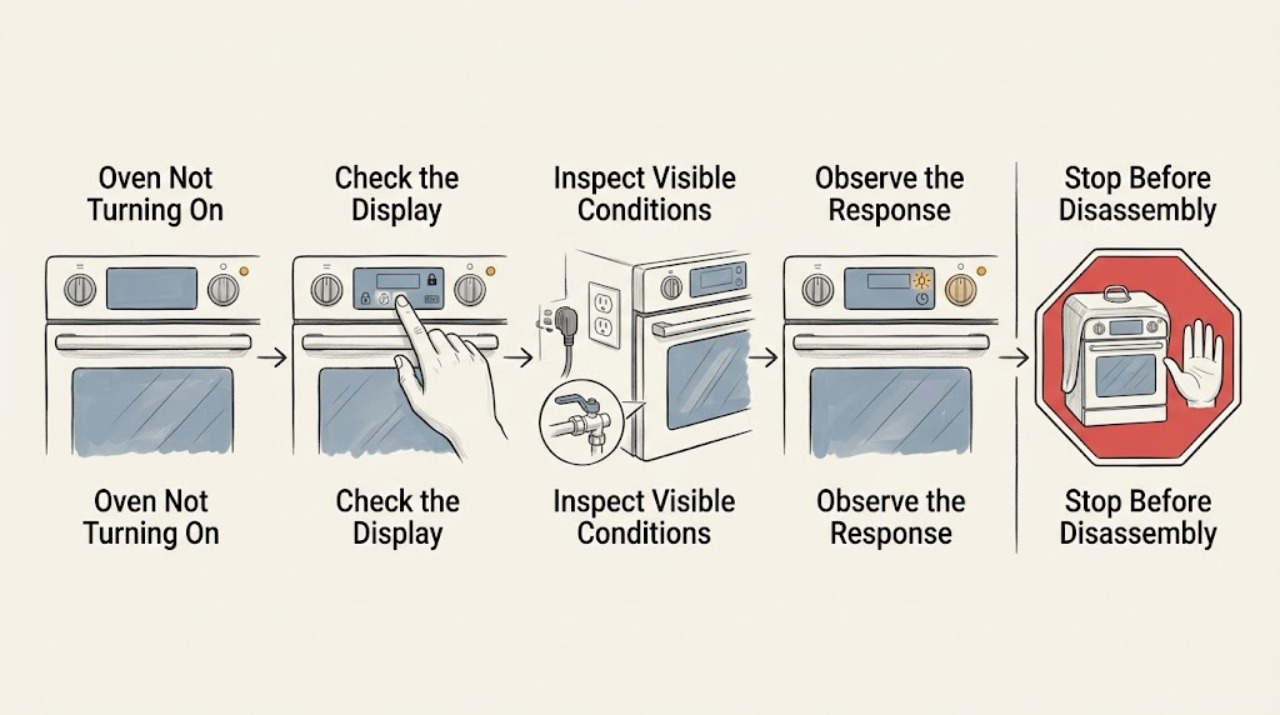
If an Amana oven will not turn on, first determine whether the display is completely blank or the display works but a bake command does not start. From a safe position, check for a recent power outage, a visibly tripped household breaker or fuse, control lock, demo mode, delayed start, and a door that is not fully closed. Gas and dual-fuel models also require a correctly connected grounded supply and an open external gas valve, but do not inspect gas fittings or wiring if there is a gas odor, moisture, smoke, sparking, or heat damage. Amana documents F9 or F9 E0 after some power events and says a recurring code may require electrical-supply inspection. Do not open the oven, remove panels, perform live tests, or repeatedly reset a breaker; stop using the appliance and arrange qualified appliance or electrical service when the display stays blank, a code returns, the breaker trips again, the cord or outlet is damaged, or gas or burning symptoms appear.
Work through in order
Diagnostic checks
Use only checks that match the exact appliance or system and its official guide.
-
Check 1
From outside the appliance, note whether the clock or control display is blank, whether cooktop or other range functions work, whether the oven light responds, and whether the oven stopped after an outage or installation change.
Expected result: The entire display is blank, the display is lit but bake does not start, or some range functions work while the oven does not.
Next step: Use the correct electric or gas/dual-fuel branch below and record the model number. Do not remove a panel to separate supply from internal control faults.
Why this matters
Why: A blank display makes supply or control power more likely. A lit display with a no-start condition points toward a setting, door, gas, heating, or control path; working surface functions do not prove the oven circuit is healthy.
-
Check 2
Look at the household breaker or fuse indicator from a safe position. If there is no moisture, burning smell, sparking, or visible damage, follow the owner's manual for one normal power reset; do not open the electrical panel or repeatedly reset a breaker.
Expected result: A breaker or fuse is visibly tripped, the control returns after the permitted reset, or the breaker trips again or the display remains blank.
Next step: If the protection device trips again, stop and call a licensed electrician or appliance technician. If the control returns, monitor it without opening the oven and continue with lock, demo, delay, and door checks.
Why this matters
Why: Amana lists a tripped household protection device and power interruption among initial no-start checks. A repeat trip or blank display after a reset can indicate a supply, wiring, or appliance fault rather than a setting problem.
-
Check 3
Read the display for F9, F9 E0, PF, a lock indicator, Sabbath or demo indication, a delayed-start time, or another exact code. Check the owner's manual for the model-specific meaning before pressing more controls.
Expected result: F9 or F9 E0 appears after an outage, PF or a time-of-day display is flashing, control lock or demo mode is shown, delayed start is active, or the code is not listed.
Next step: Use the manual's documented user control to clear a setting or perform one permitted power reset. If F9/F9 E0 or another code returns, disconnect power safely and arrange qualified electrical or appliance diagnosis.
Why this matters
Why: Amana associates F9 or F9 E0 with an incorrect-voltage detection after some power events, PF with power failure, and lock, demo, or delayed start with an intentional no-start state. An unlisted code cannot be safely decoded from appearance alone.
-
Check 4
With the oven off and cool, verify that the door closes fully and that no rack, dish, food, or obstruction prevents the latch from seating. Observe whether the control responds after the door is closed; do not remove the door or manipulate the latch.
Expected result: The door is not fully closed, the latch area is obstructed, the display responds after closure, or the oven remains unresponsive with a correctly closed door.
Next step: Remove only an obvious external obstruction and retry the manual's normal start sequence once. If the latch, hinges, or control remain abnormal, stop and arrange appliance service.
Why this matters
Why: Amana notes that some oven functions will not operate when the door is open. A closed door with no response shifts suspicion toward control, supply, lock, or heating-system diagnosis.
-
Check 5
For a gas or dual-fuel range, observe only the external gas shutoff and power cord or outlet if they are clearly accessible and there is no gas odor or damage. For an electric oven, note whether the rest of the appliance has normal power; do not inspect terminals or test wiring.
Expected result: The external gas valve appears closed, the cord or outlet is damaged or questionable, the cooktop works but the oven does not, or the external supply appears normal.
Next step: Do not alter gas connections or wiring. If the valve is unclear, the cord or outlet is damaged, or the oven still does not start, stop and arrange qualified gas, electrical, or appliance service.
Why this matters
Why: Amana identifies the external gas valve and grounded power supply as prerequisites for gas oven operation. A questionable outlet, cord, or supply needs an electrician; normal external supply with a no-start oven points to an internal control, igniter, valve, or element fault.
-
Check 6
After one model-approved setting or power check, select a normal bake function and observe whether the display accepts the command, the cycle begins, and the oven operates without an error, odor, smoke, sparking, or unusual heat. Do not keep retrying a failed start.
Expected result: The bake cycle starts normally, the display accepts the command but heating does not begin, or the same no-start condition or code returns.
Next step: Use the oven only if it remains stable and heats normally. If it does not heat, a code returns, or any warning symptom appears, stop use and provide the recorded observations to qualified service.
Why this matters
Why: A normal cycle supports a temporary power or setting condition. A command that is accepted but does not heat, or a recurring no-start display, may involve an element, igniter, sensor, relay, control, wiring, or supply fault.
Use your observations
Decision map
Find the observation that best matches what you see, then follow the next safe action.
-
PATH 01Safety boundary
What you see
Is the control display completely blank?
Do this next
Check only the visible household protection indicator and recent outage history; do not open the panel or perform live tests, and call an electrician or appliance technician if power does not return.
Why this path and its safety boundary
Safety stop: Use the lit-display branch for lock, demo, delayed start, door, gas, and model-specific control conditions.
-
PATH 02Safety boundary
What you see
Is F9, F9 E0, PF, control lock, demo mode, Sabbath mode, or delayed start shown?
Do this next
Follow only the matching owner-manual setting or one documented power reset; a returning F9/F9 E0 or unlisted code is a service trigger.
Why this path and its safety boundary
Safety stop: Continue with the door, external supply, and normal start checks without opening the oven.
-
PATH 03Safety boundary
What you see
Does the oven door close fully and allow the control to accept a normal start command?
Do this next
Continue with the model's electric or gas supply branch and one attended normal bake test.
Why this path and its safety boundary
Safety stop: Remove only an obvious external obstruction; do not remove the door or bypass the latch, and arrange appliance service if it remains abnormal.
-
PATH 04Safety boundary
What you see
Is there a gas odor, smoke, burning smell, sparking, damaged cord or outlet, repeated breaker trip, or a code that returns?
Do this next
Stop using the oven, keep clear of hazardous parts, and contact the appropriate gas utility, electrician, or qualified appliance professional.
Why this path and its safety boundary
Safety stop: Run only one model-approved normal start test; if it still fails to turn on or heat, arrange qualified appliance service.
Helpful context
Understand the symptom
Blank display and no-start are different symptoms
A blank display points first to the appliance supply, household breaker or fuse, or control power. A lit display with no heating or no response can instead involve control lock, demo mode, delayed start, door position, or a model-specific control fault. Record what is and is not working before clearing a display or changing a setting.
No panel opening or live testing
Keep the oven closed and use external observation only. Do not remove the rear cover, console, door, burner, insulation, or terminal cover; do not probe live wiring, bypass a door or control lock, or work on gas connections. Stop for gas odor, smoke, burning smell, sparking, a hot or damaged cord, water near electrical parts, or repeated breaker operation.
Only after diagnosis
Potential parts
- oven control or relay
Consider this category only after a qualified technician confirms that the supply is correct and the electronic control or relay is the failed cause of the no-start symptom.
Match the exact oven model and control specification; do not select a part from a similar-looking range or attempt a live control repair. - bake element or gas igniter
Consider this category only after qualified diagnosis distinguishes a failed electric element from a gas igniter, valve, sensor, or supply problem.
The heating technology and exact model determine fit and safety; gas components require qualified installation and an element should not be tested live.
Common questions
FAQ
Why is my Amana oven not turning on?
Separate a blank display from a lit display that will not start. Check a recent outage, a visibly tripped household breaker or fuse, control lock, demo mode, delayed start, and a door that is not fully closed. Gas and dual-fuel models also need the correct external gas and grounded power supply; internal faults need service.
What does F9 or F9 E0 mean on an Amana oven?
Amana associates these displays with incorrect-voltage detection after some power events or a possible wiring issue. Follow the model's safe power-reset guidance once; if the code returns, disconnect power safely and have a qualified electrician or appliance technician inspect it.
Can control lock, demo mode, or delayed start stop an Amana oven from starting?
Yes. Amana lists control lock, demo mode, and delayed start as possible reasons an oven will not operate or begin immediately. Use the exact owner manual to change the setting rather than opening the appliance or repeatedly cycling power.
When should I stop troubleshooting an Amana oven?
Stop for gas odor, smoke, burning smell, sparking, a hot or damaged cord, water near electrical parts, repeated breaker trips, a damaged door or outlet, a recurring code, or a display that stays blank. Do not open panels or perform live electrical or gas work; arrange qualified service.
Read the exact guide
Official sources
- Error Codes for Cooking AppliancesAmana Product Help · F9/F9 E0, PF, control lock, Sabbath mode, power reset, and model-specific oven error displays.
- Not Working After Power Outage - ElectricAmana Product Help · F9 or F9 E0 after outage, control lock or demo mode, delayed start, and qualified electrician boundary.
- Oven Not Working - ElectricAmana Product Help · Electric oven no-start checks for installation, outage, control lock or demo mode, delayed start, breaker or fuse, and electrician escalation.
- Oven Not Working - Gas and Dual Fuel RangeAmana Product Help · Gas and dual-fuel oven door, grounded power, external gas-valve, and qualified-service checks.
Community feedback
Share a repair observation
Share a plain-text repair observation. Accepted observations are published automatically; this page may take a moment to update.