
On this page
Start here
Quick answer
If an AEG oven is not turning on, first decide whether the display is completely dark, the display works but no heating programme starts, or only one heating function fails. Check the fuse or RCD and the visible power connection without opening the appliance. If the clock is flashing after a power cut, set it according to the exact model manual; also check for Demo mode, Child Lock, Duration or End settings and a selected heating function and temperature. A dark display that remains dark after the model-approved power restart, repeated fuse or RCD trips, burning smell, smoke, sparking, a damaged cord or a door or control fault is a stop condition. Do not remove covers, probe live wiring, bypass a lock or replace internal parts yourself; leave the oven switched off and arrange authorised service or qualified electrical help.
Before you begin
Safety first
- The reader should not open the oven, remove electrical covers, perform live tests, dismantle internal components, bypass Child Lock or door safety, replace heating or control parts, or continue using the appliance after smoke, burning odour, sparking, overheating or repeated fuse/RCD trips.
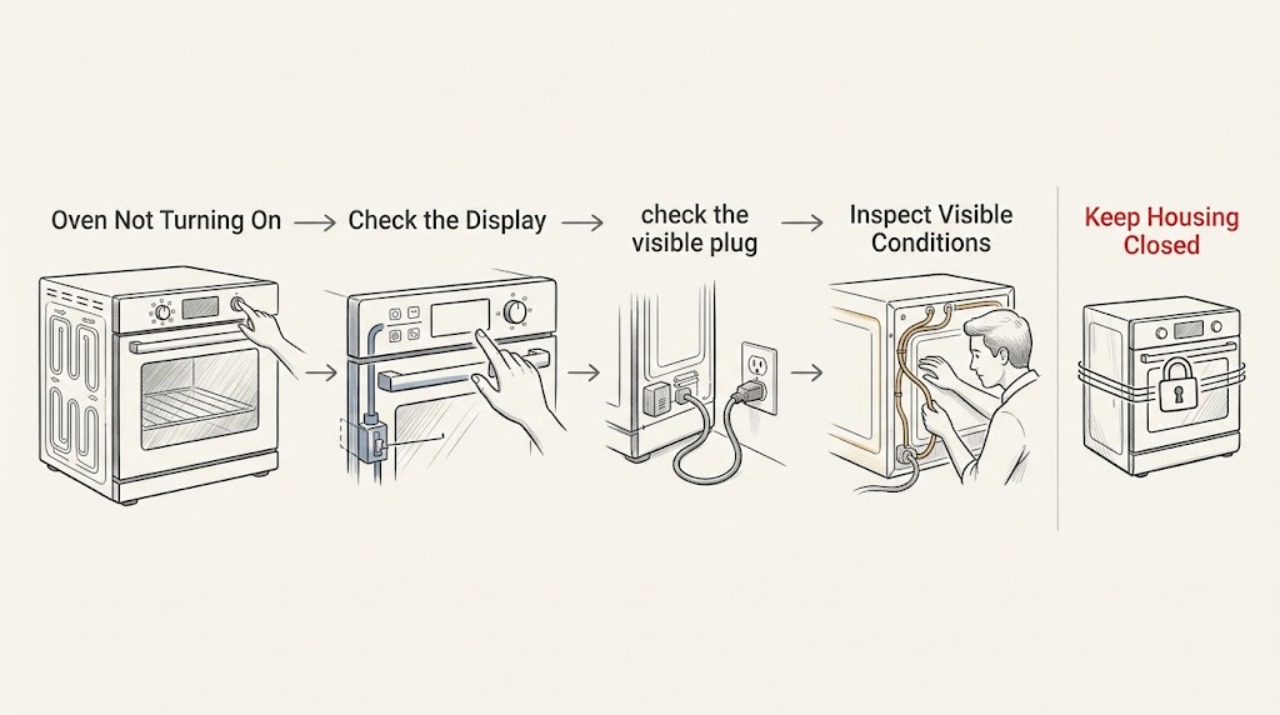
Work through in order
Diagnostic checks
Use only checks that match the exact appliance or system and its official guide.
-
Check 1
Turn the oven control to off, then note the exact state before changing anything: no display or lamp, a dim or flashing clock, a lit display with no response, or a display that accepts settings but does not heat.
Expected result: The display is dark, the clock is flashing, a lock or Demo indication appears, or only one heating mode fails.
Next step: Record the symbols and selected function, then follow the corresponding supply, clock and control, or single-function branch below.
Stop if: Stop immediately for smoke, burning odour, sparking, a hot or damaged cord, repeated fuse/RCD trips, cracked glass or water near electrical parts.
Why this matters
Why: These symptoms lead to different checks. AEG treats a dark display and several failed heating types as a supply or control branch, while a flashing clock, Demo or Child Lock can follow a power interruption or setting state. A single failed function does not prove the oven has no power.
-
Check 2
From the normal user position, check the visible plug or isolator condition and whether the oven's fuse or RCD has tripped. Do not remove an electrical cover or touch terminals.
Expected result: The fuse or RCD is tripped, the supply is uncertain, or the supply appears normal but the oven display remains dark.
Next step: If protection has tripped or supply is uncertain, leave the oven off and arrange qualified electrical or appliance service. If supply is normal, continue only with a model-directed restart; do not open the oven.
Stop if: Do not repeatedly reset a fuse or RCD, replace unknown protective devices, use an extension lead, or perform live voltage tests.
Why this matters
Why: AEG says a blank display can indicate a tripped fuse or RCD, incorrect installation or a power-source problem. A repeated trip is evidence of a supply or appliance fault, not a reason to keep resetting it.
-
Check 3
If the display is lit or the clock flashes, check the clock, selected heating function and temperature, and look for Duration, End, Demo or Child Lock indications. Use the exact AEG manual for how to clear a setting.
Expected result: The clock is unset after a power interruption, Demo or a lock symbol is active, a timed programme is set, or the controls look normal.
Next step: Correct only the displayed setting using the model manual, select a normal function and temperature, and make one supervised start attempt. If the setting cannot be cleared or the oven still does not respond, arrange service.
Stop if: Do not guess a code or button sequence, bypass Child Lock, force a dial, or remove the control panel to test it.
Why this matters
Why: AEG lists an unset digital clock, Duration or End function, Demo mode and Child Lock as reasons an oven can appear not to start or heat. A normal control state shifts suspicion toward a power or internal control fault.
-
Check 4
If the display works but only one heating type fails, compare a second model-approved heating function with the correct manual temperature and door position. Do not place food in the oven during an uncertain test.
Expected result: Another heating function works, or several functions fail and the oven does not heat despite correct settings.
Next step: If only one function remains unavailable, record the function and arrange service if the manual does not resolve it. If several functions fail, stop testing and provide the symptoms to authorised service.
Stop if: Do not remove heating elements, access wiring, bypass a thermostat or continue testing if the oven smells burnt, overheats or trips protection.
Why this matters
Why: AEG directs a single failed heating type toward a manually set function and temperature, while several failed types with a lit display point toward a broader control, supply or heating-circuit fault.
-
Check 5
After any model-approved setting correction or power restart, observe one normal start attempt and then stop if the oven does not respond. Record the display, clock, function, temperature, and whether the fan or lamp behaves normally.
Expected result: The oven starts normally, remains dark or unresponsive, or the fault returns after the restart.
Next step: If it works, monitor the next use and keep the model manual available. If it fails again or remains dead, switch it off, leave it disconnected when safe and arrange an authorised service visit.
Stop if: Do not dismantle internal components, probe live circuits, substitute a control or heating part, bypass a lock, or repeatedly cycle the mains supply.
Why this matters
Why: A one-time recovery can follow a power interruption or setting state, but a returning fault indicates that the underlying issue has not been identified. AEG advises service when display or power problems persist and places internal diagnosis beyond ordinary checks.
Use your observations
Decision map
Find the observation that best matches what you see, then follow the next safe action.
-
PATH 01Next step
What you see
The display is blank or the fuse/RCD is off or trips again.
Do this next
Leave the oven off and arrange qualified electrical or appliance service; do not repeatedly reset protection or open covers.
-
PATH 02Next step
What you see
The oven display is active but the digital clock flashes.
Do this next
Set the clock using the exact AEG manual and make one normal start attempt. If the oven still does not start, use authorised service.
-
PATH 03Next step
What you see
Demo, a padlock, Duration or End indication prevents normal operation.
Do this next
Clear the setting only with the model-specific manual, select the function and temperature, and stop if the control remains locked or unresponsive.
-
PATH 04Next step
What you see
The display and controls work but one heating type does not operate.
Do this next
Verify the manual temperature and function settings once; a persistent single-function failure needs technician diagnosis rather than an assumption that the whole oven is dead.
-
PATH 05Next step
What you see
Several functions fail, the display remains dark after a model-directed restart, the fault returns, or smoke, odour, sparking, overheating or repeated trips occur.
Do this next
Stop using the oven, disconnect power only if safe, keep panels closed and arrange authorised appliance service or qualified electrical help.
Helpful context
Understand the symptom
“Not turning on” can describe two different faults
A completely dark display points first to the supply path or an internal power fault. A lit display with no heat or no programme start points more often to the clock, selected function, temperature, Duration or End setting, Demo mode or Child Lock. If only one heating function fails, AEG directs you to compare that function's temperature and mode rather than treating the whole oven as dead.
After a power interruption, settings can matter
AEG notes that a flashing digital clock can mean the time was not set after installation or a power cut. Some models can also show Demo or a lock symbol. Use the exact manual for the display and controls; a generic button sequence may not apply to your oven.
Power faults are not a DIY repair invitation
If the oven trips its protection, smells hot or burnt, sparks or remains electrically dead, stop using it. Keep covers closed and have the supply or appliance checked by a qualified professional. AEG's general guidance says internal components should not be dismantled unless the manufacturer specifically instructs it.
Only after diagnosis
Potential parts
- oven control panel or display component
Consider this category only when the display or controls remain faulty after the model-specific settings and supply checks and a qualified technician confirms an internal control fault.
Confirm the exact AEG model and manufacturer fit information; do not remove the control panel or assume a blank display identifies this component. - oven door switch or lock component
Consider this category only when the manual and service diagnosis show that a door-position or lock fault prevents operation; a no-start symptom alone does not identify the component.
Confirm exact model fit and safe installation through authorised service; never bypass the door safety system. - oven heating or power component
Consider this category only after a technician confirms why one or more heating functions fail with normal controls and supply; the symptom does not establish a specific element, relay or power component.
Do not order or replace internal electrical or heating components from the symptom alone; qualified service must confirm the fault and model fit.
When checks do not resolve it
Need a professional?
Call an authorised appliance service centre when the AEG oven stays dark after the supply and model-directed restart check, several heating functions fail, a setting or lock cannot be cleared, or the fault returns. Use qualified electrical help for a supply problem or repeated fuse/RCD trips. Stop immediately for smoke, burning odour, sparking, abnormal heat, a damaged cord or water near electrical parts; disconnect power only if safe and do not use the oven until it is checked.
Safety scope: The reader should not open the oven, remove electrical covers, perform live tests, dismantle internal components, bypass Child Lock or door safety, replace heating or control parts, or continue using the appliance after smoke, burning odour, sparking, overheating or repeated fuse/RCD trips.
Common questions
FAQ
Why is my AEG oven display completely blank?
Check the visible supply and whether the fuse or RCD has tripped. If the supply is normal but the display remains dark after the model-directed restart, leave the oven off and arrange authorised service rather than opening it.
Why does my AEG oven have power but not start heating?
Check the clock, selected heating function and temperature, plus Duration, End, Demo or Child Lock indications. Use the exact manual to clear a setting; persistent failure needs service.
What does a flashing clock mean on an AEG oven?
AEG says a flashing digital clock can indicate that the time was not set after installation or a power cut. Set it using the model manual, then make one normal start attempt; if the oven still does not operate, arrange service.
Should I keep using an AEG oven that trips the fuse or smells burnt?
No. Stop using it, disconnect power only if safe, and seek qualified appliance or electrical help. Do not repeatedly reset protection, open covers or test internal components.
Read the exact guide
Official sources
- What to check before contacting AEG consumer serviceAEG Support · AEG general pre-service guidance for power, restart, error documentation, model manuals, safe maintenance and internal-component boundaries.
- Oven does not heat upAEG Support · AEG guidance covering an oven that does not turn on, has no power, has a blank display, or does not heat.
- Oven Clock or display goes dark, dims or switches offAEG Support · AEG guidance for a clock or display that goes blank, dims or switches off, including standby and appliance power-fault boundaries.
Community feedback
Share a repair observation
Share a plain-text repair observation. Accepted observations are published automatically; this page may take a moment to update.