
On this page
Start here
Quick answer
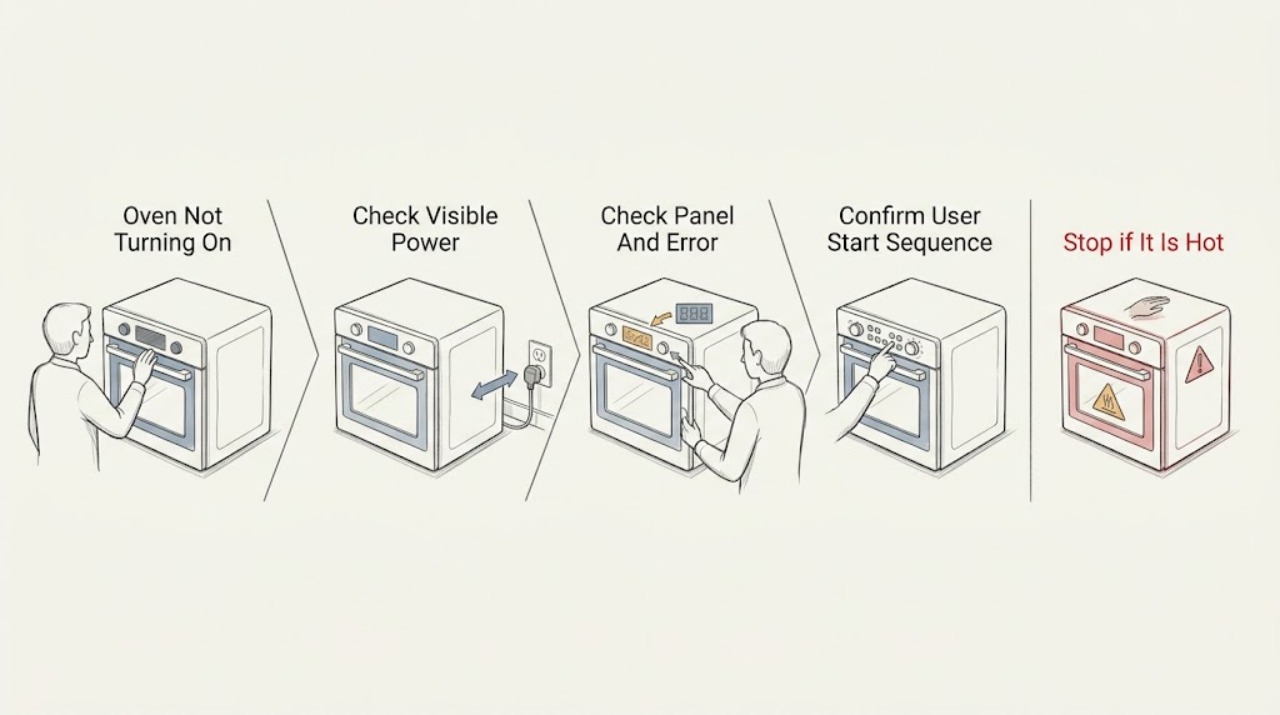
If a Bosch oven will not turn on, first determine whether the appliance has any electrical response. Check the dedicated circuit breaker or fuse and the oven's power connection without opening the appliance, then inspect the control panel for a displayed error or a damp, unresponsive keypad. Follow the exact model manual for selecting an oven mode and temperature; if the display remains dead, an error returns after a single reset, or the oven still does not respond with power available, leave it off and arrange Bosch-authorized service. Do not remove panels or work on high-voltage wiring, heating elements, or gas components.
Work through in order
Diagnostic checks
Use only checks that match the exact appliance or system and its official guide.
-
Check 1
Check whether the display, clock, interior light, or other normal indicator responds. Inspect the oven's accessible power connection and the household breaker or fuse serving the appliance; do not remove a cover or open the receptacle.
Expected result: Record whether the oven is completely dark, partially powered, or fully powered but not accepting a cooking command, and whether a breaker or fuse is open.
Next step: Restore a tripped breaker or fuse only once when safe. If it trips again or the oven remains dark with power confirmed, stop and arrange service. If the display works, continue to the panel and control check.
Stop if: Stop for a hot or damaged receptacle, smoke, burning odor, exposed wiring, or a breaker that trips again.
Why this matters
Why: A dark appliance can result from interrupted power, while a lit display means at least some control power is present. A breaker that opens again indicates an electrical fault rather than a setting issue.
-
Check 2
Inspect the control panel from the outside. If it is damp or soiled, turn the appliance Off and wipe it dry with a soft cloth. Note any E-number, beeping, locked message, or unresponsive keys; do not spray cleaner into the controls.
Expected result: The panel either responds normally, remains unresponsive, or shows a persistent error after the dry-panel check.
Next step: If the model's error guidance permits a single breaker reset, perform it once and observe the result. If the error returns or keys remain unresponsive, turn the oven Off and arrange service.
Stop if: Stop if the panel is cracked, overheated, wet inside, or requires removal to inspect.
Why this matters
Why: Bosch identifies condensation as one possible cause of certain keypad errors. A returning E-number or unresponsive control is evidence of a fault that needs the model-specific error procedure or service, not repeated button pressing.
-
Check 3
Using the Bosch model manual, select the intended oven mode and temperature or start command. Make sure the control accepts the selection and that the oven is not in a model-specific locked or delayed state; do not force a knob or key.
Expected result: The oven accepts a mode and temperature, rejects the input, shows an error or lock message, or appears powered but does not begin heating.
Next step: If the oven starts, monitor one normal cycle. If the controls reject valid selections or the oven remains inactive after the model-correct sequence, record any message and arrange service.
Stop if: Stop if the oven starts unexpectedly, the door or lock behaves abnormally, or any error or smell appears.
Why this matters
Why: A correct user selection distinguishes a control or mode issue from a no-power symptom. If the oven accepts settings but does not heat, that is a heating fault; if it cannot accept settings, it is a control or electronics fault.
-
Check 4
After one safe power reset or model-correct control attempt, decide whether the oven now responds normally. Do not open the cabinet or test a fuse, element, control board, wiring, thermostat, gas valve, or igniter with tools.
Expected result: The oven either returns to normal operation, or remains dark, unresponsive, shows a recurring error, or fails to heat despite a working display.
Next step: If the problem persists, leave the oven Off and arrange Bosch-authorized service. Provide the model number, any error text, whether the display works, and the breaker/reset result.
Stop if: If the oven remains unresponsive or an error returns, stop and arrange authorized service.
Why this matters
Why: A successful reset can clear a transient control condition. Persistent no-start or no-heat behavior exceeds the external troubleshooting boundary and cannot be assigned to a specific component without model-specific service diagnosis.
Use your observations
Decision map
Find the observation that best matches what you see, then follow the next safe action.
-
PATH 01Safety boundary
What you see
The display and indicators are dark, or the oven circuit breaker or fuse is open.
Do this next
Check the accessible plug or supply and restore the circuit once when safe.
Why this path and its safety boundary
Safety stop: If the breaker trips again or the oven remains dark with power confirmed, leave it Off and arrange service.
-
PATH 02Safety boundary
What you see
The control panel is damp, unresponsive, beeping, or showing an E-number or lock message.
Do this next
Dry the outside of the panel and follow the model-specific reset guidance once if permitted.
Why this path and its safety boundary
Safety stop: If the message returns or the keys remain unresponsive, arrange service; do not remove the panel.
-
PATH 03Safety boundary
What you see
The display works but the oven does not accept a valid mode or temperature selection, or it does not begin after the normal start sequence.
Do this next
Record the control response and arrange Bosch-authorized service.
Why this path and its safety boundary
Safety stop: Do not bypass the control, door lock, thermostat, or other safety device.
-
PATH 04Safety boundary
What you see
The oven accepts a setting and appears to run but does not heat.
Do this next
Turn it Off and arrange service for a heating-system diagnosis.
Why this path and its safety boundary
Safety stop: Do not touch or remove heating elements, gas components, or high-voltage wiring.
Helpful context
Understand the symptom
There are two useful paths: a completely dark oven has a power or control symptom, while a powered display that will not begin a cooking mode may have a control, setting, or fault condition. Bosch recommends checking the household electrical supply when an oven does not heat and using the model's controls to select a temperature. The control layout and reset behavior vary by model.
A damp or unresponsive control panel can produce an error condition. Bosch's error guidance allows a dry-panel check and a power reset for certain keypad or electronics messages, but a returning error should be documented and serviced rather than repeatedly reset.
The safe homeowner boundary is external. Never remove the oven cabinet or control panel, bypass a thermal or door safety, or touch heating, gas, or high-voltage components. Bosch specifically directs owners to leave oven repairs to experts.
Only after diagnosis
Potential parts
- oven control or power component
Consider a part only after authorized service identifies the failed component following the external power and control checks.
Confirm the exact Bosch model and manufacturer's fit information before ordering; do not infer compatibility from a no-start symptom.
When checks do not resolve it
Need a professional?
Arrange Bosch-authorized service when the oven stays dark with a confirmed supply, a breaker trips again, the control panel remains unresponsive, an error returns after one permitted reset, the oven accepts settings but does not heat, or any inspection would require opening the appliance. Stop immediately for smoke, burning odor, exposed wiring, gas odor, or abnormal door-lock behavior.
Common questions
FAQ
What should I check first if my Bosch oven will not turn on?
Check whether the display or interior light responds, inspect the accessible power supply and breaker or fuse, and confirm the normal mode and temperature selection from the model manual. If power is available but the oven remains unresponsive, arrange service.
Can a Bosch oven error code prevent it from turning on?
Yes. Bosch error guidance says a keypad or electronics error may permit a dry-panel check and a model-specific power reset, but a returning error or unresponsive control requires service. Record the exact message before resetting.
What if my Bosch oven display works but it does not start heating?
Use the model manual to select a valid oven mode and temperature. If the oven accepts the settings but does not heat, or if it rejects the controls, turn it Off and arrange service rather than touching elements or wiring.
Should I remove the Bosch oven panel to find out why it will not turn on?
No. Bosch identifies oven repairs and heating-element work as expert tasks. Keep troubleshooting external and arrange authorized service for a persistent no-start condition.
Read the exact guide
Official sources
- Common Oven Problems and How to Fix ThemBosch · Supports Bosch's general oven troubleshooting and referral to an authorized servicer when the oven may require repair.
- Bosch Oven & Microwave Error CodesBosch · Supports dry control-panel checks, permitted power resets, recording recurring errors, and contacting service for persistent faults.
- Bosch Oven RepairsBosch · Supports arranging Bosch customer service or an authorized servicer for an oven that needs repair.
- Oven Troubleshooting: Broken heating elementBosch · Supports leaving high-voltage oven repairs to experts and not attempting element repair.
Community feedback
Share a repair observation
Share a plain-text repair observation. Accepted observations are published automatically; this page may take a moment to update.