
On this page
Start here
Quick answer
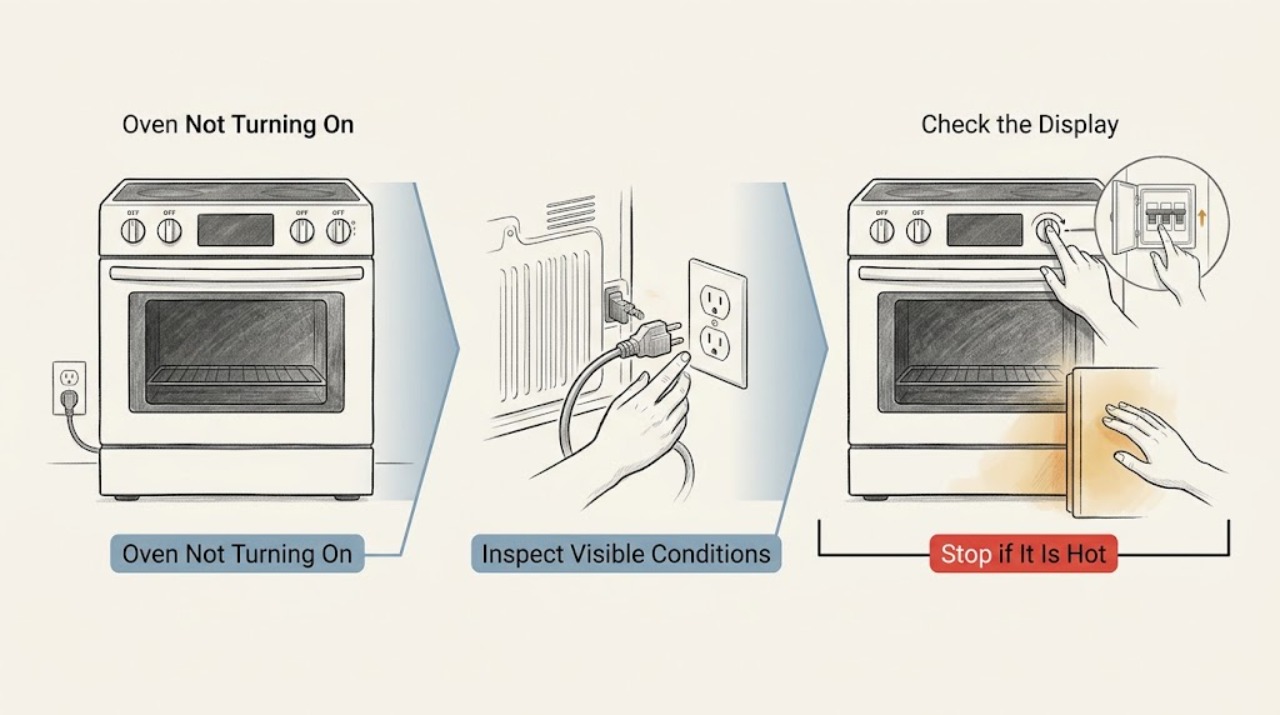
If a Breville countertop oven will not turn on, first determine whether the LCD is completely dark or shows STANDBY. Confirm that the plug is fully seated in an independent outlet and that the circuit has not opened, then press START/CANCEL or turn a dial if the oven is in standby. Breville's oven manuals also document unplugging for five seconds to restore default settings. Do not use an extension cord, open the oven, or keep resetting a breaker that trips. If the outlet and plug are sound but the oven remains dead, an E01/E02/E03 message appears, or there is a damaged cord, smoke, burning odor, or abnormal heat, unplug it when safe and arrange qualified Breville service or electrical help.
Work through in order
Diagnostic checks
Use only checks that match the exact appliance or system and its official guide.
-
Check 1
Look at the control panel before pressing buttons and classify the symptom: the LCD is completely dark, STANDBY is visible, the display is lit but START/CANCEL does nothing, or an error such as E01, E02, or E03 is shown. Record the model number and exact message.
Expected result: STANDBY indicates a supported oven has entered its idle state rather than necessarily losing power. A completely dark panel with no response points toward the outlet, circuit, plug, or an internal fault. A persistent E01/E02/E03 is a documented non-resettable condition on the applicable manual.
Next step: If STANDBY is visible, perform the wake-up check. If the screen is dark, continue to the plug and outlet check. If a non-resettable error is present, do not keep restarting the oven.
Why this matters
Why: The display state changes the next check: wake standby, verify supply, or stop for service. Error characters must be read from the exact model manual instead of being treated as interchangeable across Breville ovens.
-
Check 2
If STANDBY is visible or the LCD is merely dim after inactivity, press START/CANCEL once or turn one control dial, then check whether the screen re-illuminates. On a model that wakes, select the desired function and press START/CANCEL again to begin the cycle.
Expected result: Breville's BOV670 manual says START/CANCEL or a dial reactivates the LCD from STANDBY, and the oven is actively running only when the start control and display indicate a cycle. If neither control wakes the oven, it is not behaving like simple standby.
Next step: If the display wakes and the oven starts normally, monitor it. If the panel stays dark or controls remain unresponsive, unplug the oven and proceed to the outlet and reset checks without opening it.
Why this matters
Why: A standby display is an idle state, not evidence that the heating elements or control board have failed. A wake-up failure moves the diagnosis toward power or service.
-
Check 3
With the oven switched off, verify that the plug is fully inserted into the wall outlet and that the outlet is suitable for the appliance. Do not use an extension cord or power strip. If safe, try a different independent outlet as Breville's manual suggests, without sharing a visibly damaged or overheated circuit.
Expected result: If the oven works from another suitable outlet, the original outlet or circuit is the likely cause. If another outlet also gives no display, the fault is not resolved by the connection change.
Next step: Leave a suspect outlet unused and arrange qualified electrical help. If the outlet appears normal but the oven remains dead, continue to the visible breaker check and one controlled reset.
Why this matters
Why: Breville lists a secure plug, an independent or different outlet, and the circuit breaker among the first checks for an oven that will not switch on. A failed outlet or warm, loose, discolored, or sparking receptacle needs electrical attention.
-
Check 4
Check the household breaker or fuse state that supplies the outlet without removing electrical covers. Reset a tripped breaker only once when there is no sign of smoke, heat, damage, or a short; do not repeatedly reset a breaker that opens again.
Expected result: A restored display after a single safe breaker reset indicates a supply interruption may have caused the symptom. A breaker that trips again, or a normal breaker with a still-dark oven, requires escalation rather than an internal oven test.
Next step: If the circuit trips again, leave it off and arrange a qualified electrician. If power is stable and the oven remains dark, unplug the cool oven for the documented reset and then test once.
Why this matters
Why: The manuals identify the circuit breaker as a possible reason the oven will not turn on, but a recurring trip is an electrical safety signal and may involve the outlet, cord, or appliance.
-
Check 5
For a cool oven with no visible damage, unplug it from the wall outlet, wait five seconds, and plug it directly back in. Use this as one model-documented reset to restore settings, not as a way to bypass a recurring electrical or safety fault.
Expected result: If the LCD returns and the controls work after the reset, a temporary control state may have cleared. If the oven remains dark, immediately shows an error, or the circuit opens, the reset did not resolve the underlying condition.
Next step: Run one short supervised control test only when the oven powers normally and no safety sign is present. If it remains dead or the code returns, stop and arrange qualified service.
Why this matters
Why: Breville documents the five-second unplug interval for restoring default settings on the BOV670 manual. It is not a universal repair for every model or an acceptable response to smoke, heat, a damaged cord, or a recurring trip.
-
Check 6
If the LCD shows E01, E02, or E03 on an applicable Breville model, photograph the message and unplug the oven after stopping use. Do not remove the cover or attempt to reset the code by repeatedly cycling power.
Expected result: The LOV660 manual identifies each of these messages as a non-resettable appliance issue and directs the user to remove the power cord and contact Breville support. A code that clears but returns is still a service clue.
Next step: Keep the oven unplugged and arrange qualified Breville service. Provide the exact code, model, when it appeared, and whether the outlet or breaker also showed a problem.
Why this matters
Why: These codes are not a user-adjustable temperature or cooking setting. Continued operation could turn a control fault into a safety risk, so service—not a guessed board or heater replacement—is the next decision.
-
Check 7
Inspect only the outside of the plug, cord, outlet, and oven for a damaged sheath, scorch mark, moisture, smoke, sparking, or a burning odor. Do not touch exposed conductors or continue the test if any warning sign is present.
Expected result: A damaged cord, hot or discolored outlet, smoke, sparking, or burning smell is not a normal no-start condition. If none is present and the display still does not return after the documented checks, an internal fault remains possible.
Next step: Unplug when safe, keep the oven out of use, and arrange qualified appliance or electrical service. For a clean but persistent no-display symptom, provide the model and completed checks to Breville service.
Why this matters
Why: The presence of an electrical or overheating warning changes the goal from restoring operation to preventing further hazard. Absence of a warning does not authorize opening the oven or testing live parts.
Use your observations
Decision map
Find the observation that best matches what you see, then follow the next safe action.
-
PATH 01Next step
What you see
STANDBY is visible and the display re-illuminates after START/CANCEL or a dial is turned.
Do this next
Select the function and press START/CANCEL to begin the cycle. Monitor the oven; this was consistent with standby rather than a dead supply.
-
PATH 02Next step
What you see
The plug or a different independent outlet restores the display.
Do this next
Use the suitable outlet directly and leave the original outlet unused if it is loose, warm, discolored, or otherwise suspect; arrange electrical help for the outlet or circuit.
-
PATH 03Next step
What you see
The breaker trips again or the outlet, plug, or cord shows heat, sparking, damage, or a burning odor.
Do this next
Stop using the oven, leave the suspect circuit off as appropriate, and arrange qualified electrical or appliance service. Do not keep resetting or use an extension cord.
-
PATH 04Next step
What you see
The oven remains dark after a suitable outlet, stable circuit, and one documented unplug reset.
Do this next
Keep it unplugged and arrange qualified Breville service; do not remove the housing or attempt an internal control or heater repair.
-
PATH 05Next step
What you see
E01, E02, or E03 is displayed on a model covered by the LOV660 guidance.
Do this next
Treat the message as a non-resettable appliance issue, unplug the oven, and contact qualified Breville support with the code and model information.
-
PATH 06Next step
What you see
The display is on but START/CANCEL still does not begin a cycle after the oven is awake and the door and controls are used normally.
Do this next
Stop trying to force the control and arrange qualified service. Provide the selected function, the display state, and whether the oven responds to a dial.
Helpful context
Understand the symptom
A dark screen is not always a dead oven
Breville compact ovens can show a standby state after inactivity. On supported Smart Oven models, the LCD may stop illuminating while STANDBY remains visible; pressing START/CANCEL or turning a dial wakes the display, and START/CANCEL must then be used to begin a cycle. If there is no display, no response, and no standby indication, treat the problem as a power or internal fault rather than repeatedly changing cooking settings.
Stay on the safe side of the power check
The user-level checks are limited to the plug, a suitable outlet, the visible breaker state, and the controls. Do not open the housing, remove a fuse from inside the oven, bypass a thermal or door safety device, or probe wiring. Keep the oven clear of combustible materials and let it cool before handling the plug. Stop immediately for smoke, a burning smell, a damaged cord or plug, sparking, or a breaker that opens again.
When checks do not resolve it
Need a professional?
Professional diagnosis is appropriate for a persistent no-display condition, a recurring breaker trip, a non-resettable error message, a failed control after standby is ruled out, or any visible electrical or overheating warning.
Common questions
FAQ
Why is my Breville oven display dark but the oven may still have power?
On supported Smart Oven models, the oven can enter STANDBY after inactivity. If STANDBY is visible, press START/CANCEL or turn a dial to wake the LCD, then press START/CANCEL to start a cycle.
What should I check when a Breville oven will not turn on?
Check that the plug is secure, use a suitable independent outlet, and check the visible circuit breaker state. Do not use an extension cord. If the oven remains dark after one documented reset, arrange qualified service.
How do I reset a Breville oven that will not start?
For the BOV670 manual, unplug the cool oven, wait five seconds, and plug it directly back in to restore default settings. This is not a substitute for service when there is damage, smoke, a recurring breaker trip, or a persistent error.
What do E01, E02, and E03 mean on a Breville oven?
The LOV660 manual identifies E01, E02, and E03 as non-resettable appliance issues. Unplug the oven and arrange qualified Breville support rather than repeatedly cycling power or opening the housing.
When should I stop using a Breville oven?
Stop for smoke, sparking, a burning odor, a damaged cord or plug, unusual heat, moisture inside the appliance, or a breaker that trips again. Unplug when safe and arrange qualified appliance or electrical service.
Read the exact guide
Official sources
- the Smart Oven Air Fryer — Instruction BookletBreville · Breville LOV660 guidance for secure plug, independent outlet, circuit breaker, and E01/E02/E03 non-resettable messages, illustrating model-specific behavior.
- Product Hub – Find Support, Spare Parts & Service for Your MachineBreville · Breville's official product hub for finding oven support, manuals, and service help after user-level checks are exhausted.
- the Smart Oven Air Fryer Pro — Instruction BookletBreville · Breville BOV670 guidance for a no-power symptom, independent outlet and breaker checks, five-second reset, standby wake-up, and normal control states; apply to other models only where their manuals match.
Community feedback
Share a repair observation
Share a plain-text repair observation. Accepted observations are published automatically; this page may take a moment to update.