
On this page
Start here
Quick answer
Start by observing whether the flicker happens when a door moves, on one light or several, and whether the refrigerator is cooling normally. Amana says interior lights are controlled by the door switch, so check from outside that the refrigerator is level, the doors align and close fully, and no magnet or electronic device is close to the switch. Close the doors for a minute if they were left open for a long time, then disconnect power for one minute and reconnect it once. If the model uses a traditional bulb, a loose bulb is a possible model-specific check; many newer Amana refrigerators use LED modules that are not owner-replaceable. If several lights flicker, the light remains unstable after the safe reset, the door switch or wiring needs access, or cooling or electrical symptoms accompany the flicker, leave the refrigerator powered down when safe and arrange Amana service.
Before you begin
Safety first
- This article covers external observation, door and alignment checks, removal of nearby objects, one safe power cycle, and a model-directed traditional-bulb check. It does not authorize live testing, sealed LED or hinge-harness access, door-switch bypass, inner-door disassembly, or generic part replacement.
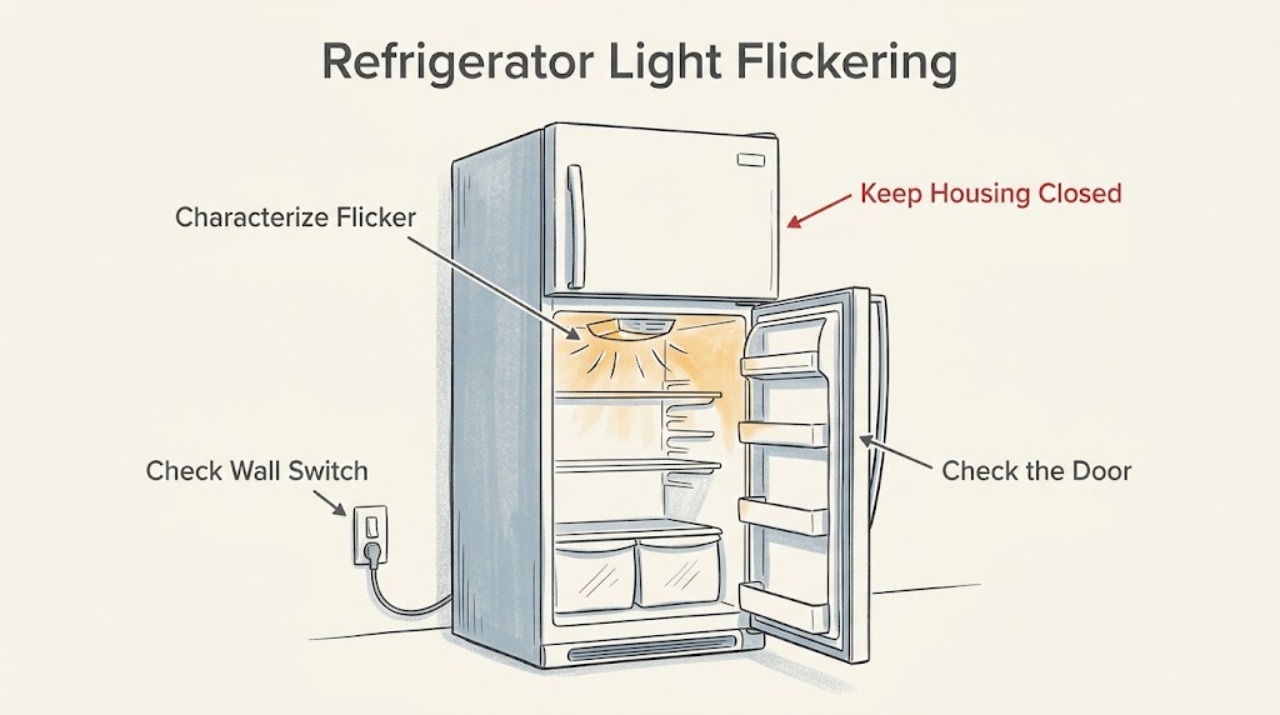
Work through in order
Diagnostic checks
Use only checks that match the exact appliance or system and its official guide.
-
Check 1
Open and close each refrigerator door once while watching the light. Note whether the flicker occurs only during door movement, continues while the door is held open, affects one light or several, and whether the control display or cooling also changes.
Expected result: The flicker tracks door movement, continues with the door still open, affects one lamp, affects several compartments, or occurs with cooling or control symptoms.
Next step: Use the door-contact checks for a door-linked pattern. Use the bulb or LED path for a single light that flickers independently, and arrange service sooner if cooling or electrical symptoms accompany the flicker.
Stop if: Stop for smoke, burning smell, arcing, heat at a plug or control, water near electrical parts, or a damaged cord.
Why this matters
Why: A door-linked flicker makes switch contact or door alignment more likely; one-light behavior makes the local lamp or module more relevant. Several lights or simultaneous control and cooling changes suggest a broader electrical or control issue, which the symptom alone cannot identify.
-
Check 2
With the refrigerator stable, check from outside that the doors sit level and align with the cabinet, close fully, and press the door switch only as gently as the model design permits. Remove shipping tape if present and move magnets or electronic devices away from the switch area; do not remove a hinge cover.
Expected result: The door is visibly misaligned, the switch is not engaged consistently, a nearby magnet or device is present, or the door and switch contact appear normal.
Next step: Correct only a removable nearby object or obvious load or door-position issue. If the door cannot align or the switch remains inconsistent, stop and arrange model-specific service or installation inspection.
Stop if: Stop if the door, hinge, seal, switch, or cabinet is damaged, the refrigerator rocks, or checking contact would require disassembly or forcing the door.
Why this matters
Why: Amana identifies door-switch engagement, level and door alignment, and nearby magnets or electronics as factors in interior-light operation. A normal external contact check does not prove the switch, harness, or control is good.
-
Check 3
If the doors were left open for an extended period, close all refrigerator and freezer doors and keep them closed for one minute before reopening once. Observe whether the lights return steadily; do not use this as a substitute for correcting a door that does not close or latch.
Expected result: The light returns steadily after the doors remain closed, the flicker returns immediately on reopening, or there is no change.
Next step: If the light is steady, monitor ordinary use. If it flickers again or never recovers, continue with the model-appropriate power and bulb checks without repeatedly opening the doors.
Stop if: Stop if the door cannot close, the seal is damaged, the cabinet is unstable, or temperature or food-safety concerns require service.
Why this matters
Why: Amana documents an automatic light-off condition after a prolonged open-door period on some models. Recovery after the closed-door interval points to that state, while immediate recurrence suggests switch contact, alignment, bulb, or module behavior.
-
Check 4
If there is no immediate hazard and the refrigerator can be safely disconnected, unplug it or disconnect its power for one minute, reconnect it once, and monitor the light. Do not repeatedly cycle power or disconnect a hardwired appliance beyond the safe control available to you.
Expected result: The flicker stops, the flicker returns, the light remains off, or cooling and controls do not recover normally.
Next step: If the light is steady and cooling is normal, continue to the bulb-design check only if needed. If the flicker returns or operation is abnormal, leave the refrigerator off when safe and arrange service.
Stop if: Stop for a tripped breaker, damaged cord, heat, moisture, smoke, burning odor, or arcing when power is restored.
Why this matters
Why: Amana provides a one-minute power cycle as an external reset for interior-light concerns. A temporary recovery does not identify a failed part; recurrence or broader loss of operation shifts the issue to service diagnosis.
-
Check 5
With power disconnected, identify the lighting design only from the ordinary lens or model manual. If the exact manual describes a traditional bulb, check for a loose fit and use only the specified replacement procedure. If the light is a sealed LED module with wires, do not open it; restore power only after the approved cover or bulb step is complete.
Expected result: A traditional bulb is visibly loose, a correctly seated bulb still flickers, or the refrigerator uses a sealed LED module or integrated light assembly.
Next step: Follow the exact owner manual for one compatible bulb check only. If the bulb is seated or a sealed LED module is present, leave the light assembly intact and arrange service.
Stop if: Stop for a sealed LED module, exposed wires, a cracked lens, a hot socket, moisture, or any need to remove the light housing or hinge wiring.
Why this matters
Why: Amana says a loose traditional bulb can cause a lighting fault, while some newer refrigerators use LED modules that are not ordinary replaceable bulbs. A sealed module or a seated bulb with persistent flicker needs model-specific diagnosis.
Use your observations
Decision map
Find the observation that best matches what you see, then follow the next safe action.
-
PATH 01Safety boundary
What you see
The light flickers as a door moves or when the door is not squarely closed, and a nearby magnet or electronic device or visible alignment issue is present.
Do this next
Remove the nearby object and correct only an obvious door-position issue, then observe one normal opening. If the door or switch remains inconsistent, arrange service.
Why this path and its safety boundary
Why it matters: Door-switch contact or door alignment is more likely than a failed light module. Amana identifies the switch as the interior-light control and calls out level, alignment, and nearby devices.
Safety stop: Do not force the door, bend hinges, bypass the switch, or remove the hinge cover without model-specific authorization.
-
PATH 02Safety boundary
What you see
Only one compartment light flickers independently, the door contact appears normal, and the model has a traditional bulb accessible under the owner manual.
Do this next
Disconnect power and follow one model-approved bulb-seating or replacement step. If flicker remains, stop and request service.
Why this path and its safety boundary
Why it matters: A loose or failing traditional bulb is plausible, but the symptom does not establish a compatible bulb or socket fault without the exact model.
Safety stop: Do not substitute a bulb by appearance, exceed the manual's rating, test an energized socket, or open a sealed module.
-
PATH 03Safety boundary
What you see
Several lights flicker, the light is a sealed LED module, a correctly seated traditional bulb still flickers, or the display and cooling change with the light.
Do this next
After one safe power cycle if appropriate, leave the assembly closed and arrange model-specific service with the exact model and pattern.
Why this path and its safety boundary
Why it matters: A broader control, harness, power, or light-module issue remains possible. Amana's guidance does not justify naming a board, switch, or LED module from flicker alone.
Safety stop: Do not probe wiring, remove the module, access the hinge harness, or continue if electrical or heat symptoms appear.
-
PATH 04Safety boundary
What you see
The flicker persists after door, nearby-object, closed-door, and one-time power checks, or smoke, heat, burning odor, arcing, water, or damaged wiring is present.
Do this next
Stop using the refrigerator if safe, disconnect power when safe and permitted, preserve the exact model and observations, and contact qualified Amana service or an electrician as appropriate.
Why this path and its safety boundary
Why it matters: The issue is not resolved by the documented owner-level checks. An electrical or control fault may be present, and hazardous symptoms require immediate isolation rather than more lighting tests.
Safety stop: For smoke, arcing, exposed conductors, burning, water at electrical parts, or a hot outlet or cord, stay clear and obtain urgent qualified help.
Helpful context
Understand the symptom
A flicker is often a door-state symptom, not proof of a bad LED
Amana refrigerators use the door switch to control interior lights. A door that is not aligned or fully closing can make the switch contact unstable, and Amana also warns that magnets or electronic devices near the switch can interfere. Note whether the flicker follows door movement and whether it affects one compartment or several before choosing a bulb or part.
Bulb and LED designs have different owner checks
Some models have a traditional bulb that may be loose; others use LED lighting or a sealed LED module. Amana's bulb guidance says the exact manual determines access and compatibility and directs owners to service when a sealed module with wires is present. Do not substitute a bulb by appearance or open a light module to test it.
Keep electrical work out of the troubleshooting path
External door, switch-area, and control observations are appropriate first checks. Disconnect power before any model-approved bulb or wiring step, keep the refrigerator dry, and do not remove a hinge cover or probe a harness unless the exact installation instructions clearly authorize that owner action. Repeated flicker with cooling loss, heat, smell, arcing, or damaged wiring requires service.
Safety boundary
Stop conditions
- Do not test a light socket, LED module, door switch, or hinge harness with power applied.
- Do not open a sealed LED module, remove the inner door or hinge cover, bypass the door switch, or force a misaligned door.
- Do not substitute a bulb by appearance or fit; use the exact model manual for any traditional-bulb instruction.
- Do not repeatedly cycle power or keep opening the refrigerator to reproduce a flicker, especially when cooling or electrical symptoms accompany it.
- Do not order a bulb, switch, LED module, harness, control, or other part until the exact model and failed component are confirmed.
When checks do not resolve it
Need a professional?
Contact Amana service when the flicker returns after the external door and one-time power checks, a traditional bulb is correctly seated but still unstable, the model uses a sealed LED module, several lights or the control display flicker, the door switch or hinge harness needs access, or cooling changes with the light. Stop immediately for smoke, burning odor, arcing, exposed wiring, water near electrical parts, a hot socket or cord, or a damaged door or cabinet.
Safety scope: This article covers external observation, door and alignment checks, removal of nearby objects, one safe power cycle, and a model-directed traditional-bulb check. It does not authorize live testing, sealed LED or hinge-harness access, door-switch bypass, inner-door disassembly, or generic part replacement.
Common questions
FAQ
Why does my Amana refrigerator light flicker when I open the door?
Amana says the interior light is controlled by the door switch. Check that the refrigerator is level, the doors align and close fully, and no magnet or electronic device is close to the switch. If the flicker continues after one safe power cycle, arrange service.
Can leaving an Amana refrigerator door open turn the light off?
On some Amana models, leaving the door open for an extended period turns the interior lights off automatically. Close all doors for one minute and observe once. If the light flickers again, check door contact and alignment instead of repeatedly opening the door.
Should I replace the bulb if my Amana refrigerator light flickers?
Only if the exact model manual identifies a traditional bulb and its owner replacement method. Amana notes that many newer refrigerators use LED lighting, and a sealed LED module should be serviced rather than opened or replaced with a generic bulb.
When should I stop troubleshooting an Amana refrigerator light?
Stop for smoke, burning odor, arcing, a hot socket or cord, water near electrical parts, exposed wires, a damaged door or cabinet, multiple lights and controls flickering, or any need to access a sealed LED module or hinge harness. Disconnect power when safe and contact qualified service.
Read the exact guide
Official sources
- Interior Lights Flickering - RefrigeratorProduct Help | Amana · Official Amana Product Help article for the listed French-door bottom-freezer family; switch location and lighting design vary by model.
- How to Test if the Door Switch is ActivatedProduct Help | Amana · Official Amana Product Help guide spanning several refrigerator families; switch placement and door behavior vary by model.
- Interior Light Not Illuminating - Top Freezer RefrigeratorProduct Help | Amana · Official Amana Product Help article for top-freezer refrigerators; some observations also apply to related models, but exact access and controls are model-specific.
- Changing the Light BulbProduct Help | Amana · Official Amana Product Help guide; light covers, bulbs, LED modules, and replacement procedures vary by model.
Community feedback
Share a repair observation
Share a plain-text repair observation. Accepted observations are published automatically; this page may take a moment to update.