
On this page
Start here
Quick answer
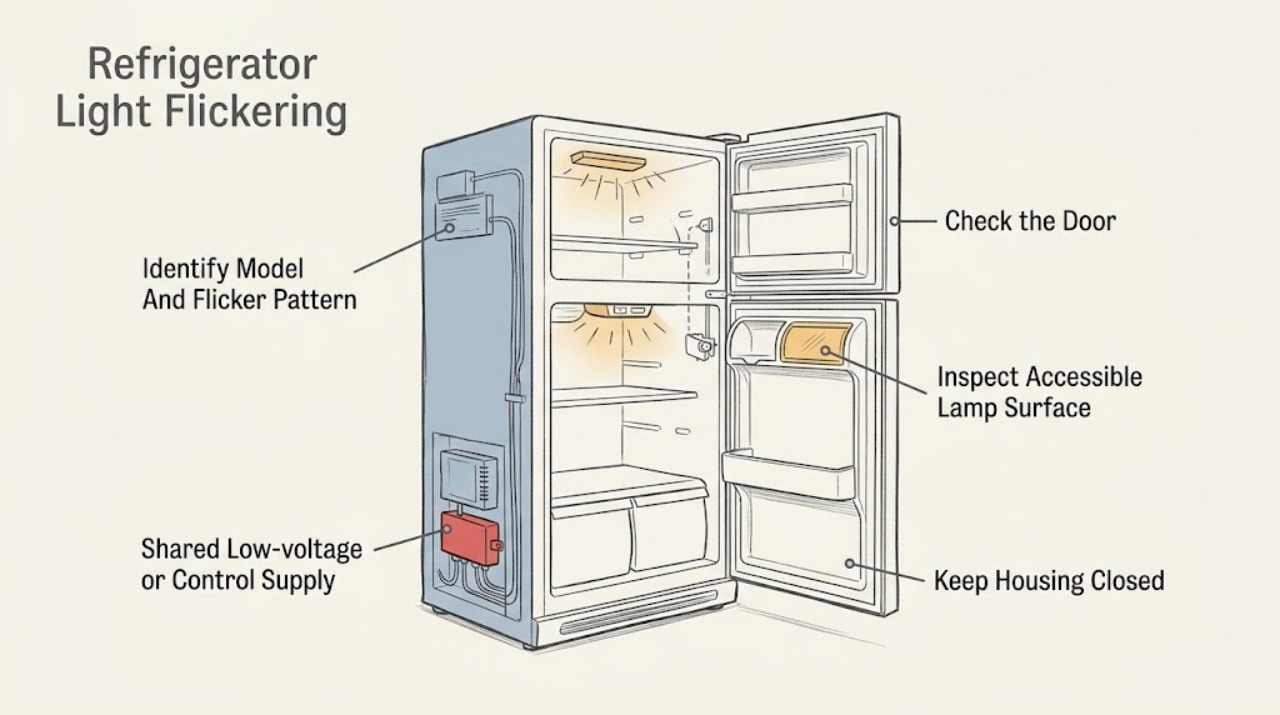
First identify the exact Daewoo refrigerator model and determine whether the flicker occurs only as the door moves or also affects the display, controls, fan, or cooling. Close the door firmly and observe whether the light becomes steady; check the gasket and hinge area for anything preventing normal closure, but do not press, short, or bypass a door switch. With the appliance disconnected only when safe, inspect and dry the outside of any accessible lamp lens and confirm that a user-replaceable lamp is installed exactly as the model manual specifies. Daewoo product pages show that refrigerator architectures vary: one model lists LED illumination, an inner electronic control, and a door-open alarm, while another lists mechanical thermostat control and LED refrigerator lighting. If flicker continues with a correctly closed door, the light housing is loose or damaged, other refrigerator functions also flicker, or there is heat, arcing, odor, water near electrics, or a damaged cord, stop using the appliance and arrange model-appropriate service. Do not remove a fixed LED module, open the control cabinet, test live wiring, or bridge a door sensor.
Before you begin
Safety first
- The user may read the model label, observe door closure, clear an obvious external obstruction, inspect and dry an accessible lens from a safe unpowered state, and follow a documented user-lamp instruction. LED modules, fixed lamp housings, door sensors, control boards, connectors, wiring, refrigeration controls, and all live electrical testing are for qualified service personnel.
Work through in order
Diagnostic checks
Use only checks that match the exact appliance or system and its official guide.
-
Check 1
Read the refrigerator's rating label and record the full model, whether it is a fridge-freezer or refrigerator-only unit, and whether the flicker occurs with the door stationary, while the door moves, or only when other loads start. Note whether the display, controls, fan sound, or cooling also change.
Expected result: The model is known and the flicker is limited to the interior light, follows door movement, or occurs together with display/control/cooling changes; alternatively, the model cannot be identified.
Next step: Use the model-matched manual and support route. If other functions pulse or the symptom is accompanied by a hazard, leave the refrigerator out of service before further checks.
Stop if: Do not remove covers or test wires to identify the model or lamp type.
Why this matters
Why: A door-correlated lamp-only symptom is different from a shared power or control symptom. An unknown model prevents safe assumptions about LED construction, door sensing, or the correct support organization.
-
Check 2
Open and close the door normally once, watching whether the light becomes steady when the door is fully closed. Check that shelves, food, or a misaligned gasket are not holding the door open and that the hinge side is not visibly sagging. Do not hold a plunger or magnet against a sensor and do not force the door.
Expected result: The light is steady with a normally closed door, flickers only at a particular door angle, remains unstable with the door fully closed, or the door does not close and seal normally.
Next step: Remove only an obvious external obstruction and retest once. If the door remains misaligned or the light still flickers when closed, arrange service and avoid repeated opening tests.
Stop if: Do not bypass, short, tape down, or repeatedly actuate a door switch or sensor.
Why this matters
Why: A change tied to door position makes closure alignment or the door-sensing path more likely. Flicker with a properly closed door, or a door that cannot align, makes a lamp assembly, sensor, connector, or control issue more likely than a normal door-open indication.
-
Check 3
If the exact manual identifies a user-replaceable lamp or removable lens, disconnect the refrigerator from power from a dry, safe position and follow only that instruction. Otherwise, leave a fixed LED lens, strip, or card in place; inspect only for condensation, a loose external lens, darkening, cracking, or visible moisture, then wipe the accessible surface dry.
Expected result: The model has a documented user lamp and the correct lamp is secure, or the light is a fixed LED assembly; the lens is wet, cracked, loose, or visibly heat-damaged.
Next step: Restore power only when the area is dry and the manual permits it. If damage, moisture, or flicker remains, keep the refrigerator unplugged when safe and request qualified service; move food to safe cold storage as needed.
Stop if: Do not remove a sealed LED module, pry a fixed lens, substitute an unlisted lamp, or touch exposed contacts.
Why this matters
Why: A correctly fitted user lamp can rule out a simple seating issue, but a fixed LED assembly or damaged lens needs model-specific service. Moisture, cracking, or heat damage raises the risk beyond a harmless intermittent light.
-
Check 4
Without opening the appliance, observe whether the temperature display, control panel, interior fan, compressor sound, or any other light changes at the same moment as the interior lamp. Check the plug and cord externally for looseness, crushing, scorch marks, or moisture, and confirm the refrigerator is connected as the installation instructions require.
Expected result: Only the lamp flickers, or the lamp flickers together with the display, fan, controls, cooling, or supply protection; the cord or plug is damaged or the outlet protection trips.
Next step: For any shared-function symptom, damaged cord, repeated trip, burning odor, or moisture near electrics, stop using the refrigerator and arrange qualified service. If only the lamp flickers and the door is sound, provide the model and pattern to the model-specific support route.
Stop if: Do not probe the outlet or refrigerator wiring, remove the rear cover, or keep resetting a breaker/RCD to continue operating it.
Why this matters
Why: A lamp-only pattern keeps the lamp/door-sensing path in focus. Synchronized changes in several functions, repeated protection trips, or cord damage indicate a shared supply, control, or wiring hazard.
-
Check 5
After the safe external checks, document a short, normal door-close observation only if there is no hazard: model, door position, whether the lamp is LED or user-replaceable, which other functions changed, and any visible damage or moisture. Do not repeatedly cycle the door or leave the refrigerator unattended while the lamp is unstable.
Expected result: The light is steady after correcting an external closure or documented lamp issue, or flicker repeats with the door closed or after a correct lamp fit.
Next step: Monitor only a normal, steady light. For repeatable flicker, keep the appliance isolated if safe and contact the correct Daewoo technical service/retailer route with the recorded model and pattern.
Stop if: Do not continue using the refrigerator after arcing, smoke, burning odor, abnormal heat, water entry, or repeated power interruptions.
Why this matters
Why: A resolved, door-related symptom is more consistent with an external alignment or documented lamp-seating issue. Repeatable flicker with correct closure and no accessible lamp fix requires diagnosis of the sensor, LED assembly, control, or wiring.
Use your observations
Decision map
Find the observation that best matches what you see, then follow the next safe action.
-
PATH 01Safety boundary
What you see
The interior light flickers only while the door moves or at one door angle, and the light is steady when the door is fully closed with no other symptoms.
Do this next
Clear only an obvious obstruction and confirm normal closure once. If the pattern persists, arrange model-specific service without holding the sensor closed.
Why this path and its safety boundary
Why it matters: Door alignment, gasket interference, or the door-sensing path is more likely than a shared supply failure.
Safety stop: Do not force hinges, alter the gasket, or bypass the door switch.
-
PATH 02Safety boundary
What you see
The door closes normally and the refrigerator continues cooling, but the interior light flickers with the door fully closed and no display or fan change.
Do this next
Follow the exact manual only if it documents a user-replaceable lamp. Otherwise leave the fixed assembly alone and request qualified service.
Why this path and its safety boundary
Why it matters: A lamp seating issue, LED assembly, local connector, or lamp-control fault is more likely than a whole-appliance supply event; the precise component is model-specific.
Safety stop: Do not pry a fixed LED lens or test the lamp circuit live.
-
PATH 03Safety boundary
What you see
The interior lamp flickers together with the display, controls, fan, cooling, or other appliance functions, or the outlet protection trips.
Do this next
Stop using the refrigerator, isolate power only from a safe dry position, and arrange qualified electrical/appliance service through the correct Daewoo route or retailer.
Why this path and its safety boundary
Why it matters: A shared supply, control, or wiring problem is more likely than an isolated lamp issue.
Safety stop: Do not repeatedly reset protection, open the rear cover, or make live measurements.
-
PATH 04Safety boundary
What you see
The lamp lens or housing is wet, cracked, loose, heat-discolored, or accompanied by arcing, smoke, burning odor, or a damaged cord.
Do this next
Keep the appliance out of service and contact qualified service. Protect food separately and do not restore power until the appliance has been assessed.
Why this path and its safety boundary
Why it matters: The symptom is a safety concern, not a lamp-adjustment problem; moisture or physical damage may expose electrical parts.
Safety stop: Do not touch exposed contacts, dry inside a fixed housing while energized, or use the appliance after arcing or smoke.
-
PATH 05Safety boundary
What you see
The refrigerator model cannot be identified, or it is a Daewoo-branded fridge made by the affiliate identified in Daewoo Electricals' support notice.
Do this next
Use the rating label, retailer, or the correct affiliate's support route before ordering a lamp or applying a reset.
Why this path and its safety boundary
Why it matters: The visible brand alone does not establish the correct manual, lamp design, or service organization.
Safety stop: Do not use a different Daewoo model's lamp, wiring instructions, or door-sensor procedure.
Helpful context
Understand the symptom
Start with the exact refrigerator identity
Daewoo is used across more than one refrigerator manufacturer and support route. The Daewoo Electricals help center says its fridge-freezer requests may concern products made by another affiliate under the Daewoo brand, while the Daewoo Electronics catalog lists multiple refrigerator families. Read the rating label before deciding whether the appliance has a plunger, magnetic, or electronic door sensor, or whether its lamp is a replaceable bulb or a sealed LED assembly.
Separate door movement from a shared supply symptom
A light that flickers only while the door is moving or only at a particular hinge position points first to door closure, alignment, or the door-sensing path. If the display, interior fan, external controls, or cooling also reset or pulse at the same time, treat it as a wider supply or control symptom rather than only a lamp problem. These observations guide the next safe step; they do not identify a component without the model manual and service diagnosis.
Only inspect what the model makes user-accessible
You may wipe and dry an accessible lens or follow an exact model manual's instructions for a user-replaceable lamp after disconnecting power safely. A fixed LED strip, LED card, connector, door switch, control board, or wiring harness is not an owner-serviceable flicker repair. Daewoo's technical-service page directs users to its technical assistance network when an appliance does not work correctly; use the correct brand affiliate or retailer route for the identified refrigerator.
Safety boundary
Stop conditions
- Stop using the refrigerator for smoke, arcing, burning odor, abnormal heat, a damaged cord, repeated breaker/RCD trips, water near electrical parts, or a cracked/loose lamp housing; isolate power only from a safe, dry position and arrange qualified service.
- Do not bypass, short, tape down, or hold a door switch, plunger, magnet, reed sensor, or other interlock in an artificial state.
- Do not remove a fixed LED strip, LED card, lamp housing, control cover, rear panel, or wiring connector; do not perform live-voltage, continuity, or resistance tests.
- Do not order a lamp or LED module from the brand name alone. Confirm the full model and the correct Daewoo affiliate or retailer support route first.
- Do not keep opening and closing the door or repeatedly resetting power to mask a repeatable flicker; preserve the food safely and arrange service.
When checks do not resolve it
Need a professional?
Contact the correct Daewoo technical-service or retailer route when the light flickers with the door fully closed, a documented user-lamp check does not resolve it, the door cannot align normally, any other function pulses with the light, or the symptom recurs. Use the rating-label model because Daewoo-branded refrigerator support may belong to a different affiliate than Daewoo Electricals.
Safety scope: The user may read the model label, observe door closure, clear an obvious external obstruction, inspect and dry an accessible lens from a safe unpowered state, and follow a documented user-lamp instruction. LED modules, fixed lamp housings, door sensors, control boards, connectors, wiring, refrigeration controls, and all live electrical testing are for qualified service personnel.
Common questions
FAQ
Why does my Daewoo refrigerator light flicker when I open the door?
If the flicker occurs only as the door moves, check for a gasket, shelf, hinge, or alignment issue that prevents normal closure. Do not hold or bypass the door sensor. If the light flickers with the door fully closed, the lamp assembly or sensing/control path needs model-specific service.
Can I replace the LED light in a Daewoo refrigerator myself?
Only if the exact model manual explicitly identifies a user-replaceable lamp and gives the procedure. Do not pry out a fixed LED strip, card, or housing or substitute a lamp based only on the Daewoo name; use qualified service for sealed LED assemblies.
What if the display flickers along with the refrigerator light?
Synchronized flicker in the display, controls, fan, or cooling is a wider supply or control symptom rather than an isolated lamp issue. Stop using the refrigerator, isolate power only when safe, and arrange qualified service. Do not keep resetting a breaker or test live wiring.
Which Daewoo support route should I use for a refrigerator?
Use the rating-label model to identify the correct affiliate or retailer. Daewoo Electricals explicitly says it cannot handle some Daewoo fridge-freezer requests because those products are made by another affiliate, while Daewoo Electronics publishes refrigerator products and technical-service information.
Read the exact guide
Official sources
- Technical Service and WarrantyDaewoo · Use the service route applicable to the identified model and market.
- Fridge FreezersDaewoo Electricals Help Centre · Support-routing notice; it does not define the lamp or door behavior of any particular model.
- DAEWOO CKL0268EWMA0-ES 54 CM Double Door with E Class, 268 LDaewoo · CKL0268EWMA0-ES model family; other models may use different lamp and control arrangements.
- DAEWOO CKN0287EWEA0-EU 54 CM Fridge-Freezer with E Class, 278 LDaewoo · CKN0287EWEA0-EU model family; other models may use different lamps, door sensors, and controls.
Community feedback
Share a repair observation
Share a plain-text repair observation. Accepted observations are published automatically; this page may take a moment to update.