
On this page
Start here
Quick answer
A flickering Dacor refrigerator light should first be separated into a door-state symptom, a local light issue, and a shared power or control symptom. Observe whether the flicker changes as the door moves or only affects one light, then read the full model number and use its Dacor manual to identify the light design. Dacor product pages show integrated LED lighting on current refrigerator families, so do not assume a screw-in bulb can be replaced. With power disconnected, make only a dry exterior check of the door fit and accessible light cover permitted by the matching manual. If several functions flicker together, the outlet or cord is warm or damaged, or there is smoke, odor, sparking, or a protection trip, stop using the refrigerator and arrange qualified service; do not open the LED, control, or wiring or test energized parts.
Before you begin
Safety first
- This article covers symptom observation, model lookup, dry exterior door and actuator checks, and a matching manual's unplugged lamp or cover step when explicitly allowed. A qualified professional must handle LED modules, drivers, sockets, connectors, internal wiring, controls, door-sensor replacement, outlet faults, damaged cords, and energized testing.
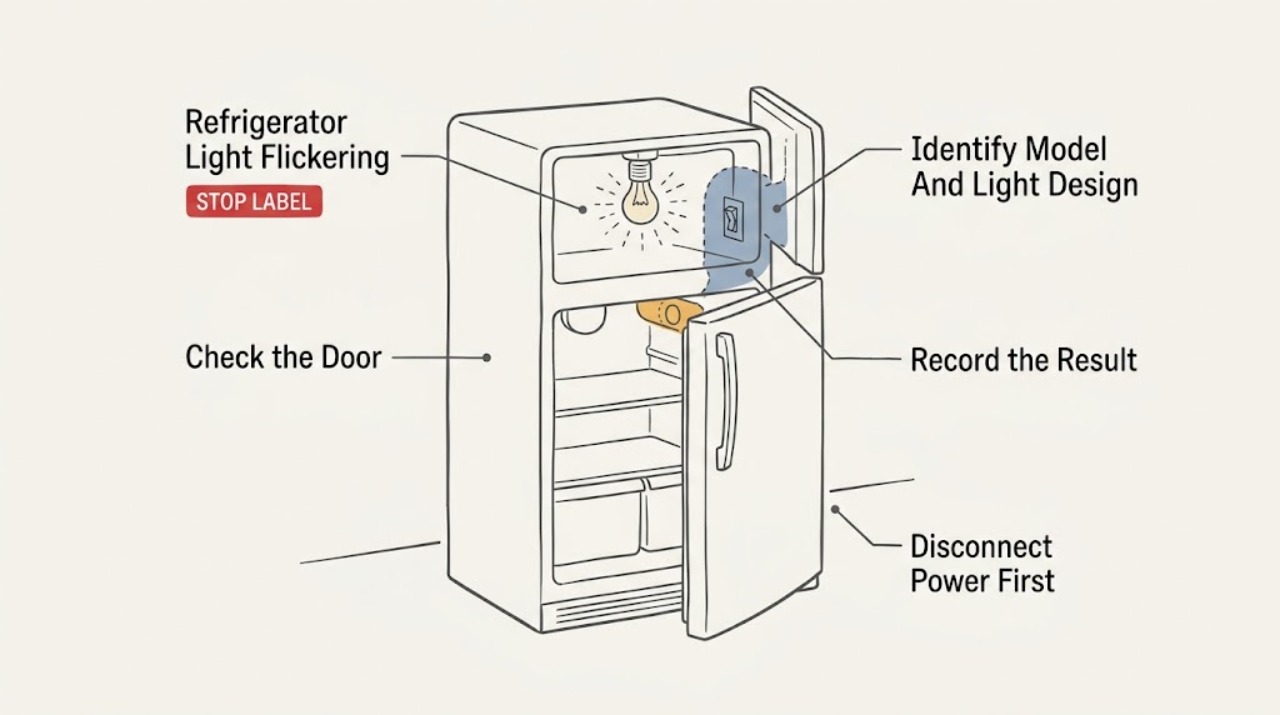
Work through in order
Diagnostic checks
Use only checks that match the exact appliance or system and its official guide.
-
Check 1
Observe the light with the door moving slowly, fully open, and nearly closed, without touching exposed parts. Note whether one light or several lights flicker, whether the display or dispenser changes with it, and whether the door closes squarely against the gasket.
Expected result: The flicker appears only at one door position, continues with the door fully open, affects several lights or controls, or occurs with a door that does not close or align normally.
Next step: Record the pattern and continue with the model lookup and safe exterior checks. Stop for smoke, sparks, abnormal heat, damaged wiring, or a protection trip.
Stop if: Do not repeatedly move the door or operate the appliance if the light arcs, overheats, or causes a breaker or other protection device to operate.
Why this matters
Why: A door-position pattern makes the door sensor or actuator, alignment, gasket, or local light connection more likely. A constant one-light pattern makes that light assembly or its driver more likely. Synchronized changes across functions raise concern about a shared power or control path; none of these observations confirms a component.
-
Check 2
Read the complete Dacor model number from the refrigerator label and open the matching Dacor product resources or use-and-care manual. Determine whether the model uses integrated LED strips or modules, a replaceable lamp, a door-sensing control, or a model-specific lighting setting.
Expected result: The matching information identifies integrated LED lighting, a user-replaceable lamp, a door-related control, a lighting setting, or a different design than the examples in this article.
Next step: Follow only the matching model's permitted user steps. If the light is integrated or the manual does not clearly permit access, leave it closed and arrange Dacor or qualified service.
Stop if: Do not infer a bulb type, LED module, door sensor, or fitment from another Dacor family.
Why this matters
Why: Dacor refrigerator architecture and service access vary. The opened Dacor column page identifies integrated LED lighting and remote lighting control; that information does not authorize removal of the module or prove it applies to every Dacor refrigerator.
-
Check 3
With the refrigerator unplugged, inspect the accessible dry door edge, gasket, and any visible door-sensing button or actuator for food residue, a stuck position, or an object that prevents full closure. Do not remove trim, a switch, or a door panel.
Expected result: The gasket or a package prevents full closure, the actuator appears held in or obstructed, the flicker changes when the door moves, or the door and accessible area look normal.
Next step: Remove only an obvious obstruction and clean the dry accessible surface with power disconnected. Verify that the door closes evenly; if flicker remains, use the matching light-design instruction or arrange service.
Stop if: Do not pry out a sensor, expose wiring, remove trim, or continue if the area is wet, cracked, discolored, or warm.
Why this matters
Why: A blocked actuator or poor door fit can change the light command as the door moves. A normal exterior makes the light assembly, driver, connector, control, or a hidden sensor issue more likely but does not distinguish them.
-
Check 4
If the exact Dacor manual explicitly permits a user-replaceable lamp or cover check, unplug the refrigerator, wait until the light is safe to handle, and inspect the lamp, cover, and visible seating for looseness or damage. Use only the exact type and rating specified by that manual. If it identifies an integrated LED module, skip lamp work and keep the module closed.
Expected result: The permitted lamp is loose or failed, the cover is not seated, the model uses integrated LED lighting, or the permitted lamp and cover appear sound but flicker continues.
Next step: Correct only the matching manual-approved lamp or cover issue and restore power for one supervised observation. If the symptom remains, or the model uses integrated LED lighting, arrange qualified service.
Stop if: Do not work with power connected, use an unverified lamp rating, handle broken glass bare-handed, or open an LED module.
Why this matters
Why: A failed or loose permitted lamp can explain a single-light flicker. Continued flicker with a sound lamp, or any integrated LED symptom, makes the driver, connector, sensor, control, or supply more likely and cannot be isolated by trying random lamps.
-
Check 5
After the permitted unplugged checks, make one supervised ordinary observation and compare the interior light with the display, dispenser light if fitted, fan, and cooling operation. Look only for external outlet or cord signs; do not open the appliance or perform an energized electrical test.
Expected result: Only one light flickers, several functions flicker together, the refrigerator loses power, the outlet or cord is warm or damaged, or the refrigerator otherwise operates normally.
Next step: For persistent one-light or integrated-LED flicker, arrange Dacor or qualified appliance service. For a supply, cord, heat, smoke, spark, or protection-trip symptom, stop using the refrigerator and have the electrical condition assessed by a qualified professional.
Stop if: Do not remove covers, probe wiring, bypass the door sensor, reset protection repeatedly, or continue using the appliance with smoke, sparks, burning odor, abnormal heat, or damaged wiring.
Why this matters
Why: A single-light symptom makes a local light assembly, driver, sensor, connector, or control more likely. Synchronized loss or flicker raises concern about the outlet, cord, control, or internal supply. Heat or damage at the connection is a safety issue rather than a bulb diagnosis.
Use your observations
Decision map
Find the observation that best matches what you see, then follow the next safe action.
-
PATH 01Safety boundary
What you see
The light flickers only while the door moves or rests at a particular position, and the door or accessible actuator does not sit consistently.
Do this next
With power disconnected, clear only an obvious obstruction and confirm even gasket contact. If the pattern remains, arrange service to check the sensor, wiring, and light circuit.
Why this path and its safety boundary
Why it matters: A door sensor or actuator, alignment, gasket, or local light connection is more likely than a shared supply fault, but the pattern does not prove which part is involved.
Safety stop: Stop for wet or damaged door-control areas, heat, discoloration, sparks, or a protection trip.
-
PATH 02Safety boundary
What you see
One light flickers continuously while open, and the matching manual explicitly permits a replaceable lamp that is loose, darkened, or visibly damaged.
Do this next
Unplug the refrigerator and perform only the manual-approved lamp or cover step once. If flicker remains, stop changing lamps and arrange service for the socket, driver, sensor, connector, or control.
Why this path and its safety boundary
Why it matters: The lamp or its permitted seating is a reasonable first suspect; the model manual still controls the type and rating.
Safety stop: Do not use an unverified lamp rating, handle broken glass bare-handed, or work with power connected.
-
PATH 03Safety boundary
What you see
The matching Dacor product information identifies integrated LED lighting, or the light assembly is not a user-replaceable lamp and flicker continues with the door and accessible exterior normal.
Do this next
Leave the light assembly closed and arrange Dacor or qualified appliance service with the full model number and the observed pattern.
Why this path and its safety boundary
Why it matters: An LED module, driver, connector, sensor, or control issue is more likely; the product page's integrated-light description does not make the assembly a user repair.
Safety stop: Do not open the LED module, disconnect its connector, remove a control, or attempt an energized circuit test.
-
PATH 04Safety boundary
What you see
The light flickers with the display or other functions, or the outlet, cord, or protection device shows heat, damage, sparks, smoke, or repeated interruption.
Do this next
Stop using the refrigerator, isolate power only from a safe dry position, and arrange qualified appliance or electrical service. Do not keep resetting a protection device to retest it.
Why this path and its safety boundary
Why it matters: A shared supply, cord, control, or internal electrical fault is more likely than an isolated lamp problem and creates an immediate safety boundary.
Safety stop: Treat smoke, sparks, burning odor, abnormal heat, damaged wiring, or repeated protection trips as urgent; do not touch damaged parts.
Helpful context
Understand the symptom
Start with the timing of the flicker
Watch the light as the door opens, closes, and rests fully open. A flicker that follows one door position makes the door fit, door sensor or actuator, and local light connection more plausible. A light that flickers continuously while open points more toward the light assembly or its control. If the display, dispenser, or other refrigerator functions change at the same time, consider a shared supply or control issue instead. These patterns narrow the next check but do not identify a failed part.
Dacor lighting varies by model
Dacor's product pages describe integrated LED lighting on refrigerator columns and French-door families, while other Dacor appliances can have different lighting layouts. Find the complete model number on the appliance and use that manual before removing a cover or ordering a lamp. The presence of a clear lens does not by itself prove that the LED board, driver, or connector is a user-serviceable part.
Use service for the internal light circuit
A user can observe the door and power symptoms and, with the refrigerator unplugged, clean a dry accessible switch area or follow a matching manual's explicitly permitted lamp-cover step. Opening an integrated LED module, tracing wiring, replacing a door sensor, checking voltage, or repairing a control is professional work. Dacor's support and warranty pages provide a service path; use it when the flicker persists or the safety signs are present.
Safety boundary
Stop conditions
- Stop using the refrigerator for smoke, sparks, burning odor, abnormal heat, a damaged cord or outlet, exposed wiring, or a breaker or other protection device that trips again; isolate power only if safe and arrange prompt professional help.
- Unplug the refrigerator before any permitted lamp, cover, cleaning, or repair step. Use the exact matching manual because lighting access differs by model.
- Do not open an integrated LED module, remove internal panels, bypass a door sensor or safety device, probe wiring, or perform an energized electrical test.
- If the light continues to flicker after the matching manual's permitted check, or if the model uses integrated LED lighting, leave the appliance closed and arrange Dacor or qualified service.
Only after diagnosis
Potential parts
- Dacor model-matched appliance light lamp
Consider this category only when the matching model manual explicitly permits a replaceable lamp and the unplugged inspection shows a failed, damaged, or persistently loose lamp; flickering alone does not establish compatibility or failure.
Confirm the complete Dacor model and the exact lamp type and rating in its manual before ordering or installing. - Dacor model-matched LED light assembly or door sensor
Consider this category only after qualified service identifies an LED assembly, driver, connector, or door-sensor fault that remains after the door fit and any permitted lamp check are addressed.
Do not infer fit from another Dacor family; confirm the full model and have internal light-circuit work performed by qualified service.
When checks do not resolve it
Need a professional?
Safety scope: This article covers symptom observation, model lookup, dry exterior door and actuator checks, and a matching manual's unplugged lamp or cover step when explicitly allowed. A qualified professional must handle LED modules, drivers, sockets, connectors, internal wiring, controls, door-sensor replacement, outlet faults, damaged cords, and energized testing.
Common questions
FAQ
Why does my Dacor refrigerator light flicker when I move the door?
A flicker tied to door movement makes the door sensor or actuator, alignment, gasket, or a local light connection more plausible, but it does not identify the failed part. With power disconnected, clear only an obvious obstruction and confirm that the door closes evenly. If the pattern remains, arrange qualified service.
Can I replace the flickering LED in a Dacor refrigerator?
Do not assume so. Dacor product pages describe integrated LED lighting on refrigerator families, and an integrated module is not the same as a user-replaceable lamp. Use the exact model manual; if it does not clearly permit the step, leave the assembly closed and arrange Dacor or qualified service.
What if the refrigerator display and light flicker together?
Synchronized flicker across the light and controls raises concern about a shared outlet, cord, control, or internal supply rather than one lamp. Stop for heat, smoke, sparks, damaged wiring, or repeated protection trips, and arrange qualified appliance or electrical service without opening the refrigerator.
Should I turn the refrigerator controls off before checking the light?
Use the matching manual's power procedure instead of relying on a control setting. For any permitted lamp, cover, cleaning, or repair step, unplug the refrigerator first. Do not expose wiring or work on the LED, control, or sensor circuit yourself.
What information should I give Dacor service?
Provide the complete model number, whether the flicker follows door movement, whether one or several lights are affected, whether the product information identifies integrated LED lighting, and any outlet, cord, heat, odor, spark, smoke, water, or protection-device symptom. Mention every safe check completed with power disconnected.
Read the exact guide
Official sources
- Contact usDacor · Official Dacor owner-support page; use it as the manufacturer support route rather than as a component diagnosis.
- Warranty InformationDacor · Official Dacor warranty page; warranty terms vary by jurisdiction and product, but the page's authorized-service and repair-safety guidance supports the service boundary here.
- 30 Inch Column RefrigeratorDacor · Official Dacor product page opened for the DRR30980RAP family; use its integrated-light and feature descriptions only as model-family examples.
- 42-Inch Built-In French Door with SteelCoolDacor · Official Dacor product page opened for the DRF427500AP family; use its integrated-light description only as a family example, not as a universal Dacor specification.
Community feedback
Share a repair observation
Share a plain-text repair observation. Accepted observations are published automatically; this page may take a moment to update.