
On this page
Start here
Quick answer
First note whether the Ariston dishwasher stopped after a door opening or power cut, is waiting on Start Delay, shows a code or flashing indicator, or has finished washing but is still unable to drain. Close the door fully and press Start/Pause when the model instructions call for resuming an interrupted cycle. Check only accessible conditions: the water tap is open, the inlet hose is not kinked, the racks and spray arms are not obstructed, and the drain hose and sink connection are not visibly bent or blocked. If the model manual identifies a dirty filter or foam condition, switch the appliance off and clean only the removable filter assembly as directed; never remove a pump-protection cover or dismantle hoses. A cycle that remains incomplete after the exact model procedure, a recurring code, a leak, no water supply, standing water, or a technical fault needs authorised Ariston service. Do not repeatedly restart a leaking appliance or perform live electrical tests.
Before you begin
Safety first
- Do not cut or disconnect the inlet hose, remove the wash-pump protection, open electrical covers, bypass the door latch, probe live wiring, or order a pump, valve, heater, or control from a code alone.
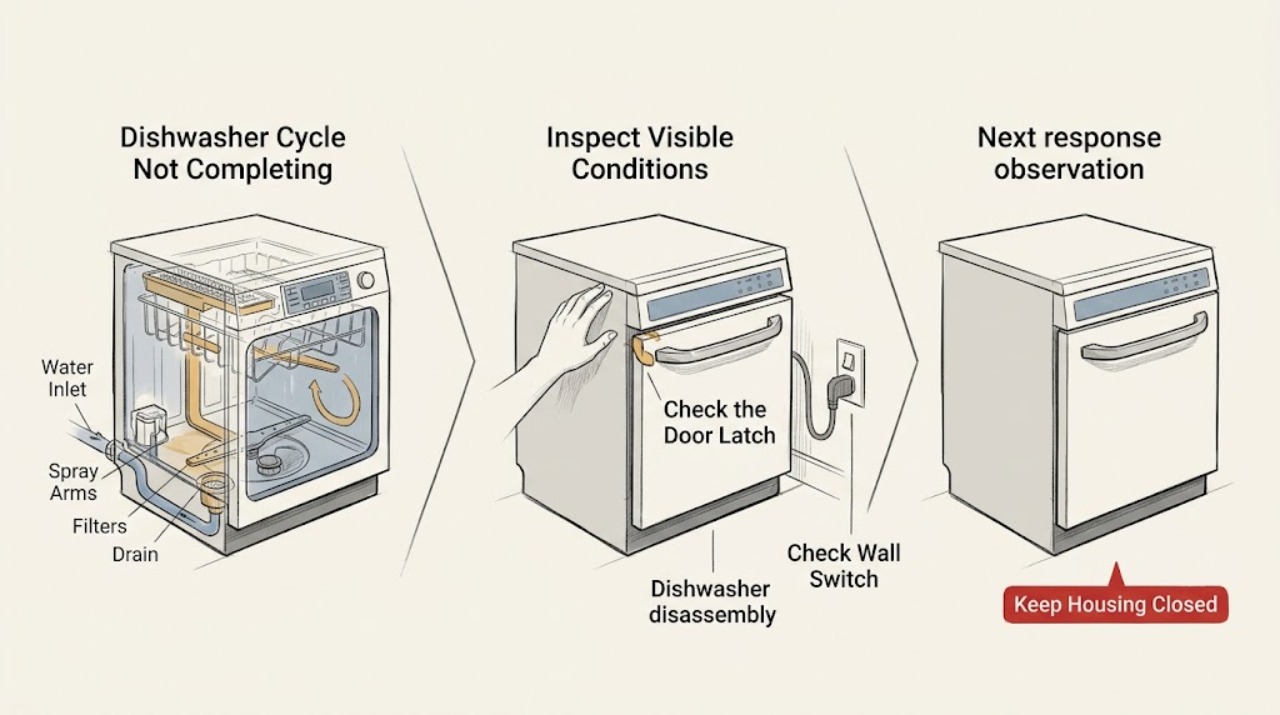
Work through in order
Diagnostic checks
Use only checks that match the exact appliance or system and its official guide.
-
Check 1
Observe the dishwasher without opening panels: note the program stage, remaining time if shown, whether the display says End, whether Start/Pause or On/Off indicators flash, and any exact F-code or message. Record whether the machine stopped immediately after a door opening, power cut, or a selected delay.
Expected result: The cycle is paused after a door or power interruption; Start Delay is active; the expected End indication is present; an exact code or rapidly flashing indicator appears; or the program remains unchanged without a clear message.
Next step: Keep the exact model number and indicator pattern. Follow the model manual for resume or delay cancellation before attempting a reset; do not guess the meaning of an unlisted code.
Why this matters
Why: An interruption or delay can explain a dishwasher that appears stuck without proving a component failure. A recurring code or a program that remains incomplete after the documented resume step shifts the concern toward water, drainage, foam, door, or technical fault conditions.
-
Check 2
If the door was opened or power was interrupted, close the door fully and press Start/Pause once as the Ariston manual directs for an interrupted cycle. Do not force the door, bypass the latch, or reach into hot steam or moving spray arms.
Expected result: The cycle resumes from its prior point; the door will not close or latch; Start/Pause continues flashing; or the cycle stops again after resuming.
Next step: Remove only an obvious rack or dish obstruction and try the model's resume step once more. If the latch will not engage or the cycle stops again, stop using the dishwasher and arrange authorised service.
Why this matters
Why: A successful resume supports an interruption rather than a confirmed internal failure. A door that cannot latch or a repeated stop after a secure closure leaves a latch, control, water, drain, or other fault unresolved.
-
Check 3
Check whether Start Delay is selected and whether the dishwasher is switched on with a valid program. Use the exact model instructions to cancel a delay or restart a just-selected program; do not apply a button sequence from another Ariston model.
Expected result: A delay indicator or countdown is present; the appliance is on but no cycle has begun; a new program starts normally; or the delay is not selected and the same incomplete-cycle symptom remains.
Next step: Let the selected delay expire or cancel it using the model manual, then monitor one cycle. If the program still stops or the controls do not respond, preserve the display pattern and move to water and drain checks or service.
Why this matters
Why: The opened Ariston troubleshooting table identifies Start Delay as a reason the appliance may wait, and says a new cycle can be selected after switching off and on when necessary. A normal start after cancelling the delay makes an intentional wait more likely than a failed pump or heater.
-
Check 4
Verify the accessible water path: make sure the water tap is open and inspect the visible inlet hose for a kink, crush, leak, or obvious restriction. Do not disconnect the hose, clean a hidden inlet filter, or cut the hose; stop if it leaks.
Expected result: The tap is closed, the inlet hose is bent or leaking, a water-inlet code appears, water is available and the hose looks clear, or the cycle still will not advance.
Next step: Open an obviously closed accessible tap and correct only a safely visible hose position without stressing the connection. If the hose leaks, water is unavailable, or the code or incomplete cycle returns, close the tap if appropriate and arrange service.
Why this matters
Why: Ariston identifies a closed tap, low water pressure, kinked inlet hose, or clogged inlet filter as causes associated with water-inlet faults. An open tap and clear hose do not prove that the internal inlet valve or sensor is working.
-
Check 5
If water remains or a drain-related indicator appears, switch the dishwasher off and isolate power only through the safe user-level method in the model manual before removing the lower rack and inspecting the removable filter assembly. Check the visible drain hose and sink or siphon connection for a kink or blockage; clean and reseat the filter only as directed, and never remove the pump protection.
Expected result: The filter is clogged, the visible drain hose is bent, the sink connection is blocked, foam is present, no external restriction is visible, or the dishwasher still retains water after the accessible check.
Next step: Remove only loose, safely accessible residue, correctly reseat the filter, and follow the exact manual for a single verification cycle without adding extra detergent when foam is the documented issue. If water remains, a leak appears, or the next step would require pump or hose disassembly, leave the appliance off and arrange authorised service.
Why this matters
Why: Ariston associates drain indicators with a clogged filter, bent drain hose, or blocked sink connection, and identifies excessive foam and filter or spray-arm conditions as causes of malfunction. A clear external path with retained water can involve the pump, control, or installation and cannot be assigned to a part safely.
Use your observations
Decision map
Find the observation that best matches what you see, then follow the next safe action.
-
PATH 01Next step
What you see
The cycle stopped after a door opening or power cut, the door now latches, and Start/Pause resumes the program without a new code.
Do this next
Allow the resumed program to finish and monitor one cycle. Escalate if the same interruption occurs without an external cause or if the door will not remain latched.
Why this path and its safety boundary
Why it matters: An accidental interruption is more likely than a confirmed appliance fault.
-
PATH 02Next step
What you see
Start Delay is visible or the program had only just been selected, and cancelling or restarting it with the model controls allows a normal start.
Do this next
Use the model manual for the desired program and observe one complete cycle. Do not repeatedly power-cycle a dishwasher that stops again.
Why this path and its safety boundary
Why it matters: An intentional delay or selection state is more likely than a drain or heating component failure.
-
PATH 03Next step
What you see
A water-inlet indicator appears or the dishwasher does not progress to washing, and the tap is closed or the visible inlet hose is kinked but there is no leak.
Do this next
Restore the obvious tap or hose condition without disconnecting plumbing, then retry the exact model start procedure once. Arrange service if filling still fails or the indicator returns.
Why this path and its safety boundary
Why it matters: The accessible water-supply condition is a plausible contributor; it does not prove an internal inlet or sensor repair.
-
PATH 04Next step
What you see
The dishwasher retains water, shows a drain-related code, has a clogged filter or visible drain restriction, or continues to stop after the accessible filter and hose checks.
Do this next
Keep the dishwasher off if water or foam persists, do not remove the pump protection or disconnect hoses, and arrange authorised Ariston service with the code, water level, and checks already completed.
Why this path and its safety boundary
Why it matters: A drain-path, foam, pump, control, or installation condition is more likely than a simple program delay; a clear external path does not identify the internal cause.
Helpful context
Understand the symptom
A paused cycle is not automatically a failed cycle
Ariston documentation distinguishes an accidental interruption from a drainage or technical fault. Opening the door or losing power can stop a cycle until the door is closed or electricity returns and Start/Pause is pressed. A Start Delay setting can make a working dishwasher wait, while an exact fault display or a cycle that repeatedly stops after resuming points to a different path. Record the indicator and the point in the program before resetting anything.
Water in and waste water out both matter
An Ariston dishwasher may not advance when it cannot fill or drain. The opened manual directs the user to check that the water tap is open and that the inlet hose is not kinked; its troubleshooting table also points to filters, the drain hose, and the sink or siphon connection for drain-related indicators. Check only visible, accessible conditions and use the complete model manual for any installation-specific routing.
Keep cleaning and service boundaries clear
The Ariston manual permits cleaning the removable filter assembly with a non-metallic brush and warns not to remove the wash-cycle pump protection. It also warns that the water inlet hose contains live electrical parts and must not be cut. Do not reach into a running or hot appliance, open electrical covers, cut or disconnect hoses, or infer a replacement part from a generic F-code; the exact model manual and authorised service should control.
When checks do not resolve it
Need a professional?
The cycle repeatedly stops, the door cannot latch, or the exact code or indicator returns after the manual procedure., Water is unavailable or leaking, standing water remains, foam persists, or a drain restriction is not safely accessible., Diagnosis would require pump protection removal, hose disconnection, electrical testing, panel removal, or a part-selection decision.
Safety scope: Do not cut or disconnect the inlet hose, remove the wash-pump protection, open electrical covers, bypass the door latch, probe live wiring, or order a pump, valve, heater, or control from a code alone.
Have this ready
- The complete Ariston model or product code and the selected program.
- The exact display or LED pattern, where in the cycle it stopped, and whether a door opening, power cut, or delay preceded it.
- Water-tap and hose observations, water level, filter or foam condition, drain connection, leaks, and the safe checks already completed.
Common questions
FAQ
Why did my Ariston dishwasher stop in the middle of a cycle?
A door opening or power cut can interrupt the cycle, and Start Delay can intentionally make it wait. Ariston also identifies water-inlet, drain-hose, filter, foam, spray-arm, and technical conditions. Record the indicator, close the door, press Start/Pause as the exact model manual directs, and escalate if the cycle stops again.
What should I do if my Ariston dishwasher will not resume?
Make sure the door closes and latches, then press Start/Pause once according to the model manual after an interruption. If Start Delay is active, cancel it using the documented controls. A latch that will not engage, a recurring indicator, or a second stop needs authorised service rather than repeated restarts.
Can a kinked water inlet hose stop an Ariston dishwasher cycle?
Yes. Ariston's troubleshooting table associates water-inlet faults with low pressure, a kinked inlet hose, or a clogged inlet filter. Check that the tap is open and inspect only the visible hose. Do not disconnect or cut the hose; arrange service if the condition is not safely accessible or the fault returns.
What if my Ariston dishwasher has water left inside and the cycle is not complete?
Switch the appliance off and follow the model manual before cleaning the removable filter. Check the visible drain hose and sink or siphon connection for a bend or blockage, and reseat the filter correctly. Do not remove the wash-cycle pump protection or dismantle hoses; persistent water needs authorised service.
When should I stop troubleshooting an Ariston dishwasher cycle?
Stop for flooding, smoke, burning odor, damaged wiring, a leak, a latch that will not engage, a returning code, persistent foam or standing water, or a cycle that still stops after the model-specific resume and accessible checks. Do not open panels, cut the inlet hose, remove pump protection, or test live parts.
Read the exact guide
Official sources
- Ariston Dishwasher User Manual - TroubleshootingAriston · Official Ariston dishwasher manual with troubleshooting entries for no start, Start Delay, water inlet, drain, filters, foam, door, and technical faults; the complete manual for the user's model takes precedence.
- Ariston Dishwasher User Manual - Daily Use and InterruptionsAriston · Official Ariston dishwasher manual describing start, pause, accidental interruption, Demo Mode, filters, and safety boundaries; exact controls and procedures vary by model.
Community feedback
Share a repair observation
Share a plain-text repair observation. Accepted observations are published automatically; this page may take a moment to update.