
On this page
Start here
Quick answer
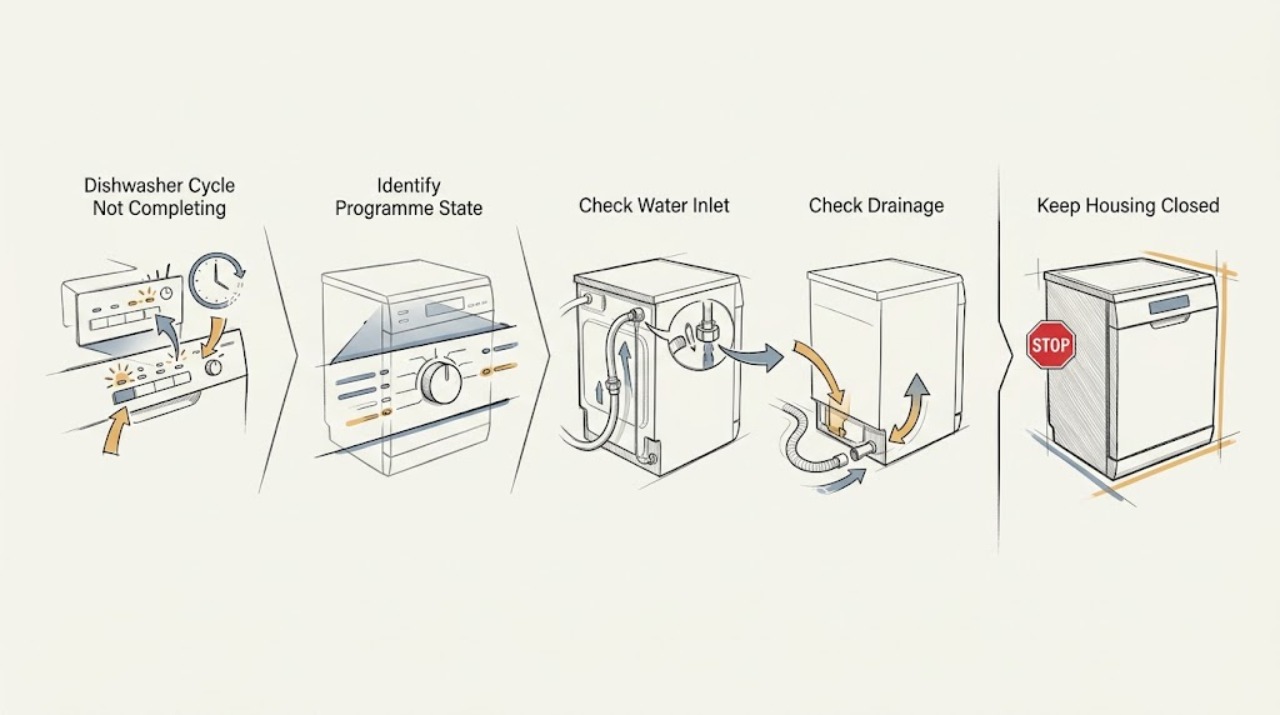
If a Blomberg dishwasher does not complete its programme, first note whether it is paused, waiting for water, left with water in the tub, or showing an overflow or other indicator. Confirm the door is fully closed, the water tap is open, the inlet hose is not kinked, and the drain hose and accessible filters are not blocked. Blomberg manuals also note that the displayed or expected time can change with the water temperature, ambient temperature, and load, so a changing countdown is not by itself a fault. If water is unavailable the programme may pause and resume when supply returns; if an overflow warning persists, drainage remains blocked, the machine repeatedly stops, or there is a leak, damaged cord, smoke, or burning smell, stop using it and arrange qualified Blomberg service.
Before you begin
Safety first
- This article covers visible controls, door closure, water tap, accessible hoses, filters, and symptom recording. A qualified technician must handle live electrical testing, pump or heater access, safety devices, internal leaks, control boards, and dismantling.
Work through in order
Diagnostic checks
Use only checks that match the exact appliance or system and its official guide.
-
Check 1
Look at the display, programme light, Start/Pause control, and any delay or warning indicator. Check that the door is fully latched and note whether the machine is silent, actively washing, draining, or simply showing a changing time estimate.
Expected result: The door is open or not latched, a pause or delay is active, the timer changes, the machine is silent with an indicator, or an error/overflow indicator is present.
Next step: Close the door securely and use only the documented Start/Pause or delay control for the exact model. Record any warning before cancelling. If an overflow warning persists or the controls do not respond, stop and arrange service.
Stop if: Do not force the door, defeat its latch, repeatedly restart a leaking machine, or remove a control or electrical cover.
Why this matters
Why: An open door or deliberate pause can be a safety state rather than a component failure. A changing estimate can reflect normal programme adjustment. A persistent warning or a programme that stops at the same point needs a supply, drainage, or service decision.
-
Check 2
Without dismantling the appliance, confirm that the dishwasher's water tap is fully open and inspect the accessible inlet hose for a kink, crush point, or visible damage. Check whether other taps have normal supply if the household water has recently been interrupted.
Expected result: The tap is closed or partly closed, the inlet hose is restricted or damaged, household water is unavailable, or the inlet path looks normal.
Next step: Restore only a safe, obviously closed tap or an accessible hose position. Do not use a visibly damaged hose. If the programme does not resume after water supply is restored, arrange service.
Stop if: Close the tap and stop if the hose leaks, the connection is damaged, or water reaches electrical parts.
Why this matters
Why: A water interruption or restricted inlet can leave a programme paused while the dishwasher waits to fill. If the inlet path is normal but the machine repeatedly stops before washing, an inlet valve, sensor, control, or another internal fault becomes more likely.
-
Check 3
If water remains in the tub or the machine stops during draining, switch off and unplug it, close the water tap, and inspect the accessible filter system and drain hose using the exact model instructions. Look for food debris, a kink, crush point, or blockage; do not reach into a pump or remove fixed parts.
Expected result: Standing water is present, the filter is visibly clogged, the drain hose is restricted, or the accessible drainage path is clear.
Next step: Clean and refit only the accessible filters and hose sections described by the model manual. If water cannot be discharged, the fault returns, or the pump needs access, arrange qualified service.
Stop if: Expect water when opening a drain connection, keep it away from electrics, and do not operate the dishwasher without its filters correctly fitted.
Why this matters
Why: Blocked filters or a restricted drain path can prevent the dishwasher from completing the drain stage and moving on. A clear accessible path with repeated drain failure makes a pump, sensor, control, or hidden blockage more likely.
-
Check 4
Run no further cycle if the machine has leaked or shows an overflow warning. Otherwise, record the point at which the programme stops, whether the tub is empty or full, and whether the same symptom occurs on another suitable programme after the safe inlet and drainage checks.
Expected result: An overflow warning remains, water appears on the floor or in the base, the cycle stops at a repeatable stage, or a different programme completes.
Next step: Use the model manual to interpret the indicator and arrange service for a persistent warning, leak, or repeatable stop. Provide the exact programme, stage, display behavior, and water level to the engineer.
Stop if: Do not tilt the machine to force water out, bypass a safety switch, remove panels, or continue operating after smoke, burning smell, sparking, or cord damage.
Why this matters
Why: A persistent overflow or leak indicates a safety or water-control fault. A repeatable stop with normal supply and drainage points toward a heater, circulation pump, sensor, latch, or control fault. A different programme completing makes a selected programme or model-specific option more likely, but does not prove the first programme is defective.
Use your observations
Decision map
Find the observation that best matches what you see, then follow the next safe action.
-
PATH 01Safety boundary
What you see
The door was opened or is not latched, or the display indicates that water is unavailable while the inlet tap is closed or supply is interrupted.
Do this next
Close the door securely or restore the safe water supply, then allow the exact model's documented resume behavior. If it does not resume, arrange service.
Why this path and its safety boundary
Why it matters: A safety pause or water-wait state is more likely than an immediate motor or control failure.
Safety stop: Do not defeat the door latch or continue if the inlet connection leaks.
-
PATH 02Safety boundary
What you see
The programme stops with standing water, a clogged accessible filter, or a kinked or blocked drain hose.
Do this next
Unplug, close the tap, clean and refit the accessible filter and hose path according to the manual, and seek service if water remains or the symptom returns.
Why this path and its safety boundary
Why it matters: The dishwasher may be unable to complete its drain stage; a blockage is more likely than a timer fault.
Safety stop: Do not reach into a pump, operate without filters, or allow released water near electrical parts.
-
PATH 03Safety boundary
What you see
An overflow warning does not clear, the appliance leaks, or water appears in an unsafe location.
Do this next
Stop using the dishwasher, close the water tap, isolate power if it can be done safely, and arrange authorised service.
Why this path and its safety boundary
Why it matters: A water-control or safety fault is more likely, and continued cycling could worsen the hazard.
Safety stop: Do not tilt the dishwasher, bypass a float or safety switch, or open its panels.
-
PATH 04Safety boundary
What you see
The door, water tap, inlet hose, drain hose, and accessible filters are normal, but the programme repeatedly stops at the same stage or never reaches the end indicator.
Do this next
Arrange qualified Blomberg appliance service and provide the model number, programme selected, stop stage, display behavior, water level, and whether another programme behaves differently.
Why this path and its safety boundary
Why it matters: An internal heater, circulation or drain pump, sensor, latch, or electronic control fault is more likely than a simple pause or blocked hose.
Safety stop: Do not test live components, remove covers, or keep running the dishwasher through an electrical or burning hazard.
Helpful context
Understand the symptom
A changing timer is not always a stopped programme
Blomberg manuals describe the displayed or total programme time as an estimate that can change with the ambient temperature, incoming-water temperature, and load. A pause while the appliance checks or waits for water is therefore different from a programme that repeatedly stops at the same stage, leaves standing water, or displays an overflow warning. Record the indicator or display state before cancelling anything.
Water in and water out are the first physical checks
A dishwasher cannot progress through its stages if it cannot fill or cannot empty. Blomberg's support guidance says to check that the water tap is fully open and the inlet hose is not kinked or damaged; its drainage guidance covers the drain hose and filters. Disconnect power before cleaning or handling a hose, and close the water tap before a check that could release water.
Door and programme controls can intentionally pause the machine
Opening the door during a programme activates a safety stop on Blomberg models described in the manuals; closing it allows the programme to resume on those models. A selected delay, pause, child lock, or an accidental programme cancellation can also make a running machine appear stuck, but controls vary by model. Use the exact model guide before trying a reset or cancellation sequence.
Treat overflow and electrical symptoms as a stop boundary
The Blomberg manual describes an overflow warning that attempts to discharge water and directs owners to authorised service if the warning does not clear. A persistent leak, water near electrical parts, smoke, a burning smell, sparking, or a damaged power cord is not a troubleshooting opportunity. Stop the appliance and use qualified service; do not remove panels or work on live wiring.
Safety boundary
Stop conditions
- Stop using the dishwasher for a persistent overflow warning, active leak, water near electrical parts, smoke, burning smell, sparking, damaged cord, or exposed wiring.
- Unplug the appliance and close the water tap before cleaning filters or handling an accessible hose, as directed by the model instructions.
- Do not bypass the door latch, float or other safety device; do not remove panels or test live wiring.
- Do not operate the dishwasher without its filters correctly fitted, and do not force a stuck pump, impeller, hose, or door.
When checks do not resolve it
Need a professional?
Safety scope: This article covers visible controls, door closure, water tap, accessible hoses, filters, and symptom recording. A qualified technician must handle live electrical testing, pump or heater access, safety devices, internal leaks, control boards, and dismantling.
Common questions
FAQ
Why does my Blomberg dishwasher stop before the cycle ends?
Check whether the door was opened, the machine is waiting for water, or water remains because the drain path is restricted. Also consider that the programme time can change with load and water or room temperature. A repeatable stop after these checks needs service diagnosis.
Can a closed tap make a Blomberg dishwasher pause?
Yes. Blomberg's guidance says a closed tap or restricted inlet can prevent filling. Check the tap and accessible inlet hose safely; if the programme does not resume when supply is restored, arrange service.
What should I do if my Blomberg dishwasher stops with water inside?
Switch it off and unplug it, close the water tap, then inspect the accessible filters and drain hose using the exact model instructions. Do not operate without the filters fitted. If water remains or the symptom returns, seek qualified service.
Is a changing dishwasher timer evidence that the cycle is stuck?
Not necessarily. Blomberg manuals state that total programme time can change with ambient temperature, incoming-water temperature, and the amount of dishes. Treat a repeated stop, standing water, or persistent warning as more significant than a changing estimate alone.
When should I call Blomberg dishwasher repair?
Call for qualified service when the cycle repeatedly stops after the visible door, inlet, drain, and filter checks, when an overflow warning or leak persists, or when internal pump, heater, sensor, latch, control, or live electrical work is needed. Stop immediately for smoke, burning smell, sparking, or a damaged cord.
Read the exact guide
Official sources
- Dishwasher User manual LDF42240W LDF42240B LDF4224Blomberg · Official Blomberg manual for the listed LDF4224 family; use the relevant model manual rather than assuming every control or indicator matches.
- What should I do if water is not draining from my Blomberg dishwasher?Blomberg · Official Blomberg dishwasher FAQ; follow the exact model manual for filter location and access.
- Contact UsBlomberg · Official Blomberg support contact page; use the model and serial information when requesting technical assistance.
- Why is my Blomberg dishwasher not filling with water, and how can I fix it?Blomberg · Official Blomberg dishwasher FAQ; exact model instructions control model-specific checks.
- Find Your Model & Serial NumberBlomberg · Official Blomberg support page; the model and serial are needed to select the applicable documentation and service path.
Community feedback
Share a repair observation
Share a plain-text repair observation. Accepted observations are published automatically; this page may take a moment to update.