
On this page
Start here
Quick answer
If a Bosch dishwasher does not complete its cycle, first record exactly where it stops: a door or control pause, a cycle that runs unusually long, standing water, a beeping or error display, or a completely dark panel. With the dishwasher stopped and safe to handle, confirm the door closes and latches without a rack or dish in the way, check that the water supply is open and the unit has power, and clean only the user-accessible filter area as the model manual directs. Use the Bosch model manual for the documented reset or cancel-and-drain procedure; do not keep restarting a machine that leaks, leaves water, overheats, or trips power. Bosch identifies door closure, water supply, power, filter or drain restrictions, and previous-cycle reset state as relevant checks. If the cycle repeatedly stops, the panel goes dark, water remains after the documented drain procedure, or an error returns, leave the dishwasher unused and arrange qualified service.
Before you begin
Safety first
- This article covers visible door and rack clearance, accessible supply checks, user-accessible filter cleaning, and model-documented reset or drain steps. Qualified service must handle cabinet removal, pumps, heaters, sensors, latch circuits, controls, hardwired connections, and energized testing.
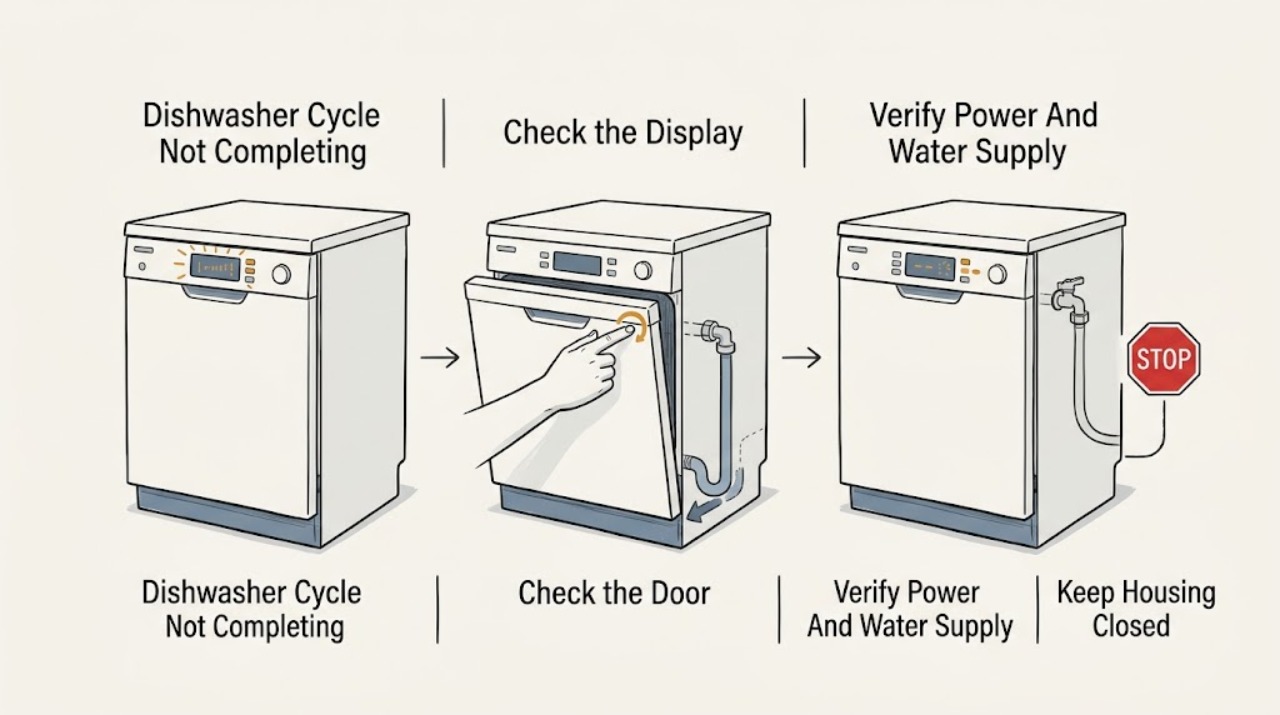
Work through in order
Diagnostic checks
Use only checks that match the exact appliance or system and its official guide.
-
Check 1
When the cycle appears not to finish, note whether the display or status light is on, the remaining time changes, the machine beeps, an error or tap symbol appears, and whether water is visible in the tub. Do not immediately start another cycle or open the door repeatedly while the machine may still be hot.
Expected result: The panel is dark, the program is paused with lights on, an error or tap indication is shown, the timer stays near completion, or standing water remains.
Next step: Record the exact display and stop point, then use the model manual's documented cancel or reset procedure once. Arrange service if the panel remains dark, the error returns, or the cycle stops again.
Stop if: Do not keep restarting a hot, leaking, smoking, or electrically abnormal dishwasher, and do not open an electrical cover to restore the display.
Why this matters
Why: A dark panel points toward power, door, or control interruption. A lit panel with an error, standing water, or a timer that does not progress gives a more useful branch than the general statement that the cycle failed.
-
Check 2
With the dishwasher stopped and cool enough to handle, inspect the door perimeter, latch area, racks, and front of the loaded dishes. Confirm that no dish, utensil, hose holder, cabinet edge, or loose hardware prevents the door from closing and latching completely; do not press on the door during an active cycle.
Expected result: The door is not fully latched, a dish or rack obstructs it, the door or latch feels loose, the unit is visibly out of level, or the door closes and latches normally.
Next step: Remove only the accessible obstruction, re-seat the rack, and run the model's documented restart procedure. Arrange service for a loose, damaged, misaligned, or intermittently sensing latch or door.
Stop if: Do not force the door, bend the latch, lean on the panel, remove a cabinet front, or operate if the door cannot close securely.
Why this matters
Why: Bosch states that an unsecured door can stop a cycle, and its support guide notes that loading or clearance can interfere with closure. A sound latch and clear load make a water, drain, heating, or control issue more likely.
-
Check 3
After the dishwasher is safely stopped, check that its plug or documented supply is present, the household breaker has not tripped, and the accessible water-supply valve is open with no visible kink or leak. Do not pull out a built-in unit or touch hardwired connections.
Expected result: The panel is dark or power has interrupted, the water valve is closed or the line is kinked, a leak is visible, or power and water supply look normal.
Next step: Restore only an obviously tripped breaker or closed accessible valve when safe and permitted, then follow the exact manual's reset procedure. Stop for a recurring trip, damaged cord, leak, or hardwired fault and arrange qualified service.
Stop if: Do not reset a breaker repeatedly, energize a wet or damaged appliance, open a junction box, or disconnect a pressurized water line.
Why this matters
Why: A power or water interruption can halt a cycle and may leave it looking incomplete. A visible leak needs a water-safety response; normal accessible supplies shift the diagnosis toward the door, drain, heating, or control system.
-
Check 4
If standing water remains, stop the dishwasher, switch off power, and let hot water cool. Remove and clean only the user-accessible filter and pump-cover area as the exact Bosch manual directs; inspect the visible drain hose under the sink for a kink without disconnecting it or reaching inside the pump.
Expected result: The filter is coated with debris, the pump-cover area has visible loose debris, the drain hose is kinked, water drains after the documented cancel procedure, or water remains despite a clear accessible path.
Next step: Clean and reseat only the user-accessible filter components, correct an obvious accessible hose kink, and run the model's documented drain or reset procedure once. Arrange service if water remains, returns, or requires internal hose or pump access.
Stop if: Do not reach into an energized pump, dismantle the drain system, use a tool to force an impeller, or run a cycle with standing water and a leak.
Why this matters
Why: Bosch links standing water with a dishwasher that is not pumping out and identifies food debris in the filter or pump area as a common accessible cause. Persistent water with a clear path points toward a drain pump, hose installation, float, control, or internal obstruction that needs diagnosis.
-
Check 5
After the visible door, supply, and filter checks are normal, run one documented cycle observation without opening the cabinet. Note whether it advances through stages, stops at a similar point, runs unusually long, leaves dishes cold or wet, or loses power; do not touch water, heater parts, wiring, or the underside while energized.
Expected result: The cycle completes, stops at a repeatable stage, runs long but eventually completes, leaves water or cold dishes, or loses power mid-cycle.
Next step: Record the program, stop point, display, water level, sound, and final dish temperature or dryness, then arrange qualified service for a repeatable stop, no-heat symptom, standing water, or power loss.
Stop if: Do not continue testing through smoke, burning odor, steam escaping abnormally, repeated breaker trips, leaks, or exposed electrical parts.
Why this matters
Why: A repeatable stop at a stage or a no-heat symptom makes a sensor, heater, circulation, drain, or control fault more likely than a one-time door obstruction. A long cycle that eventually completes can reflect water or soil conditions, but a worsening or incomplete cycle still needs model-specific diagnosis.
Use your observations
Decision map
Find the observation that best matches what you see, then follow the next safe action.
-
PATH 01Safety boundary
What you see
The dishwasher stops when the door is bumped or cannot latch fully, a rack or dish touches the door, or the latch feels loose.
Do this next
Clear the accessible obstruction and use the exact model restart procedure. Arrange service for a latch, hinge, alignment, or intermittent door-sensor problem.
Why this path and its safety boundary
Why it matters: A door-sensing or installation-clearance issue is more likely than a drain or heater fault.
Safety stop: Do not force or brace the door, remove the front panel, or run a cycle without a secure latch.
-
PATH 02Safety boundary
What you see
The tap or water indication appears, the supply is restricted, the cycle stops with standing water, or the accessible filter or hose is blocked.
Do this next
Correct only the accessible supply, filter, or hose condition described by the manual, then use its cancel-and-drain or reset procedure once. Arrange service for persistent water, a leak, or internal access.
Why this path and its safety boundary
Why it matters: A water inlet, filter, drain, or overflow-protection condition is more likely than a simple program-selection issue.
Safety stop: Do not disconnect hoses, dismantle the pump, force an impeller, or keep operating with water leaking into the cabinet or floor.
-
PATH 03Safety boundary
What you see
The panel is dark, the prior cycle was interrupted, a delay or lock state is active, or the dishwasher only responds after power is restored or reset.
Do this next
Check the documented supply and model-specific control state, then use the manual's reset procedure once. Arrange service for repeated power loss, an unresponsive panel, or a returning fault.
Why this path and its safety boundary
Why it matters: A supply interruption, control state, door sensing, or electronic fault is more likely than a clogged filter alone.
Safety stop: Do not repeatedly cycle the breaker, open hardwired connections, or continue if the appliance is wet, scorched, or electrically damaged.
-
PATH 04Safety boundary
What you see
The door, supply, and accessible drain path are normal, but the cycle repeatedly stops at a stage, runs without heating, loses power, or remains incomplete with no user-reset resolution.
Do this next
Leave the dishwasher unused and arrange qualified Bosch appliance service. Provide the exact model, program, stop point, display, water level, sound, and whether reset or drain changed the symptom.
Why this path and its safety boundary
Why it matters: A heater, circulation pump, sensor, control, internal drain, latch circuit, or wiring fault is more likely and cannot be confirmed safely from visible checks.
Safety stop: Do not remove the dishwasher from the cabinet, test live components, open the heater or pump, or replace a control based only on a similar symptom.
Helpful context
Understand the symptom
First decide whether the dishwasher paused, stopped, or is still running
A Bosch dishwasher may be waiting for a properly closed door, be delayed by a water or heating condition, or have stopped with water in the tub. A quiet interval or a longer time than expected does not by itself prove a failure: Bosch says cycle time can vary with soil and water conditions. Record the display, status light, remaining time, water level, sound, and whether the panel responds before resetting anything.
Use the exact Bosch model instructions
Bosch dishwashers differ in controls, status lights, reset methods, drying behavior, and error displays. Find the complete model or E-Nr and use its owner manual for a cancel, reset, delay-start, child-lock, or cycle-completion procedure. The Bosch troubleshooting manual used here explicitly notes that an earlier cycle may need to be reset before a new one starts, so avoid guessing at button combinations.
Keep checks unplugged and accessible
Before cleaning a filter or looking for standing water, stop the program according to the model manual, switch off power, and allow hot water and surfaces to cool. Inspect only the door, racks, visible supply connection, and user-accessible filter and pump-cover area described by the manual. Do not remove the dishwasher from its cabinet, open a junction box, reach into wiring, or work on a pump, heater, latch, or control while energized.
Safety boundary
Stop conditions
- Stop using the dishwasher for smoke, burning odor, arcing, repeated breaker trips, exposed wiring, a hot or damaged cord, or water reaching electrical parts.
- Turn off the water supply for an active leak and do not pull out a built-in unit or disconnect a pressurized hose as a first check.
- Do not reach into a pump or heater, remove a cabinet or electrical cover, force a latch, bypass a float or safety device, or test live wiring.
- If standing water remains after the model's documented accessible filter and cancel-and-drain checks, or if the cycle repeatedly stops, leave the appliance unused and arrange qualified service.
When checks do not resolve it
Need a professional?
Safety scope: This article covers visible door and rack clearance, accessible supply checks, user-accessible filter cleaning, and model-documented reset or drain steps. Qualified service must handle cabinet removal, pumps, heaters, sensors, latch circuits, controls, hardwired connections, and energized testing.
Common questions
FAQ
Why does my Bosch dishwasher stop before the cycle finishes?
Record whether it pauses with the door or controls active, stops with standing water, shows an error, or loses power. Check door closure, water supply, and accessible filter or drain conditions using the exact model manual, then arrange service for a repeated stop.
Can a Bosch dishwasher door stop a cycle mid-program?
Yes. Bosch says an incompletely closed or latched door can stop a cycle. Check that dishes, racks, cabinet clearance, or a hose holder are not preventing closure; do not force the latch or brace the door during operation.
What does standing water mean when a Bosch cycle does not complete?
Standing water indicates that the dishwasher has not pumped water out. With power off and water cooled, clean only the user-accessible filter area and inspect the visible drain hose as the manual directs. Persistent water needs service for the drain path or pump.
Why does my Bosch dishwasher run for a long time without finishing?
Bosch says cycle time can vary with soil and water conditions, but a cycle that remains incomplete, stops at a repeatable stage, or leaves dishes cold or water in the tub needs diagnosis. Record the program and stop point instead of repeatedly restarting it.
Should I reset a Bosch dishwasher that stops mid-cycle?
Use the exact model manual's cancel or reset procedure once after recording the symptom. If the cycle stops again, the panel goes dark, water remains, or an error returns, leave the appliance unused and arrange qualified service rather than repeatedly cycling power.
Read the exact guide
Official sources
- Troubleshooting GuideBosch · Opened Bosch dishwasher troubleshooting guide; model-specific manuals control differences and reset instructions.
- Bosch 300 Series dishwasher (SHE53C85N) not usable less than a year… and support is almost comical!r/bosch community · Community report from a Bosch 300 Series owner describing repeated mid-cycle stops and standing water; it does not establish a universal cause or repair.
- Bosch Dishwasher Troubleshooting & Repair Guide | Bosch – Fix Common Dishwasher ProblemsBosch · Official Bosch US dishwasher owner-support guide; exact model manuals control button sequences and installation details.
Community feedback
Share a repair observation
Share a plain-text repair observation. Accepted observations are published automatically; this page may take a moment to update.