
On this page
Start here
Quick answer
An ASKO dishwasher that will not start is often waiting for the door to be closed, a delayed-start program to be cleared, or a control input to register. With the door open, clean and dry the keypad, choose a program, press Start/Stop, and close the door fully within four seconds. If the display shows F4, record it and use the model's documented reset procedure; a recurring code, a door that will not latch, a dark panel, or a breaker that trips again needs qualified service.
Before you begin
Safety first
- Do not remove panels, probe live wiring, bypass the door interlock, or disconnect plumbing under the cabinet as a home troubleshooting step.
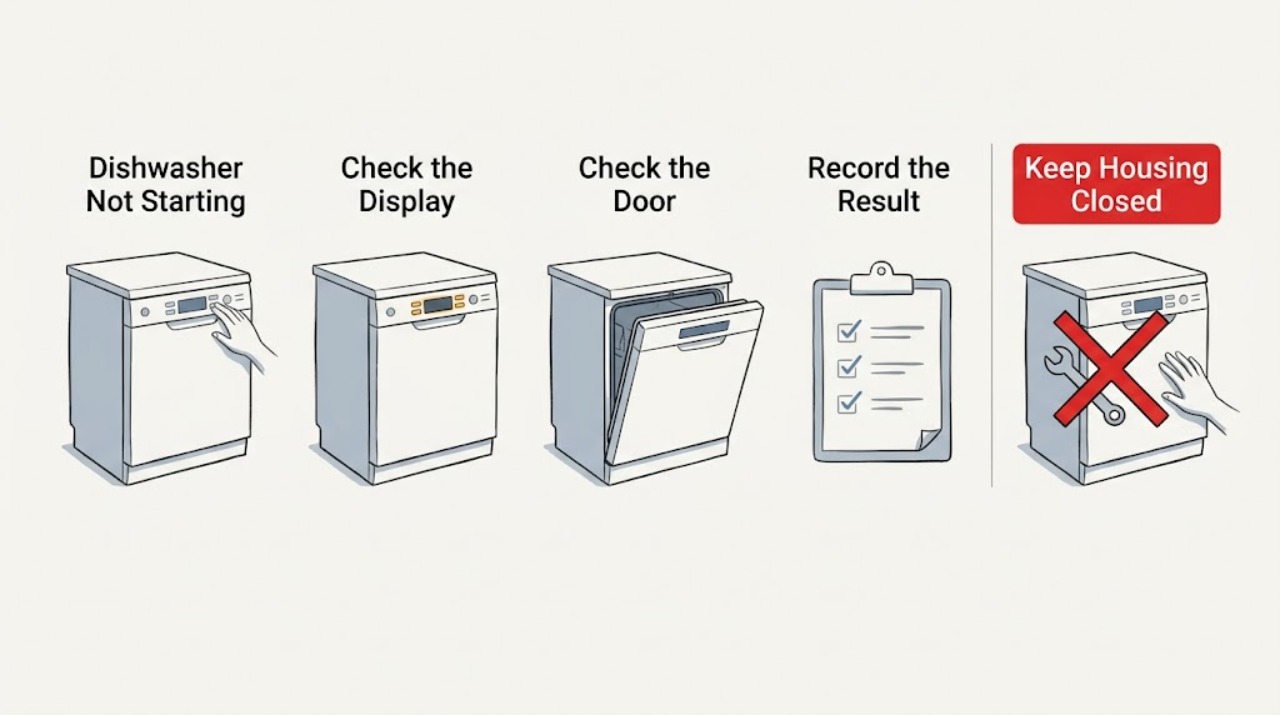
Work through in order
Diagnostic checks
Use only checks that match the exact appliance or system and its official guide.
-
Check 1
With the dishwasher off, wipe the control panel with a damp cloth, let it dry, then press a program key and Start/Stop deliberately for about one second rather than tapping.
Expected result: The display or key response returns, or the panel remains dark or unresponsive.
Next step: If the panel responds, continue to the door and delay checks. If it does not, close the door completely and open it once, verify Child Lock in the model's use-and-care guide, and arrange service if the panel remains unresponsive. Do not open the appliance or test live wiring.
Why this matters
Why: A response shows that the controls are accepting input; continued silence keeps the likely fault at power, the keypad, or Child Lock rather than at the selected wash program.
-
Check 2
Choose a wash program, press Start/Stop, and close the door fully within four seconds; make sure a rack, utensil, or dish is not preventing the door from closing.
Expected result: A countdown or running indication appears, or the door does not close, the start is ignored, or the program remains idle.
Next step: Reposition the obstructing rack or dish and repeat the start sequence once. If the door will not stay closed, will not latch, or the problem returns, stop using the dishwasher and arrange qualified appliance service.
Why this matters
Why: A running indication confirms that the start command was accepted. A door that cannot close or a command that remains idle points to the door-closure sequence or an obstruction rather than a need for a different detergent or cycle.
-
Check 3
Inspect the display for a delayed-start time or indicator before pressing Start/Stop again, then cancel or disable delayed start according to the model's use-and-care guide.
Expected result: A future start time is shown, or no delay is active.
Next step: After clearing the delay, select the program again, press Start/Stop, and close the door within four seconds. If the delay cannot be cleared from the controls, stop and use the exact model manual or service rather than guessing at a reset.
Why this matters
Why: A future time explains why the dishwasher appears idle even though the controls accepted the program. With no delay active, the cause is more likely the door sequence, controls, power, or a fault code.
-
Check 4
If the dishwasher has no display or the panel is completely dark, check that its plug is seated and reset the dedicated breaker once from the household panel without opening the appliance.
Expected result: The panel comes back on and stays on, or the breaker trips again or the panel stays dark.
Next step: If the breaker trips again, leave it off and arrange a qualified electrician or appliance technician. If the panel returns, repeat the door and delayed-start checks before attempting a cycle.
Why this matters
Why: Power returning points to an interrupted external supply; a repeat trip or persistent dark panel indicates an electrical or appliance fault that should not be diagnosed by probing inside the machine.
-
Check 5
When the display shows F4 or the dishwasher does not receive water, check that the accessible water shutoff valve is open; record the code before holding Start/Stop for five seconds only to reset the displayed F4 condition.
Expected result: Water enters and the code clears, or F4 returns or no water enters after the valve is open.
Next step: If F4 reappears, turn to qualified service. Do not remove water hoses or work on plumbing under the cabinet unless the model instructions and a qualified professional specifically direct it.
Why this matters
Why: A cleared code with normal filling points to a temporary water-supply fault. A returning F4 or continued no-fill condition needs service or plumbing assessment rather than repeated resets.
Use your observations
Decision map
Find the observation that best matches what you see, then follow the next safe action.
-
PATH 01Next step
What you see
The control panel is dark, stays unresponsive after cleaning and a door open-close cycle, or the breaker trips again.
Do this next
Leave a repeatedly tripping breaker off and arrange qualified electrical or appliance service. Do not bypass an interlock or open the machine to test voltage.
Why this path and its safety boundary
Why it matters: The symptom is not a normal program-selection problem; it is more consistent with an external supply, control, or appliance fault.
-
PATH 02Next step
What you see
The panel responds and a future start time remains visible, but no wash activity begins.
Do this next
Clear delayed start in the model's controls, then press Start/Stop and close the door fully within four seconds.
Why this path and its safety boundary
Why it matters: The dishwasher is likely waiting for its delayed-start time rather than failing to accept the program.
-
PATH 03Next step
What you see
The panel responds, no delay is active, but the start is ignored or the door will not remain closed.
Do this next
Remove only visible loading interference and retry once. If the latch will not engage, the seal is damaged, or the problem repeats, stop and arrange qualified appliance service.
Why this path and its safety boundary
Why it matters: The next decision is at the door-closure path: an obstructed rack or dish may be preventing the required closure, while a door that still will not latch points to a mechanical or interlock fault.
-
PATH 04Next step
What you see
F4 appears, the water shutoff is open, and the code returns or the dishwasher still does not receive water.
Do this next
Keep the code and model information for the service visit, avoid repeated resets, and arrange qualified appliance service or a plumbing assessment.
Why this path and its safety boundary
Why it matters: The fault is no longer a simple user-setting issue; the recurring code or no-fill condition needs professional diagnosis.
Helpful context
Understand the symptom
Use the symptom to choose the next check
If the panel responds but the program never begins, start with the delayed-start setting and the four-second door-closing sequence. If the panel is completely dark, the problem is upstream of program selection. If a code appears or water does not enter, record what the display shows before deciding whether a reset or service is appropriate.
Keep the checks user-safe
Do not remove the dishwasher's panels, probe wiring, or bypass the door interlock. Keep hands and tools out of the machine while it is energized; use only the external controls and accessible shutoff described in the appliance documentation.
When checks do not resolve it
Need a professional?
Arrange qualified appliance service if the panel remains dark, a breaker trips again, the door will not latch or seal, F4 returns after the documented reset, or the dishwasher still will not start after the accessible checks.
Safety scope: Do not remove panels, probe live wiring, bypass the door interlock, or disconnect plumbing under the cabinet as a home troubleshooting step.
Have this ready
- Give the technician the exact model or article number, whether the controls respond, whether delayed start was visible, and any displayed error code.
Common questions
FAQ
Why does my ASKO dishwasher seem to ignore Start/Stop?
Press Start/Stop and close the door fully within four seconds. Also check that delayed start is not active and that a rack or dish is not keeping the door from closing.
What should I do when an ASKO dishwasher shows F4 and will not start?
Record the F4 code, check that the accessible water shutoff valve is open, and use the model instructions for the documented five-second Start/Stop reset. If F4 returns, contact qualified service.
Can delayed start make an ASKO dishwasher look broken?
Yes. A future start time can leave the selected program idle. Clear or disable delayed start in the model's use-and-care guide, then repeat the start-and-close sequence.
Should I open the dishwasher to test why it will not start?
No. Keep troubleshooting to the external controls, visible loading interference, the accessible shutoff, and the household breaker. Do not remove panels, probe wiring, or bypass the door interlock; arrange qualified service for an unresolved electrical or latch fault.
Read the exact guide
Official sources
- Dishwasher CleaningASKO · ASKO dishwasher troubleshooting and cleaning guidance; model-specific use-and-care instructions take precedence
Community feedback
Share a repair observation
Share a plain-text repair observation. Accepted observations are published automatically; this page may take a moment to update.