
On this page
Start here
Quick answer
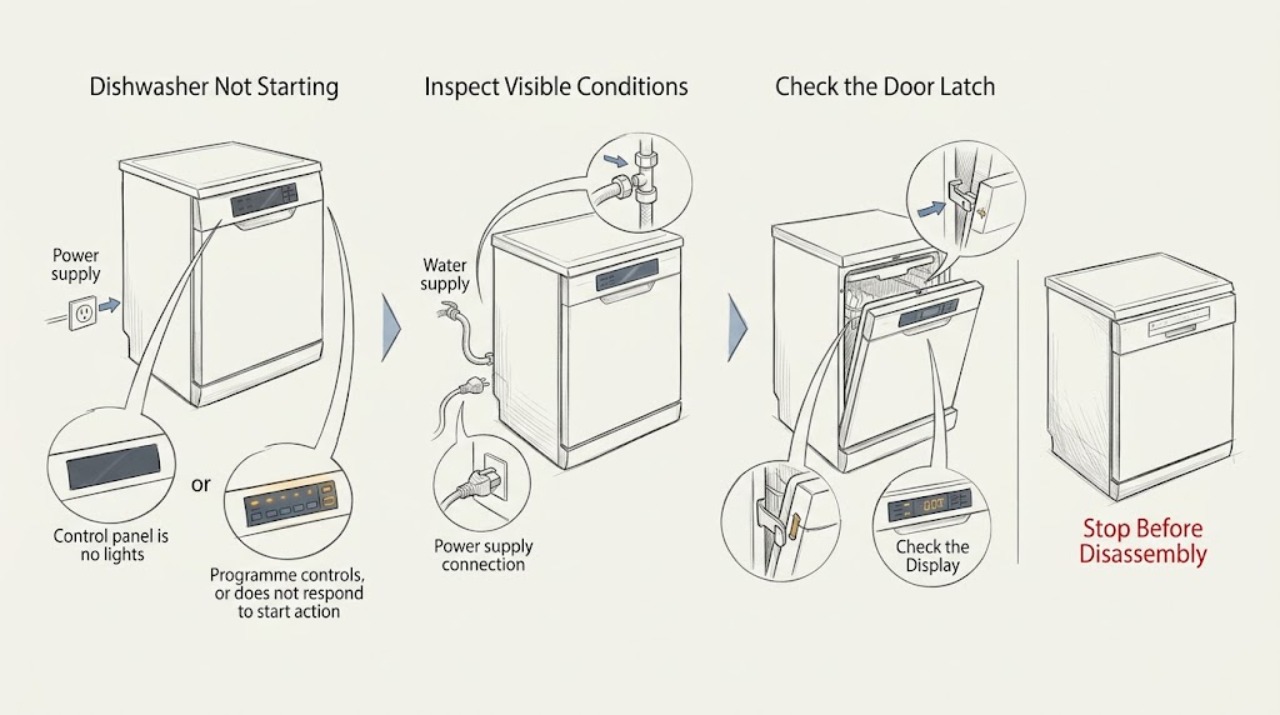
An AEG dishwasher that will not start is usually waiting for a start condition, holding a previous programme or Delay Start setting, or reporting a door, power, water, or installation issue. First determine whether the control panel is dark or lit, select a programme, and close the door until the latch clicks. If a previous programme or delay is active, use the RESET/CANCEL procedure in the exact manual; button layouts and reset methods vary by model. A dishwasher in DEMO mode can show its functions without running a cycle. Do not bend the cabinet, bypass the door lock, or open electrical covers. If the panel stays dark on a known-good supply, the door will not latch, an error or leak appears, or the dishwasher still will not start after the model-specific checks, stop and arrange authorised service.
Work through in order
Diagnostic checks
Use only checks that match the exact appliance or system and its official guide.
-
Check 1
Look at the control panel without opening electrical covers and classify the symptom: no lights at all, a lit panel with a selectable programme, a flashing cycle indicator, a countdown or Delay indicator, a DEMO message, or an error symbol/code. Record the display before pressing reset.
Expected result: The panel is dark; the panel is lit but no programme begins; an indicator flashes; a delay countdown is visible; DEMO or a code appears; or the display is abnormal.
Next step: Use the power branch for a dark panel, the programme and door checks for a lit panel, and the exact AEG manual or code article for a DEMO message or error indication.
Why this matters
Why: A dark panel makes a supply problem more likely. A lit or flashing panel shifts attention to programme selection, door closure, Delay Start, a previous cycle, DEMO mode, or the specific displayed indication. An abnormal display should not be interpreted from a generic dishwasher code list.
-
Check 2
If the panel is lit, select a normal programme and close the door firmly without slamming it. Reopen and close it once while listening or feeling for the latch click; keep racks and dishes clear of the door edge.
Expected result: The programme starts after the door clicks; the door closes but no click is felt or heard; the door springs back open; or the door is visibly misaligned or obstructed.
Next step: If the door does not latch normally, do not bypass or force the lock. Check only the model's external installation guidance and arrange service if the alignment or latch problem remains.
Why this matters
Why: Starting after a clear latch click supports a door-detection condition rather than a failed motor. A missing click, a door that will not stay closed, or visible misalignment makes the latch, hinges, installation, or door-interlock alignment more likely.
-
Check 3
If a prior programme, Delay Start, or flashing cycle indicator is present, use the RESET/CANCEL control or model-specific long-press procedure shown in the exact AEG manual. Remain nearby because cancelling a programme may cause the dishwasher to drain.
Expected result: The dishwasher returns to programme-selection mode; the delay countdown clears; the indicator keeps flashing; the old cycle will not cancel; or water remains after the reset.
Next step: Select a new programme only after the model's reset has completed and the door is safe to close. If the cycle will not cancel, water remains, or the indicator returns, stop and use the exact error or service path.
Why this matters
Why: Returning to programme selection supports a retained setting or incomplete cycle as the immediate cause. A reset that will not complete, a persistent flashing indicator, or retained water indicates a separate drain, control, or fault condition that should not be chased with repeated resets.
-
Check 4
If the display shows DEMO or d:on, compare it with the AEG DEMO-mode instructions for the exact model and follow only that documented deactivation sequence. Do not infer that a no-start symptom is a failed pump or control board while DEMO mode is active.
Expected result: DEMO mode clears and the dishwasher starts normally; DEMO remains displayed; or no DEMO indication was present.
Next step: After deactivation, select a programme and close the door once. If DEMO cannot be cleared with the exact model procedure, request service and provide the display state and model number.
Why this matters
Why: AEG describes DEMO mode as a display of appliance functions without connection to water and drain, so it can look like a no-start condition. A persistent DEMO indication needs the model manual or support article rather than a component replacement.
-
Check 5
If the control panel has no lights, switch the dishwasher off at its normal wall switch or breaker for the documented reset interval, then restore power once. If it uses a plug socket, check that socket with a small lamp or other safe device; do not remove the dishwasher's electrical cover.
Expected result: The panel returns after power is restored; the socket or supply remains dead; the breaker or fuse trips again; or the dishwasher remains dark on a working supply.
Next step: If the supply is dead or trips again, keep the dishwasher off and use a qualified electrician. If the supply is sound but the panel remains dark, arrange an authorised appliance service visit.
Why this matters
Why: A restored panel can indicate a temporary control interruption. A dead socket or repeat trip points to the household electrical connection, while a persistent dark panel on a known-good supply points toward an appliance fault that is not safely user-diagnosable.
-
Check 6
Before a final start attempt, inspect only the visible installation and operating conditions described by the model manual: the door edge is clear, the appliance is not visibly tilted, the water and drain connections show no leak, and no error or warning remains. Do not pull out an integrated dishwasher or access internal plumbing as a first-line check.
Expected result: The door edge is obstructed; the cabinet or door is visibly out of alignment; water is leaking; a warning remains; or the visible installation appears normal.
Next step: Remove only a loose, accessible obstruction without tools and close the door normally. For a leak, misalignment, persistent warning, or no-start after normal external conditions, stop using the dishwasher and request authorised service.
Why this matters
Why: A door obstruction or installation misalignment can prevent the interlock from confirming a closed door. A leak or persistent warning changes the issue from a simple start setting to a safety or appliance fault. Normal visible installation with a continued no-start points toward internal diagnosis.
Use your observations
Decision map
Find the observation that best matches what you see, then follow the next safe action.
-
PATH 01Next step
What you see
The panel is lit, a programme is selected, and the door closes with a normal latch click, but the cycle does not begin.
Do this next
Cancel the previous setting using the exact model procedure, check for DEMO or an error indication, and retry once. If it still will not begin, arrange service.
Why this path and its safety boundary
Why it matters: A retained programme, Delay Start, DEMO mode, or a displayed fault is more likely than a simple failure to press Start.
-
PATH 02Next step
What you see
The door will not latch, springs open, lacks the expected click, or is visibly misaligned.
Do this next
Do not bypass or force the latch. Follow only the model's external installation check and contact authorised service if alignment or closure is not restored.
Why this path and its safety boundary
Why it matters: The door interlock cannot reliably confirm the start condition; AEG also identifies levelling or cabinet alignment as possible causes on some installations.
-
PATH 03Next step
What you see
The panel is dark, the safe socket or supply check fails, or the breaker trips again.
Do this next
Stop resetting the appliance. Leave it off and use a qualified electrician for the supply, or authorised appliance service when the supply is sound but the panel remains dark.
Why this path and its safety boundary
Why it matters: The pattern is more consistent with a household supply or appliance power fault than with programme selection.
-
PATH 04Next step
What you see
A cycle indicator flashes, water remains, DEMO stays displayed, or an error/warning returns after the documented reset.
Do this next
Record the exact display and model number and arrange authorised service, especially if water is leaking, the pump runs continuously, or the dishwasher cannot safely complete cancellation.
Why this path and its safety boundary
Why it matters: A retained setting may have been cleared without resolving a drain, control, installation, or other monitored fault. Repeated resets will not identify the failed subsystem.
-
PATH 05Next step
What you see
Smoke, burning smell, exposed wiring, a significant water leak, or another immediate hazard is present.
Do this next
Stop using the dishwasher. Isolate power only through the normal safe disconnect if it can be done without touching damage or standing in water, and contact an appropriate qualified professional.
Why this path and its safety boundary
Why it matters: This is a safety boundary, not a programme-selection problem.
Helpful context
Understand the symptom
Separate a dark panel from a lit panel
A panel with no lights points first to the electrical supply or the appliance's power path. A lit panel that will not begin a programme more often calls for a door-latch, programme, Delay Start, previous-cycle, or DEMO-mode check. Integrated and freestanding AEG dishwashers can use different controls, so do not copy a reset combination from another model.
The door must be detected as closed
AEG says the programme starts only when the door is detected fully closed; opening and closing it again should produce an audible click. A dishwasher that is not level or whose door hardware is misaligned may fail that detection even when the panel is lit. Do not force the latch or reshape the cabinet as a general fix.
Reset only the programme the model actually uses
A previous programme or Delay Start setting can block a new start. AEG shows several reset patterns, including a RESET/CANCEL control or a model-specific long press, and warns that the illustrated interfaces are only references. Use the exact manual for the appliance before cancelling a cycle or changing installation settings.
When checks do not resolve it
Need a professional?
The door will not close and latch normally, or the cabinet and door are visibly misaligned., The panel remains dark after the supply is verified, or a flashing indicator, DEMO message, error, retained water, or leak remains., There is smoke, a burning smell, exposed wiring, a repeat breaker trip, or any need to access internal electrical or plumbing parts.
Have this ready
- The complete AEG dishwasher model, PNC, and serial number from the rating plate.
- A photo or transcription of the display, indicator pattern, DEMO or error message, and any countdown.
- Whether the panel was lit, whether the door latched, whether water remained or leaked, and which documented reset or check changed the symptom.
Common questions
FAQ
Why does my AEG dishwasher have power but not start?
AEG lists an unselected programme, a door that is not detected fully closed, an active Delay Start or previous programme, and DEMO mode among the possible causes. Check the panel state, select a programme, close the door until it clicks, and use the exact model reset procedure if a previous setting is active.
How do I reset an AEG dishwasher that will not start?
The reset differs by model. AEG shows examples including holding RESET/CANCEL, holding ON/OFF, or using a model-specific button combination. Use the exact manual and remain nearby because cancelling a programme may drain the dishwasher; do not copy a button sequence from another model.
Can a door problem prevent an AEG dishwasher from starting?
Yes. AEG says the programme starts only when the door is detected fully closed, usually with a latch click. If the door will not latch, springs open, or is misaligned, do not bypass the lock; use the model's installation guidance and request service if closure is not restored.
What does DEMO mode do on an AEG dishwasher?
AEG describes DEMO mode as showing appliance functions without connecting to water and drain, so the dishwasher can appear to operate while a programme does not actually start. If DEMO or d:on is displayed, follow the exact model's deactivation instructions rather than replacing a component.
What if my AEG dishwasher has no lights at all?
AEG says no control-panel lights usually indicate a power-supply issue. Perform one safe supply check using the normal switch or breaker and, where applicable, a small device at the socket. If the supply is dead, a breaker trips again, or the dishwasher remains dark on a working supply, stop and use an electrician or authorised service technician.
Read the exact guide
Official sources
- Dishwasher does not switch on, does not start a cycle, does not automatically open the door at the end of a cycleAEG · AEG dishwasher installations where door alignment or levelling affects the lock; model and installation details vary
- Program not starting and cycle indicator light flashing on dishwasherAEG · AEG dishwashers; cycle controls and reset buttons vary by model
- Dishwasher does not / will not start but the power is onAEG · AEG dishwashers; illustrated controls and reset methods vary by model
- Dishwasher does not switch on, no light on the control panelAEG · AEG dishwashers with no control-panel lights
Community feedback
Share a repair observation
Share a plain-text repair observation. Accepted observations are published automatically; this page may take a moment to update.