
On this page
Start here
Quick answer
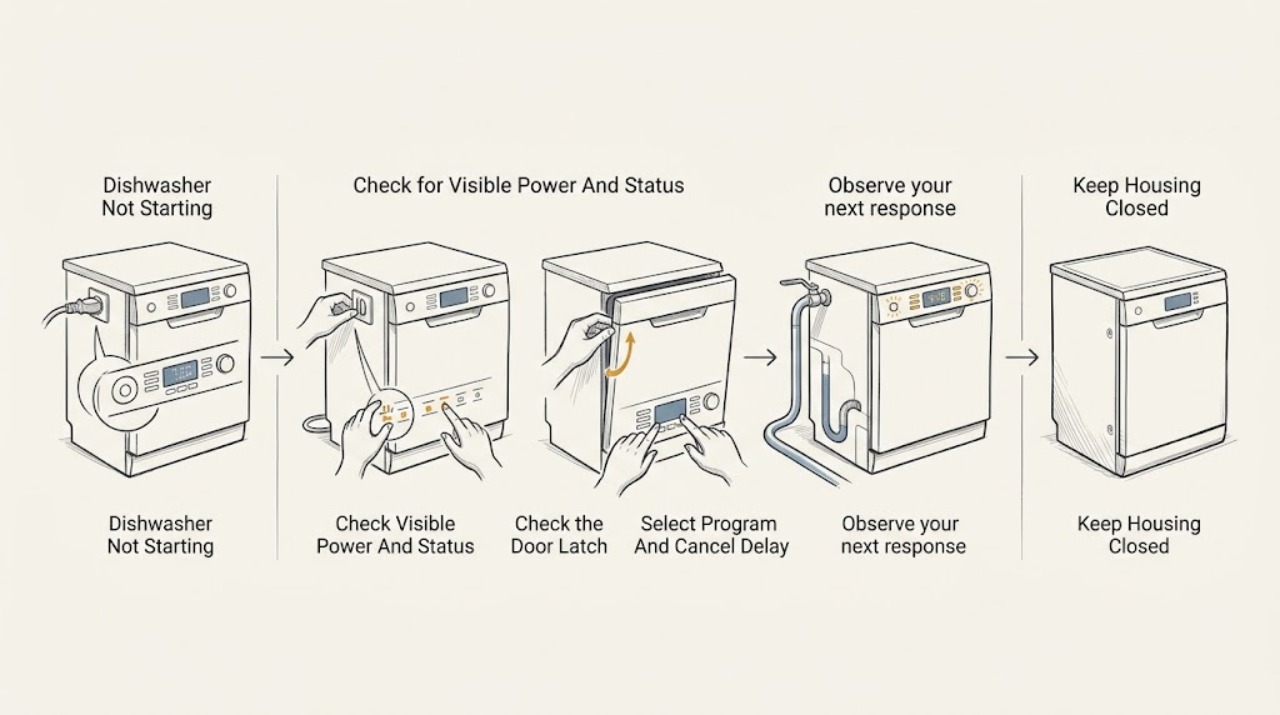
A Candy dishwasher that will not start is often waiting for a usable power connection, a fully closed door, a selected programme and start command, the end of a delayed start, or water entry. Begin with the exact model manual because Candy panels, reset methods, delay options, displays, and error meanings vary by model. From outside the appliance, confirm the plug and household supply are available, close the door without forcing it, cancel any visible delay using the model's instructions, and select the programme and Start/Reset control. If a no-water indication appears, check that the water tap is open and that the accessible inlet hose is not kinked; for a leak, damaged cord, burning smell, smoke, or an internal electrical/control fault, stop using the dishwasher and arrange authorised service. Do not remove panels, test live wiring, or bypass the door or water-safety system.
Before you begin
Safety first
- This article covers only visible power and water conditions, normal door closure, model-directed programme and delay controls, and exact error observation. An authorised technician must handle live electrical diagnosis, wiring, control, latch, valve, pump, heater, base disassembly, and water-safety components.
Work through in order
Diagnostic checks
Use only checks that match the exact appliance or system and its official guide.
-
Check 1
Look at the control panel and, from a dry visible position, inspect the accessible plug, cord, and outlet for looseness, moisture, scorching, or damage. Confirm the plug is connected and whether another device normally has power at that outlet; do not open the outlet or make a live measurement.
Expected result: The panel is dark, the plug or cord is damaged or wet, the outlet appears unavailable, other devices also have no power, or the panel and visible supply appear normal.
Next step: For moisture, heat, burning odor, damage, or a failed household outlet, stop and arrange qualified electrical or appliance service. If the visible supply is normal, continue with the door and control checks; never dismantle the plug, outlet, or dishwasher.
Stop if: Do not use a damaged or wet cord, open the outlet, replace internal electrical parts, or perform live electrical testing.
Why this matters
Why: A dark panel or no electricity makes the visible supply path or an internal power fault more likely than a programme-selection issue. A normal-looking outlet does not prove that the dishwasher's internal electrical system is safe or functional.
-
Check 2
Check that no dish, rack, detergent item, or trapped gasket material prevents the door from meeting the frame. Close the door normally until the latch engages; do not lean on it, slam it, or hold the latch closed by hand. If the model has an internal or top-edge display, note whether it changes when the door closes.
Expected result: The door was open or obstructed, it now closes and the panel changes, the door will not latch, or it latches but the dishwasher still does not accept a programme.
Next step: Remove only an obvious loading obstruction and retry the exact model's normal start command with the door fully closed. If the latch, hinge, gasket, or door-sensing behavior is damaged or unchanged, stop and arrange service.
Stop if: Do not tape, hold, short, or otherwise bypass the door latch or interlock, and do not remove the door panel.
Why this matters
Why: An open or unrecognised door can inhibit programme start. If the door cannot latch or the panel never recognises a correctly closed door, the latch, alignment, or door-sensing circuit is more likely; that is not a reason to bypass the safety control.
-
Check 3
With the door closed, use the exact model manual to select a valid programme and press its Start or START/RESET control. Look for a delay indicator, a flashing programme light, a child/control lock indication, or a stored cycle. If a delayed start is active, cancel it only with the documented reset sequence; do not guess a button combination.
Expected result: The programme starts, a delay countdown or delay light is active, the control accepts selection but not Start, the panel shows a lock or error, or the panel remains unresponsive.
Next step: Allow a deliberately selected delay to reach its start time or cancel it using the exact manual, then select the programme again. If the lock or control remains unresponsive, record the indicators and move to service rather than repeating resets indefinitely.
Stop if: Do not force controls, repeatedly reset a faulting unit, open the control panel, or attempt to defeat a child lock or safety function by disassembly.
Why this matters
Why: A delay countdown or stored programme can make a working dishwasher appear not to start. A control that will not accept the documented Start/Reset command with power and door conditions normal points toward a model-specific control, lock, or internal fault.
-
Check 4
If the display or indicator says NO WATER, shows a water-fill code, or the dishwasher hums without filling, check from outside that the water tap is open and the inlet hose is not kinked or crushed. If the manual identifies an accessible inlet-hose filter for that model, disconnect power and close the tap before inspecting or cleaning it; do not pull out the appliance or open its base. Note any drain, leak, or other code exactly.
Expected result: The tap is closed, the hose is kinked, the accessible inlet filter is visibly blocked, the machine does not fill or drain, a leak indication appears, or no water-related symptom is present.
Next step: Correct only an obvious tap or hose condition and retry the model's programme once with the appliance stable. If there is a leak, standing water with an error, a persistent code, or any inaccessible blockage, close the tap, disconnect power if safe, and arrange authorised service.
Stop if: Do not move or tilt a running dishwasher, dismantle the water inlet or base, reach into standing water near electrical parts, or bypass an overflow or water-safety device.
Why this matters
Why: Candy's opened manual associates no-water or E2-type symptoms with the water supply, a bent hose, or the inlet filter; it associates E3 with drainage and E4 with a leak. A code or symptom that does not match these visible checks is model-specific and should not be guessed.
-
Check 5
After the safe external checks, record the model and serial information, whether the panel is dark or illuminated, the selected programme, delay or lock indicators, door-latch result, water and drain observations, and the exact error code or beep pattern. Stop the appliance immediately for a leak, smoke, burning odor, sparking, hot or damaged cord, or repeated electrical trips.
Expected result: The dishwasher starts after a visible correction, remains unable to accept a programme, fails to fill or drain, displays a persistent error, or shows an electrical or water hazard.
Next step: Use the dishwasher only if it completes a normal model-compliant cycle without abnormal symptoms. Otherwise stop using it and contact Candy Technical Assistance or an authorised appliance technician with the recorded observations and exact model manual.
Stop if: Do not remove panels, probe live wiring, replace a control, latch, valve, pump, or fuse, or keep restarting a unit with a leak, odor, heat, smoke, sparking, or persistent fault.
Why this matters
Why: Recovery after correcting the door, delay, power, or visible water condition supports that external condition. Persistent no-start with those conditions normal may involve the latch sensor, control, wiring, pump, valve, or another internal fault; the symptom does not safely identify a replacement part.
Use your observations
Decision map
Find the observation that best matches what you see, then follow the next safe action.
-
PATH 01Safety boundary
What you see
The control panel is dark, the plug or cord is damaged or wet, the outlet is unavailable, or other devices at that outlet also lack power.
Do this next
Keep the dishwasher out of use; obtain qualified help for the outlet or household supply and authorised appliance service for a damaged cord or dishwasher.
Why this path and its safety boundary
Why it matters: The visible power path or household supply is more likely than a door or programme setting, although an internal dishwasher power fault cannot be ruled out externally.
Safety stop: Do not open the outlet, repair the cord, energise a wet appliance, or test live wiring.
-
PATH 02Safety boundary
What you see
The door is obstructed, will not latch, or the panel does not change when a correctly closed door is shut.
Do this next
Remove only an obvious loading obstruction and retry once with the door fully latched. Arrange service for damage or a persistent door-recognition problem.
Why this path and its safety boundary
Why it matters: A loading, alignment, latch, or door-sensing condition is more likely than a confirmed motor or programme fault.
Safety stop: Do not hold or bypass the latch or remove the door/control panel.
-
PATH 03Safety boundary
What you see
A delay indicator or countdown is active, a programme light is flashing, a lock is shown, or the Start/Reset command is not accepted.
Do this next
Use the exact model manual to cancel the delay or reset the selected programme, then select and start it again. If the control remains unresponsive, arrange service.
Why this path and its safety boundary
Why it matters: The dishwasher may be waiting for its scheduled start, a reset, or an exact model-specific control sequence rather than being completely without power.
Safety stop: Do not guess repeated reset combinations, force buttons, or open the control panel.
-
PATH 04Safety boundary
What you see
NO WATER or a water-fill code appears, the inlet hose is kinked, the dishwasher does not fill or drain, or a leak code or water is visible.
Do this next
Check only the external tap and hose condition with the appliance stable. For a leak, standing water with an error, or persistent code, close the tap, disconnect power if safe, and arrange authorised service.
Why this path and its safety boundary
Why it matters: The water supply, inlet path, drain path, or leak-protection response is more likely. A persistent or different code remains model-specific.
Safety stop: Do not tilt the dishwasher, open its base, reach into water near electrical parts, or bypass overflow protection.
-
PATH 05Safety boundary
What you see
The panel is illuminated, the door is recognised as closed, no intended delay remains, visible power and water conditions are normal, but no programme begins.
Do this next
Stop repeated start attempts and arrange Candy or authorised appliance service. Provide the exact model, indicators, error code, and the results of the external checks.
Why this path and its safety boundary
Why it matters: A latch sensor, control, wiring, valve, pump, or other internal fault is more likely; user-visible checks cannot identify a safe part replacement.
Safety stop: Do not dismantle the dishwasher, probe internal circuits, or replace electrical or water-control components as a user check.
-
PATH 06Safety boundary
What you see
There is a leak, smoke, burning odor, sparking, abnormal heat, a damaged or hot cord, repeated electrical trips, or a damaged appliance.
Do this next
Stop using the dishwasher. If it can be done without touching the hazard, switch it off, disconnect power, close the water tap, and arrange qualified service.
Why this path and its safety boundary
Why it matters: The immediate issue is an electrical, fire, shock, or water hazard, not a safe programme-setting problem.
Safety stop: Do not touch wet electrical parts, continue a cycle, or attempt live testing or disassembly.
Helpful context
Understand the symptom
Candy controls and error meanings vary by model
Candy sells freestanding, integrated, and tabletop dishwashers with different panels and programme controls. The opened CF 3E53E0W-80 manual is a model-specific reference: it uses a Programme Selection control, a START/RESET control, and 3-, 6-, or 9-hour delay indicators. Treat those labels and timings as examples only. Find the exact model or product code on the rating plate and use Candy's manual search before applying a reset or interpreting an indicator.
Keep electrical and water-safety work out of user troubleshooting
If the dishwasher is damaged, leaking, smells burnt, smokes, sparks, repeatedly trips protection, or leaves the controls unresponsive, stop using it. If safe to do so without touching a hazard, switch it off, disconnect power, and close the water supply. Candy's manual says to unplug and turn off the water before cleaning or maintenance and says a failed appliance should not be tampered with; repairs belong to an approved service agent. Do not remove panels, probe live wiring, repair the cord, defeat the door latch, or bypass a water-safety device.
Safety boundary
Stop conditions
- Stop immediately for a leak, smoke, burning odor, sparking, abnormal heat, a damaged or wet cord, repeated electrical trips, or a damaged appliance; disconnect power and close the water tap only if safe to do so.
- Unplug and turn off the water supply before any permitted cleaning or maintenance, and do not move or tilt the dishwasher while it is operating.
- Do not bypass the door latch, overflow protection, water-safety device, or control lock; do not open panels or test live electrical parts.
- Persistent no-start, persistent error, or a fault requiring access to wiring, the control, pump, valve, heater, or latch requires Candy or authorised appliance service.
When checks do not resolve it
Need a professional?
Safety scope: This article covers only visible power and water conditions, normal door closure, model-directed programme and delay controls, and exact error observation. An authorised technician must handle live electrical diagnosis, wiring, control, latch, valve, pump, heater, base disassembly, and water-safety components.
Common questions
FAQ
Why will my Candy dishwasher not start?
Check visible power, close the door fully, select a valid programme and the model's Start control, and look for a delayed start, lock, no-water indication, or error code. Candy's exact control sequence and error meanings vary by model, so use the manual for the product code.
Can an open or misaligned door stop a Candy dishwasher from starting?
Yes. Candy's opened manual lists an open door as a cause when no programme works. Remove only an obvious loading obstruction, close the door normally, and arrange service if it will not latch or the controls do not recognise the closed door.
Could delayed start make my Candy dishwasher seem not to work?
Yes. Candy models can have model-specific delayed-start options; the opened reference model uses 3-, 6-, or 9-hour settings and starts a countdown only after its Start/Reset command. Cancel or change the delay only as the exact manual describes.
What should I check when a Candy dishwasher shows no water?
From outside the appliance, check that the water tap is open and the inlet hose is not bent or crushed. If the model manual identifies an accessible inlet filter, disconnect power and close the tap before inspecting it. A persistent code, leak, or inaccessible blockage requires authorised service.
When should I call Candy service for a dishwasher that will not start?
Call when normal visible power, door, programme, delay, and water checks do not restore a start, or immediately for a leak, water near electrical parts, damaged or hot cord, smoke, burning odor, sparking, abnormal heat, or repeated electrical trips. Internal electrical, latch, control, pump, valve, and water-safety work is not a user repair.
Read the exact guide
Official sources
- CF 3E53E0W-80 Candy Rapidò DishwasherCandy Hoover Group S.r.l. · Candy CF 3E53E0W-80 freestanding dishwasher only; use the exact model page and manual for another Candy dishwasher.
- Technical assistance for our appliances | CandyCandy Hoover Group S.r.l. · Candy UK technical-assistance page; use the local Candy support page for the owner's region.
- Product user manuals | CandyCandy Hoover Group S.r.l. · Candy's official manual search; regional availability and manual results may vary, so select the exact product code.
- CF3E9E0W-80 UK Instruction ManualCandy Hoover Group S.r.l. · Opened official manual linked from Candy's CF 3E53E0W-80 product page; controls, codes, and timings are model-specific examples and must not be assumed for every Candy dishwasher.
Community feedback
Share a repair observation
Share a plain-text repair observation. Accepted observations are published automatically; this page may take a moment to update.