
On this page
Start here
Quick answer
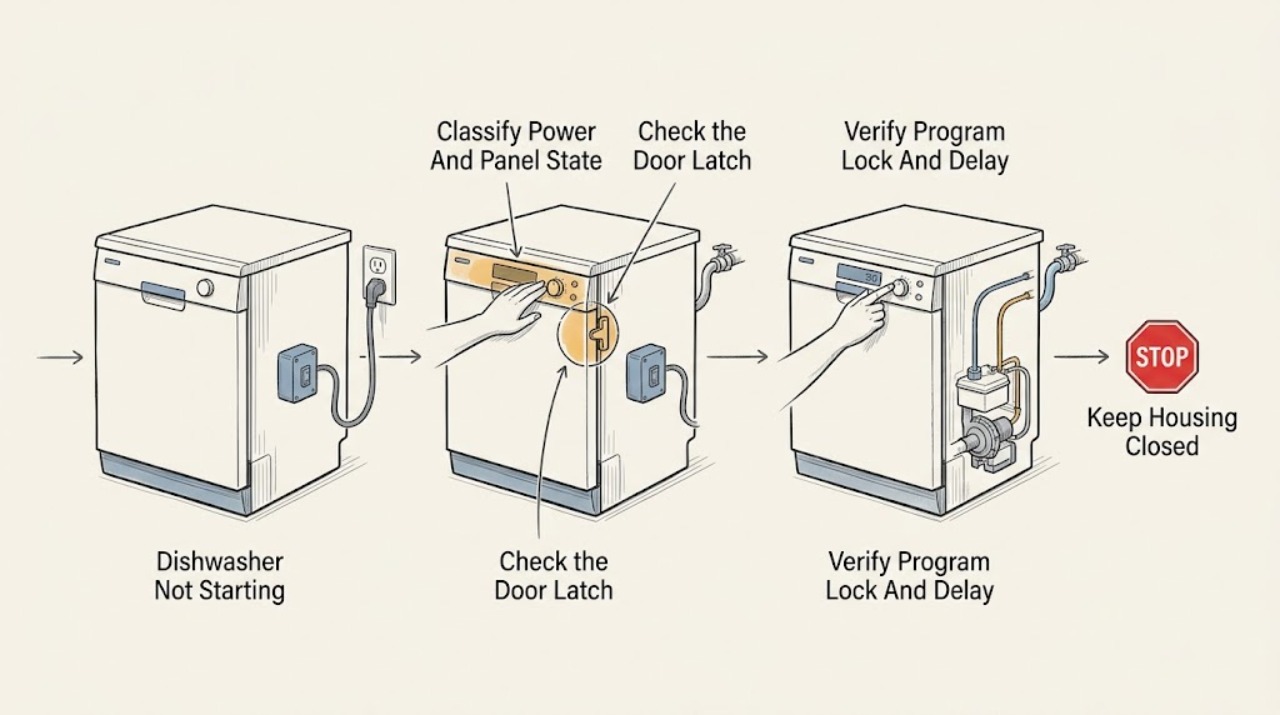
Start by separating a dead or unpowered dishwasher from one that has a display but will not begin. Check the external power connection and protection, close and latch the door normally, then verify that the selected program is not delayed or blocked by a model-specific control lock. Danby manuals list a blown fuse or tripped breaker and an incorrectly closed door among causes of a program that does not start; another Danby manual also lists the dishwasher being off, a low water supply, or an unsecured cord. Check only the visible water shutoff and inlet hose, and read any displayed code against the exact model manual. If the door will not latch, the controls stay unresponsive after the safe checks, an error returns, water leaks, the breaker trips again, or the fault points to a latch, control, inlet valve, pump, or wiring, stop and arrange qualified service. Do not remove panels, bypass the door interlock, open the control area, work on the pump or valve, or perform an energized electrical test.
Before you begin
Safety first
- The user may observe the panel, read the model label, secure an accessible plug, clear an obvious door obstruction, close a visible water shutoff only when needed to stop a leak, inspect the external inlet hose, and follow model-specific control or reset instructions. Door-latch internals, control boards, inlet valves, pumps, wiring, internal fuses, disassembly, and all energized electrical testing are for qualified service personnel.
Work through in order
Diagnostic checks
Use only checks that match the exact appliance or system and its official guide.
-
Check 1
Read the full model label, then observe the dishwasher with the door closed normally: note whether the panel or any indicator is lit, whether the outlet connection and cord are secure from the outside, and whether the household fuse or breaker has operated. If a protection device is tripped, do not open the appliance; restore it only once if there is no visible damage, moisture, burning odor, or other hazard.
Expected result: The panel is completely dark; the panel is lit but the outlet or cord connection is suspect; a breaker or fuse has operated; or the controls are powered and responsive.
Next step: For a single safe reset with no hazard, confirm the external connection and observe once. If power is absent, protection operates again, or the cord is damaged, stop using the dishwasher and arrange qualified service. If the panel is responsive, continue to the door and control-state checks.
Stop if: Do not remove panels, replace an internal fuse, reset protection repeatedly, or perform an energized electrical test.
Why this matters
Why: A dark panel or repeated protection operation makes supply, cord, or internal electrical faults more likely than a program-selection issue. A powered panel shifts the next check toward door interlock, control state, delay, water, or an internal fault.
-
Check 2
Remove only an obvious external obstruction from the door opening, racks, or gasket area. Close the door with normal hand pressure and observe whether it sits flush and latches without lifting, slamming, or holding the latch by hand. Do not press or bypass the latch or door switch.
Expected result: The door closes and latches normally; it springs back or remains visibly misaligned; or the panel reacts only when the door is forced or held in an artificial position.
Next step: Clear the external obstruction and try one normal closure. If the door still will not latch or the dishwasher starts only when the interlock is held, stop and request qualified appliance service.
Stop if: Do not bend hinges, defeat the latch, tape a switch closed, or remove the inner door or latch assembly.
Why this matters
Why: A normal latch permits the start-control and water checks. A door that cannot latch points to alignment, gasket, hinge, or latch/interlock trouble. A response only when the latch is manipulated is not a safe repair and makes the interlock path more likely.
-
Check 3
With the door latched normally, cancel any visibly selected delay or incomplete program only using the exact model manual, select a basic cycle, and press the documented Start or Start/Pause control once. If the display shows a lock indicator or CL, use the model-specific child-lock sequence rather than repeatedly pressing random buttons.
Expected result: The cycle begins; a delay countdown or lock indicator remains; the panel accepts selections but does not start; or the panel is unresponsive despite being powered and the door closed.
Next step: For the documented DDW18D1 family, the manual says the child lock shows CL and the delay can be canceled by holding Start/Pause for 3 seconds; use only the sequence for the identified model. If the control stays unresponsive or the cycle will not begin after one correct selection, stop and arrange service.
Stop if: Do not disassemble the control panel, bridge a switch, repeatedly force a key, or work on controls while energized.
Why this matters
Why: A running delay or active control lock can make a healthy dishwasher appear not to start on models that provide those features. If the exact model has no such feature, or clearing it changes nothing, the control/interlock path or another start-permissive fault remains possible.
-
Check 4
If the dishwasher has power, a normally latched door, and a valid start command, inspect only the accessible water shutoff and inlet hose for a closed valve, kink, crushing, or a visible leak. Record any error code exactly and compare it with the exact model manual. Do not remove the inlet connection or reach the valve, pump, filter housing, or wiring.
Expected result: The water supply is on and the hose is open with no leak; the hose is kinked or the shutoff is closed; an inlet or overflow code appears; or the unit remains silent without a code.
Next step: Correct only a visible hose kink or closed shutoff and make one normal start attempt. If a leak, code, or no-start persists, stop using the dishwasher and provide the model and code to qualified service.
Stop if: Do not disconnect water lines, open the base, clear an internal pump, remove a valve, or perform live electrical checks.
Why this matters
Why: A blocked visible supply can prevent a cycle from progressing on models that check water availability. The DDW18D1 manual maps FF to water inlet and F1 to overflow, but those codes are model-specific. Silence with normal power, door, controls, and supply makes an internal latch, control, inlet, pump, or wiring fault more likely.
-
Check 5
Only when there is no leak, odor, heat, damaged cord, or other hazard, follow the exact model manual for a single power reset; the DDW18D1 manual describes unplugging for approximately five minutes when an error code is displayed. After restoring power, make one normal start attempt and document the model, panel state, door result, selected cycle, delay/lock indication, water result, and code.
Expected result: The dishwasher starts normally and remains stable; the same no-start returns; a protection device trips; or water, heat, odor, smoke, or a leak appears.
Next step: Use the dishwasher only if it completes a normal cycle without a hazard. Otherwise keep it out of service when safe and arrange qualified Danby or appliance service with the recorded observations.
Stop if: Do not keep resetting power, leave the appliance unattended after a fault, or continue after smoke, arcing, burning odor, abnormal heat, a leak, or repeated breaker operation.
Why this matters
Why: A one-time recovery can clear a transient control state, but a recurring no-start is not proof that the underlying fault is fixed. Protection operation or physical hazard is an immediate safety boundary, while a repeatable failure after all external checks needs diagnosis.
Use your observations
Decision map
Find the observation that best matches what you see, then follow the next safe action.
-
PATH 01Safety boundary
What you see
The panel is dark, the external connection is secure, or a fuse/breaker operates again after one safe reset.
Do this next
Stop using the dishwasher and arrange qualified service; give the technician the model and protection behavior.
Why this path and its safety boundary
Why it matters: A supply, cord, protection, or internal electrical fault is more likely than a delayed cycle or water setting.
Safety stop: Do not replace internal fuses, open panels, repeatedly reset protection, or test energized wiring.
-
PATH 02Safety boundary
What you see
The panel is powered, but the door will not sit flush and latch, or the cycle responds only when the latch is forced or held.
Do this next
Remove only an obvious external obstruction. If normal closure does not restore starting, stop and request qualified service for the latch/interlock path.
Why this path and its safety boundary
Why it matters: Door alignment, gasket, hinge, latch, or interlock trouble is more likely than a water-supply problem.
Safety stop: Do not bypass or hold the door interlock and do not remove the inner door or latch.
-
PATH 03Safety boundary
What you see
The panel is lit and accepts input, but a delay countdown, CL/lock indication, or incomplete start state is shown; the exact model manual documents that feature.
Do this next
Use the exact manual to clear the delay or control lock, select a cycle, and press Start once. Escalate if the control remains unresponsive or the state returns.
Why this path and its safety boundary
Why it matters: A user-selectable delay or control lock is more likely than a failed pump or valve, but the feature and button sequence are model-specific.
Safety stop: Do not guess a button combination, disassemble the panel, or work on energized controls.
-
PATH 04Safety boundary
What you see
Power, normal door closure, and the start command are confirmed, but the visible supply is closed or kinked, an inlet/overflow code appears, or the dishwasher remains silent after the safe checks.
Do this next
Correct only a visible shutoff or hose issue and retry once. For a persistent code, leak, or no-start, stop and arrange model-matched qualified service.
Why this path and its safety boundary
Why it matters: A visible water restriction may explain a failure to progress; a persistent code or silence after normal supply makes an internal inlet valve, control, pump, latch, or wiring fault more likely.
Safety stop: Do not remove the inlet hose, access the pump or valve, open the base, or perform live electrical diagnosis.
Helpful context
Understand the symptom
First identify which kind of no-start you have
A completely dark panel, a lit panel that ignores Start, and a cycle that accepts a selection but waits for water are different fault paths. Note the full model from the rating label, whether any display or indicator is lit, whether the door closes flush, and whether the machine makes any brief attempt to fill or run. Danby’s manuals are model-specific, so button names, codes, and lock behavior must be matched to that model.
Keep the checks outside the appliance
The safe owner checks are the plug and visible cord, the breaker or fuse condition, normal door closure, the selected program and visible delay or lock indication, and the accessible water shutoff and hose. Do not defeat the door latch, remove a control or toe-kick panel, reach the pump or inlet valve, or probe wiring. Danby’s dishwasher FAQ notes that installation involves power, hot water, and drain connections and recommends professional installation where electrical and plumbing work is required.
Use codes and timing as clues, not as universal diagnoses
On the DDW18D1 family manual, FF means a water-inlet warning and F1 means an overflow warning; that same manual describes a child lock and a delay timer. Other Danby models can use different displays and controls. Record the code exactly and follow the matching manual; a persistent code, leak, or failure after a safe reset belongs with qualified service.
Safety boundary
Stop conditions
- Stop using the dishwasher for smoke, arcing, burning odor, abnormal heat, a damaged cord, a leak near electrical parts, or repeated breaker/fuse operation; isolate power only from a safe, dry position.
- Do not bypass, short, tape down, or hold the door latch or interlock in an artificial closed state.
- Do not remove the inner door, toe-kick, base, control cover, wiring connector, inlet valve, pump, or internal fuse.
- Do not perform energized electrical tests or repeatedly reset a breaker or the dishwasher to mask a recurring no-start.
- Do not generalize the DDW18D1 child-lock, delay, FF, or F1 behavior to another Danby model; use the exact manual.
Only after diagnosis
Potential parts
- door latch or interlock assembly
Consider this only when the exact model is identified and normal door alignment is confirmed to be the issue, or qualified diagnosis finds that the latch/interlock does not report a safely closed door.
Confirm the full rating-label model and the manufacturer's fit information; Danby door and control designs vary by model. - water inlet valve
Consider this only after the visible shutoff and hose are open and clear and a qualified diagnosis links a persistent inlet warning or failed fill to the valve.
Do not infer fit from the Danby brand alone; verify the exact model and manufacturer fit information before ordering. - dishwasher control component
Consider this only after power, normal door closure, model-specific lock/delay settings, and visible water supply have been checked and qualified service confirms a control fault.
Use the exact model manual and fit information; control components are not interchangeable by brand name alone.
When checks do not resolve it
Need a professional?
Arrange qualified service when the dishwasher has no panel power, a breaker or fuse operates again, the door will not latch normally, the controls remain unresponsive after the exact model's safe settings are checked, a code or leak persists, or the dishwasher remains silent after power, door, program, and visible water checks. Stop immediately for smoke, arcing, burning odor, abnormal heat, damaged cord, or repeated protection operation.
Safety scope: The user may observe the panel, read the model label, secure an accessible plug, clear an obvious door obstruction, close a visible water shutoff only when needed to stop a leak, inspect the external inlet hose, and follow model-specific control or reset instructions. Door-latch internals, control boards, inlet valves, pumps, wiring, internal fuses, disassembly, and all energized electrical testing are for qualified service personnel.
Common questions
FAQ
Why is my Danby dishwasher completely dead?
Check the external plug and visible cord connection and observe whether a fuse or breaker has operated. Danby manuals list loss of power, a blown fuse, or a tripped breaker as possible no-run causes. If protection operates again, the cord is damaged, or the panel remains dark, stop using the dishwasher and arrange qualified service rather than opening it.
Can a door that looks closed keep a Danby dishwasher from starting?
Yes. Close the door normally and check for a rack, dish, gasket, or visible alignment issue preventing the latch from engaging. Do not hold or bypass the latch. If the door will not latch without force or the dishwasher reacts only when the interlock is manipulated, request qualified service.
Could delay start or a control lock make a Danby dishwasher seem not to start?
On the DDW18D1EW, DDW18D1EB, and DDW18D1ESS models, the manual documents a child lock shown as CL and a delay timer that can be canceled with the model's Start/Pause hold. These features and button sequences are model-specific, so use the exact manual and do not assume another Danby model behaves the same way.
What does a water-related warning mean when the dishwasher will not start?
Inspect only the visible water shutoff and inlet hose for a closed valve, kink, crushing, or leak. The DDW18D1 manual identifies FF as a water-inlet warning and F1 as an overflow warning for its listed models. Follow the exact manual; a persistent code, leak, or silent no-start needs qualified service.
What should I give a technician for a Danby dishwasher no-start?
Provide the full model, whether the panel is dark or lit, any exact code or delay/lock indication, whether the door latches normally, whether a breaker operated, the visible water-supply result, and what happened after one model-approved reset. This prevents a model-specific control sequence or error meaning from being guessed.
Read the exact guide
Official sources
- DDW1832ESS User ManualDanby · The program-start troubleshooting table applies to the DDW1832ESS model; other Danby models may differ.
- Dishwashers FAQsDanby · General Danby dishwasher installation and maintenance guidance; model manuals control when instructions differ.
- DDW611WLED User ManualDanby · The no-run troubleshooting table applies to the DDW611WLED model; the listed causes should not be treated as a universal code or sequence for every Danby dishwasher.
- DDW18D1EW, DDW18D1EB, DDW18D1ESS User ManualDanby · Child-lock, time-delay, FF, F1, reset, and maintenance instructions are specific to these listed models and are not universal Danby behavior.
Community feedback
Share a repair observation
Share a plain-text repair observation. Accepted observations are published automatically; this page may take a moment to update.