
On this page
Start here
Quick answer
Do not guess what a Bauknecht washing-machine error display means from a partial symbol or a code copied from another model. Photograph or write down the complete display and the machine's behavior, then use the exact model number or 12 NC to open the correct Bauknecht Owner's Manual. Follow only that manual's checks and, if it permits, perform one reset; Bauknecht says an error not described in the manual that will not clear should be referred to service. Stop immediately for leaking water, a water-protection warning, smoke, sparks, a burning smell, exposed wiring, or a door that will not safely release.
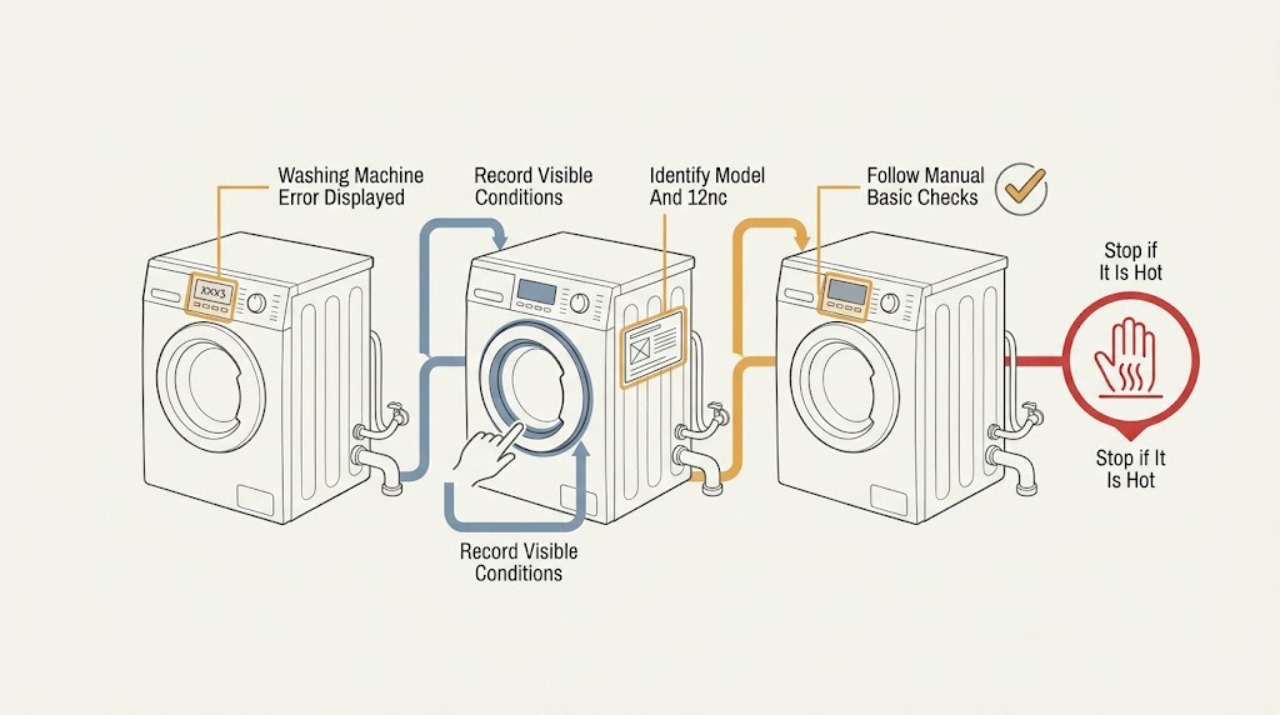
Work through in order
Diagnostic checks
Use only checks that match the exact appliance or system and its official guide.
-
Check 1
Pause or stop the machine using the normal control if it is safe. Record the complete display, including letters, numbers, decimal points, icons, flashing pattern, and the point in the cycle when it appeared. Take a photo without opening panels or touching wet electrical areas.
Expected result: The display is a complete repeatable code/message, only an icon, partially unreadable, or accompanied by water, smoke, heat, sparks, a burning smell, unusual noise, or a locked door.
Next step: Stop use and arrange qualified service for smoke, sparks, burning smell, unusual heat, exposed wiring, active leaking, or unsafe door behavior. Otherwise continue by identifying the model and retaining the exact display.
Why this matters
Why: A complete code can be matched to the correct model manual. A partial display cannot safely identify a fault. Water, electrical, heat, smoke, or door-safety symptoms change this from a code lookup to a stop/service decision.
-
Check 2
Find the washing machine's exact model designation or 12 NC from the rating label, documentation, or the location described by Bauknecht. Enter that identity into Bauknecht's manual search and open the matching Owner's Manual; do not use a generic manual from a visually similar machine.
Expected result: The model/12 NC identifies one matching manual, or the label is missing/unclear and several possible manuals remain.
Next step: If the model cannot be confirmed, stop at identification and provide the label details and display photo to qualified service. Do not choose a code meaning or wiring/part procedure by appearance alone.
Why this matters
Why: A matching manual is the authoritative place to interpret the display and permitted checks. An unresolved model identity means the code's meaning and reset sequence remain unsupported.
-
Check 3
Read the matching manual's section for the exact code or message. Perform only its external, user-level checks, such as confirming the door is closed, water supply is available, a visible hose is not kinked, the drain path is accessible, or the load/program meets the stated conditions.
Expected result: The manual identifies a simple condition that is present, the condition is absent, or the code/message is not described for that model.
Next step: Correct only the documented user-level condition and observe one normal restart if the manual permits. If the code is undocumented or the check requires panel, pump, wiring, water-protection, or lock access, stop and request service.
Why this matters
Why: A documented simple condition gives a model-specific next step. An absent condition or undocumented code does not justify substituting another model's instructions.
-
Check 4
If the matching manual explicitly gives a reset procedure for the displayed code and there is no leak, smoke, heat, burning smell, electrical symptom, or unsafe door condition, perform that reset once exactly as written. Do not improvise button combinations or repeatedly power-cycle the machine.
Expected result: The display clears and the machine behaves normally, the same code returns, a different code appears, or the machine remains stopped.
Next step: If the code returns, the appliance remains stopped, or the manual does not describe the code/reset, stop further resets and arrange qualified service. Keep the original and resulting displays for the technician.
Why this matters
Why: A cleared display may represent a transient condition, but it is not proof of a repaired fault. A returning or changed code is new diagnostic evidence and must be interpreted against the same model manual.
-
Check 5
Before any supervised restart allowed by the manual, check externally for water in or around the machine, a kinked drain or inlet hose, an overloaded drum, unusual drum movement, or a door that remains locked after the manual's stated waiting/safety condition. Do not tip the appliance, remove hoses, or reach into moving parts.
Expected result: There is standing water or a leak, a hose is visibly kinked, the load is clearly beyond the manual's limit, the drum/door behaves abnormally, or none of these symptoms is present.
Next step: For a leak, water-protection warning, abnormal door lock, or mechanical symptom, stop and arrange service; do not bypass the lock or move the machine. For a manual-documented load or visible hose condition, correct only that condition before one permitted test.
Why this matters
Why: Water-protection and drainage symptoms can trigger displays and require a different procedure from an overload or a transient control message. Abnormal drum or door behavior can indicate a mechanical or safety fault.
-
Check 6
After one manual-authorized correction or reset, observe one complete permitted test without leaving the machine unattended. Record whether the code stays clear, the program completes, the original symptom returns, or a new warning appears.
Expected result: The program completes normally, the same code returns, a different code appears, or the machine stops with water, heat, smoke, electrical, door, or noise symptoms.
Next step: Stop testing when the display returns or any physical warning appears. Give service the model/12 NC, exact display sequence, cycle stage, visible checks, reset result, and any water, door, electrical, heat, or noise observation.
Why this matters
Why: Normal completion supports a transient or documented user condition but does not erase the event. Any returning code or physical symptom means the underlying issue remains unresolved or needs model-specific diagnosis.
Use your observations
Decision map
Find the observation that best matches what you see, then follow the next safe action.
-
PATH 01Next step
What you see
Smoke, sparks, burning smell, unusual heat, exposed wiring, active leak, or unsafe door/lock behavior
Do this next
Stop using the washing machine, keep clear of wet or electrical areas, and arrange qualified appliance or electrical service. Do not reset, restart, bypass the lock, tip the machine, or open panels.
-
PATH 02Next step
What you see
The complete code is documented in the exact model manual and the manual lists an external user check
Do this next
Perform only that documented check, then follow the manual's permitted single restart or reset. If the code returns, stop and request service.
-
PATH 03Next step
What you see
The display is incomplete, the model/12 NC cannot be confirmed, or the code is not described
Do this next
Do not guess the code meaning or use another model's reset. Preserve a photo and label details and arrange qualified service or model-specific support.
-
PATH 04Next step
What you see
The code clears once but returns during the next permitted test
Do this next
Treat the reset as unsuccessful, stop repeating it, and provide the original and returning display sequence to service.
-
PATH 05Next step
What you see
A documented load, hose, door, water, or program condition is corrected and the machine completes a supervised permitted test
Do this next
Keep the model-specific maintenance or usage instruction. If the warning recurs, stop use and escalate rather than assuming the condition was permanently fixed.
Helpful context
Understand the symptom
An unspecified display is not one universal fault
Bauknecht uses different messages and codes for different conditions, including water protection, electrical-module faults, overload, and excessive foam in the manufacturer's examples. A display that looks similar can still have a different meaning on another model. Treat the code as an identifier to verify, not as a diagnosis to guess.
Find the correct manual first
The model designation or 12 NC is the bridge between the display and the correct instructions. Record it from the rating label or the appliance documentation, then use Bauknecht's manual search. Keep the complete code, punctuation, letters, and any accompanying icons; do not replace an uncertain character with a similar-looking number.
Reset only within the documented boundary
A reset can clear a transient condition on some Bauknecht models, but it cannot prove that the underlying cause is fixed. Do not repeatedly reset a code associated with water, an electrical symptom, a door lock, smoke, heat, or a leak. If the display returns, capture the result and arrange qualified service rather than opening the machine.
When checks do not resolve it
Need a professional?
Call qualified service when the exact code is not in the model manual, cannot be cleared by the one documented reset, or returns after a permitted test., Arrange service for water-protection warnings, leaks, persistent drainage or inlet faults, unsafe door-lock behavior, abnormal drum movement, or any internal electrical/mechanical check., Arrange urgent appliance or electrical inspection for smoke, sparks, burning smell, unusual heat, damaged wiring, or water reaching electrical areas.
Read the exact guide
Official sources
- Wo kann ich die Bedienungsanleitung meiner Bauknecht Waschmaschine finden?Bauknecht · Bauknecht washing-machine manual lookup by model designation or 12 NC
- Waschmaschine startet nichtBauknecht · Bauknecht washing-machine error examples, model manual/reset boundary, and service escalation
- Finden Sie schnelle Lösungen und einfache zur FehlerbehebungBauknecht · Bauknecht web-based troubleshooting, manuals, and qualified repair routing
- FAQs: Häufige Fragen und AntwortenBauknecht · Bauknecht appliance FAQ routing and washer troubleshooting categories
Community feedback
Share a repair observation
Share a plain-text repair observation. Accepted observations are published automatically; this page may take a moment to update.