
On this page
Start here
Quick answer
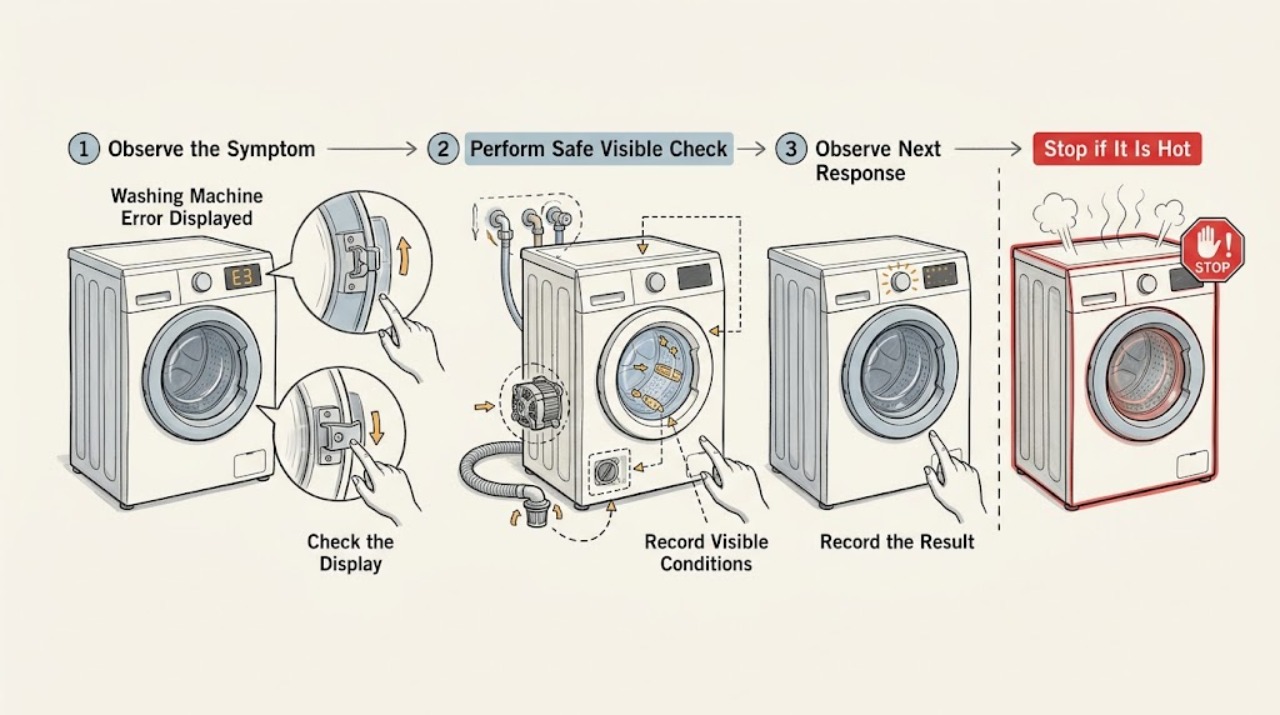
Do not diagnose a Candy washing-machine error from the code alone because the meaning varies by model and display type. Photograph or write down the exact code, identify the complete model and serial number, and open the matching Candy instruction manual or its support guide. Candy's published manual examples map different codes to door, fill, drain, heating, motor, sensor, and communication faults; the manual's own action should control. Only make external, low-risk checks such as closing the door, confirming the water tap is open, looking for a kinked hose, or checking an accessible drain hose. Before maintenance, switch the appliance off and disconnect the mains plug as Candy's safety instructions direct. If the code returns, indicates a water-level, heating, motor, sensor, protective, or communication fault, or the machine leaks, smells hot, shocks, or trips the breaker, stop and arrange qualified Candy service.
Work through in order
Diagnostic checks
Use only checks that match the exact appliance or system and its official guide.
-
Capture the code and identify the exact Candy model
Leave the machine in a safe, stationary state and record the exact display characters, flashing pattern, programme, and point at which the error appeared. Photograph the display and the model or serial label. Use Candy's official manual search with the product line, model, or product code rather than using a code list for a different model.
Expected result: The code and model are clear, the display is a flashing pattern rather than letters and numbers, or the model cannot be identified.
Next step: Open the matching Candy manual or support guide. If the model is missing, save the photograph and label details and contact Candy support or a qualified servicer before attempting internal work.
Why this matters
Why: A model-specific code can be matched to the correct procedure. A flashing pattern or unknown model cannot be safely translated from a generic list, so guessing a part or reset is not justified.
-
Apply only the procedure for the recorded code
Read the troubleshooting table for the exact model and code. Compare the displayed code with the manual's listed cause and user action; do not substitute a procedure from another Candy series. Before any maintenance step, switch off the appliance and disconnect the mains plug as the Candy manual directs.
Expected result: The manual gives a low-risk external action, directs the user to after-sales service, or does not list the code.
Next step: Perform only the listed external action and run one appropriate test cycle if the manual allows it. If the code returns or is unlisted, stop and arrange qualified service; keep the code and test result for the technician.
Why this matters
Why: A listed user action can be tried once within the manual's boundaries. A service instruction or an unlisted code is evidence that the fault needs model-specific diagnosis rather than repeated resets.
-
Check the door and start conditions for a door-related code
If the exact manual identifies a door or lock condition, remove any garment caught in the seal, close the door firmly without slamming it, and verify that the programme is started as the controls specify. Do not bypass or dismantle the door lock, and do not pull the door while it remains locked.
Expected result: The door closes fully and the error clears, the door cannot close or the seal is obstructed, or the code returns with a visibly closed door.
Next step: Remove only the accessible obstruction and retry once if the manual permits. If the door will not close, remains locked, or the code returns, leave the machine off and arrange service.
Why this matters
Why: An obstruction or incomplete closure can prevent a safe start. A recurring lock code with a clear door points to the lock, sensing, wiring, or control and is not a reason to defeat the interlock.
-
Check the water supply and inlet hose for a fill-related code
If the exact manual identifies a water-fill error, confirm from a dry position that the supply tap is open and inspect the accessible inlet hose for a visible kink or crush. Do not disconnect the hose, open the inlet valve, or remove a filter while the machine is connected or pressurized unless the exact manual provides that safe procedure.
Expected result: The tap is closed, the inlet hose is visibly kinked, there is no water supply, a leak is present, or the external supply looks normal.
Next step: Restore only a closed tap or gentle hose routing issue, check for leakage, and run one manual-approved test. If the code returns, the hose leaks, or the external supply is normal, shut off the tap if safe and arrange qualified service.
Why this matters
Why: A closed tap, missing supply, or kink can prevent filling. A leak or a normal external supply with a recurring code points to an inlet, pressure, sensor, or control fault that needs service.
-
Check the accessible drain path for a drainage code
If the exact manual identifies a drain error, stop the programme and disconnect the mains plug before maintenance. Inspect the visible drain hose for a kink or incorrect placement and check for standing water around the appliance. Do not open a pump filter while the drum may contain hot or pressurized water, and do not reach into the pump or remove panels without the model's instructions.
Expected result: The drain hose is visibly kinked or misplaced, water is leaking or standing around the machine, the machine has safely drained, or the external drain path looks normal but the code returns.
Next step: Correct only the accessible hose placement allowed by the manual and clean up water without touching electrical connections. If water remains, a leak is present, or the code returns, keep the machine disconnected and arrange service.
Why this matters
Why: A visible hose problem can prevent drainage. Standing water, hot water, or a recurring drain code creates an overflow, sanitation, or electrical hazard and may indicate a blocked pump or sensor fault beyond a safe external check.
-
Escalate codes that identify internal or electrical faults
If the manual identifies a heating, motor, water-level sensor, protective-level, or communication fault, record the code and stop the machine. Do not test live voltage, bypass a safety device, replace a board or motor, or continue resetting the appliance. Also stop for smoke, burning odor, shock, a hot cable, water near electrical parts, or a breaker that trips again.
Expected result: The fault is explicitly assigned to after-sales service, the code returns after the allowed external check, or an immediate safety hazard is present.
Next step: Disconnect power only if it is safe to do so, keep clear of the appliance, protect the floor from water, and arrange qualified Candy service. Provide the exact code, model, serial number, programme, and observations.
Why this matters
Why: These symptoms can involve mains electricity, heat, moving parts, water, or control communication. A reset may hide the symptom without correcting the hazard, and a model-specific part cannot be selected from a code alone.
Use your observations
Decision map
Find the observation that best matches what you see, then follow the next safe action.
-
PATH 01Safety boundary
What you see
The exact code or model cannot be identified, or the code is not listed in the matching Candy manual.
Do this next
Do not guess the code meaning or order a part. Save a display photograph and the model or serial details, then contact Candy support or a qualified servicer.
Why this path and its safety boundary
Safety stop: True
-
PATH 02Next step
What you see
The manual gives a door-closure action and the door closes normally after an accessible obstruction is removed.
Do this next
Run one manual-approved test. If the door code returns or the lock remains engaged, stop and request service; never bypass the lock.
-
PATH 03Next step
What you see
The manual identifies a fill problem and the tap or visible inlet hose is closed or kinked without a leak.
Do this next
Restore the tap or gentle hose routing only, then run one approved test. If filling still fails, arrange service for the inlet, pressure, sensor, or control system.
-
PATH 04Safety boundary
What you see
The manual identifies a drain problem, water remains in the machine, a hose leaks, or the code returns after the external hose check.
Do this next
Keep the machine disconnected and arrange service. Do not open a filter with hot or trapped water or access the pump without the exact safe procedure.
Why this path and its safety boundary
Safety stop: True
-
PATH 05Safety boundary
What you see
The code identifies heating, motor, sensor, protective, or communication trouble, or the machine shows smoke, burning odor, shock, water near electrical parts, or repeated breaker trips.
Do this next
Stop immediately, isolate power only from a safe position, keep clear, and arrange qualified appliance service. Do not continue resetting or perform live tests.
Why this path and its safety boundary
Safety stop: True
Helpful context
Understand the symptom
Record the exact code before clearing it
A code such as E2, E4, F3, or a flashing pattern is not universal across the Candy range. Record the characters, flashes, and what the machine was doing, then photograph the display. Keep the complete model and serial number available; Candy's support pages use the product line, model or code, and serial information to locate the relevant documentation.
Use the matching manual, not a generic code list
Candy's published instruction manual examples distinguish a door-lock error from water-fill, drain, heating, motor, sensor, and communication errors. That means a code found on another Candy model can send the diagnosis in the wrong direction. Treat any code family below as a decision to check the exact manual, not as a universal code translation.
Stop before electrical or internal work
If the machine has a damaged cable, burning smell, water near electrical parts, repeated breaker trips, a shock, or an active leak, stop using it. Do not remove covers, test live components, bypass the door lock, or reach into a moving drum. Candy's manual says to disconnect the mains plug before maintenance and reserves electrical repairs for qualified experts.
When checks do not resolve it
Need a professional?
A technician is required for recurring or unlisted error codes, failed door locking, fill or drain faults that remain after the safe external checks, heating or motor faults, sensor or communication errors, leaks, or any electrical symptom.
Common questions
FAQ
Can I use a Candy error-code list from another model?
No. Candy codes and the permitted user action vary by model and display. Record the exact code and use the manual matched to the complete model or product code.
What should I check first when my Candy washer displays an error?
Record the code and model, then read the matching manual. Only perform its low-risk external checks, such as confirming the door is closed or the water tap is open, and stop if the code returns.
When should I unplug a Candy washing machine with an error?
Disconnect the mains plug before maintenance as Candy's manual directs. Stop immediately for smoke, burning odor, shock, water near electrical parts, a damaged cable, or repeated breaker trips, and arrange qualified service.
Should I replace a part based only on the displayed code?
No. A code identifies a fault area, not necessarily a failed part. Give the technician the exact code, model, programme, and observations so the lock, inlet, drain, heater, motor, sensor, or control can be tested before a part is selected.
Read the exact guide
Official sources
- Manuales de usuario para tus electrodomésticosCandy · Finding the correct Candy manual by product line, model, or product code before interpreting an error display
- Technical assistance for our appliancesCandy · Escalating recurring or model-specific error codes and providing model and serial information to Candy support
- Candy-NewAppearanceManual1221---layout43035379 CO_CSO3D_3TEUK_EN.docxCandy · Opened Candy instruction manual example showing display-code troubleshooting, external door, fill, drain, and service decisions, plus electrical-maintenance warnings
Community feedback
Share a repair observation
Share a plain-text repair observation. Accepted observations are published automatically; this page may take a moment to update.