
On this page
Start here
Quick answer
If a Beko washer dryer is not starting, first determine whether the display is completely off or the appliance powers on but will not begin a programme. For a powered machine, confirm that a programme is selected, Start/Pause has been pressed, delay or child lock is not preventing input, and the loading door closes firmly without laundry caught in the seal. If water remains in the drum or the door stays locked, do not force it or open the pump filter while water may be present. Check only visible taps and hoses for a closed tap, kink, or leak. If the supply is absent, a fuse or breaker trips again, the door will not lock, an error returns, or the programme still will not start, switch the appliance off and arrange authorised Beko service.
Before you begin
Safety first
- This article supports accessible supply and control checks, normal door closure, visible load and hose observations, and the exact manual's user-level instructions. Electrical access, door-lock repair, internal hoses, pump or filter work with retained water, wiring, sensors, heaters, and control repairs require qualified professionals.
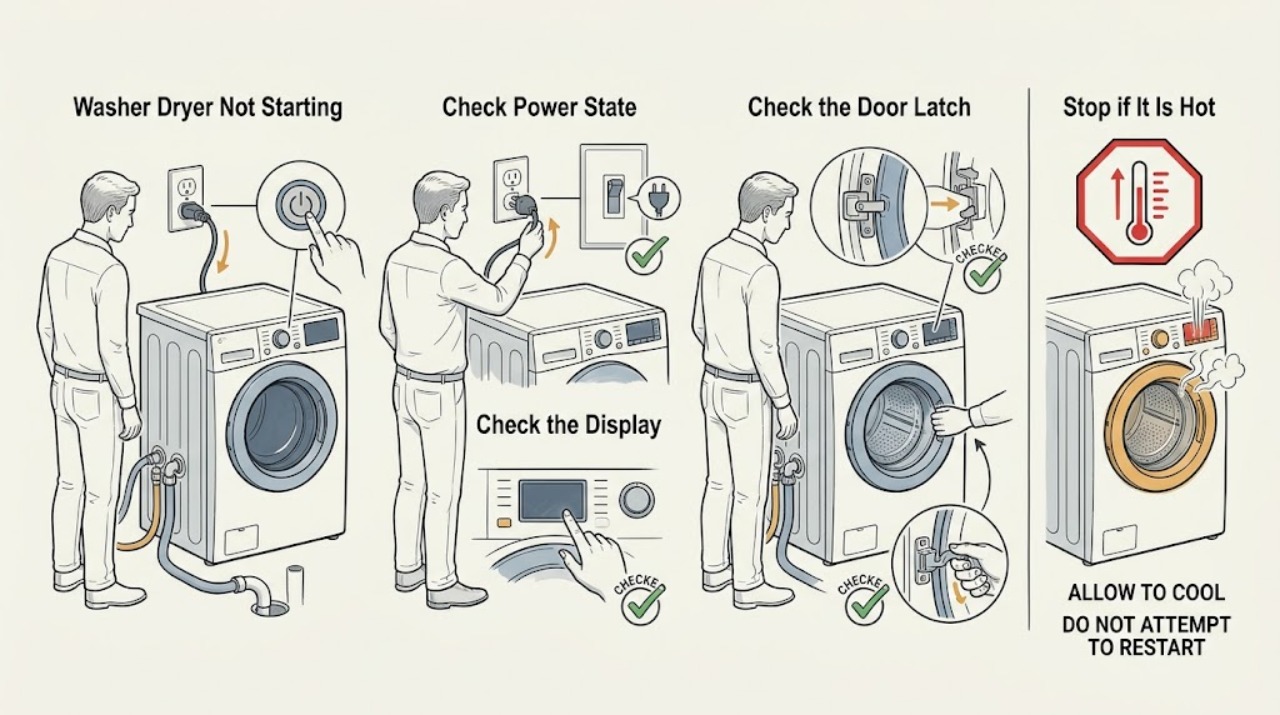
Work through in order
Diagnostic checks
Use only checks that match the exact appliance or system and its official guide.
-
Check 1
Check whether the Beko washer dryer display or indicator lights respond, then inspect the accessible plug, socket, mains supply, and appliance fuse or breaker without opening the appliance or handling wet electrical parts.
Expected result: Record a normal display, a completely blank appliance, a tripped fuse or breaker, a loose or damaged plug or cable, or power that returns but drops again.
Next step: Restore only an obviously switched-off supply if safe and permitted locally; if power is absent, the cable or socket is damaged, or the fuse or breaker trips again, keep the appliance off and arrange qualified electrical or authorised Beko service.
Stop if: Do not repeatedly reset a breaker, use an extension lead to bypass the normal supply, open the appliance, or touch plugs, sockets, or controls with wet hands.
Why this matters
Why: A blank display points to supply or electrical interruption rather than a child lock or programme setting. A protective device that trips again suggests a fault, not a condition to keep resetting.
-
Check 2
With the display powered, confirm that a wash, dry, or combined programme is selected, check for a delay indicator or padlock symbol, and press Start/Pause once as directed by the exact model manual.
Expected result: Record a programme that starts, a programme that was not selected, an active delay, a padlock or child-lock indication, or buttons that remain unresponsive after the model-specific child-lock procedure.
Next step: Cancel the delay or deactivate child lock only with the exact model manual's user procedure; if the panel remains locked or the programme will not respond, arrange authorised service.
Stop if: Do not guess button combinations, repeatedly power-cycle the machine, bypass the child lock, or open the control panel.
Why this matters
Why: A missing programme, delay, or child lock can make a working appliance appear not to start. If the controls remain unresponsive after the model instruction, an electronic or control fault is possible.
-
Check 3
Inspect the loading-door opening and rubber seal for a garment or object caught at the edge, then close the door normally until the model indicates its lock has engaged; do not force a misaligned door.
Expected result: Record a door that closes and locks, laundry trapped in the seal, an overloaded drum that prevents closure, a door that sits crooked, or a door that closes but never shows a lock indication.
Next step: Remove only an obvious item caught at the door and reduce an obviously excessive load; if the door still will not lock, keep the washer dryer off and arrange authorised service.
Stop if: Do not slam, pry, dismantle, or force the loading door, and do not continue if the seal, glass, hinge, or lock is damaged.
Why this matters
Why: Beko states that a detected open door prevents the machine from proceeding, and its manual notes that an excessive load can make closure difficult. A door that will not lock after the opening is clear can indicate a latch or interlock fault.
-
Check 4
From outside the appliance, check that the water tap is open, the visible inlet and drain hoses are not kinked or leaking, and note whether water remains in the drum; do not loosen hoses or open the pump filter while water may be hot or present.
Expected result: Record a normal visible water path, a closed tap, a kinked hose, a visible leak, water left in the drum, or no obvious external water issue.
Next step: Correct only an obvious tap position or external hose kink if it can be done without moving the appliance or opening a connection; arrange service for leaks, persistent water, a blocked internal path, or an unexplained no-start.
Stop if: Do not open the pump filter with water in the drum, pull the machine forward on wet flooring, disconnect hoses, or force a locked door.
Why this matters
Why: A water-supply or drainage condition can prevent a programme from progressing or keep the door locked. Water in the drum is a reason to follow the exact manual's safe drain and door guidance, not to force the door.
-
Check 5
If the washer dryer still will not start, record the complete display message or error indication, selected programme, door-lock state, water state, and whether the machine has recently been interrupted or overheated during drying; do not test internal components.
Expected result: Record no code, a recurring code, an electrical or supply warning, a locked door after drying, a persistent blank display, or a programme that stops before beginning.
Next step: Use the exact manual's troubleshooting entry for the displayed indication once; if it recurs or no user-level remedy applies, switch off and arrange authorised Beko service with the recorded observations.
Stop if: Do not remove covers, probe wiring, bypass an interlock, repeatedly restart a fault, or attempt to repair a nonfunctional appliance.
Why this matters
Why: The code and state help separate supply, door, water, temperature, control, and other model-specific faults, but they do not identify a safe part for a general model-free repair.
Use your observations
Decision map
Find the observation that best matches what you see, then follow the next safe action.
-
PATH 01Safety boundary
What you see
The display is blank, the mains supply is absent, or a fuse or breaker has tripped.
Do this next
Check the accessible supply once if safe; arrange qualified electrical or authorised Beko service for a repeat trip, damaged cable, or continuing no-power state.
Why this path and its safety boundary
Why it matters: The issue is a supply or electrical branch, not a child-lock or programme-selection issue.
Safety stop: Do not repeatedly reset protective devices or open the appliance.
-
PATH 02Safety boundary
What you see
The machine powers on but a delay, padlock, missing programme, or unresponsive control prevents Start/Pause from beginning a cycle.
Do this next
Use only the exact model manual to cancel delay or child lock; arrange service if the controls remain unresponsive.
Why this path and its safety boundary
Why it matters: A user setting or model-specific child-lock state may be blocking the start command.
Safety stop: Do not guess combinations, bypass the lock, or open the control panel.
-
PATH 03Safety boundary
What you see
Laundry or an overload prevents closure, or the door closes but the lock indication never appears.
Do this next
Clear only an obvious trapped item or reduce an excessive load; arrange authorised service for a door, seal, hinge, or lock fault.
Why this path and its safety boundary
Why it matters: The appliance may be correctly preventing a start because it detects an open door, or the latch or interlock may be faulty.
Safety stop: Do not slam, pry, force, or dismantle the loading door.
-
PATH 04Safety boundary
What you see
The tap is closed, a hose is visibly kinked or leaking, water remains in the drum, or the door stays locked after a previous cycle.
Do this next
Follow the exact manual's safe drain guidance and arrange service for persistent water, leaks, or an internal blockage; never force the door.
Why this path and its safety boundary
Why it matters: Water inlet or drainage conditions can prevent programme progress and can keep the safety lock engaged.
Safety stop: Do not open a filter or hose with hot or retained water, move the appliance on wet flooring, or force the door.
-
PATH 05Safety boundary
What you see
Power, controls, door closure, and visible water conditions are normal but the programme will not start, a code recurs, or the machine stops before beginning.
Do this next
Keep the washer dryer out of service and arrange authorised Beko service with the model, code, programme, door state, and observations.
Why this path and its safety boundary
Why it matters: A supply, control, interlock, inlet, drain, temperature, or other model-specific technical fault remains possible.
Safety stop: Do not open covers, bypass safety devices, repeatedly restart the machine, or replace a guessed part.
Helpful context
Understand the symptom
First separate no power from no programme start
A blank display and a lit display are different problems. Beko says to check the mains supply and fuses when a washer dryer does not power on. If the display works but nothing begins, Beko instead points to the selected programme, Start/Pause control, child lock, and loading-door closure. Capture the machine's state before changing anything.
The door and water level are safety interlocks
The loading door must close and lock before a wash or dry programme can proceed. A locked door can also mean that water remains in the drum or that the machine has not cooled sufficiently after drying. Do not pull the door, remove a filter, or drain hot water without the exact model instructions and a safe condition.
Use visible observations to decide when service is needed
A closed tap, kinked hose, blocked drain, supply fault, or protective mode can keep a programme from progressing, but external observation does not prove which internal component has failed. If the safe checks do not restore a start, Beko directs the owner to an authorised service agent rather than attempting repair of a nonfunctional appliance.
Safety boundary
Stop conditions
- Keep the appliance off for smoke, burning smell, damaged cable, water near electrical parts, a repeated fuse or breaker trip, or visible damage.
- Do not force a locked loading door or open the pump filter or hoses while water may be hot or retained in the drum.
- Do not open covers, probe wiring, bypass the door interlock or child lock, or dismantle the control panel.
- Do not repeatedly power-cycle the washer dryer, reset a breaker, or restart a recurring error to force a programme to begin.
- Arrange authorised Beko service for a persistent no-start, failed door lock, recurring code, internal water or drain fault, or any problem not resolved by the exact model manual.
When checks do not resolve it
Need a professional?
Arrange authorised Beko service when the washer dryer has no power after the accessible supply check, a fuse or breaker trips again, the loading door will not lock, water remains or leaks, a code recurs, the controls stay unresponsive, or the programme will not start after the manual-directed checks. Use qualified electrical service for a supply or cable concern and do not operate the appliance when wet or damaged.
Safety scope: This article supports accessible supply and control checks, normal door closure, visible load and hose observations, and the exact manual's user-level instructions. Electrical access, door-lock repair, internal hoses, pump or filter work with retained water, wiring, sensors, heaters, and control repairs require qualified professionals.
Common questions
FAQ
Why is my Beko washer dryer not starting at all?
First determine whether the display is blank or powered. Check the accessible mains supply and fuses for a blank display; for a powered machine, check the selected programme, Start/Pause, delay or child lock, and loading-door closure. Arrange service if the supply or controls remain abnormal.
Can child lock stop a Beko washer dryer from starting?
Yes. Beko says child lock can prevent programme and function changes while the appliance is powered. Use only the exact model manual's child-lock procedure; do not guess button combinations or bypass the lock.
Why will my Beko washer dryer not start when the door is closed?
Laundry caught in the seal, an excessive load, a misaligned door, or a failed door interlock can prevent the machine from confirming closure. Clear only an obvious trapped item or reduce an excessive load; do not force the door or dismantle the lock.
Can water left in the drum stop a Beko washer dryer starting?
Water left in the drum can keep the loading door locked and may indicate a drain condition. Do not force the door or open the filter while water may be hot or retained; follow the exact manual's safe drain guidance and arrange service for persistent water or leaks.
When should I call service for a Beko washer dryer that will not start?
Arrange authorised service for no power after the supply check, a recurring fuse or breaker trip, a door that will not lock, retained water or leaks, an unresponsive panel, a recurring error, or a programme that still will not start after the manual-directed checks.
Read the exact guide
Official sources
- How to fix a washing machine that won’t start a programBeko · Beko official general washing-machine guidance used for shared washer-dryer start logic; child-lock controls and exact behavior vary by model.
- My Beko washer dryer is not powering on, what should I do?Beko · Beko UK support guidance used for general washer-dryer no-power triage; local electrical requirements and the exact model manual control.
- User's ManualBeko · Official Beko Washer-Dryer manual opened for general examples; the exact model manual controls programme, child-lock, emergency-door, drain, and service procedures.
Community feedback
Share a repair observation
Share a plain-text repair observation. Accepted observations are published automatically; this page may take a moment to update.