
On this page
Start here
Quick answer
When a GE washer-dryer will not start, first separate a no-power condition from a powered control that will not run. Check the wall outlet, plug, breaker, and door or lid closure, then confirm that a cycle and Start command were actually selected. On GE Profile UltraFast Combo models, a Control Lock can leave the controls unresponsive, and a new installation may spend up to 20 seconds in its initial self-check. If the display remains dead, a breaker trips again, the door or lid cannot lock, or the appliance still will not start after a safe power reset, stop and arrange qualified appliance service.
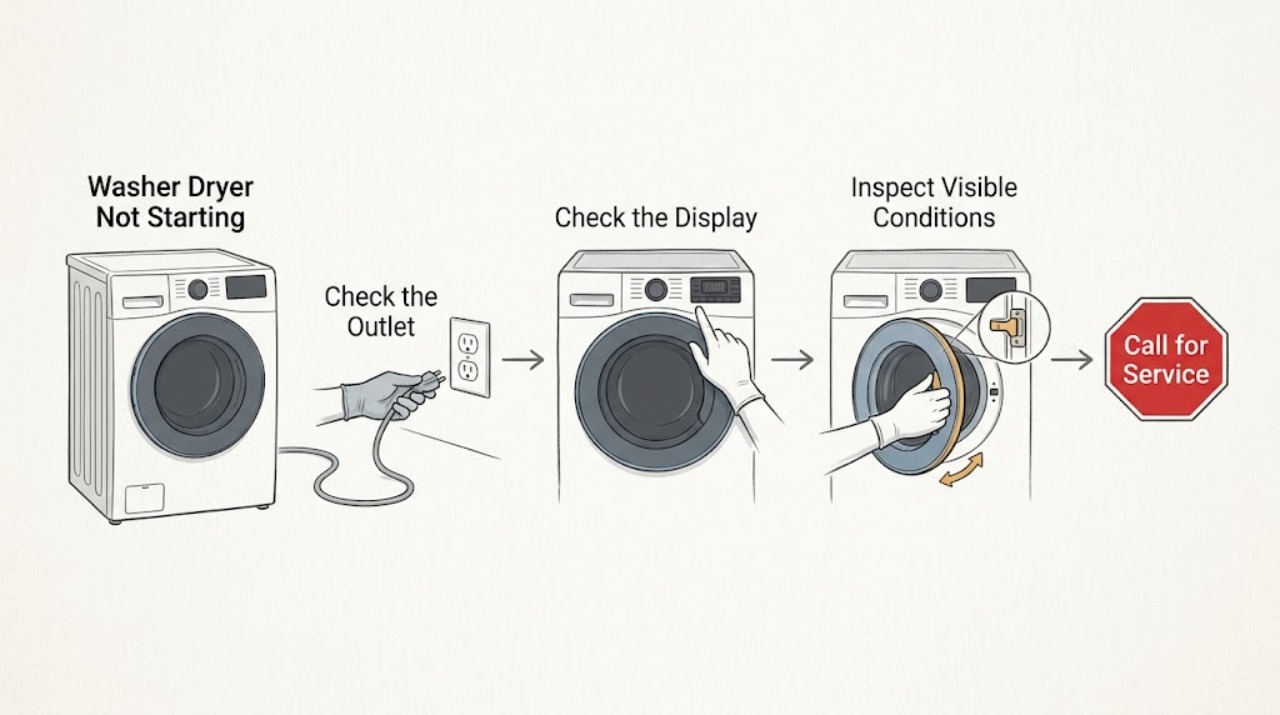
Work through in order
Diagnostic checks
Use only checks that match the exact appliance or system and its official guide.
-
Check 1
Check the washer-dryer display, status lights, sounds, plug, and wall outlet. Confirm the plug is fully seated and check the supplying breaker without opening the appliance. If the outlet is accessible and you can do so safely, verify it with a small appliance rather than probing the receptacle.
Expected result: The display and indicators are dark, or the appliance has control power and responds to buttons.
Next step: If the appliance is dark, restore only a stable supply and continue once. If it has power, proceed to the control and cycle check rather than repeatedly resetting the breaker.
Why this matters
Why: No lights or sounds points to the household supply, plug, outlet, or breaker. A live display moves the diagnosis toward a selected cycle, Control Lock, door or lid interlock, or a control fault.
-
Check 2
If this is a newly installed GE Profile UltraFast Combo, remove any protective film that can cover the display and wait for the first automatic self-check to finish before pressing controls. Allow the initial check to complete without repeatedly unplugging the unit.
Expected result: The display was covered by film or the unit is within its initial self-check period, or neither condition applies.
Next step: After the film is removed or the self-check ends, select a cycle and try Start once. If the controls remain unresponsive, check for Control Lock.
Why this matters
Why: A display film can prevent touch input, and the first self-check temporarily prevents normal use. An established appliance with no installation condition needs the ordinary power and control checks.
-
Check 3
Look for a Control Lock icon or a display that beeps without accepting cycle changes. On the GE Profile UltraFast Combo, use the model's documented Control Lock release; GE describes holding Extra Rinse for 3 seconds on that model family. Do not assume the same button applies to every GE washer-dryer.
Expected result: The controls are locked or only beep, or the display accepts selections normally.
Next step: Release Control Lock using the applicable manual instruction, select the cycle again, and press Start. If the lock will not release or the buttons remain unresponsive, arrange service.
Why this matters
Why: A locked control can make a powered unit appear not to start. If the display accepts selections, the cause is more likely cycle setup, door or lid closure, or a mechanical or control fault.
-
Check 4
Confirm a valid wash or dry cycle is selected, the Start or Start/Pause command is pressed fully, and the appropriate door or lid is closed. On a separate dryer section, check that the door closes tightly; on a top-load laundry center, confirm the washer lid can close and engage its lock.
Expected result: The cycle or Start command was missing, the door or lid is not fully closed, or the controls and interlock appear ready.
Next step: Correct only the accessible setting or closure and try the cycle once. Do not hold or defeat the interlock; if it will not latch or the appliance still does not start, request service.
Why this matters
Why: A missing cycle, incomplete Start command, open dryer door, or lid that cannot lock prevents a normal start. A ready control with no response points beyond a simple setup issue.
-
Check 5
If the appliance has power and the controls are still not running, disconnect it from power for 30 seconds only when the plug is accessible and undamaged, then reconnect, select the cycle, and try Start once. For a model with a different reset instruction, follow its owner's manual instead.
Expected result: The washer-dryer starts after the reset, or it remains powered but will not begin a cycle.
Next step: If it starts, monitor one complete cycle. If it remains stopped, the door or lid cannot lock, or the breaker trips, stop user troubleshooting and arrange qualified appliance service.
Why this matters
Why: A temporary control state can clear after a short power reset. Failure after the reset makes a control, door or lid lock, motor, or other internal fault more likely.
Use your observations
Decision map
Find the observation that best matches what you see, then follow the next safe action.
-
PATH 01Next step
What you see
The washer-dryer has no lights or sounds.
Do this next
Check the plug, working dedicated outlet, and breaker once. If the outlet is dead, the breaker will not hold, or power is present but the display stays dark, stop and request qualified service.
-
PATH 02Next step
What you see
The display is on but buttons beep or do not accept a cycle.
Do this next
Check the Control Lock indicator and use the correct owner's manual release sequence. If the controls stay locked or unresponsive, arrange service.
-
PATH 03Next step
What you see
The cycle is selected but the dryer door or washer lid does not close or lock.
Do this next
Remove only an obvious obstruction and close the door or lid normally. Do not bypass or force the lock; persistent failure needs service.
-
PATH 04Next step
What you see
Power, controls, cycle, and closure are normal but the machine still does not begin after one safe reset.
Do this next
Stop repeated reset attempts and request qualified appliance service with the full model number and the observed display or lock behavior.
Helpful context
Understand the symptom
“Washer-dryer” can describe a one-piece combination unit or a stacked laundry center. The controls and door or lid interlock differ by model, so use the model owner's manual for any model-specific button sequence. The decision path is still the same: confirm power, confirm the control can accept a cycle, then confirm the door or lid can close and lock.
Do not bypass a door or lid lock, remove electrical covers, or work on the power cord while the appliance is energized. If the cord, outlet, or breaker shows heat or damage, stop at the visual check and arrange qualified service.
Only after diagnosis
Potential parts
- door or lid lock assembly
Only consider this part if inspection and service testing confirm that the door or lid cannot signal a closed and locked condition despite correct alignment.
Confirm the complete GE model and the manufacturer's fit information before ordering any component. - control interface or control board
Only consider this part after power is confirmed and testing shows that the controls or main control are not accepting a valid start command.
Use the full model identification and manufacturer fit information; do not infer compatibility from a similar-looking panel.
When checks do not resolve it
Need a professional?
Request service for a GE washer-dryer that has confirmed power but remains unresponsive, will not lock its door or lid, or will not run after the basic setup and reset checks.
Have this ready
- Provide the complete model number, whether the display is dark or lit, any displayed message or lock icon, whether the door or lid latches, and whether the breaker has tripped.
Common questions
FAQ
Why is my GE washer-dryer display on but it will not start?
Check for Control Lock, select a valid cycle, press Start fully, and confirm that the dryer door or washer lid is closed and able to lock. If the controls remain unresponsive or the lock will not engage, service is needed.
What should I check if the GE washer-dryer has no power?
Check the plug, working dedicated wall outlet, and supplying breaker. If the breaker trips again or the appliance stays dark with power present, stop resetting and arrange qualified service.
Can I reset a GE washer-dryer that will not start?
For the GE Profile UltraFast Combo, GE describes disconnecting power for 30 seconds and retrying. Use the owner's manual for other models, and do not keep resetting a unit with a tripping breaker, damaged cord, or persistent no-start condition.
Read the exact guide
Official sources
- Top Load Washer - No FillGE Appliances · GE top-load washers
- GE Profile™ UltraFast Combo Washer/Dryer - Will Not Start or RunGE Appliances · GE Profile UltraFast Combo Washer/Dryer
- Unitized Spacemaker Washer - Washer Will Not Start / Lid Not LockedGE Appliances · GE Unitized Spacemaker Washer/Dryer Laundry Center
- Dryer - Will Not Run or StartGE Appliances · GE gas and electric dryers
Community feedback
Share a repair observation
Share a plain-text repair observation. Accepted observations are published automatically; this page may take a moment to update.