
On this page
Start here
Quick answer
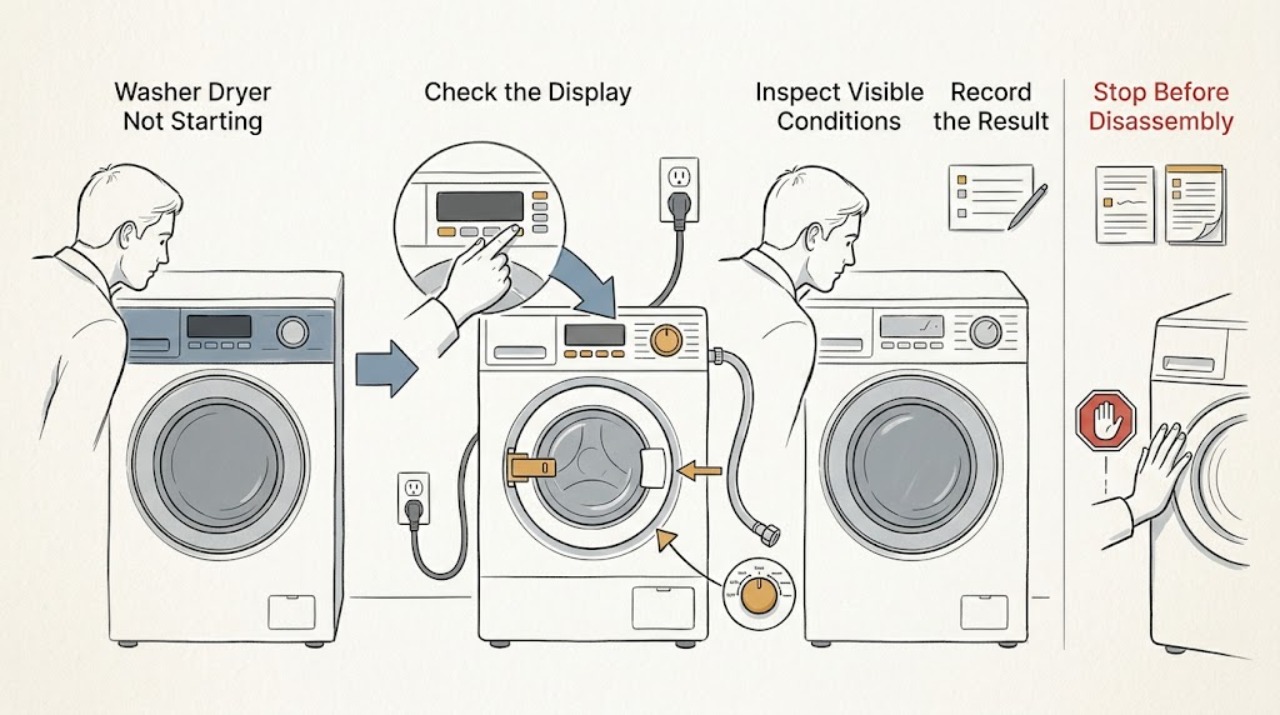
First decide whether the washer-dryer has no power, has power but will not accept a start command, or starts one side of the appliance but not the other. If there is a burning smell, smoke, sparking, melted plastic, water near an electrical connection, repeated breaker tripping, or abnormal heat, stop immediately, keep clear of the hazard, and isolate power only when it is safe to do so; do not keep resetting or testing it. With no hazard present, check the display and breaker, confirm the door is fully closed, release the model-specific control lock, select the intended wash, dry, or combined cycle, and use the Start control exactly as the owner manual describes. A locked door, leftover water, missing water supply, an invalid cycle selection, or a control lock can prevent a cycle from starting. If the safe checks and one model-approved reset do not restore operation, leave the appliance out of service and arrange qualified repair.
Work through in order
Diagnostic checks
Use only checks that match the exact appliance or system and its official guide.
-
Check 1
Stop and assess the appliance before touching controls. If you see sparks, smoke, melted plastic, a burning smell, water at an electrical connection, abnormal heat, or a breaker that trips again, move clear and isolate the appliance only from a safe, dry location; do not keep resetting or attempt another cycle.
Expected result: There is either a clear electrical, water, heat, or fire warning, or the appliance is cool and dry with no visible damage or hazardous odor.
Next step: For smoke, fire, or an escalating electrical event use local emergency procedures. Otherwise keep a hazardous appliance out of service and arrange qualified repair; continue only when no hazard is present.
Why this matters
Why: A safety warning changes the task from troubleshooting to hazard control. A cool, dry, undamaged appliance may proceed to low-risk external checks.
-
Check 2
Without touching a damaged cord, plug, outlet, wet surface, or loose wiring, look for display lights, an interior light if fitted, and the position of the appliance breaker. Confirm that the appliance is connected directly to its intended grounded outlet and is not relying on a visibly damaged power strip or extension lead.
Expected result: The display and lights are completely dark, the breaker is out, the connection is visibly damaged, or the appliance has power but the panel is unresponsive.
Next step: If the outlet, cord, plug, or breaker shows damage or repeatedly trips, stop and use qualified electrical or appliance service. If there is no hazard and the breaker is simply off, follow the model manual's safe power instructions once; do not repeatedly reset it.
Why this matters
Why: A dark unit points toward supply, outlet, breaker, or internal power issues. A lit but unresponsive panel points toward controls, a lock feature, or a control fault rather than a simple power outage.
-
Check 3
If the panel is lit, check the display for a control-lock or child-lock indicator and use only the unlock procedure printed for this model. Then select the intended wash, dry-only, or combined cycle and press or hold Start exactly as the manual specifies.
Expected result: The lock indicator clears and the controls respond, the appliance beeps without changing, or a cycle is selected but Start still produces no response.
Next step: If the model-specific lock and start procedure does not work, record any exact display message and continue to the door and water checks without guessing at a code from another brand.
Why this matters
Why: A control lock can make buttons appear dead, while an invalid or incomplete cycle selection can prevent a start command. A responsive panel that still will not start points to a door, water, stored fault, or control problem.
-
Check 4
For a wash or combined cycle, check that the door is fully closed and the seal or latch area has no trapped garment or debris. Check that the water valves are open and the inlet hoses are connected; do not force a locked door or remove a panel.
Expected result: The door does not latch, the display reports a door or lock condition, water is unavailable, or the door and visible water connections appear normal.
Next step: Remove only plainly visible obstructions with the appliance stopped. If water remains, the lock will not engage, the door is damaged, or a hose leaks, stop and arrange service rather than forcing the door or running a cycle.
Why this matters
Why: The wash side generally will not start until it can secure the door and obtain the required water supply. A locked door with standing water can also indicate that a safe drain or lock condition has not cleared.
-
Check 5
Separate the wash symptom from the dry symptom. With no safety warning, note whether wash, dry-only, or wash-and-dry is selected, whether the drum contains water, and whether the appliance stopped before washing, after washing, or at the drying transition.
Expected result: Only wash will not start, only dry will not start, neither side responds, or a combined cycle stops at the transition between stages.
Next step: Use the model manual for the affected mode and record the exact stage and message for service. Do not substitute a different cycle as a stress test when the appliance has already shown a fault.
Why this matters
Why: A wash-only failure points more strongly to door, water, drain, or wash-control conditions; a dry-only failure may involve the selected dry mode, load or sensor conditions, airflow, or a drying-system fault. A whole-unit failure points back to power or controls.
-
Check 6
If the appliance is cool, dry, free of damage, and the manual permits a reset, perform one model-approved power reset using the specified method. Do not unplug a wet or arcing connection, and do not repeat resets when a breaker trips or the symptom returns.
Expected result: The panel returns normally and accepts a start command, the same symptom remains, or the breaker trips or abnormal signs return.
Next step: If the symptom remains or any hazard returns, keep the appliance isolated and arrange qualified service with the model, mode, display message, and observed behavior.
Why this matters
Why: A single reset can clear a temporary control state, but it cannot repair a failed lock, pump, motor, heater, wiring connection, or unsafe supply. A returning hazard is evidence to stop, not a reason to test again.
-
Check 7
Prepare the service handoff without opening the cabinet: record the model, whether the failure affects wash, dry, or both, the exact display message, door and water state, breaker behavior, and any leak, odor, heat, or noise. Photograph only from a safe, dry, unpowered position.
Expected result: The failure can be described as no power, controls locked or unresponsive, door or water interlock, wash-side fault, dry-side fault, or a recurring safety event.
Next step: Keep the washer-dryer out of service until qualified repair confirms it is safe, especially after smoke, sparks, a burning smell, water near electrics, overheating, or a repeated breaker trip.
Why this matters
Why: “Not starting” is a symptom rather than a confirmed part failure. This distinction helps the technician choose the correct appliance, electrical, or water-service boundary without unsafe user disassembly.
Use your observations
Decision map
Find the observation that best matches what you see, then follow the next safe action.
-
PATH 01Next step
What you see
There is smoke, sparking, melting, a burning smell, water at an electrical connection, abnormal heat, or a breaker trips again.
Do this next
Stop immediately, move clear, and use local emergency procedures for fire or an escalating electrical event. Otherwise keep the appliance isolated and arrange qualified appliance or electrical service.
-
PATH 02Next step
What you see
The display and lights are dark, but there is no visible damage or hazardous condition.
Do this next
Check the appliance's intended outlet and breaker from a safe, dry position, then follow one model-specific power check. If power is present but the unit remains dark, request service.
-
PATH 03Next step
What you see
The display is lit but buttons are locked, beeping, or refusing the Start command.
Do this next
Check the model-specific control-lock indicator and unlock method, then select a valid cycle and use Start as specified. If it remains unresponsive, record the message and request service.
-
PATH 04Next step
What you see
The wash or combined cycle cannot secure the door, has standing water, or lacks the required water supply.
Do this next
Do not force the door or run another cycle. Clear only a plainly visible obstruction, follow the model's safe drain or unlock guidance, and request service for a failed latch, persistent water, leak, or lock condition.
-
PATH 05Next step
What you see
Only dry-only or the drying transition fails while wash operation is normal.
Do this next
Use the exact model manual for the drying mode and record the load stage and message. Do not bypass a sensor, open the cabinet, or repeat a cycle if heat, odor, or a safety warning is present.
-
PATH 06Next step
What you see
A single safe, model-approved reset does not restore operation.
Do this next
Stop troubleshooting, keep the appliance out of service, and arrange qualified repair with the recorded symptom and evidence.
Helpful context
Understand the symptom
Start with the symptom, not the part
A combined washer-dryer can fail to start in more than one way. A dark panel suggests a supply or power path issue; a lit panel with beeps or no response suggests a control lock, door, or selection issue; a wash cycle that will not begin can be waiting for a door lock or water supply; and a dry-only selection can be blocked by a cycle or load condition specific to the model. The controls and names differ between brands, so use the appliance's own manual for button combinations and displayed messages rather than treating a code from another model as universal.
Why a door or leftover water matters
The wash side normally confirms a closed and locked door before adding water or turning the drum. If a cycle was interrupted, water may still be present and the lock may remain engaged to reduce a flooding risk. Do not force the door or reach into a moving, hot, or water-filled machine. Record the displayed message and arrange service when the door, drain, or lock cannot be safely cleared using the model instructions.
When checks do not resolve it
Need a professional?
Use local emergency procedures for fire, smoke, injury, or an escalating electrical event. Keep the appliance isolated and arrange qualified service for any spark, burning smell, melted connection, water near electrical parts, repeated breaker trip, persistent lock or standing-water condition, or failed start after one safe model-approved reset.
Common questions
FAQ
Why does a washer-dryer have power but still not start?
Common decision branches include a control lock, an incomplete cycle selection, a door that has not latched, missing water supply, standing water, or a fault recorded by the appliance. Check the model's display and manual rather than treating another brand's code as universal.
Should I keep resetting a washer-dryer that will not start?
No. If the appliance is cool, dry, undamaged, and the manual permits it, one model-approved reset is reasonable. Stop if the symptom returns, the breaker trips, or there is heat, odor, water, smoke, or sparking.
Can I force open the door when the washer-dryer will not start?
No. A locked door may be protecting against standing water or a moving or hot drum. Use only the model's safe unlock or drain guidance; if water remains or the lock fails, keep the appliance off and request service.
Read the exact guide
Official sources
- GE Profile™ UltraFast Combo Washer/Dryer - Will Not Start or RunGE Appliances · Washer-dryer combos; no-power, outlet, breaker, control-lock, reset, and service branches
- Not Starting or Not Operating - Front Load WasherWhirlpool Product Help · Front-load washer starting; control lock, door, water supply, cycle selection, Start control, reset, and service guidance
- All-in-One Washer & Dryer Quick Start GuideWhirlpool Brand Home Appliances · All-in-one washer-dryer operation; power, door, cycle selection, Start/Pause, wash, dry, and control-lock states
- [LG Front Load Washer] Power issueLG USA Support · Washer-dryer combos and washers; outlet, power strip, breaker, and service boundary
Community feedback
Share a repair observation
Share a plain-text repair observation. Accepted observations are published automatically; this page may take a moment to update.