
On this page
Start here
Quick answer
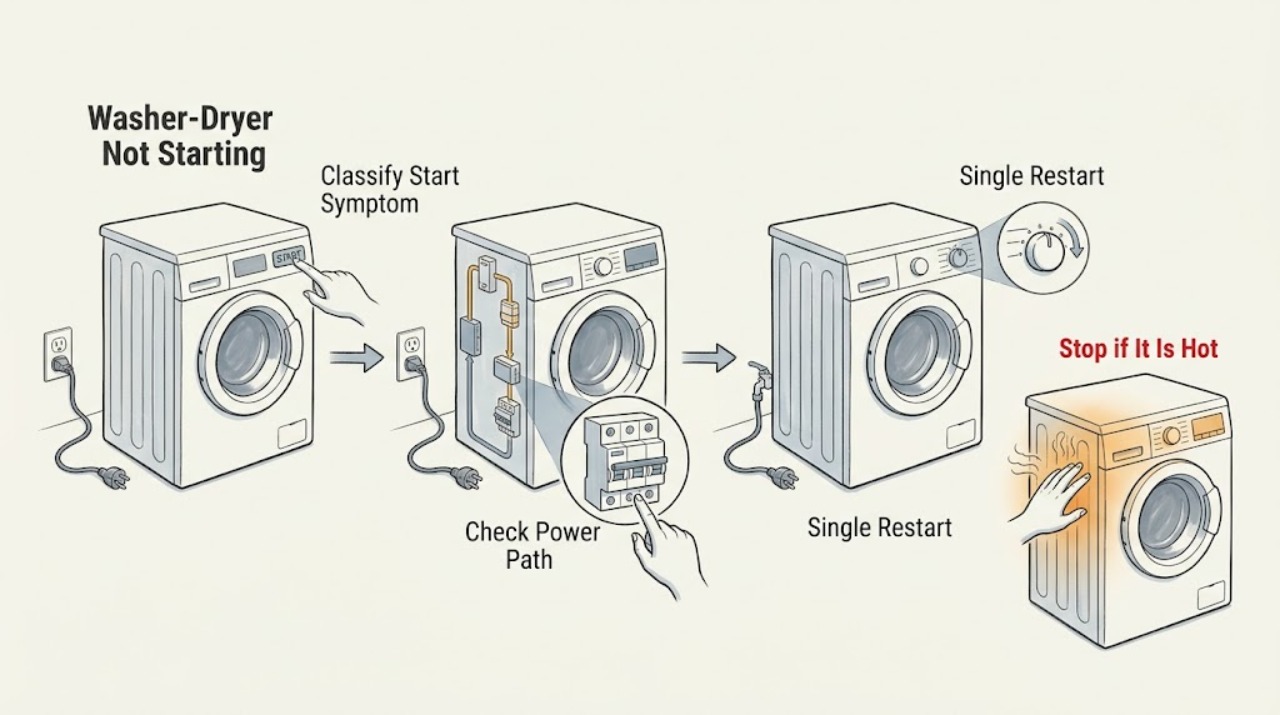
If an Electrolux washer-dryer will not start, first separate a blank display or no power from a powered machine that refuses to begin its programme. Check the plug, socket, breaker or safety switch, and then make one restart according to the model manual. If the display works, close the door fully, remove an overload, check Child Lock or a paused or delayed programme, confirm the water tap and drain path, and read any complete error code. If the machine still will not start, stops after a drying cycle, repeatedly trips power, shows damage, or has a burning smell or water near electrical parts, unplug it and arrange qualified service rather than opening the cabinet.
Work through in order
Diagnostic checks
Use only checks that match the exact appliance or system and its official guide.
-
Check 1
With the drum empty of loose items and the controls off, note whether the display is blank, the display responds but the programme will not begin, or the machine stopped and remained off after a drying cycle. Record any flashing light, padlock, delay symbol, or complete error code.
Expected result: The washer-dryer has no visible power, has power but ignores Start, or has no power after drying.
Next step: Follow the matching branch instead of repeating a generic reset.
Stop if: Stop for smoke, burning odor, a damaged cord, water near electrical parts, or visible cabinet damage.
Why this matters
Why: No display points toward the supply or appliance power path; a responsive display points toward door, control, water, drain, or programme conditions; a post-drying shutdown is an explicit service route in Electrolux guidance.
-
Check 2
From a dry, safe position, check that the plug is fully seated, the socket has power using a small known-good appliance if appropriate, and no breaker or safety switch has operated. Inspect the washer-dryer's cord only for safely visible damage.
Expected result: The socket or protective device is off, the cord is damaged, or another appliance works while the washer-dryer remains blank.
Next step: If the household supply is faulty, use a qualified electrician. If the supply is normal and the washer-dryer remains blank, leave it unplugged and arrange appliance service.
Stop if: Do not use an extension cable, change a protective-device rating, or plug in a machine with a damaged cord or water around the outlet.
Why this matters
Why: A failed socket or supply needs electrical attention; a working socket with a blank washer-dryer points toward the appliance rather than proving a specific failed part.
-
Check 3
If the supply is normal and there is no hazard, switch the washer-dryer off, disconnect it from power for the interval stated in its user manual, reconnect it once, and select a normal programme.
Expected result: The display and Start control return to normal, or the machine remains unresponsive or the same error reappears.
Next step: If it starts, monitor the programme. If it remains dead or the error returns, leave it unplugged and move to service escalation.
Stop if: Do not repeatedly unplug and reconnect a machine that will not start or trips the supply.
Why this matters
Why: A restart may clear a temporary control state, but it does not repair a recurring door, water, drain, power, or internal fault.
-
Check 4
If the display works, close the door firmly and check that no clothing is caught at the seal or latch. Remove enough laundry to avoid an overloaded drum, then select the programme again and press Start once.
Expected result: The door closes and locks and the programme begins, or the door will not latch, the Start light flashes, or the machine still will not begin.
Next step: If the door still will not latch or the no-start condition persists, stop using the machine and request service; do not bypass the door interlock.
Stop if: Do not force the door, defeat the lock, or dismantle the latch or door switch.
Why this matters
Why: A door that is not fully closed prevents a cycle from starting; an overloaded drum can stop the door from closing correctly. A door that looks closed but does not enable the cycle may have a latch or interlock fault.
-
Check 5
Look for a padlock or Child Lock indication, Pause state, Delay Start countdown, or a programme that has not been selected. Use the exact model manual to clear the indicated function, then press only the documented Start or Pause control.
Expected result: A lock, pause, or delayed programme clears and the cycle begins, or no setting is active and the control still does not start the cycle.
Next step: If the control state will not clear or the machine still ignores Start, record the display and arrange service instead of trying undocumented button combinations.
Stop if: Do not reset factory settings, enter service mode, or open the control panel as a user check.
Why this matters
Why: Safety and scheduling functions can make a powered appliance appear not to start. If no setting explains the symptom, a control, door, water, drain, or technical fault remains possible.
-
Check 6
If the washer-dryer powers up but refuses to start or stopped mid-cycle, check that the water tap is open, visible inlet hoses are not kinked, the drain hose is not twisted, and any user-accessible filter is handled only as the manual directs. Read and record the complete error code rather than guessing it.
Expected result: Water supply or drainage is interrupted, an error such as an inlet or drain code is displayed, or those external conditions are normal.
Next step: Correct only a simple external hose or tap condition described by the manual. If the code returns, the filter or pump area is inaccessible, or the machine still will not start, request service.
Stop if: Do not open a filter housing with power connected, reach into a pump, or run repeated cycles with standing water or a leak.
Why this matters
Why: Electrolux links certain washer-dryer error indications to water intake or drainage conditions; a code and normal external paths may indicate an internal or model-specific issue.
-
Check 7
Prepare the model number or PNC, serial number, complete display message, selected programme, whether the door locked, whether water entered or drained, when the failure began, and whether it followed a drying cycle or power event.
Expected result: The machine remains unable to start after the safe external checks, or it has a recurring error, post-drying shutdown, electrical issue, or visible damage.
Next step: Keep the washer-dryer unplugged when unsafe or repeatedly unresponsive and arrange qualified Electrolux appliance service or electrical service as appropriate.
Stop if: Do not remove panels, bypass a door lock, or test internal wiring or components.
Why this matters
Why: The symptom history helps a technician separate supply, door, water, drain, control, and internal faults without asking the user to expose hazardous components.
Use your observations
Decision map
Find the observation that best matches what you see, then follow the next safe action.
-
PATH 01Next step
What you see
The display is blank and the socket or safety switch is also not working normally.
Do this next
Do not use the appliance until a qualified electrician checks the supply; never substitute an extension cable.
Why this path and its safety boundary
Why it matters: The household supply, socket, breaker, or wiring needs electrical attention.
-
PATH 02Next step
What you see
The socket works but the washer-dryer remains blank after one manual-approved restart.
Do this next
Leave it unplugged and arrange qualified appliance service.
Why this path and its safety boundary
Why it matters: The appliance power path or an internal control fault is more likely than a simple socket outage.
-
PATH 03Next step
What you see
The display responds but the door does not latch, a padlock is shown, or the Start control flashes without beginning.
Do this next
Remove trapped laundry, close the door, and clear Child Lock with the model manual. If it still will not latch or start, stop and request service.
Why this path and its safety boundary
Why it matters: A door closure or lock state is blocking the programme, or the latch/interlock may need service.
-
PATH 04Next step
What you see
The machine powers up but a water-inlet or drain indication appears, or it stopped with water in the drum.
Do this next
Check only the external water and drain conditions described in the manual, then request service if the code or no-start condition returns.
Why this path and its safety boundary
Why it matters: A closed tap, kinked hose, blocked drainage path, or model-specific water fault may prevent the programme from starting.
-
PATH 05Next step
What you see
The washer-dryer does not switch on after a drying cycle.
Do this next
Do not keep trying cycles; leave the appliance disconnected and contact an authorized service center.
Why this path and its safety boundary
Why it matters: Electrolux identifies this symptom as a technical problem rather than a normal user setting.
-
PATH 06Next step
What you see
The code or no-start fault returns after external checks, or there is a burning smell, damaged cord, water near electrical parts, or another hazard.
Do this next
If safe, isolate power and keep the machine out of use. Arrange qualified appliance or electrical service; use local emergency procedures for active fire or immediate danger.
Why this path and its safety boundary
Why it matters: A persistent or hazardous fault needs professional isolation and diagnosis.
Helpful context
Understand the symptom
A washer-dryer that is completely dark has a different starting point from one that lights up but will not launch a cycle. If there is no display, check the normal power path. If the display responds, the door interlock, Child Lock, Pause or Delay Start, water supply, drain condition, or a displayed code can prevent the programme from beginning. The selected programme and the exact model manual matter more than a generic reset sequence.
Keep the first checks external. Electrolux recommends confirming the socket and protective device, performing a restart when appropriate, ensuring the door is fully closed, and checking the water and drainage conditions that can stop a cycle. Use only cleaning or maintenance steps described for the model, and do not dismantle the door lock, pump, control panel, or cabinet.
A washer-dryer that fails immediately after a drying cycle is treated by Electrolux as a technical problem requiring an authorized service check. For any persistent no-start condition, record the model or PNC, serial number, complete error text, and what happens when Start is pressed so the technician can distinguish a supply issue from a door, water, drain, control, or internal fault.
Safety boundary
Stop conditions
- Disconnect power before cleaning or carrying out maintenance described in the model manual.
- Do not use an extension cable, bypass the door interlock, or change a fuse or breaker rating.
- Do not repeatedly restart a machine that remains unresponsive, trips power, or displays the same error.
- Do not remove panels or work on internal locks, pumps, valves, heaters, wiring, or control boards.
- Stop immediately for burning odor, smoke, damaged cord, water near electrical parts, or visible appliance damage.
When checks do not resolve it
Need a professional?
Arrange qualified service if the washer-dryer stays blank after one safe restart with a working socket, the door will not latch, Child Lock or a programme state will not clear, a water or drain error returns, the machine will not switch on after drying, or any electrical, heat, water, or internal fault is suspected. Unplug it and stop using it for a damaged cord, burning smell, water near electrical parts, or repeated protective-device operation.
Have this ready
- Electrolux model number or PNC, serial number, complete error message, selected programme, door-lock behavior, water or drain status, timing of the failure, and any recent power or installation event.
Common questions
FAQ
Why is my Electrolux washer-dryer completely blank?
Check the plug, socket, breaker or safety switch from a safe, dry position, then perform one model-approved restart. If the socket works but the appliance remains blank, leave it unplugged and arrange qualified service.
Why does the display work but the washer-dryer will not start?
Check that the door is fully closed, no clothing is trapped, and Child Lock, Pause, or Delay Start is not blocking the programme. If the controls are correct but Start still does nothing, record the display and request service.
Can a water or drain problem stop an Electrolux washer-dryer from starting?
Yes. A closed tap, kinked inlet or drain hose, blocked drainage path, or a related error can prevent a programme from beginning. Check only the external and manual-approved items, then arrange service if the code returns.
What if my Electrolux washer-dryer will not switch on after drying?
Electrolux identifies that symptom as a technical problem and directs the owner to an authorized service center. Do not keep trying cycles or open the cabinet.
When should I stop trying to start the machine?
Stop for a recurring error, repeated power trips, a damaged cord, burning smell, smoke, water near electrical parts, or a door that will not latch. Isolate power if safe and arrange qualified appliance or electrical service.
Read the exact guide
Official sources
- Door not fully closedElectrolux Support · Electrolux laundry appliance door-closure condition that prevents a cycle from starting
- What to check before contacting Electrolux consumer serviceElectrolux Support · Electrolux appliance pre-service checks, model-specific manuals, error codes, and safety boundary
- Washer - dryer does not switch on after a drying cycleElectrolux Support · Electrolux washer-dryers that do not switch on after a drying cycle
- Washer dryer displays error message E10, C1 or emits 1 beep / 1 flashElectrolux Support · Electrolux washer-dryers with the specified water-inlet or drainage error indications
- Problem with power supplyElectrolux Support · Electrolux appliance power-supply checks and safe restart guidance
- Washing Machine Not Working or Not Turning On – Troubleshooting GuideElectrolux Support · Electrolux washing machines and washer dryers with no power or programme-start concerns
Community feedback
Share a repair observation
Share a plain-text repair observation. Accepted observations are published automatically; this page may take a moment to update.