
On this page
Start here
Quick answer
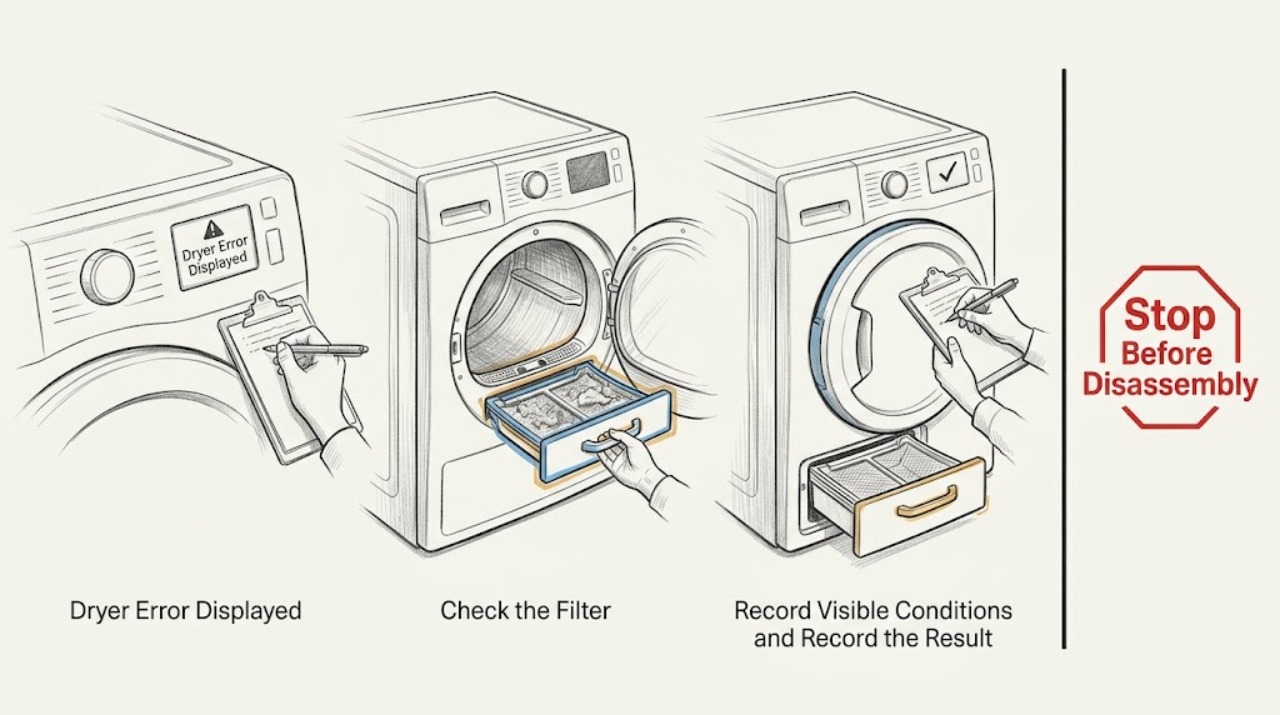
When a Blomberg dryer shows an error or warning, first photograph or write down the exact symbol, text, and whether it is steady or flashing, then identify the model from its rating label and use that model's manual. Many Blomberg dryer displays use maintenance or status warnings for the lint filter, filter drawer, water tank, loading door, child lock, or end of cycle rather than a universal numeric fault code. With the dryer stopped and cool, perform only the manual-directed user checks, such as cleaning the lint filter or emptying the water tank. If the warning returns, the dryer is faulty, or there is smoke, burning smell, damaged wiring, or unusual heat, stop using it and contact authorized service; do not open the cabinet or test live circuits.
Work through in order
Diagnostic checks
Use only checks that match the exact appliance or system and its official guide.
-
Check 1
Stop the cycle and record the exact display symbol or text, whether it is steady or flashing, the selected program, and what the dryer was doing when it appeared. If the display says End or shows an anti-wrinkle hold, note whether the laundry is simply waiting at the end of the cycle.
Expected result: The indication is a cycle-status message, a maintenance warning, a door or child-lock indication, a water-tank warning, or an unfamiliar recurring fault.
Next step: Use the rating label and exact model manual to identify the symbol. If there is smoke, burning smell, damaged wiring, unusual heat, or water near electrical equipment, stop immediately and use the safety-service branch.
Why this matters
Why: Blomberg manuals distinguish normal end-of-program status from warnings that require filter or tank attention; symbols may vary by model. An unfamiliar or recurring message cannot be safely decoded by guessing from its shape.
-
Check 2
Match the symbol to the warning-symbol and troubleshooting sections of the exact Blomberg manual. Check whether it is the lint-filter, filter-drawer, water-tank, loading-door, child-lock, Start/Pause, or end-of-cycle indication described for that model.
Expected result: The symbol has a documented user action, or the symbol/text is absent from the model manual or returns after the documented action.
Next step: Follow only the documented user action for the matching model. Do not substitute a different model's error table or assume all Blomberg displays use the same symbols.
Why this matters
Why: A documented warning can often be cleared by a low-risk maintenance or control step. An absent or persistent warning is evidence that the model-specific manual no longer supports an owner correction.
-
Check 3
If the manual identifies a lint-filter or filter-drawer warning, switch the dryer off, let it cool, and clean the accessible lint filter and filter drawer exactly as the manual directs. Refit every filter, drawer, sponge, and cover before using the dryer.
Expected result: The filter or drawer contains lint, its warning clears after reassembly, or the warning continues flashing despite a clean and correctly seated filter system.
Next step: If the warning clears, use the dryer normally while keeping the filter installed. If it returns immediately, if a filter or cover is damaged, or if access differs from the manual, stop and request service; do not remove internal parts.
Why this matters
Why: Blomberg manuals associate a steady filter indication with a filter needing cleaning and a flashing indication with lint in the housing or filter drawer. A continuing warning may mean a restricted housing, sensor, or technical issue.
-
Check 4
If the display shows a water-tank warning, stop the dryer and empty the accessible tank as described in the manual. For a model connected to a waste drain, inspect the visible drain hose for a bend or loose connection without disconnecting a wet hose or moving the appliance.
Expected result: The tank is full and the warning clears after it is seated empty, or the tank is empty / the drain route looks clear but the warning remains or returns.
Next step: Resume only when the manual says the dryer is ready and the tank or hose is correctly restored. If water leaks, the hose connection is damaged, or the warning persists, stop and use qualified service.
Why this matters
Why: A full tank can place a condenser dryer in standby until the tank is emptied; a bent drain hose can prevent direct drainage. A persistent warning after the documented check may involve the tank sensor or drainage system.
-
Check 5
Check the loading door and the visible control state: close the door until it latches, confirm a program is selected, press Start/Pause once if the manual calls for it, and check that child lock or a delayed end setting is not active. Do not force the door or defeat its switch.
Expected result: The program starts and the indication clears, or the door remains unlatched, the machine stays in standby, or the same display returns.
Next step: Correct only the visible setting or door position described by the exact manual and make one start attempt. If the dryer still will not start or the warning returns, stop using it and arrange service.
Why this matters
Why: The manuals identify an open door, pause state, child lock, or end-time setting as conditions that can make a dryer appear inactive. A latch or control fault cannot be diagnosed by bypassing its safety switch.
-
Check 6
After one manual-directed correction, observe one supervised cycle from a dry position. Note whether the warning clears, the program resumes, the dryer stops again, or an unusual smell, smoke, heat, or electrical interruption appears. Do not repeatedly restart a faulted dryer.
Expected result: The warning clears and the cycle completes, or the warning recurs / the dryer remains stopped after the filters, tank, door, and controls are correct.
Next step: Stop the dryer when the warning recurs or any hazardous symptom appears. Give authorized service the model, serial number, exact indication, and the result of each safe check; do not open the cabinet or perform live testing.
Why this matters
Why: A single recovery supports a status or maintenance condition. Recurrence after the documented checks points to a sensor, control, door circuit, airflow, or other internal fault that an owner cannot safely isolate.
Use your observations
Decision map
Find the observation that best matches what you see, then follow the next safe action.
-
PATH 01Next step
What you see
There is smoke, a burning smell, unusual heat, a damaged cord, water near electrical equipment, or repeated breaker operation.
Do this next
Stop the dryer and move away from the hazard. Isolate power only from a safely reachable dry control if this can be done without contact with water or damage; otherwise leave it alone and contact a qualified appliance or electrical professional.
Why this path and its safety boundary
Why it matters: This is a fire or electrical safety concern, not a routine display reset.
-
PATH 02Next step
What you see
The exact manual identifies the displayed symbol as a lint-filter, filter-drawer, or water-tank warning and the accessible area is cool and safe.
Do this next
Clean the named filter or empty the tank exactly as the manual directs, refit all parts, and observe one cycle. If the warning persists, use the service branch.
Why this path and its safety boundary
Why it matters: The display is asking for a documented owner maintenance step rather than proving a failed component.
-
PATH 03Next step
What you see
The display shows End or an anti-wrinkle hold, Start/Pause, loading-door, child-lock, or delayed-end status and the dryer is otherwise safe.
Do this next
Use the exact manual to end, resume, unlock, close, or select the program once. Do not force the door or bypass its switch; escalate if the status returns unexpectedly.
Why this path and its safety boundary
Why it matters: The dryer may be at a normal cycle state or waiting for a visible control or door correction.
-
PATH 04Next step
What you see
The exact display indication is not documented, returns after the correct user check, or the dryer stops, overheats, or will not operate normally.
Do this next
Stop using the dryer and contact authorized service. Provide the exact model, serial number, indication state, and safe checks already completed; do not remove panels or perform live electrical testing.
Why this path and its safety boundary
Why it matters: A sensor, control, door circuit, heating, airflow, or other internal fault remains possible.
Helpful context
Understand the symptom
An on-screen symbol is not always a component failure
Blomberg dryer manuals use displays and warning symbols for several different states. A steady End or anti-wrinkle-hold indication may simply mean the cycle is over, while a lint-filter or water-tank indication calls for a user maintenance step. A flashing or recurring warning after the manual-directed check is more useful evidence of a remaining restriction or technical fault. Symbols and controls vary by model, so do not give a numeric meaning that is not in the matching manual.
Keep the dryer closed and de-energized for maintenance
Stop the dryer and let hot laundry and surfaces cool before cleaning a filter or tank. Keep the area dry, unplug only by holding the plug when the plug is safely reachable, and never spray water onto the dryer. Do not remove panels, reach behind the drum, bypass a door or safety device, or perform live electrical tests. Smoke, a burning smell, damaged cord, repeated breaker operation, or unusual heat is an immediate stop-and-service condition.
Only after diagnosis
Potential parts
- lint-filter or filter-drawer assembly
Consider this category only if the exact model's filter or drawer is cracked, missing, or cannot seal after a technician confirms it is causing the warning.
Verify the exact model and approved fit before ordering; no universal filter assembly is assumed. - water-level sensor or control assembly
Consider this category only after a qualified technician confirms that a warning returns with the tank, hose, filters, and visible controls correct.
Confirm the exact model and authorized component fit before replacement; do not infer a failed board from the display alone.
When checks do not resolve it
Need a professional?
Contact authorized appliance service when a warning is not documented for the exact model, returns after cleaning or emptying the tank, prevents the dryer from starting, or requires a sensor, control, heater, wiring, or door-switch diagnosis. Stop immediately for smoke, burning smell, unusual heat, damaged cord, water near electricity, or repeated breaker operation.
Common questions
FAQ
Does every Blomberg dryer error display mean a failed part?
No. Blomberg displays can show end-of-cycle, anti-wrinkle hold, lint-filter, filter-drawer, water-tank, loading-door, or child-lock states. Identify the exact model and follow its manual before treating a warning as a component failure.
What should I do when the Blomberg lint-filter warning flashes?
Stop and cool the dryer, then clean the lint filter and filter drawer only as the exact manual directs. Refit the filter system before use. If the warning continues flashing or the housing is damaged, stop and arrange service.
Why is the Blomberg water-tank warning on?
The tank may be full, or a direct-drain hose may be bent or incorrectly routed. Empty the accessible tank or inspect the visible hose according to the manual. Persistent warnings, leaks, or unsafe access require qualified service.
When should I stop troubleshooting a Blomberg dryer display error?
Stop after the exact manual-directed user check fails once, or sooner for smoke, burning smell, unusual heat, damaged wiring, water near electricity, or repeated breaker operation. Do not open the cabinet or perform electrical testing; contact authorized service with the model and exact display indication.
Read the exact guide
Official sources
- Dryer / User ManualBlomberg · Blomberg LTS2832W dryer user manual
- Dryer / User ManualBlomberg · Blomberg TKF7431 dryer user manual
- Dryer / User ManualBlomberg · Blomberg LTH3842 dryer user manual
Community feedback
Share a repair observation
Share a plain-text repair observation. Accepted observations are published automatically; this page may take a moment to update.