
On this page
Start here
Quick answer
When a Candy dryer displays an error, stop the cycle and record the exact characters, symbols, affected programme, and any filter, tank, or door indicator. Do not assume that a code has the same meaning on every Candy model: use the full model or product code to obtain the matching manual, and use hOn or simply-Fi only when that model supports it. With the dryer off and cool, check only the accessible lint filter, water container, door closure, and external airflow described by the manual. If the error returns, the drum will not turn, the dryer overheats, the display is unresponsive, a protective device trips, or there is smoke or a burning smell, stop using it and arrange qualified service. Candy also has a safety notice for specific built-in heat-pump dryers; a suspected affected model should be stopped and unplugged as the notice directs.
Before you begin
Safety first
- This article covers model-approved external observations only. Qualified service determines whether the fault involves filters, water collection, airflow, motor, heater, sensors, door lock, control electronics, or a safety-notice modification and performs any internal work.
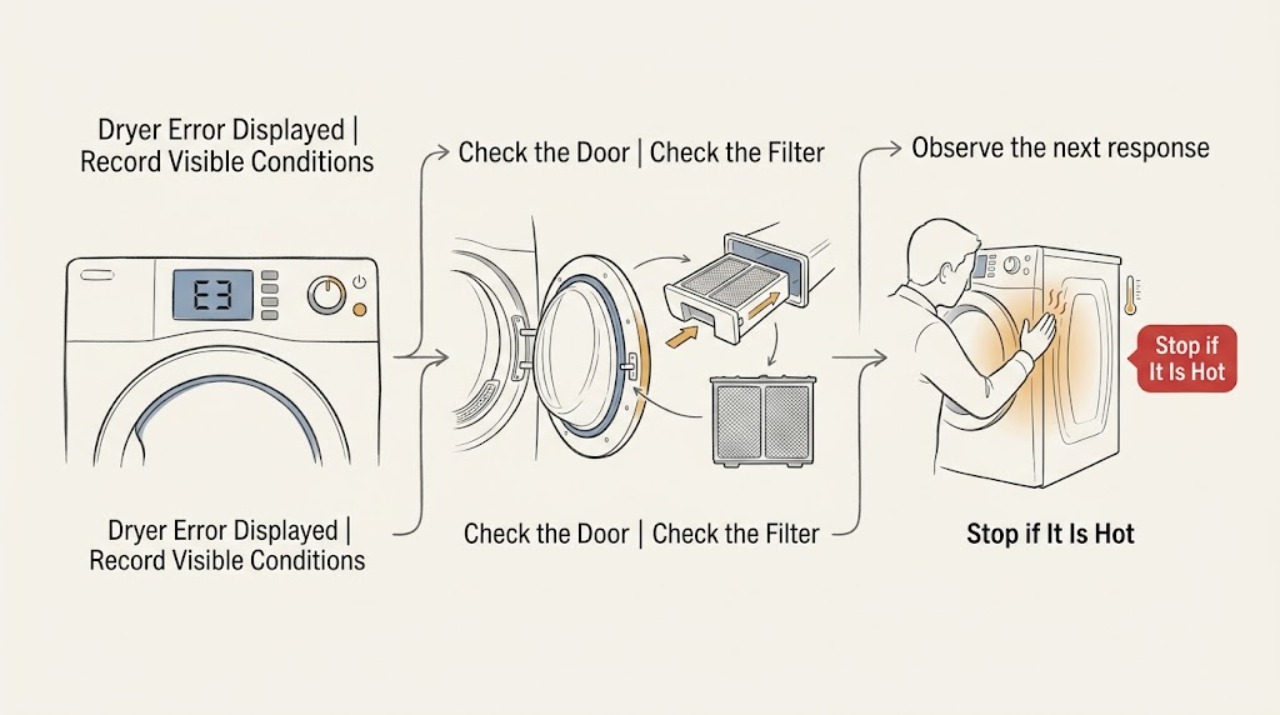
Work through in order
Diagnostic checks
Use only checks that match the exact appliance or system and its official guide.
-
Check 1
Stop the Candy dryer programme and photograph the display from a safe position; record every letter, number, icon, flashing pattern, programme name, and whether the drum was turning, heating, or full of water when the error appeared.
Expected result: The display shows a repeatable code, a filter or tank symbol, a door-lock warning, an app notification, a blank panel, or an unclear intermittent pattern.
Next step: Write down the full model or product code without moving the appliance and use it to retrieve the matching Candy manual. Stop immediately for smoke, burning smell, abnormal heat, scorched material, a damaged cord, or repeated power interruption.
Stop if: Do not keep restarting the dryer to reproduce the error, open the cabinet, or remove covers to find a code label.
Why this matters
Why: A repeatable code or indicator is model-specific evidence. Filter, tank, and door symbols support an external maintenance check, while a blank panel or an unclear pattern can involve power or control electronics. The display alone does not identify a replacement part.
-
Check 2
With the drum stopped and the dryer cool, verify that the door is fully closed, the selected programme is one the load can use, and no clothing is trapped in the door opening; operate only the normal controls shown for the model.
Expected result: The door indicator clears, the programme starts normally, the door will not latch, the same error returns immediately, or the controls do not respond.
Next step: If the door closes and one normal programme starts without a safety warning, monitor the cycle. If the latch, controls, or error remains abnormal, leave the dryer off and arrange qualified Candy appliance service.
Stop if: Do not force the door, bypass the lock, reach into a moving drum, or continue a cycle with smoke, heat, or a damaged seal.
Why this matters
Why: A door-lock or programme-state indication can prevent a cycle from starting without proving a motor or heating failure. A door that will not latch, a returning error, or an unresponsive panel requires the model manual and likely service rather than force.
-
Check 3
After switching the dryer off and allowing it to cool, inspect and clean only the accessible lint filter and empty the water container only as the exact Candy manual permits; keep hands away from internal air paths and moving parts.
Expected result: The filter is blocked, the tank is full, lint or moisture is excessive, the accessible items are clear, or the error remains after they are correctly refitted.
Next step: Refit the filter and container exactly as shown, then make one ordinary start attempt only if the manual allows it. If the warning returns, water is not collected, the filter cannot be fitted, or access is not safe, stop and arrange service.
Stop if: Do not dismantle the filter housing, spill water onto controls, reach under the machine, or open a hot container or service area.
Why this matters
Why: Candy identifies filters and the water collection system as model-dependent check-up items; a blockage or full tank can inhibit drying or trigger a warning. Clear external items with a continuing code point toward airflow, pump, sensor, or electronic diagnosis rather than repeated cleaning.
-
Check 4
From outside the appliance, check that the surrounding ventilation openings and visible air path are not covered by lint, laundry, furniture, or a crushed external duct; use the model guidance for load size and do not remove panels.
Expected result: Airflow appears unobstructed, the dryer is overloaded, the room or external path is unusually hot, lint accumulates quickly, or the error appears during heating and drying.
Next step: Correct only an obvious external obstruction and use a manual-approved load. If the error or overheating returns, leave the dryer off and provide the airflow and load observations to qualified service.
Stop if: Do not remove the rear panel, enter the duct, use a tool to clear an internal path, or continue operation when heat, smoke, or a burning smell appears.
Why this matters
Why: A restricted airflow path or unsuitable load can change drying performance and heat behavior, but a clear exterior does not rule out an internal fan, condenser, sensor, or heating fault. Heat, repeated shutdown, or an error during drying needs a professional boundary.
-
Check 5
Use the full Candy model or product code to open its official manual; if the dryer is a supported connected model, compare the displayed error with the hOn or simply-Fi check-up information without starting a remote cycle.
Expected result: The manual identifies the displayed indication, the connected check-up identifies a filter, door, drying, motor, cooling, or water-collection item, the code is not listed, or the app and appliance disagree.
Next step: Follow only the listed ordinary user step for that exact model. If the code is unlisted, returns, or points to motor, heater, cooling, sensor, or control electronics, leave the appliance unused and arrange qualified service.
Stop if: Do not apply another model's code table, run a remote cycle to test a fault, or bypass an app warning or door lock.
Why this matters
Why: A model-specific manual or supported check-up can narrow the external branch, but an unlisted code or disagreement is unresolved evidence. It is not safe to substitute a code from another Candy dryer family.
-
Check 6
Compare the appliance type and product identification with Candy's current safety notice, then decide whether the error has cleared once with normal operation or has returned or accompanied a safety warning; do not move a built-in dryer to read hidden labels.
Expected result: The dryer is not a listed affected built-in model and operates normally, the displayed error returns, the appliance is a potentially affected built-in heat-pump model, or smoke, burning smell, abnormal heat, or electrical damage is present.
Next step: For a returning error or any safety sign, stop using the dryer and arrange qualified service. For a potentially affected built-in heat-pump model, follow the Candy safety notice's stop-and-unplug direction only when the plug is safely reachable without touching a hazard.
Stop if: Do not continue drying, reset repeatedly, open the cabinet, or attempt an in-home modification or internal repair.
Why this matters
Why: A one-time clear without abnormal heat can be monitored only under the model manual. A returning error or any safety-notice match changes the decision to service; Candy's safety notice says an affected appliance should be stopped and unplugged.
Use your observations
Decision map
Find the observation that best matches what you see, then follow the next safe action.
-
PATH 01Safety boundary
What you see
Smoke, burning smell, abnormal heat, scorching, damaged cord, repeated protective-device operation, or a suspected match to Candy's affected built-in heat-pump dryer safety notice is present.
Do this next
Stop using the dryer and keep people away. If the plug or isolator is safely reachable without touching a hazard, switch off or unplug as the applicable safety notice directs; otherwise leave the area and arrange qualified service.
Why this path and its safety boundary
Safety stop: Do not run another cycle, repeatedly reset power, move a built-in unit, or open the cabinet.
-
PATH 02Safety boundary
What you see
The display identifies a blocked filter, full water container, or door state, and the dryer has no smoke, abnormal heat, or electrical warning.
Do this next
With the dryer off and cool, perform only the exact model's accessible filter, tank, or door check, then make one ordinary start attempt if the manual permits it.
Why this path and its safety boundary
Safety stop: Stop and request service if the indicator returns, the door will not latch, water is not collected, or access requires dismantling.
-
PATH 03Safety boundary
What you see
The error appears during heating or drying, airflow is restricted externally, lint accumulates rapidly, or the connected check-up points to drying or cooling.
Do this next
Correct only an obvious external obstruction and use the manual-approved load; leave the appliance off and arrange service if the error or heat condition returns.
Why this path and its safety boundary
Safety stop: Do not remove panels, clear internal ducts with tools, or continue a cycle with overheating or smoke.
-
PATH 04Safety boundary
What you see
The code is not listed for the exact model, the app and display disagree, the error returns after the documented ordinary check, or the panel remains blank or unresponsive.
Do this next
Leave the dryer unused and arrange qualified Candy appliance service with the exact code, model, programme, and external-check results.
Why this path and its safety boundary
Safety stop: Do not use another model's code table, bypass the door lock, or replace a board, sensor, heater, or motor based on the display alone.
-
PATH 05Safety boundary
What you see
The indication clears once after the exact manual's ordinary user step and the dryer completes a normal cycle without heat, smoke, noise, or control problems.
Do this next
Monitor the next ordinary use and retain the code record. Request service if the indication returns or drying performance changes.
Why this path and its safety boundary
Safety stop: Do not treat a single clear as proof that a recurring or heat-related fault is repaired.
Helpful context
Understand the symptom
A Candy error display is model-specific evidence
Candy dryers use different programmes, displays, filters, water containers, and connected features. The same-looking symbol can therefore have different meaning across product families. Record the exact display rather than translating it from a generic code list, then use the product code to find the correct Candy manual. For supported connected models, the hOn or simply-Fi app may identify an error, but the appliance manual remains the authority for the installed model.
Start with the external items Candy exposes to the user
Candy product information describes check-up functions that can monitor filters, the door lock, drying system, motor, cooling ventilation, and water collection. That makes the lint filter, door, tank, and visible airflow path useful first observations when the dryer is cool and switched off. Do not open the cabinet, reach into moving parts, bypass the door lock, or infer a failed board from an indicator alone.
Safety notices override ordinary code checking
Smoke, a burning smell, abnormal heat, scorched material, a damaged cord, repeated protective-device operation, or an appliance that may match Candy's built-in heat-pump safety notice is a stop condition. Keep the dryer unused and follow the applicable safety notice or qualified service route. A code that clears once is not proof that an overheating or electrical fault is resolved.
Only after diagnosis
Potential parts
- lint filter or filter housing
Consider this part class only if the exact model's filter is damaged, will not seat, or a qualified diagnosis links it to an airflow warning after ordinary cleaning.
Confirm the full Candy model and approved fit information; a filter indicator does not establish the correct assembly. - water-level sensor or condensate pump
Consider this part class only if a qualified diagnosis finds that the water container or collection system is not sensed or drained correctly after safe external checks.
Verify the complete model and the diagnosed component before ordering; water or error symptoms alone do not prove fit. - display and control assembly
Consider this part class only when qualified diagnosis links a recurring unlisted code, blank display, or unresponsive controls to the user-interface or control assembly.
Confirm model-specific fit and diagnosis; do not replace electronics from a generic error message.
When checks do not resolve it
Need a professional?
Arrange qualified Candy appliance service when the exact error returns, the code is not listed for the model, the display is blank or unresponsive, the door will not latch, the dryer will not turn or collect water, or a filter, cooling, drying, motor, or control fault remains after the manual-approved external checks. Treat smoke, burning smell, abnormal heat, scorching, damaged cord, repeated protective-device operation, and a suspected affected built-in heat-pump model as urgent safety stops.
Safety scope: This article covers model-approved external observations only. Qualified service determines whether the fault involves filters, water collection, airflow, motor, heater, sensors, door lock, control electronics, or a safety-notice modification and performs any internal work.
Have this ready
- Full Candy model or product code and whether the unit is built-in, condenser, heat-pump, or vented
- Exact displayed characters, symbols, flashing pattern, programme, and time in the cycle
- Filter, water-container, door-lock, airflow, and load observations
- Whether the drum turned, heat appeared, water collected, and the display remained responsive
- Any smoke, burning smell, abnormal heat, scorching, noise, damaged cord, or protective-device trip
Common questions
FAQ
What should I do first when my Candy dryer displays an error?
Stop the cycle, photograph the exact display, and record the programme and indicators. Find the correct Candy manual using the full model or product code. Do not apply a code meaning from another dryer family.
Can a full tank or blocked filter cause a Candy dryer warning?
It can. Candy describes model-dependent checks for filters and the water-collection system. With the dryer off and cool, inspect only the accessible filter and container by the exact manual procedure. If the warning returns or water is not collected, request service.
Can the Candy app explain a dryer error code?
On supported connected models, Candy says the app can identify an error and help find a solution. Use it only with the correct registered model and compare it with the appliance manual; an unlisted code or app disagreement needs qualified service.
When should I stop using a Candy dryer with an error displayed?
Stop when the code returns, the display is unresponsive, the drum or water system does not operate normally, or the dryer overheats. Treat smoke, burning smell, scorching, a damaged cord, repeated protective-device operation, or a potentially affected built-in heat-pump model as an urgent safety stop.
Read the exact guide
Official sources
- Product Safety IssueCandy · Supports the safety branch for a potentially affected built-in heat-pump dryer and does not establish that an unspecified model is affected.
- Product user manualsCandy · Supports using the exact Candy dryer model or product code to obtain the applicable manual and avoiding generic code assumptions.
- BCTD H7A1TE-80 Dryer Built in DryerCandy · Supports the dryer identity, model-dependent filter, door lock, drying system, motor, cooling ventilation, and water-collection checks, and connected error assistance without generalizing its exact model to every Candy dryer.
- Technical assistance for our appliancesCandy · Supports using official manuals and qualified Candy technical service for malfunctions, maintenance, and model-specific compatible parts.
Community feedback
Share a repair observation
Share a plain-text repair observation. Accepted observations are published automatically; this page may take a moment to update.