
On this page
Start here
Quick answer
Write down the exact code, symbols, beeps, and what the dryer was doing before the message appeared. With the dryer inactive and no burning smell, damage, or wet electrical area, check the door, load, filter, and accessible water container or drain, then use the model's instructions for one reset. A code that returns, an electronics or internal-fault code, an unstable-power code, or any sign of heat or electrical damage is a stop condition: unplug the dryer when safe and arrange qualified service. Do not open the cabinet or test wiring, motors, heaters, or control boards.
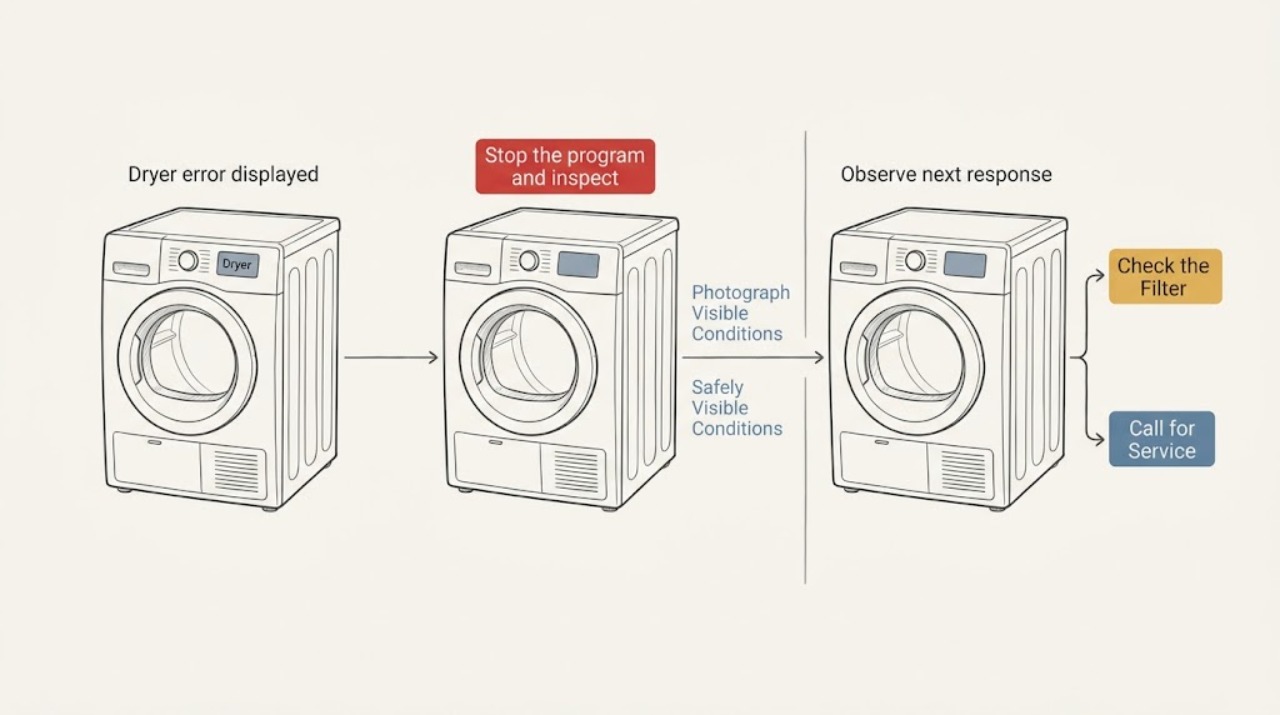
Work through in order
Diagnostic checks
Use only checks that match the exact appliance or system and its official guide.
-
Check 1
Before touching the controls, photograph or transcribe the full display and note any beeps or flashing Start/Pause light, the selected program, whether the drum was moving, and whether the message appeared at start or during a cycle.
Expected result: The display is a clearly identifiable code such as E50, E90/E91, EH0/EH1/EH2, or CE/CF; it is a non-code symbol or Err; or the characters are unclear.
Next step: Keep the exact record and locate the manual for this dryer using its model information. If the message cannot be identified, do not guess a part or cause; use the general safe checks below and arrange service if it persists.
Why this matters
Why: The code family changes the safe next step. A misread character can send the diagnosis to the wrong manual, while an unclear or model-specific message cannot be safely decoded from a generic list.
-
Check 2
Stop the program and inspect only from the outside for a burning smell, smoke, melted plastic, damaged power cord or plug, water near electrical parts, unusual heat, or visible cabinet damage.
Expected result: Any burning smell, smoke, melted or damaged electrical material, water at an electrical area, or major physical damage is present; or the dryer is cool, dry, and visibly intact.
Next step: If a hazard is present, stop using the dryer, disconnect it only if this can be done without contact with damage or water, and obtain qualified service or electrical help. Otherwise continue with the door, load, filter, and water checks with the appliance inactive.
Why this matters
Why: These symptoms raise an electrical, fire, or water hazard that a display reset cannot make safe. No visible damage does not rule out an internal fault, but it permits only the limited checks that follow.
-
Check 3
With the dryer off, check that the door closes fully, no clothing is trapped in the seal, the filter is fitted and not packed with lint, the drum is not overloaded or jammed by an item, and the water container is emptied when the model uses one.
Expected result: The door was not latched, clothing was trapped, the filter was blocked or missing, the drum was overloaded or obstructed, or the water container was full; alternatively these accessible conditions are normal.
Next step: Correct only the visible condition using the model instructions, then make one brief test with a suitable program. If the code returns or the dryer will not start, stop and retain the code for service; never run without the filter.
Why this matters
Why: A door, load, filter, or full-container condition can prevent a program from starting or can interrupt it. A normal exterior check makes those simple causes less likely but does not identify an electronic or motor fault.
-
Check 4
If the displayed code is E50, remove only an obviously excessive load or an item visibly caught in the drum, then make the single reset described in the AEG support guidance: unplug, wait 30 seconds, reconnect, switch on, and select a program.
Expected result: E50 clears after the load correction and one reset, or E50 returns, the drum cannot turn freely, or the dryer still stops.
Next step: If E50 returns or the drum remains obstructed, leave the dryer off and contact an authorized or qualified appliance service provider. Do not remove panels, test the motor, or replace a control component based on the code alone.
Why this matters
Why: AEG identifies E50 as a motor or software problem; an overloaded or obstructed drum may be a recoverable condition, but a recurring code is evidence of an unresolved fault.
-
Check 5
If the display is EH0, EH1, or EH2, test the same wall socket with another suitable product only from a dry, safe position; do not use an extension cable, open the plug, or alter household wiring.
Expected result: The other product also has no power, the dryer reports the EH code again, or the socket works and the dryer operates normally after one reset.
Next step: If the socket or wiring appears faulty, stop and contact a qualified electrician. If the socket works but the dryer code returns, leave the dryer off and arrange appliance service; do not keep resetting it.
Why this matters
Why: AEG associates EH-series messages with possible low, high, or unstable supply. Failure of the other product points toward the socket or wiring; a working socket with a recurring dryer code points toward the appliance or its supply connection.
-
Check 6
If the display is CE or CF, or if it shows E90/E91, switch the dryer off and perform no cabinet-level checks; preserve the code, cycle, and timing for the service request.
Expected result: CE/CF remains displayed, E90/E91 returns after the documented restart, or a different code appears and is explained by the exact model manual.
Next step: Unplug the dryer when safe and do not use it until an authorized or qualified technician has assessed the fault. For a different code, follow only the exact model manual; if it is not covered, arrange service instead of guessing.
Why this matters
Why: AEG describes CE/CF as an electronics problem and E90/E91 as an internal communication failure. A repeated internal or electronics code is not a filter or load adjustment and needs diagnosis.
-
Check 7
After one safe correction or reset, run one short observation with no laundry or only the model-appropriate test load, and watch whether the code, beeps, drum motion, and heating behavior remain normal; stop immediately if a hazard symptom appears.
Expected result: The dryer completes the test without the message, the same message returns, a new message appears, or the dryer starts and stops abnormally.
Next step: Use the dryer only when the test is stable and the manual permits it. For recurrence, abnormal stopping, overheating, electrical symptoms, or any internal repair need, leave it disconnected when safe and request professional diagnosis with the recorded code.
Why this matters
Why: A clear single test after an obvious condition supports a transient interruption or user-setting issue, but recurrence or a new abnormal cycle shows that the underlying cause remains unresolved.
Use your observations
Decision map
Find the observation that best matches what you see, then follow the next safe action.
-
PATH 01Next step
What you see
The display is unclear, is a symbol rather than a code, or is not listed in the exact model manual.
Do this next
Do not infer a component from the characters; record a photo and arrange service if the message persists after the limited exterior checks.
-
PATH 02Next step
What you see
The dryer has smoke, burning smell, damaged electrical material, water at an electrical area, or major physical damage.
Do this next
Stop using it and disconnect only when safe; obtain qualified appliance or electrical service.
-
PATH 03Next step
What you see
The door, lint filter, load, obstruction, or water container condition is visibly wrong.
Do this next
Correct that condition with the model instructions, then make one brief test; escalate if the code returns or the dryer stops again.
-
PATH 04Next step
What you see
The display is E50 and the code returns after removing an obvious overload or obstruction and one 30-second reset.
Do this next
Leave the dryer off and request appliance service for the motor or software fault; do not open the cabinet.
-
PATH 05Next step
What you see
The display is EH0/EH1/EH2 and the socket or supply is unstable, or the code returns with a working socket.
Do this next
Use a qualified electrician for a socket or wiring problem, or qualified appliance service for a recurring dryer code; do not use an extension cable.
-
PATH 06Next step
What you see
The display is CE/CF or recurring E90/E91, or any code remains after its exact manual procedure.
Do this next
Stop use, unplug when safe, and obtain authorized or qualified professional diagnosis; do not test boards, wiring, heaters, motors, or capacitors.
-
PATH 07Next step
What you see
The dryer completes one safe test with no recurring code or abnormal behavior.
Do this next
Resume only within the manual's operating limits and keep the code record; arrange service if the message returns.
Helpful context
Understand the symptom
Treat the displayed code as evidence, not a diagnosis
Aeg dryers use different messages for different faults, and the same-looking characters can be easy to misread. Record the display exactly, including a leading E, C, H, zero, dash, padlock, or a flashing indicator, and note whether the drum was turning, the door was closed, and the cycle had just started or stopped. Do not substitute a code from a similar model's manual.
One reset can separate a transient interruption from a recurring fault
A reset may clear a temporary program or supply interruption, but it does not prove that an underlying fault is repaired. After one safe reset, record whether the same code returns and stop repeated attempts. A technician can use the exact code and sequence to choose the correct diagnostic path.
When checks do not resolve it
Need a professional?
Use professional service for recurring or unidentified codes, electronics or internal-fault codes, unstable-power warnings that persist with a working socket, and every cabinet-level or electrical repair.
Common questions
FAQ
What should I do first when my Aeg dryer displays an error?
Record the exact characters and any beeps, then check the door, filter, load, and water container from the outside with the dryer off. Use only the exact model manual for the code and make at most one safe reset; stop if the code returns or a hazard symptom appears.
Can I reset an Aeg dryer error code?
Some AEG support instructions allow one reset, including unplugging for 30 seconds for certain E50 or EH0 messages. A reset is only a test: if the code returns, do not keep cycling power; record it and arrange service.
What does E50 mean on an Aeg tumble dryer?
AEG identifies E50 as a motor or software problem. Remove only an obvious overload or trapped item, perform the documented single reset, and contact service if the message remains or returns. Do not open the cabinet to test the motor.
What do CE or CF mean on an Aeg dryer?
AEG describes CE/CF as an electronics problem and advises contacting an Authorized Service Center. Do not continue using the dryer or attempt board or wiring work; disconnect it when safe until it is assessed.
What does EH0 mean on an Aeg dryer?
AEG associates EH0, EH1, and EH2 with a possible power-supply problem. Test the socket safely with another product, never use an extension cable, and use an electrician for a socket or wiring fault; recurring dryer warnings need appliance service.
Read the exact guide
Official sources
- Tumble dryer displays error message CE / CFAEG · AEG tumble dryers displaying CE or CF
- User ManualAEG · The linked AEG dryer manual only; use the manual matching the appliance model for exact code meanings
- Tumble dryer displays error message EHO, EH0AEG · AEG condenser and heat-pump dryers displaying EH0, EH1, or EH2
- Tumble dryer displays error message E50AEG · AEG vented, condenser, and heat-pump dryers displaying E50
- DryersAEG · AEG vented, condenser, and heat-pump dryers; exact article applicability varies by model
Community feedback
Share a repair observation
Share a plain-text repair observation. Accepted observations are published automatically; this page may take a moment to update.