
On this page
Start here
Quick answer
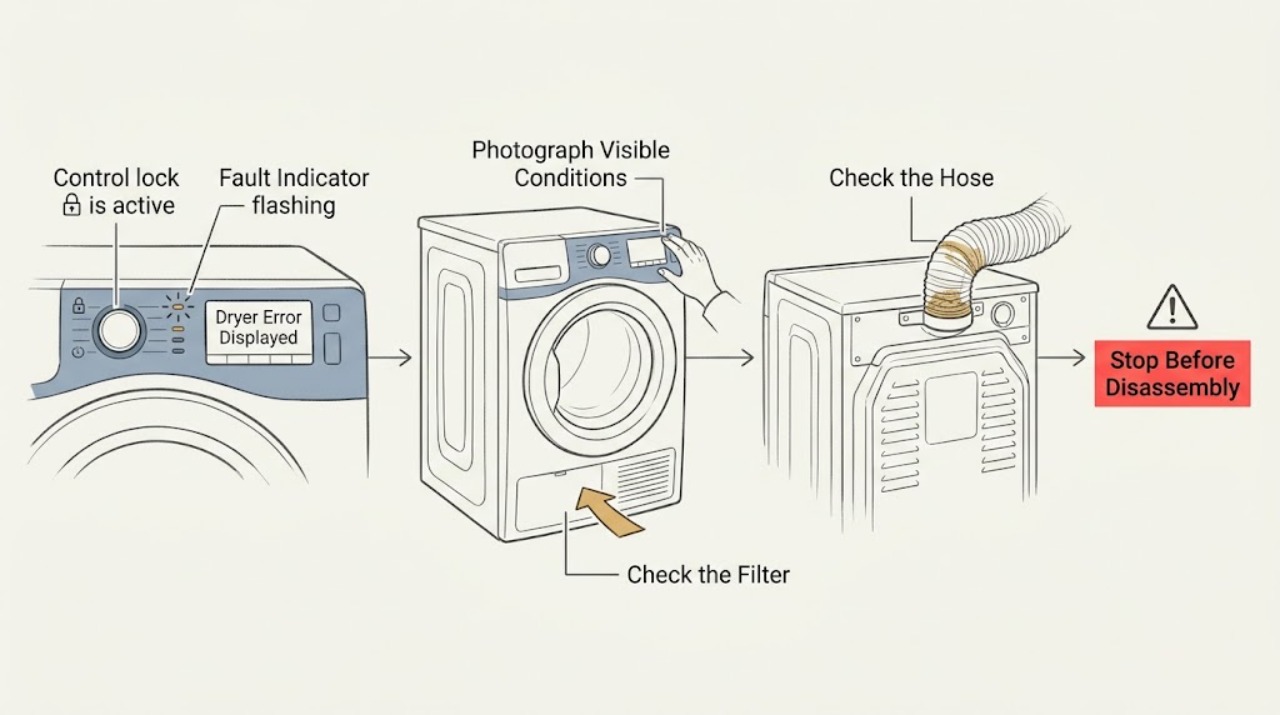
When a Beko dryer displays an error or warning, photograph or write down the exact code, symbol, and when it appeared before clearing anything; Beko error meanings and controls vary by model. With the dryer cool, use only the model manual's user checks: clean and correctly refit the lint filter, clean the condenser or evaporator only if your model specifies it, empty a full water tank, check an accessible drain hose for a kink, and make sure the door is fully closed. A filter, tank, door, child-lock, delay, or interrupted-cycle indication may have a user action, but a recurring or unlisted fault is not safely decoded by guessing from another model. Do not open the cabinet, bypass a lock, probe wiring, or keep restarting the machine. Stop for smoke, burning smell, sparks, melted material, a hot or damaged cord, water near electrical parts, or repeated breaker trips; arrange qualified appliance service for a persistent error and qualified electrical service for a household supply concern.
Work through in order
Diagnostic checks
Use only checks that match the exact appliance or system and its official guide.
-
Check 1
Before pressing reset, photograph or write down the exact display text, code, icon, flashing light, and the point in the cycle when it appeared. Record whether the drum was turning, whether the load was hot or damp, and the model number from the rating label inside the door rim.
Expected result: The message is a named maintenance indicator, a tank or door warning, a child-lock or delay symbol, a power-interruption notice, or an alphanumeric fault that is not explained on the visible panel.
Next step: Open the exact model manual and follow only its matching entry. If the message is unlisted or the model cannot be identified, keep the dryer off and arrange qualified appliance support rather than guessing a code meaning.
Why this matters
Why: A displayed symbol cannot be assigned a reliable meaning across all Beko dryers. The model and exact message determine whether a normal user action exists or whether service is required.
-
Check 2
After the dryer is cool, check the door lint filter and any filter drawer or lower filter that the model manual identifies. Remove visible lint using the manual's method, inspect for damage, and refit every filter fully; do not run the dryer with a missing or damaged filter.
Expected result: A filter-cleaning light is on or flashing, lint is packed into the filter or its holder, the filter is damaged or absent, or the filters are clean and seated correctly.
Next step: Replace a damaged filter through model-specific support. If it was only a maintenance warning, clear it using the model manual and continue to the tank and airflow checks; if the warning returns immediately or another fault remains, stop and call service.
Why this matters
Why: Beko manuals associate long drying and filter warnings with clogged filter pores, filter bearings, or a clogged condenser. A damaged or missing filter is a safety stop, not an invitation to run a test cycle.
-
Check 3
For a condenser or heat-pump model, check the water-tank indicator and empty the tank using the manual's external procedure. If the dryer is connected to a drain, inspect only the accessible hose for a twist or kink; do not pull internal hoses or remove covers.
Expected result: The tank indicator is on or flashing, the tank is full, the drain hose is visibly kinked, or the tank and accessible hose are clear.
Next step: Empty and refit the tank, or correct an obvious external hose kink, then follow the manual's resume instruction once. If the warning persists while the tank is empty, stop and arrange qualified appliance service.
Why this matters
Why: Beko troubleshooting lists a full water tank or a folded direct-drain hose as reasons a program can pause or be interrupted. A clear tank does not explain an unrelated fault code.
-
Check 4
Check the simple cycle-state conditions shown on the display: close the door until it latches, verify a program has been selected and Start/Pause has been pressed, and look for child lock or delay symbols. Use the model manual's documented control sequence only; do not force the door or bypass a lock.
Expected result: The door was ajar, the machine was paused or waiting for Start, child lock or delay was active, or the cycle-state controls were already correct.
Next step: Correct the matching setting and resume only if there are no hazard signs and the manual permits it. If a real fault message returns after the documented control action, treat it as persistent and move to service instead of repeating the sequence.
Why this matters
Why: Beko states that an open door, an unstarted program, child lock, or delay can prevent normal operation without proving that an internal component has failed.
-
Check 5
If the display appeared during a long or incomplete cycle, inspect visible front ventilation grilles and the external vent hose where fitted, then review the load size and whether the clothes were adequately spun. Keep cabinet panels closed and do not reach into the heater, fan, or sensor area.
Expected result: The grille or vent is blocked, the load was oversized or very wet, the cycle was unusually long, or visible airflow and load conditions are normal.
Next step: Clear only an obvious external obstruction, use a suitable smaller load, and clean the model-approved condenser or evaporator as directed. If the same error appears with clear airflow and a suitable load, stop further tests and call service.
Why this matters
Why: Beko links restricted airflow, a blocked condenser or filter, inadequate room ventilation, an overloaded load, and insufficient spinning with long or poor drying; these conditions can accompany protective or maintenance warnings.
-
Check 6
After the matching user check is complete, use at most one model-approved reset or resume action and stay nearby. Observe whether the display clears, the program resumes and completes its cool-down, the same message returns, or a new fault or hazard appears.
Expected result: The warning clears and the cycle completes, the warning returns immediately, the dryer stops again, or there is smoke, burning smell, sparking, melted material, water near electrical parts, or a hot or damaged cord.
Next step: For any hazard, leave the dryer off and contact appropriate emergency or qualified electrical/appliance help. For a recurring or unlisted error without a hazard, arrange qualified appliance service and provide the saved display photo and model details.
Why this matters
Why: A cleared maintenance reminder supports the corresponding user check, but it does not prove that internal safety controls are healthy. A returning or changing fault, abnormal stop, or hazard needs diagnosis rather than more resets.
Use your observations
Decision map
Find the observation that best matches what you see, then follow the next safe action.
-
PATH 01Next step
What you see
Smoke, burning smell, sparks, melted material, water near electrical parts, a hot or damaged cord or outlet, or repeated breaker operation is present.
Do this next
Stop immediately, keep the dryer off, and arrange qualified appliance or electrical service as appropriate. Do not restart, open panels, bypass a safety device, or work on wiring.
-
PATH 02Next step
What you see
The display identifies a filter, condenser, evaporator, or tank maintenance warning and there are no hazard signs.
Do this next
Let the appliance cool, perform only the model-specific external maintenance, refit the filter or tank correctly, and use one permitted resume action. A warning that persists needs service.
-
PATH 03Next step
What you see
The message is a door, child-lock, delay, pause, or power-interruption indication and the model manual gives a user control for it.
Do this next
Correct the matching visible condition and resume once as documented. If the exact fault returns, stop treating it as a setting issue and arrange appliance service.
-
PATH 04Next step
What you see
The code is unlisted, returns after the documented user check, or the dryer stops abnormally without a user-resolvable indication.
Do this next
Keep the appliance off and contact qualified Beko or appliance service. Give the technician the exact message, model and serial details, cycle, load, and checks already performed; do not attempt an internal repair.
Helpful context
Understand the symptom
Treat the display as a clue, not a universal code list
Beko dryers use different displays and indicator combinations across models. The same-looking light can be a maintenance reminder, a full tank, a paused cycle, or a fault. Record the exact text or symbol and the model from the rating label, then use the manual for that specific appliance before clearing the message.
Keep displayed-error troubleshooting external
Let the dryer cool before handling filters or the condensate system. User checks stop at accessible filters, the tank, the door, visible ventilation, and normal controls described in the model manual. Do not remove cabinet covers, bypass a door or child lock, repair electrical parts, or continue cycling a dryer that smells burnt, sparks, smokes, overheats, or has a damaged cord or outlet.
Only after diagnosis
Potential parts
- display or electronic control assembly
Only consider this category after the exact model manual and an authorized diagnosis identify a control fault; a displayed error by itself does not identify the control assembly.
Confirm the exact model and product code from the rating label and have fitment and safety requirements verified before selecting a component. - temperature sensor or safety thermostat
Only consider this category when a qualified technician diagnoses a temperature-related fault after filters, airflow, load, and user settings have been ruled out.
Sensor and safety-device designs vary by model; do not bypass or replace one based only on an error symbol.
Common questions
FAQ
What should I do first when my Beko dryer shows an error?
Record the exact code, icon, or flashing light and the model number before clearing it. Then use the exact model manual to distinguish a filter, tank, door, child-lock, delay, interrupted-cycle, or fault indication. Do not guess from another Beko model.
Can a full tank or dirty filter cause a Beko dryer warning?
Yes. Beko manuals list clogged filter or condenser conditions and a full water tank among causes of long, interrupted, or poorly performing cycles. Clean or empty only the user-accessible parts described by the model manual, then stop if the warning remains.
Why does my Beko dryer show an error but still run?
Some displayed lights are maintenance reminders or cycle-state indicators rather than proof of an immediate component failure. Check the exact model manual, filter, condenser or evaporator, tank, door, load, and visible airflow. A recurring fault or abnormal stopping needs qualified service.
When should I stop using a Beko dryer with an error displayed?
Stop for smoke, burning smell, sparks, melted material, unusual overheating, a hot or damaged cord or outlet, water near electrical parts, repeated breaker trips, or a fault that returns after the documented user check. Keep the cabinet closed and arrange qualified appliance or electrical service as appropriate.
Read the exact guide
Official sources
- My clothing is not drying in my tumble dryerBeko UK official support · Official Beko guidance connecting load size, front grille obstruction, condenser, lint filter, and water tank maintenance with drying performance and engineer escalation.
- Where can I find the serial number on my Beko tumble dryer?Beko UK official support · Official Beko guidance for locating the model and serial label needed to match a manual and prepare a service request.
- Dryer / User ManualBeko official documentation · Official Beko manual corroborating model-specific visible warnings, filter/condenser care, airflow and load troubleshooting, and authorized service escalation.
- Dryer / User ManualBeko official documentation · Official Beko manual troubleshooting for filter, condenser, ventilation, load, tank, door, child lock, power interruption, and displayed maintenance indicators; exact code meanings vary by model.
- How to use and maintain your Tumble DryerBeko UK official support · Official Beko safety and maintenance guidance on lint, suitable loads, heat build-up after interruption, nearby supervision, and condenser care.
- How to troubleshoot potential problems when your tumble dryer is not workingBeko UK official support · Official Beko support guidance for door, program/start, direct drainage hose, tank, child lock, delay, visible power condition, and escalation; controls vary by model.
- Why is my tumble dryer not getting hot?Beko UK official support · Official Beko guidance on load-related airflow, possible drum-drive symptoms, avoiding user repairs, and service escalation; it does not decode every display code.
Community feedback
Share a repair observation
Share a plain-text repair observation. Accepted observations are published automatically; this page may take a moment to update.