
On this page
Start here
Quick answer
If a Blomberg dryer is not heating, stop the cycle and let it cool, then check the load size and selected program, clean the lint filter, and check the model-specific vent, condenser, or water tank. Blomberg says a clogged filter or vent can restrict airflow, while heat-source problems can involve the heating element or thermostat. With power off and the drum empty, the drum should resist manual turning when the belt is functioning; an unusually easy spin is a service clue, not a reason to open the cabinet. Do not keep running the dryer if there is smoke, a burning smell, scorching, exposed wiring, or unusual heat, and do not attempt internal repair.
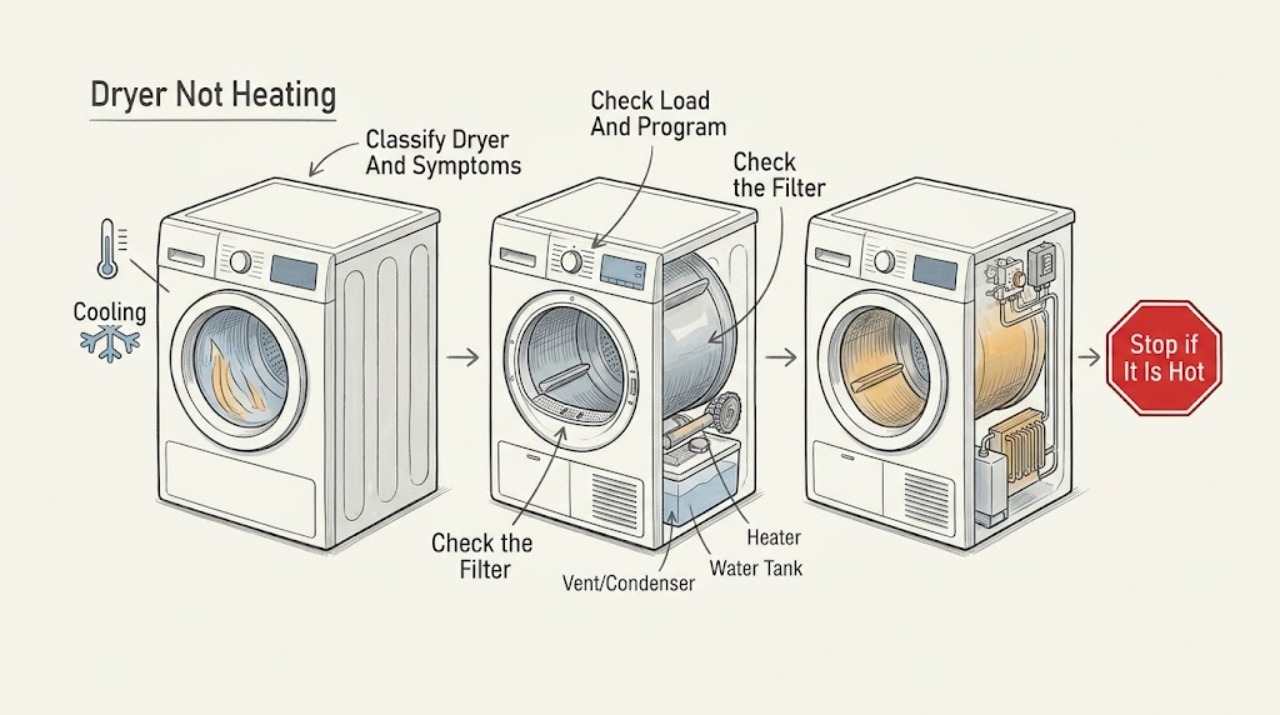
Work through in order
Diagnostic checks
Use only checks that match the exact appliance or system and its official guide.
-
Check 1
Stop the program, remove the load if safe, and let the dryer cool. Identify whether it is vented, condenser, or heat-pump, using the label or Owner's Manual. Note whether the drum turns, whether the load is merely taking longer, and whether there is smoke, scorching, a burning smell, or unusual cabinet heat.
Expected result: The drum does not turn, drying is slow but the drum turns, the air remains cold, or a hazardous sign is present.
Next step: Stop using the dryer for smoke, scorching, burning odor, exposed wiring, or unusual heat, keep clear, and arrange qualified appliance or electrical service. Otherwise continue with checks that match the dryer type.
Why this matters
Why: A non-turning drum can prevent normal heating and airflow. Slow drying points first to load, filter, vent, condenser, or tank checks. Smoke, scorching, burning odor, or unusual heat is a safety boundary rather than a troubleshooting result.
-
Check 2
With the dryer cool, reduce an overfull load to the drying capacity stated for the model and select a program suitable for the fabric and load. Do not fill the drum completely; allow space for air to move around the items.
Expected result: A smaller, correctly selected load dries better, or it remains cold and wet despite a suitable load and program.
Next step: Use the model's specified drying capacity and program. If the load remains cold or wet, stop repeating full cycles and continue to the filter and model-specific airflow checks.
Why this matters
Why: Improvement supports an airflow or program/load issue rather than proving a heater failure. No improvement after this check makes filter, vent/condenser, tank, drum-drive, or heat-source diagnosis more likely.
-
Check 3
When the dryer is cool and off, remove the user-accessible lint filter and clear lint. If the mesh is coated, wash it only as the manual permits and dry it completely before reinstalling; never run the dryer without the filter in place.
Expected result: The filter is packed with lint or residue, or it is clean but drying remains cold or slow.
Next step: Reinstall the fully dry filter and run only a normal, supervised test if there was no hazardous symptom. If the filter was clean or the no-heat symptom remains, use the dryer-type branch instead of opening the cabinet.
Why this matters
Why: A clogged filter restricts airflow and can reduce drying efficiency. A clean filter does not rule out a blocked vent, condenser, heater, thermostat, or electrical fault.
-
Check 4
For a vented model, inspect the visible vent hose and external outlet for a kink, disconnection, or obvious obstruction. For a condenser or heat-pump model, empty the water tank if indicated and clean the user-accessible condenser/filter only according to the Owner's Manual. Keep hands and tools out of concealed ducts.
Expected result: The vent is obstructed, the tank is full, the condenser/filter is blocked, or the relevant path is clear but the dryer still produces no heat.
Next step: Correct only the accessible issue described by the manual, then perform one supervised test. If the path is clear, the tank is managed, and air is still cold, stop use and request qualified service; do not dismantle the vent, condenser housing, or cabinet.
Why this matters
Why: An airflow or water-management restriction can cause poor drying and can make heat appear absent. A clear accessible path with cold air points toward a heat-source, sensor, thermal-protection, or electrical issue that cannot be confirmed externally.
-
Check 5
With the dryer switched off, unplugged only when safe, cool, and empty, turn the drum gently by hand as Blomberg describes. Do not remove panels or reach for the belt.
Expected result: The drum resists turning, or it spins unusually easily or otherwise does not behave normally.
Next step: If the drum spins too easily, does not turn, scrapes, or feels abnormal, do not run the dryer or replace the belt yourself. Record the result and arrange qualified technical assistance.
Why this matters
Why: Blomberg says a functioning drive belt should make the drum feel stiff and resist manual turning; an unusually easy spin can indicate a belt problem. Excessive resistance or abnormal scraping also needs diagnosis rather than force.
-
Check 6
Only if the dryer has no smoke, burning smell, scorching, abnormal heat, damaged cord, or drive symptom, and the filter and model-specific airflow checks are complete, run one short supervised test with a small suitable load. Stop at once if a hazardous sign appears.
Expected result: The dryer warms and dries normally, remains cold, trips power, stops unexpectedly, or develops burning odor, smoke, unusual heat, or noise.
Next step: Do not repeat cycles to force heat back. Stop using the dryer and arrange qualified service for persistent no-heat, power, control, motor, heater, thermostat, sensor, or safety-cutout symptoms.
Why this matters
Why: Normal heat after correcting load or airflow supports a maintenance or selection cause. Continued cold air, a power trip, an unexpected stop, or any hazardous symptom suggests a heater, thermostat, sensor, control, motor, or electrical fault.
Use your observations
Decision map
Find the observation that best matches what you see, then follow the next safe action.
-
PATH 01Next step
What you see
Smoke, burning smell, scorching, exposed wiring, unusual cabinet heat, or a damaged power cord
Do this next
Stop using the dryer and keep clear. Do not restart it or open the cabinet; arrange qualified appliance or electrical service.
-
PATH 02Next step
What you see
The drum does not turn or spins unusually easily with the dryer off and empty
Do this next
Treat the drive belt, motor, or related drive system as a professional diagnosis. Do not open the cabinet or attempt a belt replacement.
-
PATH 03Next step
What you see
The load is overfilled or the selected program does not match the load
Do this next
Reduce the load to the model's drying capacity and select the appropriate program. If heat remains absent, continue to filter and dryer-type checks.
-
PATH 04Next step
What you see
Lint filter, vent hose/outlet, condenser, or tank needs the model's routine attention
Do this next
Clean, empty, or clear only the user-accessible item named in the Owner's Manual, reinstall it correctly, and run one supervised test. Persistent no-heat requires service.
-
PATH 05Next step
What you see
Accessible airflow and load checks are normal but the dryer remains cold
Do this next
Stop use and arrange qualified diagnosis of the heating element, thermostat, sensor, thermal protection, switch/timer, control, wiring, or related internal system.
Helpful context
Understand the symptom
Separate a heating fault from a drying-performance problem
A dryer can feel as though it is not heating when the load is too large, the filter or vent is restricted, a condenser or tank needs attention, or the selected program is unsuitable. Start with the user-accessible airflow and program checks. If the drum does not turn, the no-heat symptom may be secondary to a drive problem; if airflow is normal but the air stays cold, the heating system needs professional diagnosis.
The dryer type changes the check
Blomberg describes vented, condenser, and heat-pump dryers as handling moisture differently. A vented model needs a clear hose and external outlet. A condenser or heat-pump model needs its water tank managed and its condenser or filter maintained according to the manual. Do not apply a vent-hose instruction to a model that has no vent, and do not remove a condenser unless the manual identifies it as user-accessible.
Where the professional boundary starts
The heating element, thermostat, switch, timer, control board, wiring, thermal protection, and concealed airflow parts cannot be confirmed safely from the outside. Blomberg advises against attempting dryer repairs yourself. Record the observations from the checks below and arrange trained technical assistance when the basic causes are excluded.
Only after diagnosis
Potential parts
- heating element or thermostat
Consider this part class only when the dryer type, load, program, filter, and accessible airflow checks are normal but the dryer still produces cold air and a qualified diagnosis identifies the heat source.
Confirm the exact model and the manufacturer's fit information before ordering; do not infer compatibility from the dryer brand alone. - drive belt or drive component
Consider this part class only when the empty drum spins unusually easily or does not turn and a qualified technician confirms a drive fault.
Confirm the exact model and service procedure; belt replacement requires cabinet access and is not a user heat check. - condenser, filter, or water-management component
Consider this class only when the exact dryer type and manual-directed maintenance checks show a damaged or failed user-accessible or internal component after airflow and tank symptoms are confirmed.
Use the exact model manual and manufacturer fit information; do not substitute parts based only on condenser or heat-pump appearance.
When checks do not resolve it
Need a professional?
Call qualified service when the dryer remains cold after the load, program, filter, and model-specific airflow checks., Arrange service for a drum that does not turn or spins unusually easily, power trips, unexpected stops, abnormal noises, or suspected drive, heater, thermostat, sensor, control, or wiring faults., Arrange urgent appliance or electrical inspection for smoke, scorching, burning smell, exposed wiring, damaged cord, or unusual heat.
Read the exact guide
Official sources
- Why is my tumble dryer not heating?Blomberg · Blomberg tumble-dryer no-heat troubleshooting, load size, drum-drive clue, and professional repair boundary
- Why are my clothes not drying in my tumble dryer?Blomberg · Blomberg tumble-dryer drying performance, filter, vent, heat-source, water, program, and electrical checks
- Vented vs Condenser vs Heat Pump: Which Tumble Dryer?Blomberg · Blomberg dryer-type differences in venting, condensation, water tanks, and heat-pump air handling
Community feedback
Share a repair observation
Share a plain-text repair observation. Accepted observations are published automatically; this page may take a moment to update.